1. 서론
The Linksys SE1500 is a 5-Port Fast Ethernet Switch designed to expand your wired network. It allows you to connect up to five devices, such as computers, printers, storage devices, and gaming consoles, at speeds up to 100 Mbps. This device provides a simple and efficient way to add more wired connections to your existing network without complex configuration.

그림 1: 전면 view of the Linksys SE1500 5-Port Fast Ethernet Switch.
2. 패키지 내용
패키지에 다음 품목이 포함되어 있는지 확인하십시오.
- Linksys SE1500 5-Port 10/100 Switch
- 전원 어댑터
- 빠른 시작 가이드(이 설명서에는 포함되지 않음)
3. 제품 특징
The Linksys SE1500 switch offers the following key features:
- 5개의 고속 이더넷 포트: Provides five 10/100 Mbps ports for connecting wired devices.
- Auto-Sensing Ports: Automatically detects and optimizes the speed for each connected device.
- 서비스 품질(QoS): Prioritizes traffic for smooth performance of bandwidth-intensive applications.
- 전력 절약 기능: Includes auto power-down for unused ports and a port status switch to disable LED indicators, reducing energy consumption.
- 플러그 앤 플레이: Requires no software configuration for basic operation.
4. 설정 지침
Follow these steps to set up your Linksys SE1500 switch:
- 스위치 위치를 조정하세요: Place the switch on a flat, stable surface or mount it in a suitable location. Ensure adequate ventilation around the device.
- 전원 어댑터 연결: Plug the included power adapter into the 12V DC port on the back of the switch. Then, plug the other end of the power adapter into a standard electrical outlet. The power LED on the front of the switch should illuminate.
- 네트워크에 연결하세요: Connect an Ethernet cable from your router or modem to any of the five numbered Ethernet ports on the back of the SE1500 switch.
- 장치 연결: Connect your wired devices (e.g., computer, printer, gaming console) to the remaining Ethernet ports on the switch using Ethernet cables. The switch's auto-sensing ports will automatically detect the connection speed.
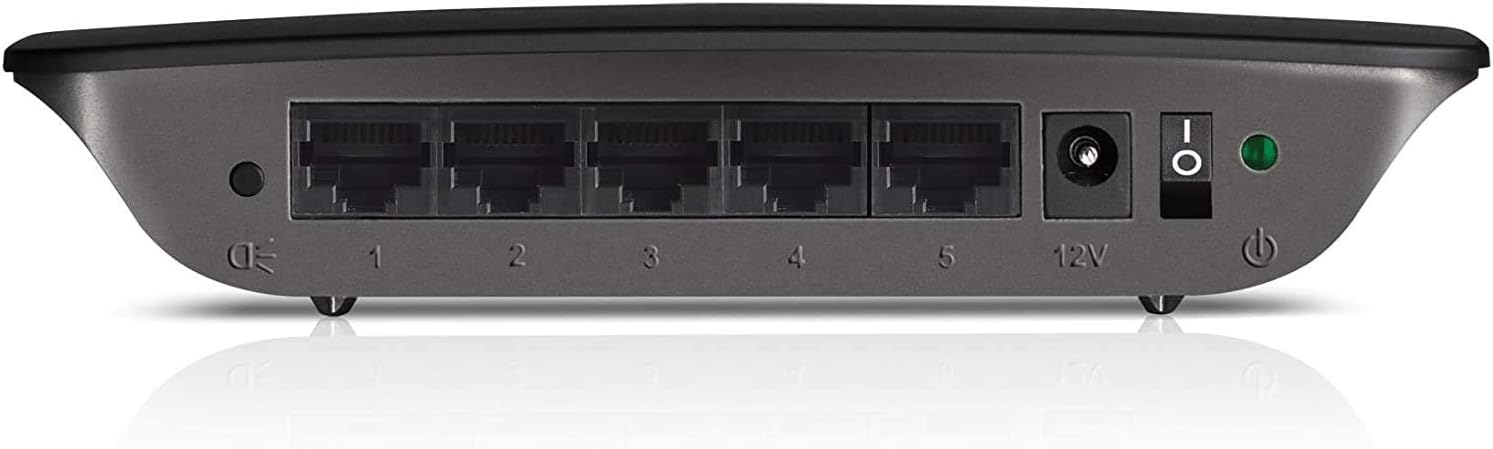
Figure 2: Rear panel of the Linksys SE1500, showing Ethernet ports, power input, and power switch.
5. 사용 설명서
The Linksys SE1500 is a plug-and-play device, meaning it typically requires no software configuration. Once connected, it operates automatically.
LED 표시등
스위치 전면 패널에는 상태 정보를 제공하는 LED 표시등이 있습니다.
- 전원 LED: 스위치에 전원이 들어오면 불이 들어옵니다.
- 포트 LED(1-5): Each numbered port has an associated LED.
- 솔리드 그린: Indicates a successful link connection at 100 Mbps.
- 호박색: Indicates a successful link connection at 10 Mbps.
- 섬광: 네트워크 활동(데이터 전송)을 나타냅니다.
- 끄다: 링크가 감지되지 않았거나 포트가 비활성화되었습니다.
절전 모드
The SE1500 automatically enters a power-saving mode when a connected device is turned off or when a port is unused. This feature helps reduce energy consumption. You can also use the port status switch on the rear panel to turn off the port LEDs if desired.
6. 유지관리
To ensure optimal performance and longevity of your Linksys SE1500 switch, consider the following maintenance tips:
- 깨끗하게 유지하십시오: Regularly wipe the exterior of the switch with a soft, dry cloth. Avoid using liquid cleaners or aerosols.
- 환기를 보장하십시오: Do not block the ventilation openings on the switch. Ensure it is placed in an area with good airflow to prevent overheating.
- 케이블 관리 : Keep Ethernet cables neatly organized to prevent accidental disconnections or damage.
- 전원 재부팅(필요한 경우): 스위치가 응답하지 않으면 전원 어댑터를 분리하고 10초간 기다린 후 다시 연결하세요.
7. 문제 해결
If you encounter issues with your Linksys SE1500 switch, try the following troubleshooting steps:
- 전원 없음:
- 전원 어댑터가 스위치와 작동하는 전기 콘센트에 안전하게 연결되어 있는지 확인하세요.
- Verify the power switch on the rear panel is in the "On" position.
- 링크 표시등 없음:
- 이더넷 케이블이 스위치 포트와 연결된 장치에 제대로 연결되어 있는지 확인하십시오.
- 다른 이더넷 케이블을 사용해 보세요.
- 연결된 장치의 전원이 켜져 있고 올바르게 작동하는지 확인하세요.
- If the port status switch is off, toggle it to enable the LEDs.
- 네트워크 속도가 느립니다:
- Ensure all connected devices and cables support Fast Ethernet (100 Mbps) for optimal performance.
- Check for excessive network traffic or issues with your internet service provider (ISP) or router.
- 간헐적인 연결:
- 이더넷 케이블에 손상이 있는지 점검하십시오.
- Try connecting devices to different ports on the switch.
- Power cycle the switch, router, and connected devices.
8. 사양
| 모델 | SE1500 |
| 상표 | 링크시스 |
| 포트 수 | 5 |
| 인터페이스 유형 | RJ45 |
| 데이터 전송 속도 | 10/100Mbps(고속 이더넷) |
| 제품 치수 | 4.29 x 6.06 x 1.14 인치 |
| 품목 무게 | 5.4 온스(0.34 파운드) |
| 색상 | 검은색 |
| 호환 장치 | Desktop, Gaming Console, Laptop, Printer |
| 포함된 구성 요소 | 5-port 10/100 Switch, Power Adapter |
9. 보증 및 지원
For detailed warranty information and technical support, please refer to the documentation included with your purchase or visit the official Linksys support web사이트. 보증 약관은 지역에 따라 다를 수 있습니다.
링크시스 지원 Web대지: www.linksys.com/support


