1. 제품 오버view
The Ranco J10-821 Humidistat is designed to regulate the relative humidity within enclosed spaces. It achieves this by controlling humidifying or dehumidifying equipment. This device is suitable for integration into portable humidifiers and dehumidifiers, as well as for use as a wall-mounted humidity control in central systems.
The J10-821 operates as a relative humidity control, featuring a humidity sensing element, an adjustable setpoint cam, and an electrical switch. The sensing element responds to changes in relative humidity by altering its length, which in turn activates the switch mechanisms at predetermined setpoints.
2. 주요 특징
- 습도 범위 : 20% ~ 80% 상대 습도(RH)
- 미분: 8% RH maximum
- 설치: 벽걸이 디자인
- 색상: 화이트 마감
- 스위치 유형: 단극 단투(SPST)
- 권tage: 125 / 250 VAC
- 전체 부하 Amperage (FLA): 7.5 Amps @ 125VAC, 3.3 Amp초 @ 250VAC
- Cycle Ratings: 50,000 automatic cycles @ 140°F (60°C), 6,000 manual cycles
- 작동 온도: 화씨 32도에서 화씨 140도(섭씨 0도에서 60도)
- 배송 온도: -22°F ~ 150°F(-30°C ~ 65.5°C)
3. 설치 및 설정
The Ranco J10-821 Humidistat is designed for wall mounting. Proper installation is crucial for accurate operation and safety. It is strongly recommended that installation and electrical wiring be performed by a qualified electrician or HVAC technician in accordance with all local and national electrical codes.
3.1 설치 위치
Select a location on an interior wall, away from direct sunlight, drafts, heat sources, or areas with poor air circulation. These factors can affect the accuracy of humidity readings.
3.2 전기 연결
경고: Disconnect power to the humidifying or dehumidifying equipment at the main service panel before performing any wiring. Failure to do so can result in electrical shock or equipment damage.
Connect the humidistat according to the wiring diagram provided with your specific humidifying or dehumidifying equipment. The J10-821 features an SPST switch. Ensure all connections are secure and properly insulated.
4. 운영
The Ranco J10-821 Humidistat features a simple rotary dial for setting the desired relative humidity level. The dial is marked with percentages from 20 to 80, and also includes "ON" and "OFF" positions.
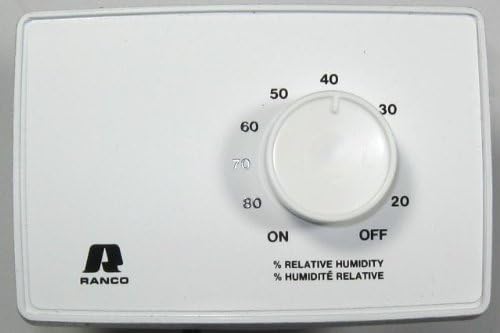
그림 1: 앞쪽 view of the Ranco J10-821 Humidistat, showing the white casing and the central rotary dial. The dial is marked with relative humidity percentages from 20 to 80, along with 'ON' and 'OFF' indicators. The Ranco logo is visible in the lower-left corner.
4.1 원하는 습도 설정
- 전원 켜기: Ensure the humidistat has power.
- 조정 다이얼: Rotate the central dial to align the indicator with your desired relative humidity percentage (e.g., 40, 50, 60).
- 자동 제어: Once set, the humidistat will automatically activate or deactivate the connected equipment to maintain the selected humidity level within its differential range.
4.2 ON/OFF Function
- 에: Turning the dial to the "ON" position will continuously activate the connected equipment, regardless of the current humidity level. This is typically used for continuous humidification or dehumidification.
- OFF : Turning the dial to the "OFF" position will deactivate the connected equipment, preventing it from operating.
5. 사양
| 매개변수 | 값 |
|---|---|
| 모델 | J10-821 |
| Humidistat RH Range | 20% - 80% 상대습도 |
| 미분 | 8% RH 최대 |
| 설치 | 벽면 장착 |
| 색상 | 하얀색 |
| 스위치 유형 | SPST(단극 단투 스위치) |
| 권tage | 125 / 250 VAC |
| FLA @ 125VAC | 7.5 Amps |
| FLA @ 250VAC | 3.3 Amps |
| Automatic Cycle Rating | 50,000 cycles @ 140°F (60°C) |
| Manual Cycle Rating | 6,000 사이클 |
| 작동 온도 | 화씨 32도에서 화씨 140도(섭씨 0도에서 60도) |
| 배송 온도 | -22°F ~ 150°F(-30°C ~ 65.5°C) |
| 품목 무게 | 9.12 온스 |
6. 유지관리
The Ranco J10-821 Humidistat requires minimal maintenance. To ensure optimal performance and longevity:
- 청소: Periodically wipe the exterior of the humidistat with a soft, damp 천으로 닦으세요. 연마성 세제나 용제는 사용하지 마세요. 내부 부품에 습기가 들어가지 않도록 주의하세요.
- 공기 흐름: Ensure that the area around the humidistat is free from obstructions to allow for proper air circulation and accurate humidity sensing.
- 점검: Annually inspect the wiring connections for any signs of wear or damage. If any issues are found, consult a qualified technician.
7. 문제 해결
If you experience issues with your Ranco J10-821 Humidistat, consider the following common troubleshooting steps:
- Equipment Not Responding:
- Check if the humidistat dial is set to "OFF".
- Verify that the humidistat is receiving power.
- Ensure the wiring connections are secure and correct.
- Confirm that the connected humidifying/dehumidifying equipment is operational.
- 부정확한 습도 판독값:
- Ensure the humidistat is not exposed to direct sunlight, drafts, or heat sources.
- Check for obstructions around the unit that might impede airflow.
- Allow sufficient time for the humidistat to stabilize after installation or significant environmental changes.
- Constant Operation/No Operation:
- Verify the setpoint on the dial is appropriate for the current environmental conditions.
- Consider the 8% RH differential; the equipment will not cycle immediately upon reaching the setpoint.
- If issues persist, professional inspection may be required.
For complex issues or if troubleshooting steps do not resolve the problem, contact a qualified technician or Ranco customer support.
8. 안전 정보
Please read and understand all safety instructions before installing or operating the Ranco J10-821 Humidistat.
- 전기적 위험: Always disconnect power at the main service panel before installing, servicing, or cleaning the humidistat.
- 전문적인 설치: Electrical wiring should be performed by a qualified professional in compliance with all applicable codes.
- 용도: Use this device only for its intended purpose of controlling relative humidity.
- 환경 조건: Do not expose the humidistat to extreme temperatures, high humidity (beyond specified operating range), or corrosive environments.
- 어린이와 애완동물: Keep the device out of reach of children and pets to prevent tamp오류나 우발적인 손상.
9. Approvals and Certifications
The Ranco J10-821 Humidistat complies with the following standards:
- IEC 60730-1 & 2-13
- UL 873
- CSA C22.2 번호 24
10. 지원 및 보증
For technical assistance, warranty information, or to purchase replacement parts, please contact Ranco customer support. Refer to the official Ranco web최신 연락처 정보는 웹사이트 또는 제품 포장에서 확인하실 수 있습니다.


