소개
This manual provides comprehensive instructions for the safe and efficient operation, maintenance, and troubleshooting of your GBC Inspire Thermal Laminator Machine. Please read this manual thoroughly before using the device to ensure optimal performance and longevity.
안전 정보
Always adhere to the following safety guidelines to prevent injury or damage to the laminator:
- Do not operate the laminator with wet hands or near water.
- 전원 코드가 손상되거나 끼지 않았는지 확인하세요.
- Keep the laminator away from heat sources and direct sunlight.
- Do not insert objects other than laminating pouches into the machine.
- 사용하지 않거나 청소하기 전에는 라미네이터의 플러그를 뽑아두십시오.
- This device is designed for home use and features a finger-safe design.
패키지 내용
모든 품목이 포장에 들어 있는지 확인하세요.
- GBC Inspire Thermal Laminator Machine
- 사용 설명서(본 문서)
- Starter pack of laminating pouches (may vary by region)
제품 끝view
The GBC Inspire Thermal Laminator is a compact and efficient device designed for protecting documents and photos. It features a sleek black design and a convenient landing tray to reduce page curl.

Image: The GBC Inspire Thermal Laminator in operation, laminating a photograph.
Key components include the power switch, ready indicator light, document entry slot, and exit tray.
설정
- 라미네이터를 개봉하세요: 라미네이터와 모든 부속품을 포장에서 조심스럽게 꺼내십시오.
- 놓기: Place the laminator on a flat, stable, and heat-resistant surface. Ensure there is enough clear space behind the machine for laminated items to exit freely.
- 전원 연결: 전원 코드를 표준 전기 콘센트에 꽂으세요.
- 전원 켜기: Turn on the laminator using the power switch. The ready indicator light will illuminate, typically red or amber, indicating the machine is warming up.
- 워밍업 시간: Allow approximately 7 minutes for the laminator to reach its optimal operating temperature. The ready indicator light will turn green when the machine is ready for use.

Image: The GBC Inspire Thermal Laminator placed on a clean, flat surface, ready for setup.
작동 지침
- 문서 준비: Place the document or photo you wish to laminate inside a thermal laminating pouch. Ensure the document is centered and aligned within the pouch, leaving a small margin on all sides.
- 파우치 두께 선택: The Inspire laminator supports 3 mil pouches for letter or legal size documents and 5 mil pouches for items up to 4" x 6" photo size. No carrier is required.
- 파우치 삽입: Once the green ready light is illuminated, carefully insert the sealed edge of the laminating pouch into the document entry slot. The laminator will automatically feed the pouch through.
- 적층 공정: The laminator operates at a speed of 10 inches per minute. Allow the machine to fully process the pouch. Do not pull or force the pouch through the laminator.
- 쿨다운: Once the laminated item exits the machine, place it on a flat surface to cool and set. Avoid handling it excessively until it has cooled to prevent bending or warping.
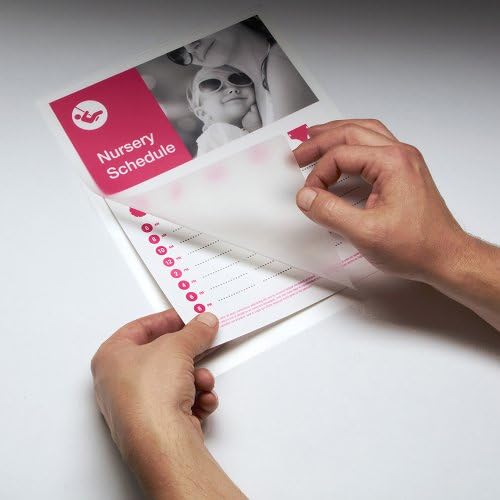
Image: A user carefully placing a document into a laminating pouch before insertion into the machine.

Image: The GBC Inspire Thermal Laminator actively feeding a document through its rollers.
유지
- 청소: 청소하기 전에 라미네이터의 전원 플러그를 뽑고 완전히 식혔는지 확인하십시오. 부드럽고 마른 천으로 외부를 닦으십시오. 연마성 세척제나 용제를 사용하지 마십시오.
- 롤러 청소: 주기적으로 라미네이터에 청소용 시트(별매)를 넣어 롤러에 남아 있는 접착제 잔여물을 제거하십시오.
- 저장: Store the laminator in a cool, dry place when not in use.
문제 해결
| 문제 | 가능한 원인 | 해결책 |
|---|---|---|
| 라미네이터가 켜지지 않습니다. | 전원 공급이 없습니다. | 전원 코드 연결과 벽면 콘센트를 확인하세요. |
| Laminator not heating up (no green light). | 준비운동 시간이 부족했습니다. | Allow the full 7 minutes for warm-up. |
| 파우치 잼. | 파우치가 잘못 삽입되었거나 너무 두껍습니다. | Ensure pouch is inserted sealed-edge first. Use correct pouch thickness (3 mil or 5 mil). |
| 적층된 제품이 흐릿하거나 거품이 있습니다. | Laminator not hot enough or incorrect pouch. | Wait for the green ready light. Ensure correct pouch type for thermal laminators. |
명세서
- 모델: 1701855
- 라미네이팅 유형: 열의
- 워밍업 시간: 약 7분
- 라미네이팅 속도: 분당 10인치
- Maximum Document Width: 9인치
- 파우치 두께 호환성: 3 mil (for Letter/Legal size), 5 mil (for up to 4" x 6" photo size)
- 치수: 4.33 x 14.96 x 4.25 인치
- 무게: 2.61파운드
- 색상: 검은색
보증 및 지원
The GBC Inspire Thermal Laminator is backed by a limited 90-day warranty. For warranty claims, technical support, or additional product information, please contact GBC customer service through their official web제품을 구매한 사이트 또는 소매업체.
자세한 내용은 다음을 방문하세요. GBC Store on Amazon.


