소개
The BenQ SP890 is a high-performance Full HD 1080p projector designed for conference rooms and large venues. It delivers exceptional brightness and resolution, ensuring clear and vibrant presentations. This manual provides essential information for setting up, operating, maintaining, and troubleshooting your BenQ SP890 projector.

Image: The BenQ SP890 projector displaying a large, detailed image of a cathedral interior with stained glass windows, demonstrating its high-resolution projection capabilities suitable for large-scale presentations.
주요 특징
- Premium Full HD 1080p Resolution: Delivers crisp and detailed images with 1920 x 1080 resolution.
- Brilliant Visual Performance: Features 4000 ANSI lumen brightness and a 50,000:1 contrast ratio for vivid and clear projections.
- Hollywood Quality Video (HQV) Image Quality: Advanced processing enhances both HD and standard definition content to true 1080p quality.
- Vivid Color with BrilliantColor Technology: Boosts mid-tone colors and overall brightness for a more lifelike picture.
- VIDI Lamp 기술: Collaborates with Philips and Texas Instruments to dynamically control lamp brightness for optimal color ratios across different scenes.

Image: A side-by-side comparison illustrating the enhanced color and vibrancy achieved by the projector's advanced color technologies, with the right image showing improved visual quality.
패키지 내용
포장을 풀 때 모든 물품이 있는지 확인하십시오.
- BenQ SP890 Projector
- 전원 코드
- VGA Cable (D-Sub 15pin)
- 배터리를 사용한 원격 제어
- 사용설명서 CD
- 빠른 시작 가이드
- 보증 카드
설정
1. 프로젝터 배치
Place the projector on a stable, flat surface or mount it securely to the ceiling. Ensure there is adequate ventilation around the projector to prevent overheating. Position the projector at an appropriate distance from the screen to achieve the desired image size.
2. 장치 연결
The BenQ SP890 offers various connectivity options. Refer to the diagram below for port identification.

Image: The rear connection panel of the BenQ SP890 projector, detailing all available input and output ports for various devices, labeled for easy identification.
- A: IR Receiver - For remote control signals.
- B: AC Power Input - Connect the power cord here.
- C: LAN Port - For network control and monitoring.
- D: Security Slot - For attaching a security cable.
- E: HDMI Input - Connect HDMI-enabled devices (e.g., Blu-ray player, laptop).
- F: Video Input - Composite video connection.
- G: S-Video Input - S-Video connection.
- H: USB Port - For service or firmware updates.
- I: RS232 Port - For serial control.
- J: 12V Trigger - For automated screen control.
- K: Component Video Input - For high-quality analog video.
- L: PC Input (VGA) - Connect a computer via VGA cable.
- M: Monitor Out (VGA) - Output signal to an external monitor.
- N: Audio In - Connect audio from external sources.
- O: Audio Out - Output audio to external speakers.
Connect your desired video and audio sources to the corresponding ports. For optimal quality, use the HDMI input for Full HD content.
3. 전원 켜기
- Connect the power cord to the projector's AC input (B) and then to a power outlet.
- Press the Power button on the projector's control panel or the remote control. The power indicator light will turn on.
- Allow a few moments for the projector lamp to warm up and display the image.
프로젝터 작동
1. 기본 제어
Use the control panel on the projector or the remote control to navigate menus and adjust settings. Common buttons include Power, Menu, Exit, Arrow keys, and Source.
2. 입력 소스 선택
Press the "Source" button on the remote or control panel to cycle through available input sources (HDMI, PC, Video, S-Video, Component). Select the input corresponding to your connected device.
3. 이미지 조정
- 초점 링: 프로젝터 렌즈의 초점 링을 돌려 이미지가 선명하고 깨끗하게 보이도록 하십시오.
- 줌 링: Adjust the zoom ring to change the image size without moving the projector.
- 키스톤 보정: 이미지가 사다리꼴 모양으로 보이면 키스톤 보정 기능(일반적으로 OSD 메뉴에 있음)을 사용하여 이미지를 정사각형으로 만드십시오.
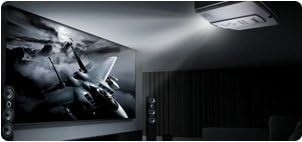
Image: The BenQ SP890 projector, ceiling-mounted, projecting a large, high-definition image of a jet fighter onto a screen in a dark room, illustrating its powerful projection and image quality.
4. 사진 모드
The projector offers various picture modes optimized for different content and environments. Access the "Picture" menu in the On-Screen Display (OSD) to select modes such as Presentation, Cinema, Dynamic, or User-defined settings.
유지
1. 엘amp 대사
프로젝터 lamp 수명이 유한합니다. l이amp 표시등이 켜지거나 화면이 흐려지면 렌즈를 교체할 시기입니다.amp자세한 내용은 전체 사용자 설명서를 참조하십시오.amp replacement instructions. Always allow the projector to cool down completely before attempting lamp 대사.
2. 공기 필터 청소
Regularly clean the air filter to ensure proper ventilation and prevent dust buildup, which can affect performance and lamp life. The filter location is typically on the side or bottom of the projector. Use a soft brush or vacuum cleaner to remove dust.
3. Cleaning the Lens and Casing
Use a soft, lint-free cloth and a mild lens cleaning solution to gently clean the projector lens. For the casin예를 들어, 부드럽고 마른 천을 사용하십시오. 연마성 세제나 용제는 사용하지 마십시오.
문제 해결
| 문제 | 가능한 원인 | 해결책 |
|---|---|---|
| 이미지가 표시되지 않음 |
|
|
| 이미지가 흐릿함 |
|
|
| 이미지는 사다리꼴입니다 |
|
|
| 소리가 나지 않습니다 |
|
|
명세서
| 특징 | 세부 사항 |
|---|---|
| 모델 번호 | SP890 |
| 디스플레이 해상도 | 1920 x 1080(풀HD) |
| 명도 | 4000 ANSI Lumens (from product description) |
| 대비율 | 50,000:1 (from product description) |
| 연결 기술 | HDMI, VGA, Component, S-Video, Composite, LAN, RS232, USB |
| 제품 치수 | 16.9 x 13.6 x 6.1 인치 |
| 품목 무게 | 15.9파운드 |
| 특징 | Portable (as listed in specifications) |
보증 및 지원
For warranty information, please refer to the warranty card included in your product package. For technical support, service, or further inquiries, please visit the official BenQ web사이트를 방문하거나 고객 서비스 부서에 문의하세요. 지원을 요청하실 때는 구매 영수증과 제품 일련번호를 보관하세요.
Official BenQ Web대지: www.벤큐닷컴


