1. 서론
The SilverStone SST-AP181 Air Penetrator is a high-performance 180mm computer case cooling fan designed to provide focused airflow for efficient system cooling. Unlike traditional fans that disperse air, the Air Penetrator's unique blade and grille design channels air into a concentrated column, allowing it to effectively pass through obstacles within a computer case. This design is particularly beneficial for intake applications, ensuring optimal cooling performance even at lower fan speeds and noise levels.

그림 1: 각도 view of the SilverStone SST-AP181 Air Penetrator fan, showcasing its unique blade design.
2. 안전 정보
- 컴퓨터의 내부 부품을 설치하거나 유지 보수하기 전에 항상 컴퓨터의 전원을 차단하십시오.
- 선풍기 날개나 내부 부품이 손상되지 않도록 프레임을 잡고 다루십시오.
- Ensure proper orientation during installation to achieve desired airflow direction.
- Keep fingers and other objects clear of rotating fan blades to prevent injury.
- Do not attempt to disassemble or modify the fan, as this may void the warranty and cause damage.
3. 패키지 내용
설치를 진행하기 전에 패키지에 모든 품목이 들어 있는지 확인하세요.
- 1 x SilverStone SST-AP181 Air Penetrator 180mm Fan
- 장착 나사
- Anti-vibration Rubber Mounts
- Y-Cable Adapter (for connecting two fans to one power source, if included)

Figure 2: Retail packaging for the SilverStone SST-AP181 fan.
4. 설정 및 설치
The SST-AP181 fan is designed for easy installation in standard computer cases that support 180mm fan mounts. It is particularly effective as an intake fan due to its air channeling capabilities.
- 컴퓨터를 준비하세요: 컴퓨터 전원을 끄고 전원 콘센트에서 플러그를 뽑으세요. 컴퓨터 케이스를 열어 팬 장착 위치에 접근하세요.
- 설치 위치를 확인하십시오: Locate an available 180mm fan mount in your computer case. Consider the desired airflow direction (typically intake for this fan type).
- 선풍기를 설치하세요:
- 팬을 장착 구멍에 맞춰 정렬하십시오.
- Secure the fan using the provided mounting screws or anti-vibration rubber mounts. If using rubber mounts, carefully pull them through the fan and case holes to avoid tearing.
- 전원 연결: The SST-AP181 uses a 3-pin or 4-pin power connector. Connect the fan's power cable to an available fan header on your motherboard or a fan controller.

그림 3: 예ample of a fan power connector and an optional speed switch (if included with your case).
Important Note on Starting Voltage: The SST-AP181 may require approximately 10.8 Volts to start at its low speed setting. Some fan controllers or motherboard BIOS settings might not supply sufficient voltage at low temperatures, causing the fan to not spin up. If this occurs:
- Adjust the fan speed or temperature settings within your motherboard's BIOS to ensure a higher starting voltage.
- If your case has a fan speed switch, set it to the "high" position to enable a lower starting voltage for the fan.
- 케이블 관리: 다른 구성 요소나 공기 흐름에 방해가 되지 않도록 팬 케이블을 깔끔하게 배선하세요.
- 케이스를 닫고 전원을 켜세요. Once the fan is securely installed and connected, close your computer case and reconnect the power. Power on your computer and verify that the fan is operating correctly.

Figure 4: Visual representation of the Air Penetrator fan's focused airflow compared to a traditional fan's dispersed airflow.
5. 팬 작동
The SilverStone SST-AP181 fan operates continuously once powered. Its speed can be controlled via a compatible motherboard fan header (PWM or voltage control) or an external fan controller, if available. At lower voltages (e.g., 5 Volts), the fan speed will be approximately 500 RPM, resulting in nearly inaudible operation while still providing effective airflow.
- 속도 제어: Adjust fan speed through your motherboard's BIOS settings or dedicated fan control software for optimal balance between cooling and noise.
- 공기 흐름 방향: Ensure the fan is oriented to draw cool air into the case (intake) for best performance, especially when utilizing its air channeling capabilities.
6. 유지관리
정기적인 유지 관리는 선풍기의 최적 성능과 수명 연장에 도움이 됩니다.
- 먼지 제거: Periodically clean dust from the fan blades and grille using compressed air or a soft brush. Ensure the fan is powered off and stationary before cleaning.
- 점검: Check for any obstructions around the fan or signs of wear on the cables.
7. 문제 해결
| 문제 | 가능한 원인 | 해결책 |
|---|---|---|
| 선풍기가 전혀 돌아가지 않거나 간헐적으로 돌아갑니다. |
|
|
| Fan is unusually loud or making a buzzing noise. |
|
|
| 냉각 성능이 좋지 않습니다. |
|
|
8. 사양
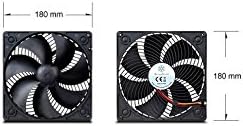
Figure 5: Diagram showing the 180mm x 180mm dimensions of the SilverStone SST-AP181 fan.
| 특징 | 세부 사항 |
|---|---|
| 모델 번호 | SST-AP181 |
| 치수(길이x너비x높이) | 7.09" x 7.09" x 1.26"(180mm x 180mm x 32mm) |
| 재료 | 폴리카보네이트 |
| 전원 커넥터 유형 | 3-Pin or 4-Pin |
| 권tage | 10.8 Volts (starting), 12 Volts (operating) |
| 왓tage | 5.4 와트 |
| 냉각 방식 | 공기 |
| 소음 수준 | 20 Decibels (at specified conditions) |
| 최대 회전 속도 | 1500 RPM |
| 기류 용량 | 0.08 Cubic Meters Per Second |
| 호환 장치 | 데스크탑 컴퓨터 |
9. 보증 및 지원
SilverStone Technology Co., Ltd. provides a limited warranty for its products. For specific warranty terms and conditions, please refer to the warranty card included with your product or visit the official SilverStone website. For technical support, product inquiries, or warranty claims, please contact SilverStone customer service through their official channels.
공식적인 Web대지: www.silverstonetek.com


