소개
The Avaya BM32 Button Module is an expansion unit designed to enhance the functionality of your Avaya 1616 or 1616-I IP phone. It provides 32 additional programmable line and feature buttons, allowing for increased call handling capacity and quick access to frequently used features. This manual provides essential information for the proper setup, operation, and maintenance of your BM32 Button Module.
안전 정보
- 사용하기 전에 모든 지침을 주의 깊게 읽으세요.
- 장치를 습기나 극한의 온도에 노출시키지 마십시오.
- Use only with compatible Avaya 1616/1616-I IP phones.
- 기기를 직접 열거나 수리하지 마십시오. 모든 정비는 자격을 갖춘 기술자에게 맡기십시오.
- 어린이의 손이 닿지 않는 곳에 보관하세요.
패키지 내용
패키지에 다음 품목이 포함되어 있는지 확인하십시오.
- Avaya BM32 Button Module (Model 700415573)
- Connecting cable (usually integrated or supplied with the phone)
- 문서(이 매뉴얼)
설정
The Avaya BM32 Button Module is designed for easy integration with compatible Avaya IP phones. Follow these steps for proper installation.
호환성
The BM32 Button Module is compatible with:
- Avaya 1616 IP Phone
- Avaya 1616-I IP Phone
- Avaya IP Office R4.2 or higher
- Avaya Communication Manager R3.0 or higher
Up to three BM32 button modules can be connected to a single 1616 or 1616-I IP phone.
Connecting the Button Module
- Ensure your Avaya 1616 or 1616-I IP phone is powered off.
- Locate the expansion port on the back or side of your IP phone.
- Connect the provided cable from the BM32 Button Module to the expansion port on the IP phone. Ensure the connection is secure.
- If connecting multiple BM32 modules, connect them in a daisy-chain fashion, connecting the first module to the phone, the second to the first, and so on.
- Power on your Avaya IP phone. The BM32 module does not require an additional power supply; power is drawn directly from the connected 1616/1616-I telephone, which is powered either via Power over Ethernet (PoE) or a 5V external power supply.
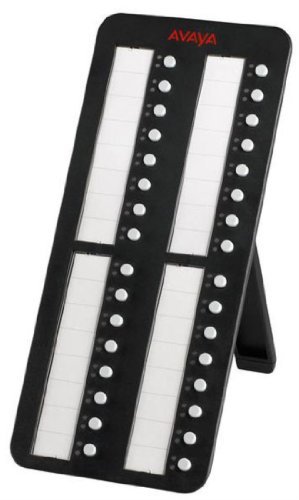
Image: Avaya BM32 Button Module connected to an Avaya IP phone. This image illustrates the physical connection of the BM32 module to the main IP phone unit, highlighting its side profile 일체형 스탠드 포함.
Operating the BM32 Button Module
The BM32 Button Module provides 32 additional buttons, each with dual LEDs, to extend the functionality of your Avaya 1616/1616-I IP phone.
프로그래밍 가능한 버튼
Each of the 32 buttons can be programmed to perform various functions, such as:
- 선 표시 횟수: Assign additional incoming or outgoing lines.
- 기능 버튼: Quick access to phone features like call transfer, conference, hold, or voicemail.
- 단축 다이얼: 자주 통화하는 번호를 원터치 다이얼링에 저장하세요.
- Bridged Line Appearances (BLA): Monitor and answer calls for other extensions.

이미지: 앞면 view of the Avaya BM32 Button Module. This image displays the 32 programmable buttons, each accompanied by dual LEDs, which indicate the status of the assigned line or feature.
Dual LEDs
Each button is equipped with dual LEDs (typically red and green) that provide visual status indicators:
- 녹색 LED : Indicates an active line, an available line, or a feature that is currently enabled.
- 적색 LED : Indicates a line on hold, a busy line, or a feature that is currently in use or unavailable.
- 깜박이는 LED: May indicate an incoming call, a held call, or a waiting message, depending on system configuration.
버튼 구성
The programming of the BM32 buttons is typically managed through your Avaya IP Office or Communication Manager system by your system administrator. Consult your system administrator for specific instructions on how to program or reconfigure the buttons to suit your needs.
유지
Proper maintenance ensures the longevity and optimal performance of your BM32 Button Module.
청소
- Disconnect the module from the IP phone before cleaning.
- 부드럽고, 건조하고, 보푸라기가 없는 천을 사용하여 외부 표면을 닦으세요.
- 완고한 자국의 경우 가볍게 dampen the cloth with water or a mild, non-abrasive cleaner. Avoid spraying liquids directly onto the device.
- Do not use harsh chemicals, solvents, or abrasive materials, as these can damage the finish and internal components.
저장
If storing the module for an extended period, keep it in a cool, dry place, away from direct sunlight and extreme temperatures. It is recommended to store it in its original packaging to protect it from dust and physical damage.
문제 해결
If you encounter issues with your BM32 Button Module, try the following troubleshooting steps:
Module Not Powering On / No LED Activity
- 연결 확인: Ensure the connecting cable between the BM32 module and the IP phone is securely plugged in at both ends.
- Check IP Phone Power: Verify that the Avaya 1616/1616-I IP phone itself is powered on and functioning correctly. The BM32 draws power from the IP phone.
- Reboot IP Phone: Power cycle the connected IP phone (unplug and replug its power source or PoE connection).
- 호환성: Confirm that your IP phone model and system software version meet the compatibility requirements (Avaya 1616/1616-I, IP Office R4.2+, Communication Manager R3.0+).
Buttons Not Responding / Incorrect Functionality
- 시스템 구성 : The buttons require programming by your system administrator. Contact your administrator to ensure the buttons are correctly configured for your desired functions.
- Reboot IP Phone: A power cycle of the IP phone can sometimes resolve minor communication issues.
- 물리적 손상 확인: Inspect the buttons for any visible damage or obstructions.
If these steps do not resolve the issue, contact your system administrator or Avaya support for further assistance.
명세서
| 특징 | 설명 |
|---|---|
| 모델 번호 | 700415573 |
| 버튼 | 32 programmable line/feature buttons |
| LED | Dual LEDs per button (red/green) |
| 호환성 | Avaya 1616/1616-I IP Phones, IP Office R4.2+, Communication Manager R3.0+ |
| Max Modules per Phone | 최대 3개 |
| 힘 | Powered by host IP phone (no separate power supply required) |
| 제품 치수 | 10 x 10 x 6 인치 |
| 품목 무게 | 1.1 파운드 |
| 제조업체 | 아바야 |
보증 및 지원
For warranty information, please refer to the documentation provided with your original Avaya IP phone or contact your Avaya reseller or system administrator. Avaya provides support resources through its official website and authorized service partners.
For technical assistance or further inquiries, please contact your Avaya system administrator or visit the official Avaya support portal.


