1. 서론
This manual provides instructions for the installation, operation, and maintenance of the NETGEAR WN2000RPT Universal WiFi Range Extender. This device is designed to expand the coverage of an existing wireless network, eliminating dead zones and improving signal strength in areas with weak Wi-Fi connectivity.
2. 패키지 내용
패키지에 다음 품목이 포함되어 있는지 확인하십시오.
- NETGEAR WN2000RPT Universal WiFi Range Extender
- 전원 어댑터
- 이더넷 케이블
구성품이 누락되었거나 손상된 경우 NETGEAR 고객 지원팀에 문의하십시오.
3. 제품 오버view
The NETGEAR WN2000RPT is a compact device designed to blend into various environments. It features indicator lights on the front panel and multiple ports on the rear for connectivity.
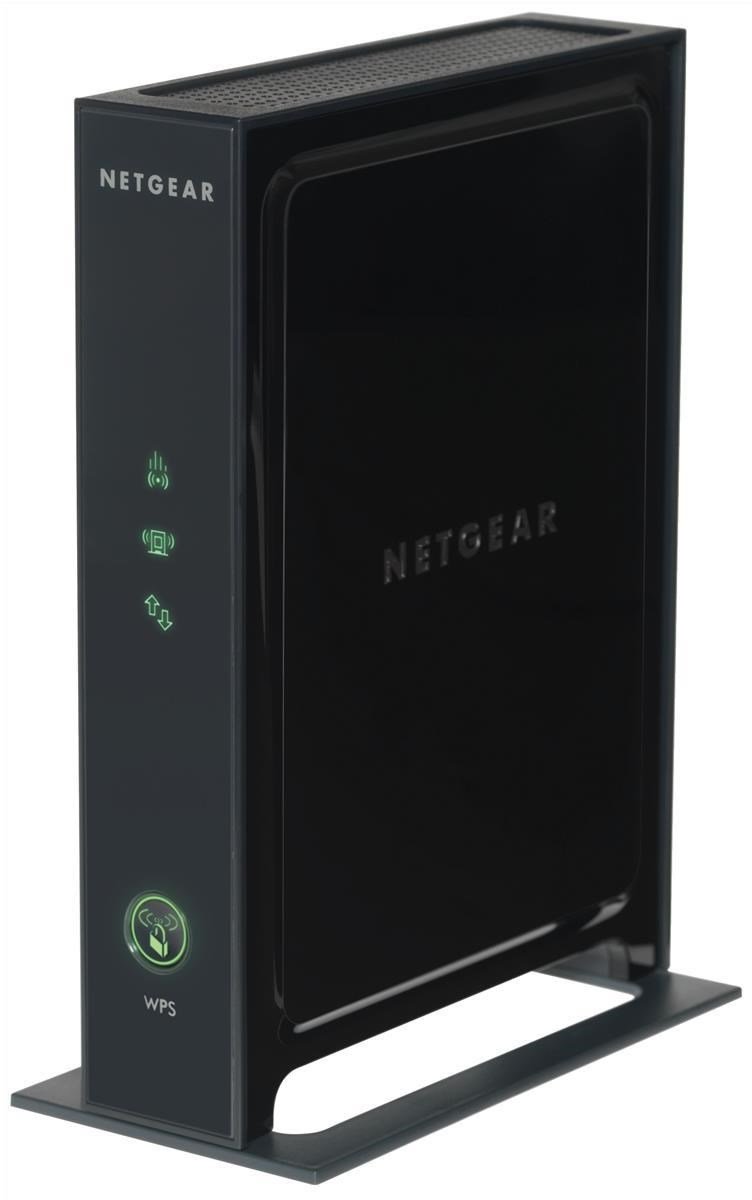
그림 3.1: 앞쪽 view of the NETGEAR WN2000RPT Universal WiFi Range Extender. The front panel displays status indicator lights and a WPS button.
3.1 전면 패널 표시등
- 전원 LED: 장치의 전원 상태를 나타냅니다.
- 라우터 링크 LED: Shows the connection status to your main wireless router.
- Client Link LED: Indicates the connection status to client devices.
- WPS 버튼: Used for easy setup with WPS-compatible routers.
3.2 후면 패널 포트

그림 3.2: 뒤쪽 view of the NETGEAR WN2000RPT, illustrating the four Ethernet LAN ports, power switch, and DC-in jack.
- Ethernet LAN (RJ-45) Ports (x4): For connecting wired devices such as desktop PCs, notebooks, or gaming consoles.
- 전원 켜기 / 끄기 버튼 : 기기에 전원을 공급하는 것을 제어합니다.
- DC-인 잭: 전원 어댑터에 연결합니다.
4. 설정
Follow these steps to set up your NETGEAR WN2000RPT Universal WiFi Range Extender:
- 놓기: Place the extender in a location between your wireless router and the area where you want to improve Wi-Fi coverage. Ensure it is within the range of your existing router's Wi-Fi signal.
- 전원 켜기: Connect the power adapter to the DC-in jack on the extender and plug it into an electrical outlet. Press the Power On/Off button. Wait for the Power LED to turn solid green.
- 익스텐더에 연결: On a computer or mobile device, connect to the extender's default Wi-Fi network. This network typically has a name like "NETGEAR_EXT" or similar. The network name and password can usually be found on a label on the extender.
- 액세스 설정 마법사: 열기 web browser and navigate to the extender's setup page. This is often http://www.mywifiext.net or the extender's IP address (e.g., 192.168.1.250). Follow the on-screen instructions to select your existing Wi-Fi network and enter its password.
- 라우터에 연결: The extender will connect to your main router. The Router Link LED should turn green, indicating a good connection.
- 이전(선택 사항): If the Router Link LED is not green, try moving the extender closer to your router. Once connected, you can optionally rename the extended network or use the same name as your main network.
5. 익스텐더 작동
Once set up, the NETGEAR WN2000RPT operates automatically to extend your Wi-Fi signal. Devices within the extended range will connect to the extender's network.
- 무선 연결 : Your wireless devices (laptops, smartphones, tablets) can connect to the extended Wi-Fi network for improved signal strength and coverage.
- 유선 연결: Use the Ethernet LAN ports to connect wired devices to your network. This is useful for devices that require a stable wired connection or do not have Wi-Fi capabilities.
- 액세스 포인트 모드 : The device supports Access Point Mode, allowing it to function as a new Wi-Fi access point when connected to a router via an Ethernet cable.
6. 유지관리
Regular maintenance ensures optimal performance of your range extender:
- 펌웨어 업데이트: NETGEAR 지원 페이지를 주기적으로 확인하세요. web펌웨어 업데이트 사이트입니다. 펌웨어를 업데이트하면 성능이 향상되고, 새로운 기능이 추가되며, 버그가 수정될 수 있습니다.
- 청소: 기기를 깨끗하고 먼지가 없는 상태로 유지하세요. 부드럽고 마른 천으로 외부를 닦으세요. 액체 세제는 사용하지 마세요.
- 통풍: 과열을 방지하기 위해 연장기를 통풍이 잘 되는 곳에 두십시오.
- 재설정: If the device experiences persistent issues, a factory reset may be necessary. Refer to the troubleshooting section for instructions.
7. 문제 해결
If you encounter issues with your NETGEAR WN2000RPT, refer to the following common problems and solutions:
- 전원 없음:
징후: 전원 LED가 꺼져 있습니다.
해결책: Ensure the power adapter is securely connected to the extender and a working electrical outlet. Press the Power On/Off button. - Cannot Access Setup Wizard:
징후: Web browser does not load the setup page (e.g., http://www.mywifiext.net).
해결책: Ensure your device is connected to the extender's Wi-Fi network (e.g., "NETGEAR_EXT"). Try clearing your browser's cache or using a different browser. Restart the extender and your computer/device. - Weak or No Extended Signal:
징후: Devices connected to the extender still have poor signal or no internet access.
해결책: Relocate the extender closer to your main wireless router. Ensure the Router Link LED is green, indicating a strong connection to the router. Avoid placing the extender near large metal objects, concrete walls, or other sources of interference. - 간헐적인 연결:
징후: Devices frequently disconnect from the extended network.
해결책: Check for interference from other electronic devices. Ensure the extender's firmware is up to date. Try changing the Wi-Fi channel on your main router if possible. - 공장 초기화 :
징후: Persistent issues or forgotten login credentials.
해결책: With the extender powered on, use a paperclip to press and hold the Reset button (usually a small pinhole) for about 7-10 seconds until the LEDs flash. The extender will restart with factory default settings, requiring re-setup.
8. 사양
| 상표 | 넷기어 |
| 모델 | WN2000RPT |
| 무선 통신 표준 | 802.11n |
| 데이터 전송 속도 | 최대 300Mbps |
| 주파수 대역 | 2.4GHz |
| 연결 기술 | 무선 전화 |
| 이더넷 LAN(RJ-45) 포트 | 4 |
| 특별 기능 | Access Point Mode, QoS |
| 색상 | 검은색 |
| 전원 입력 | DC 입력 잭 |
9. 보증 및 지원
보증 정보 및 기술 지원에 대해서는 공식 NETGEAR를 참조하십시오. website or the documentation included with your product. You can typically find support resources, FAQs, and contact information at www.netgear.com/support.


