소개
This manual provides detailed instructions for the setup, operation, and maintenance of your Supersonic SC371 Digital Projection Alarm Clock with AM/FM Radio. Please read this manual thoroughly before using the device to ensure proper function and to maximize your user experience.
안전 정보
- 기기를 극한의 온도, 직사광선, 먼지 또는 습기에 노출시키지 마십시오.
- Ensure the power adapter is compatible with your local power supply (AC 120V, 60Hz).
- 장치를 분해하거나 개조하지 마십시오. 모든 정비는 자격을 갖춘 기술자에게 맡기십시오.
- 본 제품을 물이나 기타 액체로부터 멀리 두십시오.
- Use only the specified battery type for backup (9V, not included).
패키지 내용
패키지에 모든 품목이 들어 있는지 확인하세요.
- Supersonic SC371 Digital Projection Alarm Clock with Radio
- AC 전원 어댑터
- 사용 설명서 (본 문서)
제품 끝view
The Supersonic SC371 is a versatile digital alarm clock featuring a clear LED display, built-in time projection, and an integrated AM/FM radio. It includes an alarm with sleep/snooze timers and a 3.5mm audio input for external devices.
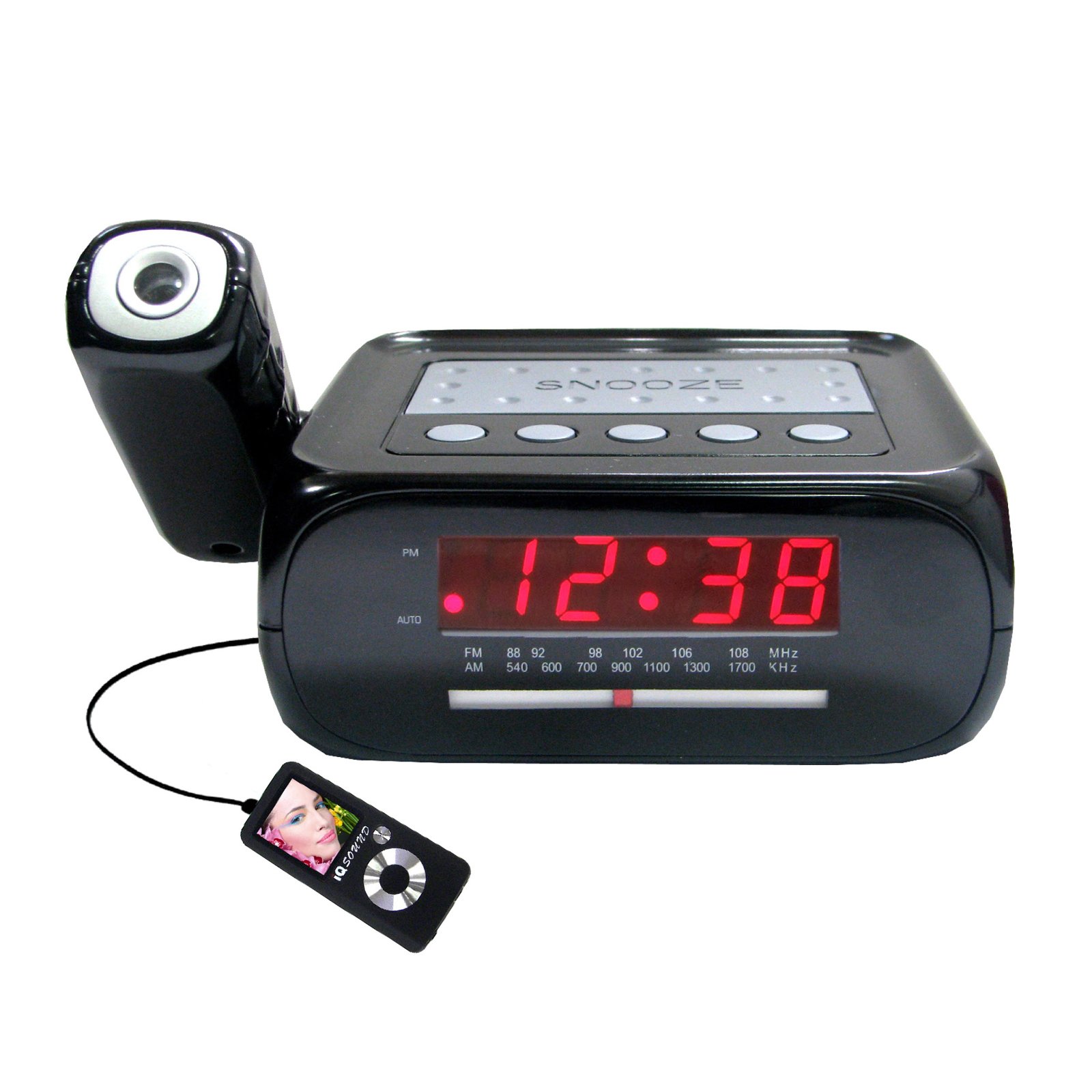
이미지: 앞면 view of the Supersonic SC371 Digital Projection Alarm Clock, showing the LED display and control buttons.
주요 특징:
- Digital Clock with LED Display
- Built-in Time Projection
- AM/FM 라디오 튜너
- Alarm Clock with Sleep/Snooze Timers
- Wake Up to Music or Buzzer
- 3.5mm Audio Input Jack for Portable Audio Players
설정
1. 전원 연결
Connect the AC power adapter to the DC IN jack on the back of the unit, then plug the adapter into a standard AC 120V, 60Hz wall outlet. The unit will power on and the LED display will illuminate.
2. 배터리 백업 (선택 사항)
For battery backup functionality, insert one 9V battery (not included) into the battery compartment located on the bottom of the unit. This battery will preserve time and alarm settings during a power outage, but the display and projection will not operate.
작동 지침
시간 설정
- 를 누르고 계세요 시간 설정 버튼을 누르세요. 그러면 시 숫자가 깜빡이기 시작합니다.
- 사용하세요 시간 버튼을 눌러 시간을 조정합니다.
- 사용하세요 분 버튼을 눌러 분을 조정합니다.
- 누르다 시간 설정 시간 설정 모드를 확인하고 종료하려면 다시 누르세요.
알람 설정
- 를 누르고 계세요 알람 설정 버튼을 누릅니다. 알람 시간 숫자가 깜빡입니다.
- 사용하세요 시간 원하는 알람 시간을 설정하려면 버튼을 클릭하세요.
- 사용하세요 분 버튼을 눌러 원하는 알람 분을 설정하세요.
- 누르다 알람 설정 알람 시간을 다시 한번 확인하겠습니다.
- 를 누르세요 알람 ON / OFF button to activate or deactivate the alarm. An indicator will appear on the display when the alarm is active.
스누즈 기능
알람이 울리면 버튼을 누르세요. 선잠 버튼을 눌러 약 9분 동안 알람을 일시적으로 끕니다. 스누즈 시간이 지나면 알람이 다시 울립니다.
라디오 운영(AM/FM)
- 를 누르세요 라디오 켜기/끄기 버튼을 눌러 라디오를 켭니다.
- 를 누르세요 밴드 AM과 FM 대역을 전환하는 버튼입니다.
- 사용하세요 동조 knob or buttons (if available) to select your desired station.
- 를 사용하여 볼륨을 조정합니다. 용량 손잡이.
- 라디오를 끄려면 라디오 켜기/끄기 버튼을 다시 누르세요.
시간 투영
The unit features a built-in projector to display the time on a wall or ceiling. Locate the 투사 button or switch. Press or slide it to activate the projection. You may be able to adjust the focus and angle of the projection using dedicated controls on the unit.
Aux 입력 사용
Connect an external audio device (e.g., MP3 player, smartphone) to the 3.5mm Audio Input Jack using a standard 3.5mm audio cable (not included). The unit will automatically switch to AUX mode, allowing you to play audio from your connected device through the clock's speaker.
유지
청소
To clean the unit, gently wipe the surfaces with a soft, dry cloth. Do not use abrasive cleaners, waxes, or solvents, as these can damage the finish. Ensure the unit is unplugged before cleaning.
배터리 교체
If the battery backup feature is used, replace the 9V battery annually or when the unit fails to retain settings during a power interruption.
문제 해결
| 문제 | 가능한 원인 | 해결책 |
|---|---|---|
| 장치의 전원이 켜지지 않습니다. | 전원 어댑터가 연결되지 않았거나 결함이 있습니다. | AC 어댑터가 장치에 단단히 꽂혀 있고 벽면 콘센트에 잘 연결되어 있는지 확인하세요. |
| Projection does not work or is dim. | Projection feature not activated; unit too far from surface; projector lens obstructed. | Activate the projection feature. Adjust the unit's distance from the projection surface. Clean the projector lens if necessary. |
| 라디오 잡음이나 수신 불량. | 신호가 약합니다. 안테나가 확장되지 않았습니다. | FM 와이어 안테나를 최대한 펼치세요. 수신 상태가 좋아지도록 장치 위치를 조정하세요. |
| 알람이 울리지 않습니다. | 알람이 설정되지 않았거나 해제되었습니다. 볼륨이 너무 작습니다. | Ensure the alarm is set and activated (check display indicator). Increase the volume. |
명세서
| 특징 | 사양 |
|---|---|
| 모델 번호 | SC371 |
| 디스플레이 유형 | 디지털 LED |
| 전원 | AC 120V, 60Hz (Corded Electric) |
| 배터리 백업 | 9V 배터리 1개 (별도 구매) |
| 특별 기능 | Alarm, Audio Input, Projection Clock, Radio, Snooze |
| 치수(길이x너비x높이) | 18.52 x 9.42 x 8.71cm(7.29 x 3.71 x 3.43인치) |
| 품목 무게 | 517g(1.14파운드) |
| 장착 유형 | 테이블탑 |
보증 및 지원
Supersonic products are designed for reliability and performance. For warranty information or technical support, please refer to the warranty card included with your purchase or visit the official Supersonic web사이트. 보증 청구에 대비해 구매 증빙 자료로 구매 영수증을 보관하세요.


