1. 서론
The Antec TruePower TPQ-1200 is a high-performance 1200-watt power supply designed for demanding computer systems. It features an 80 PLUS Silver certification, indicating high energy efficiency, and provides stable power delivery through its six +12V rails. This manual provides essential information for the safe installation, operation, and maintenance of your TPQ-1200 power supply.
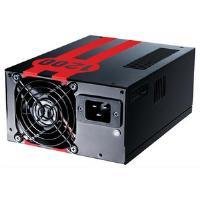
Image 1.1: The Antec TruePower TPQ-1200 Power Supply unit, showcasing its design and modular connectors.
2. 안전 정보
전원 공급 장치를 설치하거나 작동하기 전에 모든 안전 지침을 읽고 이해하십시오. 그렇지 않으면 부상이나 장비 손상이 발생할 수 있습니다.
- 전원 공급 장치를 설치, 제거 또는 청소하기 전에 항상 벽면 콘센트에서 전원 코드를 분리하세요.
- 이 전원 공급 장치는 개인용 컴퓨터에만 사용하도록 설계되었습니다. 다른 용도로 사용하지 마십시오.
- 전원 공급 장치를 열지 마십시오.asing. 고용량tag내부에는 es가 존재하며 사용자가 수리할 수 있는 부품은 없습니다. c를 열면asing를 선택하면 보증이 무효화됩니다.
- 컴퓨터 시스템을 올바르게 접지하세요.
- Avoid operating the power supply in high humidity or extreme temperature environments.
- Keep the power supply away from liquids and sources of heat.
3. 패키지 내용
패키지에 다음 품목이 포함되어 있는지 확인하십시오.
- Antec TruePower TPQ-1200 Power Supply Unit
- Modular Cable Set (PCIe, SATA, Molex, Floppy)
- AC 전원 코드
- 장착 나사
- 사용 설명서 (본 문서)
If any items are missing or damaged, please contact your retailer or Antec customer support.
4. 특징
The Antec TruePower TPQ-1200 power supply offers advanced features for reliable and efficient performance:
- 1200와트 연속 전력: 제공합니다 ample power for high-end gaming and workstation systems.
- 80 PLUS Silver Certified: 최대 88%의 효율을 달성하여 열 발생량과 운영 비용을 절감합니다.
- Six +12V Rails: Delivers stable and clean power to critical components.
- 고급 케이블 관리: Semi-modular design allows for cleaner builds and improved airflow.
- PowerCache High Performance Capacitors: Enhances stability and transient response.
- Ultra-Quiet Pulse Width Modulation (PWM) Fan: Provides efficient cooling with minimal noise.
- Industrial Grade Protection Circuitry: 과전류 보호(OCP), 과전압 보호 포함tag전자 보호(OVP), Under Voltage Protection (UVP), Short Circuit Protection (SCP), Over Power Protection (OPP), and Over Temperature Protection (OTP).
5. 설정 및 설치
Follow these steps carefully to install your Antec TruePower TPQ-1200 power supply.
5.1 설치 전 체크리스트
- Ensure your computer case supports an ATX power supply.
- 필요한 도구를 모으세요: 십자 드라이버.
- Unplug your computer from the wall outlet and discharge any residual power by pressing the power button.
5.2 전원 공급 장치 장착
- Carefully place the power supply into the designated PSU bay in your computer case. Ensure the fan is oriented correctly (typically facing down for bottom-mounted PSUs, or according to case design for top-mounted).
- Align the screw holes on the power supply with those on the case.
- Secure the power supply using the provided mounting screws. Do not overtighten.
5.3 전원 케이블 연결
Connect the necessary cables to your motherboard and components. The TPQ-1200 features both fixed and modular cables.
- 24-Pin ATX Motherboard Power: Connect the main 24-pin connector to the corresponding port on your motherboard. Ensure it clicks into place.
- 8-Pin EPS12V (CPU) Power: Connect the 8-pin (or 4+4 pin) EPS12V connector to the CPU power port on your motherboard.
- PCIe (Graphics Card) Power: For graphics cards requiring additional power, connect the appropriate 6-pin or 6+2 pin PCIe modular cables from the power supply to your graphics card(s).
- SATA 전원: Connect SATA modular cables to your SATA hard drives, SSDs, and optical drives.
- Molex (Peripheral) Power: Use Molex modular cables for older peripherals or case fans that require this connector type.
- 케이블 관리 : 공기 흐름을 개선하고 미관을 향상시키려면 케이블을 마더보드 트레이 뒤쪽이나 케이스의 지정된 다른 영역에 깔끔하게 정리하십시오.
5.4 초기 전원 켜기
- 모든 연결이 안전한지 확인하세요.
- AC 전원 코드를 전원 공급 장치에 연결한 다음 접지된 벽면 콘센트에 연결하세요.
- 전원 공급 장치 뒷면에 있는 전원 스위치를 'ON'(I) 위치로 전환하십시오.
- 컴퓨터의 전원을 켭니다.
6. 사용 설명서
The Antec TruePower TPQ-1200 is designed for continuous operation within its specified limits. Ensure adequate ventilation around your computer case to prevent overheating. The intelligent PWM fan will adjust its speed based on the power supply's temperature to maintain optimal cooling and noise levels.
Always shut down your computer properly through the operating system before turning off the power supply switch or unplugging the AC cord.
7. 유지관리
정기적인 유지관리는 전원 공급 장치의 수명과 최적의 성능을 보장하는 데 도움이 됩니다.
- 먼지 청소: Periodically (e.g., every 6-12 months), disconnect the power supply from the wall outlet and use compressed air to gently clean dust from the fan grille and ventilation openings. Do not open the power supply casing.
- 케이블 검사: 가끔 모든 전원 케이블 연결을 점검하여 안전하고 손상이 없는지 확인하세요.
8. 문제 해결
If you encounter issues with your power supply, refer to the following troubleshooting guide:
| 문제 | 가능한 원인 | 해결책 |
|---|---|---|
| 컴퓨터 전원이 켜지지 않습니다. | AC power cord not connected or loose. Power supply switch is OFF. Faulty power supply. | Ensure AC cord is firmly connected. Flip PSU switch to 'ON' (I). Test with another power supply if possible. |
| 시스템이 켜지지만 즉시 종료됩니다. | Overload, short circuit, or overheating. | Check for short circuits (e.g., loose screws). Ensure adequate ventilation. Disconnect non-essential components to check for overload. |
| System instability or random reboots. | Insufficient power, faulty component, or power supply issue. | Verify all power connectors are secure. Ensure total system wattage does not exceed PSU capacity. Test components individually if possible. |
| 파워서플라이 팬 소음이 너무 심합니다. | Dust accumulation, fan malfunction, or high load. | Clean dust from the fan grille. If noise persists and is excessive, contact support. |
If troubleshooting steps do not resolve the issue, contact Antec customer support for further assistance.
9. 사양
Detailed technical specifications for the Antec TruePower TPQ-1200 power supply:
- 모델 이름: TruePower TPQ-1200
- 출력 와트tage: 1200 와트
- 폼 팩터: ATX12V
- 커넥터 유형: 에이티엑스
- 능률: 80 PLUS Silver Certified
- 냉각 방식: Air (PWM Fan)
- 팬 수: 1
- 호환 장치: 개인용 컴퓨터
- 품목 무게: 4.96파운드(2.25kg)
- 패키지 크기: 12.91 x 9.84 x 5.59인치(32.8 x 25 x 14.2cm)
- 첫 이용 가능 날짜: 17년 2012월 XNUMX일
10. 보증 및 지원
보증 정보 및 기술 지원에 대해서는 Antec 공식 웹사이트를 참조하십시오. web사이트를 방문하거나 고객 서비스에 직접 문의하세요. 보증 약관은 지역 및 구매일자에 따라 다를 수 있습니다.
안텍 공식 Web대지: www.antec.com


