1. 서론
This manual provides essential information for the safe and effective use of your Kodak Easyshare M530 Digital Camera. Please read it thoroughly before operating the device and retain it for future reference. The Kodak Easyshare M530 is a compact digital camera featuring a 12-megapixel sensor, 3x optical zoom, and a 2.7-inch LCD screen, designed for capturing high-quality photos and videos with ease.
2. 상자 안에 무엇이 들어있나요?
- 코닥 이지쉐어 M530 디지털 카메라
- USB 케이블
- 충전식 리튬 이온 배터리
- 손목 스트랩
- 사용 설명서(본 문서)
3. 카메라 오버view
카메라의 주요 구성 요소를 숙지하세요.

그림 1: 앞쪽 view of the Kodak Easyshare M530 Digital Camera, showing the lens, flash, and brand logo.

그림 2: 뒤쪽에 view of the Kodak Easyshare M530 Digital Camera, displaying the 2.7-inch LCD screen and control buttons.

그림 3: 맨 위 view of the Kodak Easyshare M530 Digital Camera, highlighting the power button and shutter release.

그림 4: 옆 view of the Kodak Easyshare M530 Digital Camera, illustrating the USB port for connectivity.
4. 설정
4.1. 배터리 설치
- 카메라 하단에 있는 배터리 덮개를 엽니다.
- Insert the rechargeable Lithium-Ion battery with the contacts facing the correct direction, as indicated inside the compartment.
- 배터리 덮개를 딸깍 소리가 날 때까지 단단히 닫으세요.
4.2. 메모리 카드 설치
The camera supports SD/SDHC memory cards (not included).
- 일반적으로 배터리 칸 근처에 있는 메모리 카드 슬롯 덮개를 엽니다.
- SD/SDHC 카드의 라벨이 카메라 앞쪽을 향하도록 하여 딸깍 소리가 나면서 제자리에 고정될 때까지 삽입하십시오.
- 메모리 카드 슬롯 커버를 닫습니다.
4.3. 배터리 충전
- 카메라에 배터리가 올바르게 장착되었는지 확인하십시오.
- 제공된 USB 케이블을 카메라의 USB 포트에 연결합니다.
- USB 케이블의 다른 쪽 끝을 호환되는 USB 전원 어댑터 또는 컴퓨터의 USB 포트에 연결하십시오.
- The charging indicator light will illuminate. Charging is complete when the light turns off or changes color (refer to camera display for exact status).
5. 카메라 작동
5.1. 전원 켜기/끄기
- 전원을 켜려면: 누르세요 힘 카메라 상단에 있는 버튼입니다.
- 전원을 끄려면: 길게 누르세요. 힘 button until the camera shuts down.
5.2. 사진 찍기
- 카메라를 켭니다.
- 2.7인치 LCD 화면을 사용하여 사진 구도를 잡으세요.
- 를 누르세요 셔터 버튼을 반쯤 눌러 초점을 맞춥니다. 초점이 맞춰지면 초점 프레임이 녹색으로 바뀝니다.
- 를 누르세요 셔터 button all the way down to capture the photo.
5.3. 비디오 녹화
- Switch the camera to video mode (refer to your camera's specific mode dial or menu for this option).
- 를 누르세요 셔터 button to start recording. A red indicator will typically appear on the screen.
- 를 누르세요 셔터 버튼을 다시 눌러 녹음을 중지합니다.
5.4. 줌 기능
Use the zoom lever (often labeled W for Wide and T for Telephoto) to adjust the 3x optical zoom.
- 레버를 앞으로 밀세요 T to zoom in (telephoto).
- 레버를 앞으로 밀세요 W to zoom out (wide-angle).
5.5. 플래시 모드
를 누르세요 플래시 button (often indicated by a lightning bolt icon) to cycle through available flash modes:
- 자동 플래시: 카메라가 플래시 필요 여부를 자동으로 판단합니다.
- 플래시 채우기: 모든 샷마다 플래시가 터집니다.
- 적목 현상 감소: 적목 현상을 줄이기 위해 프리플래시를 작동시킵니다.
- 플래시 끄기: 플래시가 비활성화되어 있습니다.
5.6. 다시view사진 및 비디오
- 를 누르세요 Review 버튼(재생 아이콘으로 표시되는 경우가 많음).
- 방향 패드를 사용하여 촬영한 이미지와 비디오를 탐색하세요.
- 를 누르세요 OK or 선택하다 버튼을 view 선택한 항목.
5.7. Smart Capture and Face Recognition
The Kodak Easyshare M530 features Smart Capture, which automatically adjusts camera settings for optimal results, and Face Recognition, which detects and optimizes settings for faces in your shots.
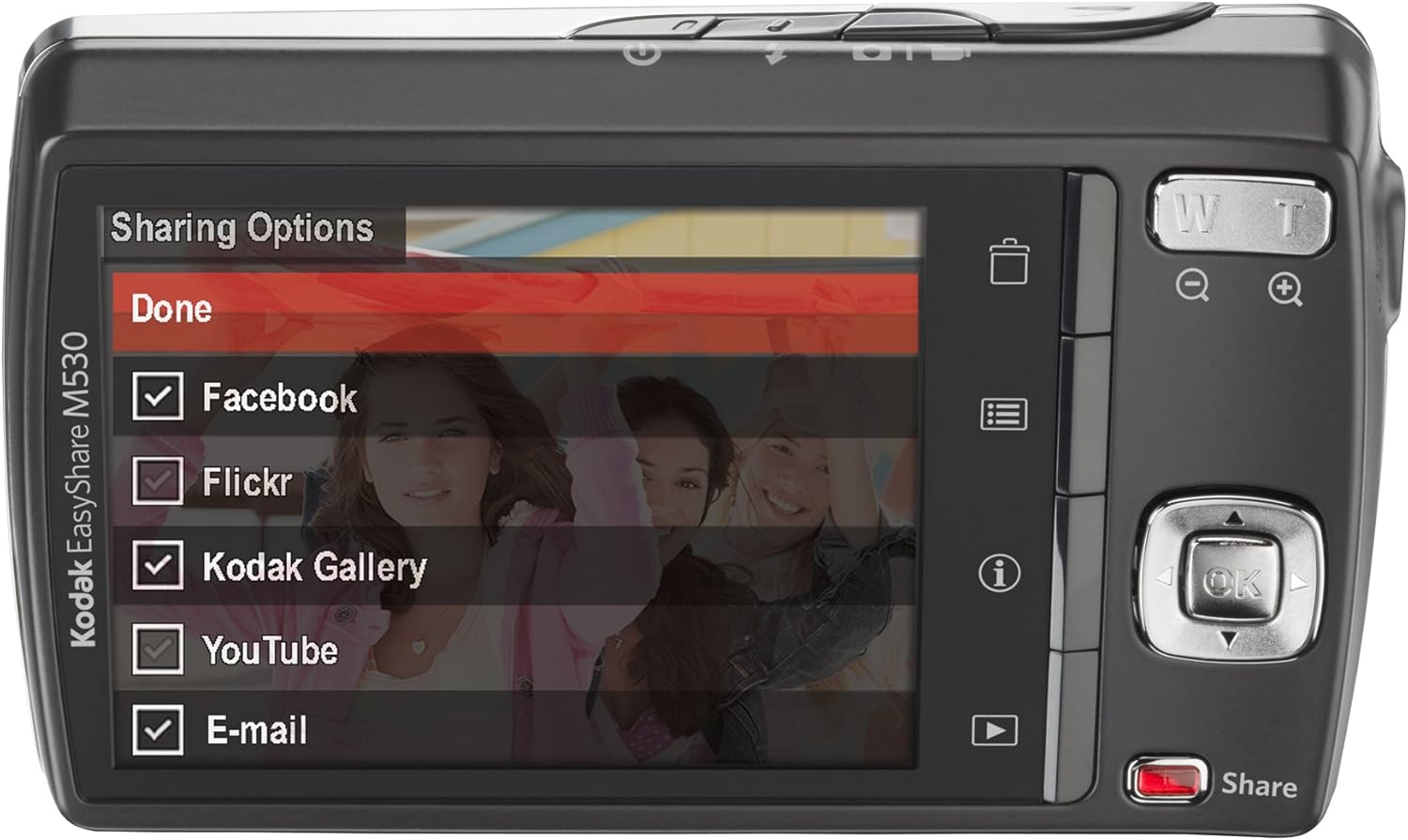
그림 5: The camera's LCD screen displaying sharing options, including Facebook, Flickr, Kodak Gallery, YouTube, and Email.
5.8. Sharing Your Content
Utilize the dedicated Share button for easy uploading of your photos and videos to various platforms when connected to a computer with Kodak's EasyShare software.
6. 유지관리
6.1. 카메라 청소
- 부드럽고 보푸라기가 없는 천을 사용하여 카메라 본체를 청소하세요.
- 렌즈와 LCD 화면의 경우, 특수 렌즈 세척용 천과 세척액을 사용하세요. 독한 화학 물질은 피하세요.
6.2. 배터리 관리
- 사용하지 않을 때는 배터리를 서늘하고 건조한 곳에 보관하십시오.
- 배터리를 극한 온도에 노출시키지 마세요.
- 장기간 보관하기 전에 배터리를 완전히 충전하세요.
6.3. 보관
When storing the camera for long periods, remove the battery and memory card. Store the camera in a dry, dust-free environment, preferably in a camera bag.
7. 문제 해결
| 문제 | 가능한 원인 | 해결책 |
|---|---|---|
| 카메라가 켜지지 않음 | 배터리 부족 또는 소모 | 배터리를 완전히 충전하십시오. |
| Battery incorrectly inserted | Reinsert the battery correctly. | |
| 흐릿한 이미지 | 카메라 흔들림 | 카메라를 흔들리지 않게 잡거나 삼각대를 사용하세요. |
| Subject out of focus | Ensure the camera focuses before fully pressing the shutter. | |
| 메모리 카드 오류 | Card not inserted correctly or corrupted | Reinsert the card. If the problem persists, try formatting the card (this will erase all data) or use a different card. |
| 플래시가 터지지 않습니다 | Flash mode set to 'Off' | Change the flash mode to Auto or Fill Flash. |
8. 사양
- 사진 센서 해상도: 12 MP
- 광학 줌: 3x
- 화면 크기: 2.7인치(LCD)
- 비디오 해상도: 640 x 480 (30fps)
- 배터리 유형: 리튬 이온
- 이미지 안정화: 없음
- 지원됨 File 체재: 날것의
- 연결 기술 : USB
- 품목 무게: 0.33 파운드
- 색상: Blue (for this specific model variant)
9. 보증 및 지원
Your Kodak Easyshare M530 Digital Camera comes with a 30-day warranty from the manufacturer, Eastman Kodak Company. This warranty covers defects in materials and workmanship under normal use. For warranty claims or technical support, please refer to the contact information provided with your purchase documentation or visit the official Kodak support web대지.
추가 지원 및 리소스를 보려면 다음을 방문하세요. 아마존에서 코닥 스토어를 만나보세요.


