소개
The Seca 656 EMR-Validated Digital Stretcher/Gurney Scale is designed for precise weight measurement of patients on stretchers, in wheelchairs, or seated. Its robust construction and innovative features make it suitable for various medical environments, including emergency units. This manual provides essential information for the safe and effective operation, maintenance, and troubleshooting of your Seca 656 scale.
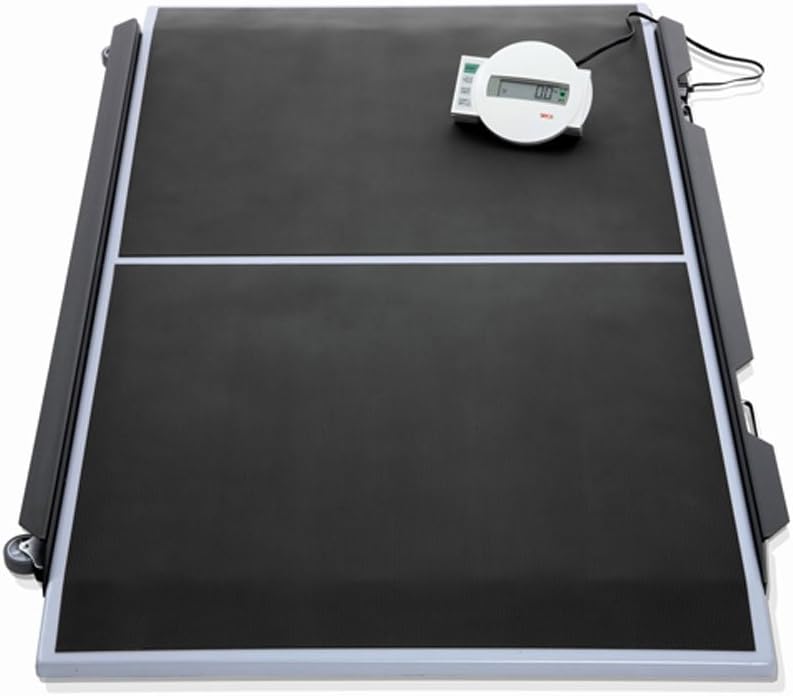
Image: The Seca 656 Digital Stretcher/Gurney Scale, showing its large black platform with white dividing line, and the remote display unit connected by a cable, positioned on the top right of the platform.
안전 정보
중요한 안전 예방 조치:
- Always ensure the scale is placed on a stable, level surface before use.
- 최대 중량 용량은 800파운드(360kg)를 초과하지 마십시오.
- Ensure patients are safely positioned on the stretcher or in the wheelchair before rolling onto the scale.
- Use caution when rolling stretchers or wheelchairs onto and off the scale, utilizing the slightly-elevated side rails and self-lowering ramps.
- Keep the scale and its components dry. Avoid exposure to liquids.
- Only use accessories and replacement parts approved by Seca.
- Statements regarding dietary supplements have not been evaluated by the FDA and are not intended to diagnose, treat, cure, or prevent any disease or health condition. This product is a medical device for weight measurement.
설정
- 짐 풀기: Carefully remove all components from the packaging. Verify that all parts are present: the scale platform, remote display unit, and power cable.
- 놓기: Position the scale on a firm, flat, and level surface. Ensure there is sufficient space around the scale for safe patient access and movement of stretchers or wheelchairs.
- 디스플레이 연결: Connect the cable from the remote display unit to the designated port on the scale platform. Ensure the connection is secure.
- 전원 연결: Connect the power cable to the scale and then to a suitable power outlet. The scale can also operate on battery power (if applicable, refer to the display unit's specific instructions for battery installation).
- 초기 전원 켜기: Press the power button on the remote display unit. The display should illuminate and show "0.0" or similar initial reading.
작동 지침
Basic Weighing Procedure
- 저울의 전원이 켜져 있고 "0.0"이 표시되는지 확인하십시오.
- Carefully roll the stretcher or wheelchair with the patient onto the scale platform, utilizing the self-lowering ramps. The slightly-elevated side rails help guide the wheels.
- Wait for the weight reading to stabilize on the remote display unit.
- Record the patient's weight as displayed.
- Carefully roll the stretcher or wheelchair off the scale.
Memory Function (Net Weight Calculation)
This function allows for the automatic deduction of the stretcher or wheelchair weight to display only the patient's net weight.
- First, weigh the patient and stretcher/wheelchair together. Note this total weight.
- Roll the patient and stretcher/wheelchair off the scale.
- Roll the empty stretcher or wheelchair onto the scale.
- Activate the memory function (refer to your display unit's specific button for "Memory" or "Tare"). The scale will store the weight of the empty stretcher/wheelchair.
- Roll the empty stretcher/wheelchair off the scale.
- Roll the patient and stretcher/wheelchair back onto the scale. The display will now automatically show the patient's net weight.
Pre-TARE Function
The pre-TARE function allows you to deduct the weight of a known accessory (like a stretcher or wheelchair) directly from the total weight during the weighing process.
- Before placing the patient and stretcher/wheelchair on the scale, input the known weight of the empty stretcher or wheelchair using the pre-TARE function on the display unit. (Consult the display unit's manual for specific button presses for pre-TARE input).
- Once the pre-TARE weight is set, roll the patient and stretcher/wheelchair onto the scale.
- The display will show the patient's net weight immediately.
BMI 기능
The BMI (Body Mass Index) function helps determine the nutritional condition of the patient.
- Weigh the patient using the basic weighing procedure or the net weight calculation.
- Once the patient's weight is displayed, activate the BMI function on the remote display unit.
- The display will prompt you to enter the patient's height. Use the appropriate buttons to input the height.
- After entering the height, the display will calculate and show the patient's BMI.
유지
청소
- Regularly clean the scale platform and display unit with a damp cloth and mild, non-abrasive cleaning agent.
- Do not use harsh chemicals, solvents, or abrasive cleaners, as these can damage the surface.
- Ensure no liquid enters the display unit or other electronic components.
- 세척 후 즉시 물기를 닦아내십시오.
저장
- When not in use, store the scale in a dry, clean environment, away from extreme temperatures and direct sunlight.
- The integrated handles and castors allow for easy transport and storage.
구경 측정
The Seca 656 scale is factory calibrated. Regular professional calibration may be required depending on local regulations and usage frequency. Contact authorized Seca service personnel for calibration services.
문제 해결
| 문제 | 가능한 원인 | 해결책 |
|---|---|---|
| 저울이 켜지지 않습니다. | No power supply; loose cable connection; discharged batteries (if applicable). | Check power cable connection and outlet. Ensure batteries are correctly inserted and charged/replaced. |
| 부정확한 무게 측정. | Scale not on a level surface; object touching the scale; scale needs calibration. | Ensure scale is on a flat, stable surface. Remove any objects touching the scale. Contact service for calibration. |
| 디스플레이에 "Err" 또는 오류 코드가 표시됩니다. | 과부하; 내부 오작동. | Ensure weight does not exceed 800 lbs. Turn off and on again. If error persists, contact customer support. |
| Memory/TARE function not working. | Incorrect procedure followed; display unit issue. | Review "Operating Instructions" section. Ensure correct buttons are pressed in sequence. |
명세서
| 특징 | 세부 사항 |
|---|---|
| 모델 번호 | 6561321134 |
| 상표 | 세카 |
| 용량 | 800파운드 / 360킬로그램 |
| 눈금 | 0.1파운드 / 50g |
| 플랫폼 특징 | Extra large platform, slightly-elevated side rails, flat platform with self-lowering ramps |
| 표시하다 | Cable remote display with easy-to-read LCD figures |
| 기능 | Memory function, Pre-TARE function, BMI function |
| 연결성 | EMR-validated (transmit measured data directly to any Electronic Medical Record system) |
| 휴대성 | Practical castors and integrated handles |
| 품목 무게 | 101.9 파운드 |
| 패키지 크기 | 45 x 32 x 17 인치 |
보증 및 지원
보증 정보
Seca products are manufactured to high quality standards. For specific warranty terms and conditions, please refer to the warranty card included with your product or visit the official Seca web사이트. 보증 청구를 위해 구매 증빙 자료를 보관하세요.
고객 지원
For technical assistance, service, or inquiries regarding your Seca 656 scale, please contact Seca customer support or your authorized distributor. You may find contact information on the Seca web사이트 또는 구매 시 제공된 설명서를 참조하세요.
When contacting support, please have your model number (6561321134) and serial number (if applicable) ready.


