소개
구매해주셔서 감사합니다asing the Muse M-12 CR Radio Alarm Clock. This compact and versatile device combines an FM radio with a dual alarm clock, offering convenience and functionality for your daily routine. Featuring a clear red LED display and intuitive controls, the M-12 CR is designed for ease of use. Please read this manual carefully to ensure proper operation and to fully utilize all features of your new alarm clock.
패키지 내용
모든 품목이 모두 있고 상태가 양호한지 확인하세요.
- Muse M-12 CR Radio Alarm Clock Unit
- 전원 어댑터
- 사용 설명서 (본 문서)
제품 끝view 및 제어
Familiarize yourself with the various parts and controls of your Muse M-12 CR Radio Alarm Clock.

그림 1: 전면 및 상단 view of the Muse M-12 CR Radio Alarm Clock, highlighting the red LED display and the arrangement of control buttons.
제어 버튼(상단 패널):
- SNOOZE / DIMMER Button: Press to temporarily silence the alarm (snooze function). Press and hold to adjust display brightness.
- ALARM 1 Button: Press to activate/deactivate Alarm 1. Press and hold to set Alarm 1 time.
- ALARM 2 Button: Press to activate/deactivate Alarm 2. Press and hold to set Alarm 2 time.
- 시간 설정 버튼: Press and hold to set the current time.
- HR(시간) 버튼: Used to adjust the hour during time or alarm setting.
- MIN(분) 버튼: Used to adjust the minute during time or alarm setting.
- VOL- / PREV Button: Decreases volume. In radio mode, short press for previous preset station, long press for backward auto-scan.
- VOL+ / NEXT Button: Increases volume. In radio mode, short press for next preset station, long press for forward auto-scan.
- FM / MEM Button: Press to switch to FM radio mode. Press and hold to automatically scan and store FM stations.
- 슬립 버튼: 슬립 타이머 기능을 활성화합니다.
- NAP Button: Activates the nap timer function.
설정
1. 전원 연결
- Unpack the Muse M-12 CR unit and the power adapter.
- Insert the DC plug of the power adapter into the DC IN jack located at the back of the unit.
- Plug the power adapter into a standard AC wall outlet (100-240V, 50/60Hz). The display will light up, and the clock will be ready for time setting.
2. 배터리 백업 (선택 사항)
정전 중에도 시간 및 알람 설정을 유지하려면tage, you can install backup batteries (not supplied). The unit typically uses AAA batteries. Refer to the battery compartment on the bottom of the unit for correct battery type and polarity.
작동 지침
시간 설정
- 를 누르고 계세요 시간 설정 시 숫자가 깜빡일 때까지 버튼을 누르세요.
- 를 누르세요 HR 시간을 조정하려면 버튼을 반복해서 누르세요.
- 를 누르세요 최소 분을 조정하려면 버튼을 반복해서 누르세요.
- 를 누르세요 시간 설정 버튼을 다시 누르면 시간 설정 모드를 확인하고 종료합니다.
알람 설정 (알람 1 및 알람 2)
The M-12 CR features two independent alarms.
- 를 누르고 계세요 경보 1 or 경보 2 알람 시간 숫자가 깜빡일 때까지 버튼을 누르세요.
- 를 누르세요 HR 원하는 알람 시간을 설정하려면 버튼을 클릭하세요.
- 를 누르세요 최소 버튼을 눌러 원하는 알람 분을 설정하세요.
- 를 누르세요 경보 1 or 경보 2 button again to select the alarm source (Radio or Buzzer). The corresponding indicator will light up.
- 를 누르세요 경보 1 or 경보 2 button one more time to confirm and activate the alarm. The alarm indicator (1 or 2) will appear on the display.
경보를 해제하려면 해당 버튼을 누르십시오. 경보 1 or 경보 2 button until its indicator disappears from the display.
라디오 운영(FM)
- 를 누르세요 FM / MEM FM 라디오 모드로 전환하는 버튼입니다. 주파수가 표시됩니다.
- Automatic Scan and Store: 를 누르고 계세요 FM / MEM button to automatically scan for and store available FM stations (up to 20 presets).
- 수동 조정 : 사용하세요 VOL- / PREV 그리고 VOL+ / NEXT buttons to manually tune to a specific frequency. Long press for auto-scan to the next strong station.
- 사전 설정 선택: 짧게 누르세요 VOL- / PREV or VOL+ / NEXT buttons to cycle through stored preset stations.
- 볼륨 조절: 사용하세요 VOL- / PREV 그리고 VOL+ / NEXT buttons (when not in tuning mode) to adjust the radio volume.
스누즈 기능
알람이 울리면 버튼을 누르세요. 스누즈 / 디머 button to temporarily silence the alarm. The alarm will sound again after a few minutes (default snooze time is usually 9 minutes, refer to specific product behavior if different).
타이머 기능을 잠
수면 타이머를 사용하면 라디오를 들으며 잠들 수 있으며, 설정한 시간이 지나면 라디오가 자동으로 꺼집니다.
- 라디오가 재생되는 동안 잠 button repeatedly to cycle through available sleep timer durations (e.g., 120, 90, 60, 30, 15, 10, 5 minutes, or OFF).
- 설정한 시간이 지나면 라디오가 자동으로 꺼집니다.
낮잠 타이머 기능
The nap timer sets an alarm to sound after a short, predefined period.
- 를 누르세요 선잠 button repeatedly to select a nap duration (e.g., 120, 90, 60, 30, 15, 10, 5 minutes, or OFF).
- The alarm will sound after the selected nap time has elapsed.
디스플레이 디머
LED 디스플레이의 밝기를 조정하려면:
- 를 누르세요 스누즈 / 디머 button (when the alarm is not sounding) to cycle through different brightness levels (e.g., High, Medium, Low, Off).
유지
- 청소: 제품 외부를 닦을 때는 부드럽고 마른 천을 사용하십시오. 연마성 세제, 왁스 또는 용제는 마감재를 손상시킬 수 있으므로 사용하지 마십시오.
- 놓기: 직사광선, 열원, 과도한 먼지 또는 습기를 피해 안정적이고 평평한 곳에 제품을 놓으십시오.
- 통풍: 과열을 방지하기 위해 장치 주변에 충분한 환기를 유지하세요. 환기구를 막지 마세요.
- 전원 차단: If the unit is not going to be used for a long period, unplug the power adapter from the wall outlet.
문제 해결
| 문제 | 가능한 원인 | 해결책 |
|---|---|---|
| 전원 없음 / 디스플레이 꺼짐 | 전원 어댑터가 연결되어 있지 않거나 고장났습니다. 전원 콘센트가 작동하지 않습니다. | 전원 어댑터가 본체와 작동하는 벽면 콘센트에 제대로 꽂혀 있는지 확인하십시오. 다른 콘센트에 꽂아 보십시오. |
| 알람이 울리지 않습니다 | Alarm not activated. Alarm volume too low (for radio alarm). Incorrect alarm time set. | Ensure the alarm indicator (1 or 2) is visible on the display. Increase radio volume if using radio alarm. Verify alarm time is correctly set. |
| 라디오 수신 불량 | Antenna not extended or positioned correctly. Interference from other electronic devices. Weak signal in the area. | Fully extend and adjust the FM wire antenna for best reception. Move the unit away from other electronics. Try auto-scanning for stronger stations. |
| 버튼이 응답하지 않습니다 | 일시적인 시스템 오류입니다. | 기기의 전원 코드를 몇 분 동안 뽑아두었다가 다시 꽂으면 재설정됩니다. |
명세서
| 모델 | M-12 CR |
| 디스플레이 유형 | LED(적색) |
| 디스플레이 크기 | 1.5cm(0.6인치) |
| 고주파 | FM (with 20 preset stations) |
| 알람 기능 | Dual Alarm (Radio or Buzzer), Snooze, Sleep, Timer (Nap) |
| 전원 | Wired (AC Power Adapter) |
| 치수(길이 x 너비 x 높이) | 12.9 x 5.3 x 6.5cm (대략) |
| 무게 | 290g(대략) |
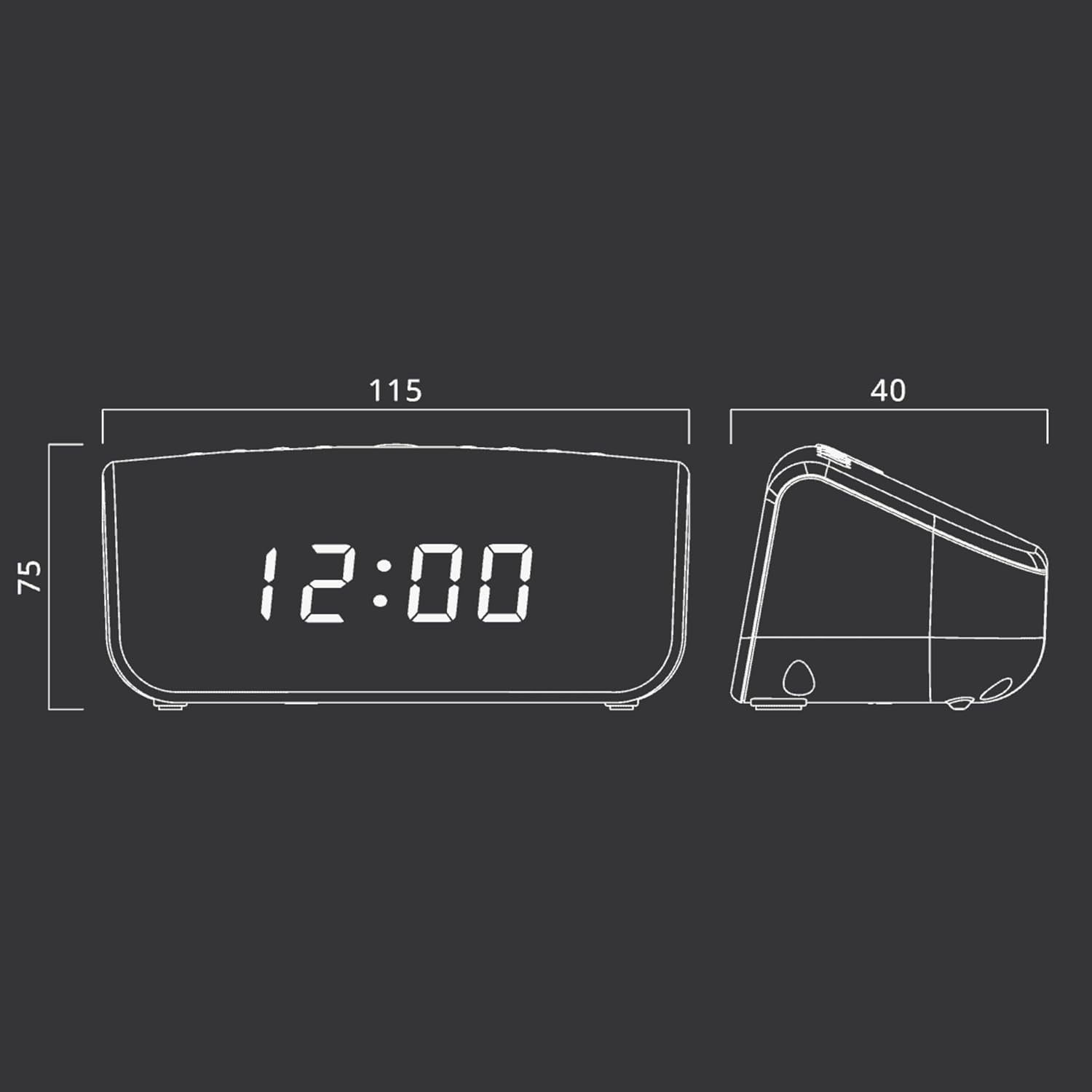
그림 2: Approximate dimensions of the Muse M-12 CR unit.
보증 및 지원
보증 정보 및 기술 지원은 제품에 동봉된 보증 카드를 참조하거나 Muse 공식 웹사이트를 방문하십시오. web사이트. 보증 청구에 대비해 구매 증빙 자료로 구매 영수증을 보관하세요.
추가적인 도움이 필요하시면 Muse 고객 서비스 센터로 문의해 주십시오.


