소개
This manual provides comprehensive instructions for setting up, operating, and maintaining your RCA RCRP05BR 5-Device Universal Remote Control. This remote is designed to consolidate control of up to five audio/video devices, offering a familiar layout for cable box control and supporting various digital television features.
원격 제어 레이아웃
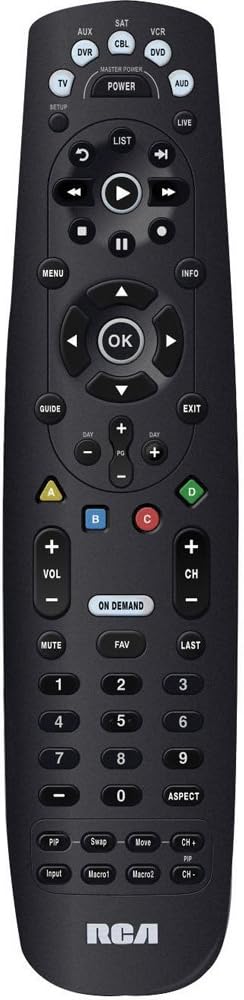
The image above displays the RCA RCRP05BR universal remote control. Key sections include:
- 상단 섹션: Device selection buttons (TV, AUX, SAT, CBL, VCR, DVD, AUD) and the Master Power button. The SETUP button is also located here.
- Middle Section (Playback & Navigation): Includes playback controls (Play, Pause, Stop, Rewind, Fast Forward, Skip), a circular navigation pad with an OK button, and MENU, INFO, GUIDE, and EXIT buttons.
- Lower Middle Section (Channel & Volume): Features Volume (+/-), Channel (+/-), MUTE, FAV (Favorites), LAST, and the colored A, B, C, D buttons. The ON DEMAND button is also present.
- Bottom Section (Numeric Keypad & Advanced Functions): A standard numeric keypad (0-9) and buttons for ASPECT, PIP (Picture-in-Picture), Swap, Move, Input, Macro1, and Macro2. The RCA logo is at the very bottom.
설정
1. 배터리 설치
- 리모컨 뒷면의 배터리실 덮개를 제거하세요.
- Insert two (2) fresh AA alkaline batteries, matching the polarity (+ and -) indicators inside the compartment.
- 배터리 덮개를 다시 장착하세요.
2. 리모컨 프로그래밍
The remote can be programmed using direct code entry, auto code search, or a learning feature.
직접 코드 입력
- 제어하려는 기기(예: TV, DVD 플레이어)를 켜세요.
- 를 누르고 계세요 설정 빨간색 표시등이 켜질 때까지 버튼을 누르십시오.
- 프로그래밍하려는 장치 버튼을 누르세요(예: TV, DVD). The red indicator light will blink once and remain lit.
- Enter the 4-digit code for your brand and device from the provided code list (not included in this manual, refer to product packaging or manufacturer's web대지).
- If the code is valid, the red indicator light will turn off. If the light blinks four times, the code is invalid; re-enter the code.
- 리모컨을 테스트하려면 버튼을 누르세요. 힘 button. If the device turns off, try other functions like volume or channel. If it works, programming is complete. If not, try the next code for your brand or use auto code search.
자동 코드 검색
- 제어하려는 장치를 켭니다.
- 를 누르고 계세요 설정 빨간색 표시등이 켜질 때까지 버튼을 누르십시오.
- Press the device button you want to program. The red indicator light will blink once and remain lit.
- 를 누르세요 힘 기기가 꺼질 때까지 버튼을 약 2초 간격으로 반복해서 누르세요.
- 장치가 꺼지면 다음을 누르세요. 입력하다 button (usually the OK button in the center navigation pad) to save the code. The red indicator light will turn off.
- Test the remote. If it works, programming is complete.
학습 기능
This feature allows the universal remote to learn functions directly from your original remote control. This is useful for functions not covered by pre-programmed codes or for devices not listed.
- Place the RCA universal remote and your original remote control on a flat surface, facing each other, about 1-2 inches apart.
- 를 누르고 계세요 설정 빨간색 표시등이 켜질 때까지 버튼을 누르십시오.
- 기기 버튼을 누르세요 (예: TV) you want to assign the learned function to. The red indicator light will blink once and remain lit.
- Press the button on the RCA remote that you want to teach a function (e.g., a specific function button). The red indicator light will blink rapidly.
- Press and hold the corresponding button on your original remote control until the red indicator light on the RCA remote blinks twice and then stays lit. This indicates successful learning.
- Repeat steps 4 and 5 for any other functions you wish to learn.
- 를 누르세요 설정 button to exit learning mode. The red indicator light will turn off.
- Test the learned functions.
3. Volume Punch-Through
This feature allows the volume control (VOL +/-) to always control a specific device, regardless of which device mode the remote is currently in. This is useful if you use an audio receiver for all sound.
- 를 누르고 계세요 설정 빨간색 표시등이 켜질 때까지 버튼을 누르십시오.
- 기기 버튼을 누르세요 (예: 호주 달러) that you want to control the volume. The red indicator light will blink once and remain lit.
- 를 누르세요 볼륨+ button. The red indicator light will blink twice and turn off.
- Now, when you press 볼륨+/- in any device mode, it will control the volume of the selected device (e.g., AUD).
- To disable volume punch-through, repeat steps 1-3, but in step 3, press the 권 버튼 대신 볼륨+.
리모컨 조작하기
장치 선택
특정 기기를 제어하려면 리모컨 상단에 있는 해당 기기 버튼을 누르세요(예: TV, 씨비엘, DVD). The remote will then send commands for that device.
기본 기능
- 힘: 선택한 장치를 켜거나 끕니다.
- 볼륨 +/-: 볼륨을 조절합니다.
- 채널 +/-: 채널을 변경합니다.
- 음소거: 오디오를 음소거하거나 음소거 해제합니다.
- 숫자 키패드(0-9): For direct channel entry or other numeric inputs.
고급 기능
- 메뉴: 선택한 장치의 화면 메뉴에 액세스합니다.
- 가이드: Displays the program guide (for TV/Cable/Satellite).
- 정보: 현재 프로그램 또는 선택 항목에 대한 정보를 표시합니다.
- 탐색 패드(위/아래/왼쪽/오른쪽/확인): 메뉴를 탐색하고 선택 사항을 확인하는 데 사용됩니다.
- 재생 제어(재생, 일시 정지, 정지, 되감기, 빨리 감기, 건너뛰기): Controls playback for DVRs, VCRs, and DVD/Blu-ray players.
- 색상 버튼(A, B, C, D): These buttons (Red, Blue, Yellow, Green) are often used for special functions in cable/satellite boxes or Blu-ray players. Their function varies by device.
- 온디맨드: Accesses On Demand services (for cable/satellite).
- PIP (Picture-in-Picture), Swap, Move, Input, Macro1, Macro2: These buttons provide additional functionality, which may need to be programmed via the learning feature or specific codes for your devices.
유지
- 배터리 교체: Replace batteries when the remote's indicator light becomes dim or functions become unreliable. Always use fresh AA alkaline batteries.
- 청소: 부드럽고 마른 천으로 리모컨을 닦으세요. 액체 세제나 연마성 재질은 사용하지 마세요.
- 저장: 리모컨은 직사광선과 극한의 온도를 피해 서늘하고 건조한 곳에 보관하세요.
문제 해결
- 원격 장치가 작동하지 않습니다.
- 새 배터리가 올바르게 설치되었는지 확인하세요.
- Verify the correct device button (e.g., TV, CBL) is pressed before attempting to control the device.
- Reprogram the remote using a different code for your device, or try the auto code search method.
- 리모컨과 장치 사이에 장애물이 없는지 확인하세요.
- 프로그래밍 후 일부 버튼이 작동하지 않습니다.
- The selected code may only support basic functions. Try another code for your device.
- Use the learning feature to teach specific functions from your original remote.
- Roku "Back" button not working (as noted in user review에스):
- The RCA RCRP05BR may not have a pre-programmed "Back" function for all Roku devices.
- If your original Roku remote is IR-based, use the learning feature to teach the "Back" function to an unused button on the RCA remote.
- If your Roku remote uses Wi-Fi Direct (not IR), the learning feature will not work directly. Some users have successfully used IR remote apps on smartphones (if the phone has an IR blaster) to teach the function.
- Volume control not working as expected:
- Check if Volume Punch-Through is enabled for a different device than intended. Adjust or disable it as needed.
명세서
| 특징 | 세부 사항 |
|---|---|
| 모델 번호 | RCRP05BR |
| 장치 수 | 5 |
| 전원 | 2 AA 배터리(포함되지 않음) |
| 치수 | 11.1 x 4.75 x 2 인치 |
| 무게 | 6.4 온스 |
| 특별 기능 | Universal compatibility, Learning feature, Volume Punch-Through |
보증 정보
RCA products typically come with a limited warranty. Please refer to the warranty card included with your purchase or visit the official RCA website for detailed warranty terms and conditions specific to the RCRP05BR model. Keep your proof of purchase for warranty claims.
고객 지원
For further assistance, technical support, or to access the latest code lists, please visit the official RCA support website or contact their customer service department. Contact information can usually be found on the product packaging or the RCA brand web대지.


