소개
This manual provides instructions for the Vivitar Vivicam 5024 5.1MP Digital Camera. It covers setup, operation, maintenance, and troubleshooting to help you get the most from your camera. The Vivicam 5024 features a 5.1-megapixel sensor, 8x digital zoom, and a 2.4-inch TFT preview screen, designed for capturing photos and videos.
제품 끝view
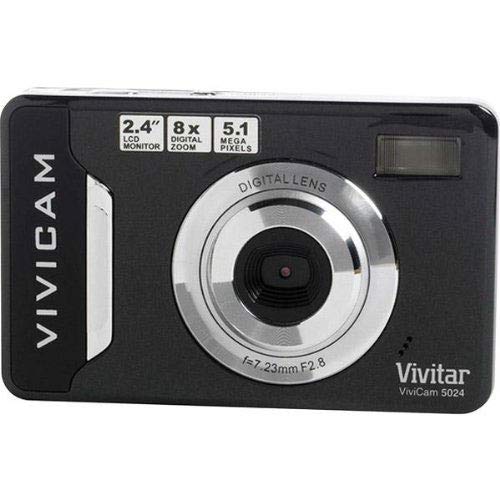
이미지 1: 앞쪽 view of the Vivitar Vivicam 5024 Digital Camera. Shows the lens, flash, and overall compact design.
The Vivitar Vivicam 5024 is a compact digital camera equipped with a 5.1-megapixel sensor for still images and video recording. It includes an 8x digital zoom and a 2.4-inch color LCD screen for framing shots and reviewing content. Key features include anti-shake technology, scene modes, ISO adjustment, and white balance settings.
설정
1. 배터리 설치
The Vivicam 5024 operates on three (3) AAA batteries. Ensure batteries are inserted with correct polarity.
- 카메라 하단에서 배터리 덮개를 찾으세요.
- 덮개를 밀어 엽니다.
- Insert three fresh AAA batteries, matching the positive (+) and negative (-) terminals as indicated inside the compartment.
- 배터리 덮개를 단단히 닫으세요.
2. SD 카드 설치
The camera uses an SD (Secure Digital) card for storing photos and videos. A 4GB SD card is typically included.
- Locate the SD card slot, which does not have a cover, on the side of the camera.
- Insert the SD card into the slot with the metal contacts facing the front of the camera until it clicks into place.
- To remove, gently push the card further in until it springs out.
3. 초기 전원 켜기
Press and hold the Power button, usually located on the top of the camera, until the LCD screen illuminates.
카메라 작동
1. 기본 제어
- 전원 버튼: 카메라를 켜거나 끕니다.
- 셔터 버튼: 버튼을 반쯤 누르면 초점이 맞춰지고, 완전히 누르면 사진이 촬영됩니다.
- 확대/축소 버튼: Control the 8x digital zoom (usually marked 'W' for Wide and 'T' for Telephoto).
- 탐색 버튼: Used to navigate menus and playback images.
- LCD 화면: 프레이밍 샷을 위한 2.4인치 디스플레이viewing images, and accessing menus.
2. 사진 찍기
- 카메라를 켭니다.
- 2.4인치 LCD 화면을 사용하여 사진 구도를 잡으세요.
- Use the zoom buttons to adjust the 8x digital zoom as needed.
- Press the Shutter button halfway down to allow the camera to focus.
- 셔터 버튼을 완전히 눌러 이미지를 캡처하세요.
- 중요한: Due to the camera's design, it is crucial to hold the camera perfectly still for a couple of seconds after pressing the shutter button to ensure a clear image.
The camera features anti-shake technology to assist in reducing blur, but stable handling is still recommended.
3. 비디오 녹화
The Vivicam 5024 can record video. To switch to video mode, navigate through the camera's menu or use a dedicated mode button if available.
- Start recording by pressing the Shutter button (or dedicated record button).
- Stop recording by pressing the button again.
- 메모: The Vivitar Vivicam 5024 records video without sound. This is a design characteristic and not a malfunction.
4. 재생 모드
다시view 귀하의 사진과 비디오:
- Enter Playback mode (usually via a dedicated button or menu option).
- Use the navigation buttons to scroll through your captured media.
- 셔터 버튼이나 확인 버튼을 누르세요 view a video or a larger image.
5. 메뉴 설정
Access the camera's menu to adjust various settings:
- 장면 모드: Select pre-set modes for different shooting conditions (e.g., Portrait, Landscape).
- ISO: Adjust light sensitivity (e.g., for low-light conditions).
- 화이트 밸런스: Correct color cast based on lighting (e.g., Daylight, Cloudy, Fluorescent).
- 플래시 모드 : Set the built-in flash to Automatic, Red-Eye Reduction, Fill-Flash, or Off.
- 셀프타이머: Set a delay (e.g., 10 seconds) before taking a photo.
컴퓨터에 연결하기
사진과 동영상을 컴퓨터로 전송하려면 다음 단계를 따르세요.
- 카메라의 전원이 꺼져 있는지 확인하세요.
- Locate the USB port on the 맨 아래 카메라의.
- Connect the camera to your computer using a compatible USB cable.
- 카메라를 켜세요. 컴퓨터에서 이동식 디스크 드라이브로 나타날 것입니다.
- 드래그 앤 드롭 files from the camera's SD card folder to your computer.
- USB 케이블을 분리하기 전에 카메라를 컴퓨터에서 안전하게 꺼내세요.
유지
1. 카메라 청소
- 부드럽고 마른 천을 사용하여 카메라 본체를 청소하세요.
- 렌즈와 LCD 화면은 전용 렌즈 클리닝 천과 세척액을 사용하여 청소하십시오.
- 연마성 세척제나 용제를 사용하지 마십시오.
- Note that the camera does not have a lens cover, so keep the lens area clean and protected from dust.
2. 배터리 관리
- 장기간 카메라를 사용하지 않을 경우 배터리를 제거하십시오.
- Use high-quality AAA alkaline or rechargeable batteries for optimal performance.
3. SD Card Care
- Format the SD card periodically within the camera's menu to maintain performance.
- Avoid removing the SD card while the camera is writing data.
- The SD card slot does not have a cover; protect it from dust and moisture.
문제 해결
- 카메라가 켜지지 않음: 배터리 설치를 확인하고 배터리가 새 것인지 확인하세요.
- 흐릿한 사진: Ensure the camera is held still for a few seconds after pressing the shutter. Check lighting conditions and adjust ISO if necessary.
- 플래시가 작동하지 않습니다: Verify flash mode settings in the camera menu. Ensure batteries have sufficient power.
- 동영상에 소리가 없습니다: This camera model (Vivicam 5024) does not record audio with video. This is a normal operational characteristic.
- 전송할 수 없습니다 files를 컴퓨터로: Ensure USB cable is securely connected to both camera (bottom port) and computer. Verify camera is powered on and recognized as a removable disk.
명세서
| 모델명 | 5024 |
| 사진 센서 해상도 | 5.1 Megapixels (Effective Still Resolution: 5 MP) |
| 디지털 줌 | 8x |
| 화면 크기 | 2.4 Inches (TFT LCD) |
| 이미지 안정화 | 디지털 |
| 지원됨 File 체재 | JPEG(스틸), MP4(비디오) |
| 내장 미디어 | SD 카드 (최대 4GB 권장) |
| 연결 기술 | USB |
| 전원 | AAA 배터리 3개 |
| 플래시 | Built-In, Automatic modes |
| 셀프 타이머 | 10초 |
| 품목 무게 | 100그램 |
보증 및 지원
Specific warranty information for the Vivitar Vivicam 5024 is typically provided with the product packaging or can be found on the manufacturer's official website. For technical support or service inquiries, please refer to the contact information provided by Vivitar at the time of purchase or visit their official support channels.


