1. 서론
This manual provides essential information for the safe and efficient use of your Nokia 8800 Unlocked Cell Phone. Please read this guide carefully before operating the device to ensure proper functionality and to understand its features.

Image: The Nokia 8800 phone in a partially slid-open position, revealing the keypad and screen.
2. 설정
2.1 SIM 카드 및 배터리 설치
- Remove the back cover of the phone by sliding it downwards or pressing the release button, if present.
- Insert your SIM card into the designated slot with the gold contacts facing down and the cut corner aligned correctly.
- Place the battery into the battery compartment, ensuring the contacts align with those on the phone.
- 뒤쪽 덮개를 제자리에 딸깍 소리가 날 때까지 다시 끼웁니다.

Image: The Nokia 8800 phone with its back cover removed, revealing the internal battery compartment and SIM card slot. A separate back cover is shown next to it.
2.2 배터리 충전
Before first use, fully charge the phone's battery. Connect the charger to the phone's charging port and plug it into a power outlet. The battery indicator on the screen will show the charging status.

Image: The Nokia 8800 phone placed upright in a dedicated charging dock.
2.3 전원 켜기/끄기
To power on, press and hold the power key (usually the red end call key) until the Nokia logo appears. To power off, press and hold the same key until the 'Power off' option appears, then select it.
3. 사용 설명서
3.1 전화 걸기 및 받기
- 전화 걸기: 키패드를 사용하여 전화번호를 입력하고 초록색 통화 버튼을 누르세요.
- 전화 받기 : 전화벨이 울리면 초록색 통화 버튼을 누르세요.
- 통화 종료: 빨간색 통화 종료 버튼을 누르세요.
3.2 메시지 보내기
Navigate to the 'Messages' menu. Select 'Create new message' or 'New SMS/MMS'. Enter your text, add multimedia content if sending an MMS, and then enter the recipient's number or select from contacts before sending.
3.3 카메라 사용
Access the camera from the main menu. Frame your shot using the display and press the dedicated camera key or the center navigation key to capture an image. The integrated SVGA camera supports still images and improved video recording quality (QCIF).
3.4 Internet Browsing
The Nokia 8800 features an integrated xHTML browser that connects over TCP/IP. Access the browser from the main menu to navigate web pages. Data transfer is supported via EDGE/E-GPRS (Class 8) and GPRS (Class 8).

Image: The Nokia 8800 phone with its screen displaying 'Telekom.de', indicating network or service provider information.
4. 특징
The Nokia 8800 is designed with a focus on premium materials and functionality:
- 표시하다: High-resolution TFT display with 256K colors and 208 x 208 pixel resolution.
- 이미징: Integrated SVGA camera (0.5 megapixels) with improved video recording quality (QCIF).
- 메시징: Supports text, audio, image, and video clips (MMS up to 300 KB). Email support for SMTP, POP3, and IMAP4 protocols. Predictive text input for major languages.
- 메모리: 64MB internal NAND flash memory.
- 연결성: Bluetooth (Stereo, Plug & Play connector, SIM Access Profile), EDGE/E-GPRS, GPRS.
- 음성 기능: Integrated handsfree speaker.
- 메디아: 64 polyphonic MIDI, AAC, MP3 ringing tones. Video recording and streaming. Digital music player and FM Radio.
- 응용 프로그램: Java MIDP 2.0 for applications and games.
- 특별 기능: Exclusive 3D graphics and UI themes, Mobile Wallet 2.0 application, device-to-device synchronization.

Image: The Nokia 8800 phone in its closed, compact form, showcasin세련된 디자인이에요.
5. 유지관리
5.1 장치 청소
Use a soft, lint-free cloth to clean the phone's screen and body. Avoid using harsh chemicals or abrasive materials, as these can damage the finish and display.
5.2 배터리 관리
To prolong battery life, avoid exposing the phone to extreme temperatures. Do not leave the battery fully discharged for extended periods. Use only Nokia-approved chargers and batteries.
5.3 일반적인 취급
Protect your phone from drops, impacts, and moisture. Keep it away from magnetic fields and direct sunlight.
6. 문제 해결
6.1 일반적인 문제 및 해결 방법
- 휴대전화 전원이 켜지지 않음: 배터리가 충전되어 있고 올바르게 삽입되었는지 확인하십시오. 충전기를 연결해 보십시오.
- 네트워크 신호 없음: 유심 카드가 제대로 삽입되었는지 확인하십시오. 네트워크 신호가 더 잘 잡히는 곳으로 이동하십시오. 문제가 지속되면 서비스 제공업체에 문의하십시오.
- 배터리가 충전되지 않음: Verify the charger connection. Ensure the charger is functional. Check for any damage to the charging port.
- 화면이 반응하지 않음: Try restarting the phone. If the issue continues, contact support.
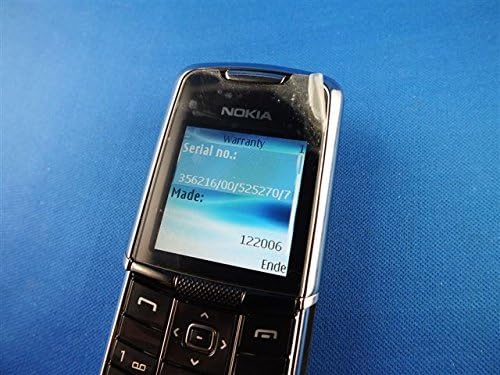
Image: The Nokia 8800 phone with its screen displaying 'Warranty' and 'Serial no.' information, useful for troubleshooting or support inquiries.
7. 사양
| 특징 | 세부 사항 |
|---|---|
| 모델명 | 노키아 8800 |
| 작동 주파수 | Tri-band GSM 900/1800/1900 |
| 치수(길이 x 너비 x 두께) | 107 mm x 45 mm x 15.0 - 16.5 mm |
| 무게 | 134g(4.7온스) |
| 표시하다 | High-resolution TFT, 256K colors, 208 x 208 pixels, 2 inches |
| 카메라 | SVGA (0.5 megapixels), QCIF video recording |
| 내부 메모리 | 64MB 낸드 플래시 |
| 운영 체제 | Java-based (proprietary) |
| 연결성 | Bluetooth, EDGE/E-GPRS Class 8, GPRS Class 8 |
| 브라우저 | Integrated xHTML browser |
| 오디오 잭 | 헤드폰 잭이 없습니다 |
| 폼 팩터 | 슬라이더 |
| 색상 | 은 |
| 첫 번째 이용 가능 날짜 | 13년 2007월 XNUMX일 |
8. 보증 및 지원
For warranty information and customer support, please refer to the documentation provided at the time of purchase or visit the official Nokia web사이트. 보증 청구를 위해 구매 증빙 자료를 보관하세요.


