소개
The RCA DRC8052N DVD Recorder is designed for recording and playing back video content on DVD discs. This device allows you to record from various sources such as a television, camcorder, or other video devices, and archive your favorite movies and shows. It features an HDMI output for a high-quality digital connection and upconversion to high-definition resolution, enhancing your viewing experience. The unit also supports DivX playback and includes convenient front audio/video input jacks for easy connectivity.
설정
Follow these steps to set up your RCA DRC8052N DVD Recorder:
- 짐 풀기: Carefully remove the DVD recorder and all accessories from the packaging. Ensure all components are present.
- 전원 연결: Connect the power cord to the DC IN 9V port on the rear of the unit and then plug it into a standard electrical outlet.
- 비디오 출력 연결:
- For optimal picture quality, connect an HDMI cable from the HDMI 출력 port on the DVD recorder to an HDMI 입력 TV의 포트.
- Alternatively, use composite video (yellow) and stereo audio (red/white) cables to connect the 비디오 출력 그리고 오디오 출력(R/L) ports on the DVD recorder to corresponding input ports on your television.
- Video Input Connection (for recording):
- To record from a camcorder, connect it to the DV-Input port on the front panel. This digital connection is ideal for transferring digital video.
- For other video sources (e.g., VCR, cable box), use the AUDIO IN (R/L) 그리고 비디오 입력 jacks on the rear panel, or the convenient Front Audio/Video Input Jacks.
- 원격 제어 배터리: Insert two AA batteries into the remote control unit, observing the correct polarity. The remote control is essential for full functionality.
- 초기 전원 켜기: 를 누르세요 힘 button on the unit or remote control to turn on the DVD recorder. Follow any on-screen prompts for initial setup.
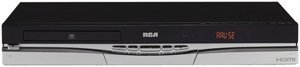
그림 1: 앞쪽 view of the RCA DRC8052N DVD Recorder, showing the disc tray and control buttons.
작동 지침
This section details the basic operation of your DVD recorder.
DVD 재생
- Ensure the DVD recorder is powered on and your TV is set to the correct input source (e.g., HDMI 1, AV1).
- 를 누르세요 열기/닫기 버튼을 눌러 디스크 트레이를 엽니다.
- DVD 디스크를 라벨 면이 위를 향하도록 트레이에 놓습니다.
- 를 누르세요 열기/닫기 버튼을 다시 누르면 트레이가 닫힙니다. 디스크가 자동으로 로드됩니다.
- 사용하세요 놀다, 정지시키다, 멈추다, and navigation buttons on the remote control to manage playback.
DVD로 녹화
The RCA DRC8052N supports recording to DVD+R/+RW and DVD-R/-RW discs.
- Insert a blank recordable DVD disc into the disc tray.
- Select the input source you wish to record from (e.g., DV-Input, AV-Input) using the remote control.
- Ensure the source device is playing or transmitting the content you want to record.
- 를 누르세요 기록 button on the remote control or the unit to begin recording.
- 를 누르세요 멈추다 녹음을 끝내려면 버튼을 누르세요.
- Finalize the disc if necessary, following the on-screen instructions, to ensure it can be played on other DVD players.
HDMI with HD Upconversion
When connected via HDMI, the DVD recorder can upconvert standard DVD images to high-definition resolution (up to 1080i), providing a clearer and more detailed picture on compatible HD televisions.
DivX Playback
This unit is DivX certified, allowing playback of DivX video files stored on compatible discs. Insert a disc containing DivX files, and the interactive user interface will guide you through selecting and playing the content.
유지
Proper care ensures the longevity and optimal performance of your DVD recorder.
- 장치 청소: 제품 외부를 닦을 때는 부드럽고 마른 천을 사용하십시오. 액체 세제나 연마제는 표면 손상을 유발할 수 있으므로 사용하지 마십시오.
- 디스크 관리: 디스크를 다룰 때는 지문이나 흠집이 생기지 않도록 가장자리를 잡으십시오. 사용하지 않을 때는 디스크 케이스에 보관하십시오. 더러워진 디스크는 부드럽고 보풀 없는 천으로 중앙에서 바깥쪽으로 닦아주십시오.
- 통풍: Ensure the unit has adequate ventilation. Do not block any ventilation openings on the top, sides, or bottom of the recorder. Avoid placing the unit in an enclosed space or on soft surfaces that may obstruct airflow.
- 전원 끄기 : 장기간 사용하지 않을 경우 전원 콘센트에서 제품의 플러그를 뽑는 것이 좋습니다.
문제 해결
If you encounter issues with your RCA DRC8052N DVD Recorder, refer to the following common solutions:
| 문제 | 가능한 원인 / 해결책 |
|---|---|
| 장치의 전원이 켜지지 않습니다. | Ensure the power cord is securely connected to both the unit and a working electrical outlet. |
| 텔레비전에 화면도 소리도 나오지 않습니다. | Check all video and audio cable connections (HDMI, composite). Ensure your TV is set to the correct input source (e.g., HDMI 1, AV1). |
| 디스크가 재생되지 않습니다. | Ensure the disc is inserted correctly with the label side up. Check if the disc is clean and free of scratches. Verify the disc format is compatible with the player (e.g., DVD-Video, DivX). Some discs may be region-coded and not compatible. |
| 녹음할 수 없습니다. | Ensure a blank, recordable DVD disc (DVD+R/+RW or DVD-R/-RW) is inserted. Verify the input source is correctly selected and providing a signal. Check if the disc has sufficient free space. |
| 리모컨이 작동하지 않습니다. | Check and replace the batteries (2 AA batteries required). Ensure there are no obstructions between the remote and the unit's sensor. The remote control is necessary for full operation. |
| Unit takes a long time to start up. | A brief startup sequence (approximately 20 seconds) is normal for this device before it fully responds to commands. |
명세서
- 상표: (주)알에이씨에이
- 모델 번호: DRC8052N
- 제품 크기: 16.9 x 11 x 2.6 인치
- 품목 무게: 10.1파운드
- 배터리: AA 배터리 2개 필요(리모컨용)
- 특별 기능: 컴팩트한 디자인
- 미디어 유형: DVD (+R/+RW, -R/-RW)
- 해결: Up to 1920x1080 (via HDMI upconversion)
- 커넥터 유형: RCA, HDMI
- 연결 기술 : HDMI, RCA
- 오디오 출력 모드: 스테레오 재생
- 지원되는 오디오 형식: 돌비 디지털, DTS, PCM
- 총 HDMI 포트: 1
보증 및 지원
For detailed warranty information, please refer to the warranty card included with your product or visit the official RCA website. For technical support or service inquiries, please contact RCA customer service through their official channels.


