1. 서론
구매해주셔서 감사합니다asing the Pentax Optio W10 Digital Camera. This manual provides essential information for the safe and effective use of your camera. The Optio W10 is a compact 6.0-megapixel digital camera featuring a 3x optical zoom lens, designed for capturing high-quality still images and video. Its robust design makes it suitable for various environments.
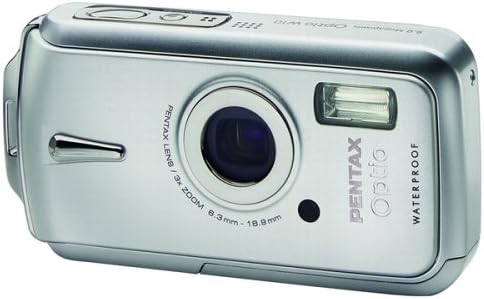
그림 1.1: 전면 view of the Pentax Optio W10 Digital Camera, showcasing the lens, flash, and branding.
2. 안전 정보
Please read and understand all safety precautions before using the camera. Failure to do so may result in injury or damage to the product.
- 카메라를 분해하거나 개조하려고 하지 마세요.
- 카메라를 극한 온도, 직사광선 및 높은 습도로부터 멀리하십시오.
- Ensure all compartment covers (battery, memory card) are securely closed and locked before exposing the camera to water or dust.
- Use only the specified battery type (Lithium-ion DL-I8) and charger.
- 어린이의 손이 닿지 않는 곳에 보관하세요.
3. 패키지 내용
카메라 패키지에 모든 구성품이 들어 있는지 확인하십시오.
- Pentax Optio W10 Digital Camera
- Lithium-ion Battery DL-I8
- 배터리 충전기
- AC 전원 코드
- USB 케이블(컴퓨터 연결용)
- 견장
- 소프트웨어 CD-ROM
- 사용 설명서(본 문서)
4. 설정
4.1. 배터리 설치
- 카메라 하단에 있는 배터리/메모리 카드 삽입구 덮개를 찾으세요.
- Slide the lock switch to the 'OPEN' position and open the cover.
- Insert the Lithium-ion battery DL-I8 into the compartment, ensuring the correct orientation as indicated inside the compartment.
- Close the cover and slide the lock switch to the 'LOCK' position until it clicks securely.

그림 4.1: 하단 view of the camera, illustrating the battery and SD card compartment with the lock switch.
4.2. 메모리 카드 설치
The Pentax Optio W10 uses SD memory cards.
- Open the battery/memory card compartment cover as described in Section 4.1.
- Insert the SD memory card into the designated slot with the label facing the correct direction, pushing gently until it clicks into place.
- Close the cover and slide the lock switch to the 'LOCK' position.
4.3. 최초 전원 켜기 및 날짜/시간 설정
- 를 누르세요 켜짐/꺼짐 카메라 상단에 있는 버튼입니다.
- Upon first power-on, the camera will prompt you to set the date and time. Use the directional buttons on the back of the camera to navigate and the OK 확인 버튼을 클릭하세요.
- 화면의 지시에 따라 초기 설정을 완료합니다.

그림 4.2: 상단 view of the camera, highlighting the ON/OFF button and 6.0 Megapixels branding.
5. 카메라 작동
5.1. 기본 사진 촬영
To take a still picture:
- 를 눌러 카메라를 켭니다. 켜짐/꺼짐 단추.
- 2.5인치 LCD 모니터를 사용하여 구도를 잡으세요.
- 셔터 버튼을 반쯤 눌러 초점을 맞추세요. 초점이 맞춰지면 초점 프레임이 녹색으로 변합니다.
- 사진을 촬영하려면 셔터 버튼을 끝까지 누르세요.

그림 5.1: 후면 view of the camera, displaying the LCD screen and various control buttons for navigation and settings.
5.2. 촬영 모드
The Optio W10 offers various shooting modes accessible via the 방법 button. Refer to the on-screen menu for specific options such as Program Auto, Scene Modes, and Movie Mode.
5.3. 비디오 녹화
비디오를 녹화하려면:
- Switch to Movie Mode using the 방법 단추.
- Press the shutter button to start recording. The camera can capture QuickTime motion JPEG videos at 640 x 480 resolution at 30 frames per second.
- 촬영을 중지하려면 셔터 버튼을 다시 누르십시오.
5.4. 재생
에게 view 촬영된 이미지 및 비디오:
- 를 누르세요 재생 버튼(일반적으로 삼각형 아이콘으로 표시됨).
- Use the directional buttons to scroll through your photos and videos.
- 를 누르세요 OK 버튼을 view 비디오를 보거나 사진을 확대해 보세요.
5.5. 컴퓨터에 연결하기
이미지와 비디오를 컴퓨터로 전송하려면:
- 카메라가 꺼져 있는지 확인하십시오.
- 제공된 USB 케이블을 사용하여 카메라를 컴퓨터에 연결합니다.
- 카메라를 켜세요. 카메라가 이동식 디스크 또는 PTP 장치로 인식될 것입니다.
- 컴퓨터 운영 체제의 지침에 따라 액세스하고 전송하십시오. files.
6. 유지관리
6.1. 청소
- 카메라 본체 : 부드럽고 마른 천으로 닦아주세요. 잘 지워지지 않는 오염에는 약간 묽은 천을 사용하세요.amp 천으로 닦아낸 후 완전히 말리세요.
- 렌즈: Use a lens brush or a soft, clean lens cloth. Avoid touching the lens surface with your fingers.
- LCD 모니터: 부드럽고 마른 천으로 부드럽게 닦아주세요. 화면을 세게 누르지 마세요.
- 방수 씰: Regularly inspect the rubber seals around the battery/memory card compartment for dirt, sand, or damage. Clean gently with a soft cloth. Do not use sharp objects.
6.2. 보관
When not in use for extended periods, store the camera in a cool, dry, and well-ventilated place. Remove the battery to prevent leakage. Avoid storing in areas with high humidity or extreme temperature fluctuations.
7. 문제 해결
If you encounter issues with your Pentax Optio W10, refer to the following common solutions:
| 문제 | 가능한 원인 / 해결책 |
|---|---|
| 카메라가 켜지지 않음 | Battery is depleted or incorrectly inserted. Recharge the battery or reinsert it correctly. |
| 사진을 찍을 수 없습니다 | Memory card is full, locked, or not inserted. Delete unnecessary file카드를 잠금 해제하거나 올바르게 삽입하세요. |
| 이미지가 흐릿합니다 | Lens is dirty, camera shake, or incorrect focus. Clean the lens, hold the camera steady, or ensure proper focus. |
| Water inside compartment | Compartment cover not securely closed or seal is damaged. Ensure cover is locked. If seal is damaged, contact service. |
For further assistance, please refer to the official Pentax support web사이트를 방문하거나 고객 서비스에 문의하세요.
8. 사양
Key technical specifications for the Pentax Optio W10 Digital Camera:
- 효과적인 스틸 해상도: 6.0메가픽셀
- 포토 센서 기술: CCD(1/2.5인치)
- 광학 줌: 3x
- 디지털 줌: 4x
- 최대 초점 거리: 114mm (XNUMXmm)
- 최소 초점 거리: 38mm (XNUMXmm)
- LCD 화면 크기: 2.5 인치
- 이미지 안정화: 디지털, 광학
- 비디오 해상도: 640 x 480, 30/15 fps (QuickTime Motion JPEG)
- 지원됨 File 체재: JPEG(정지 이미지), MJPEG(동영상)
- 저장 매체: SD/MMC card, Internal Memory
- 배터리 유형: Lithium-ion (DL-I8)
- 특징: Waterproof (Note: Ensure all seals are properly closed before water exposure)
- 최소 셔터 속도: 4초
- 최대 셔터 속도: 1/2000초
- ISO 범위 : 자동, 64, 100, 200, 400, 800
- 품목 무게: 5.6 온스
- 모델 번호: 19033
9. 보증 및 지원
For information regarding warranty coverage, service, or technical support for your Pentax Optio W10 camera, please refer to the warranty card included with your product or visit the official Pentax web사이트. 보증 청구를 위해 구매 증빙 자료를 보관하세요.
온라인 지원: Ricoh Imaging Global Support (Pentax is a brand of Ricoh Imaging)


