1. 서론
This manual provides essential information for the setup, operation, and maintenance of your ELAC Cinema 05 ESP 5.1 Speaker System. This compact surround sound system is designed to deliver a balanced audio experience for home cinema environments.
The system comprises the SUB 05 ESP subwoofer, one Cinema 05 CENTER speaker, and four Cinema 05 SAT mini-satellite speakers. All components are engineered for optimal performance and durability.
2. 안전 지침
- 전원 공급 장치: Ensure the subwoofer is connected to a power outlet with the correct voltage. Disconnect the power cord during electrical storms or when unused for long periods.
- 통풍: 통풍구를 막지 마십시오. 서브우퍼 주변에 적절한 공기 흐름을 위한 충분한 공간을 확보하십시오.
- 습기와 열: Do not expose the system to rain, moisture, dripping, or splashing. Keep away from heat sources such as radiators, heat registers, stoves, or other apparatus (including amp열을 생성하는 발전기.
- 놓기: Place speakers on stable surfaces to prevent them from falling. Avoid placing heavy objects on the speakers.
- 서비스: 이 제품을 직접 수리하려고 하지 마십시오. 모든 서비스는 자격을 갖춘 서비스 담당자에게 문의하십시오.
- 자기 차폐: All speakers are magnetically shielded. However, maintain a reasonable distance from sensitive electronic devices if interference is observed.
3. 패키지 내용
포장 안에 모든 구성품이 들어 있는지 확인해 주십시오.
- 1x ELAC SUB 05 ESP Subwoofer
- 1x ELAC Cinema 05 CENTER Speaker
- 4x ELAC Cinema 05 SAT Mini-Satellite Speakers
- 서브우퍼용 전원 케이블
- Speaker cables (may vary by region/retailer)
- Wall mounting brackets for center speaker (included)
- Mounting provisions for satellite speakers
4. 설정
4.1 풀기
Carefully remove all components from their packaging. Retain the packaging for future transport or storage.
4.2 스피커 배치
Optimal speaker placement is crucial for achieving the best sound quality in a 5.1 surround sound configuration.

그림 1: 이상view of the ELAC Cinema 05 ESP 5.1 Speaker System components.
- Front Left/Right Satellites (Cinema 05 SAT): Place these speakers equidistant from your primary listening position, typically at ear level. They should form an equilateral triangle with the listening position.
- Center Speaker (Cinema 05 CENTER): Position the center speaker directly above or below your television/screen, centered horizontally. Its primary role is dialogue reproduction.
- Surround Left/Right Satellites (Cinema 05 SAT): Place these speakers to the sides or slightly behind the listening position, typically slightly above ear level.
- Subwoofer (SUB 05 ESP): The subwoofer's placement is less critical for imaging but can significantly impact bass response. Experiment with different locations in the room, often in a corner or along a wall, to find the best bass balance.
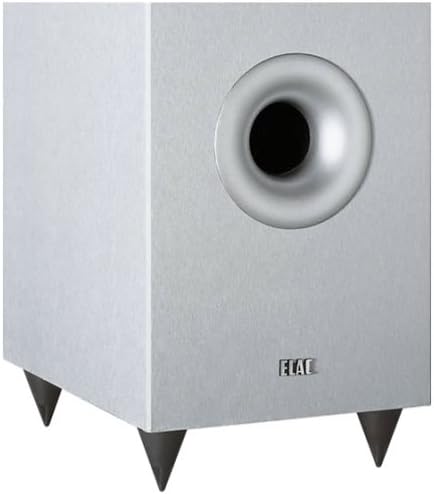
그림 2: 전면 view of the ELAC SUB 05 ESP Subwoofer, featuring its down-firing woofer and front bass reflex port.
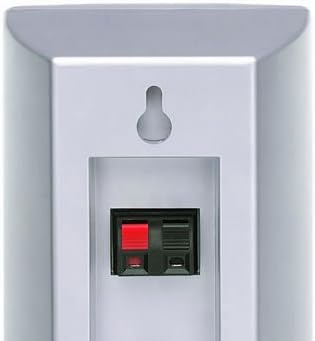
그림 3: 전면 view of an ELAC Cinema 05 SAT Satellite Speaker, showcasin컴팩트한 디자인입니다.

그림 4: 전면 view of the ELAC Cinema 05 CENTER Speaker, designed for clear dialogue.
4.3 벽면 장착
The Cinema 05 SAT satellites and Cinema 05 CENTER speaker are designed for flexible placement, including wall mounting.
- Cinema 05 SAT: These speakers feature a hanging provision for unobtrusive wall mounting. Optional horizontal swivel wall mounts are available (sold separately).
- Cinema 05 CENTER: A horizontal and vertical wall mount is included with the center speaker for versatile installation.

그림 5: 후면 view of an ELAC Cinema 05 SAT Satellite Speaker, showing the keyhole mount and speaker terminals.

그림 6: 후면 view of the ELAC Cinema 05 CENTER Speaker, illustrating the included wall mount attachment.
4.4 연결
Ensure your AV receiver or amp연결을 하기 전에 lifier를 꺼야 합니다.
- 위성 및 중앙 스피커: Connect the Cinema 05 SAT and Cinema 05 CENTER speakers to the corresponding speaker terminals on your AV receiver using appropriate speaker wire. Ensure correct polarity (+ to + and - to -) for all connections.
- Subwoofer (SUB 05 ESP): Connect the subwoofer to your AV receiver's LFE (Low-Frequency Effects) or Subwoofer Pre-Out jack using a single RCA cable. If your receiver does not have an LFE output, use the Line Level inputs.
- 전원 연결: Once all audio connections are made, connect the SUB 05 ESP subwoofer to a wall outlet using the provided power cable.
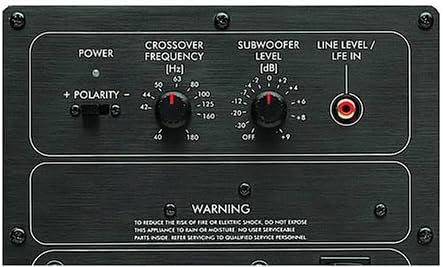
Figure 7: Rear control panel of the ELAC SUB 05 ESP Subwoofer, showing power input, LFE/Line In, and control knobs.
5. 운영
5.1 전원 켜기/끄기
The SUB 05 ESP subwoofer has a power switch on its rear panel. Turn it on after connecting all cables. Many AV receivers can trigger the subwoofer to turn on automatically when a signal is detected.
5.2 Subwoofer Controls
The SUB 05 ESP features several controls on its rear panel to integrate it seamlessly with your main speakers and room acoustics.
- 크로스오버 주파수(Hz): This knob determines the highest frequency the subwoofer will reproduce. Adjust it to blend smoothly with your satellite speakers. A common starting point is around 80-100 Hz, but refer to your AV receiver's recommendations or experiment for the best sound.
- Subwoofer Level (dB): This control adjusts the subwoofer's output volume. Start at a moderate level and fine-tune it to match the volume of your satellite speakers. Avoid setting it too high, which can result in boomy or overpowering bass.
- Polarity (+ / -): This switch adjusts the phase of the subwoofer's output. Experiment with both positions while listening to music with strong bass. Choose the setting that provides the most impactful and coherent bass response.
- ESP (Electronic Stabilization Program): The SUB 05 ESP features ELAC's patented ESP technology, which prevents mechanical overload and distortion, ensuring a clean bass spectrum even at high volumes. This is an automatic feature and does not require user adjustment.
5.3 초기 사운드 조정
After connecting and powering on your system, use your AV receiver's automatic calibration feature (if available) or manually adjust speaker levels and distances to achieve a balanced sound field.
6. 유지관리
- 청소: Use a soft, dry cloth to clean the speaker cabinets. Do not use liquid cleaners, aerosols, or abrasive materials, as these may damage the finish.
- 그릴 : 필요한 경우 스피커 그릴을 조심스럽게 분리하여 청소할 수 있습니다. 부드러운 솔이나 브러시가 달린 진공청소기를 사용하여 먼지를 제거하세요.
- 직사광선을 피하세요: Prolonged exposure to direct sunlight can cause discoloration or damage to the speaker cabinets.
7. 문제 해결
- 스피커에서 소리가 나지 않습니다:
- Check all speaker wire connections at both the speaker and receiver ends for proper polarity and secure contact.
- Ensure the AV receiver is powered on and the correct input source is selected.
- Verify that the speaker levels in your receiver's settings are not set to minimum or muted.
- 서브우퍼에서 소리가 나지 않습니다.
- Check the subwoofer's power cable connection and ensure the power switch is in the 'ON' position.
- Verify the RCA cable connection between the subwoofer and the receiver's LFE/Subwoofer Pre-Out.
- Adjust the 'Subwoofer Level' knob on the subwoofer's rear panel.
- Check your AV receiver's settings to ensure the subwoofer output is enabled and the crossover frequency is set appropriately.
- 소리가 왜곡되거나 불분명함:
- 스피커 선이 닳거나 합선되지 않았는지 확인하십시오.
- Reduce the volume level on your receiver or amp리퍼.
- 원본 오디오 품질을 확인하세요.
- 허밍 소음:
- 모든 연결이 안전한지 확인하세요.
- Try connecting the subwoofer to a different electrical outlet.
- If using a long RCA cable, consider a higher quality, shielded cable.
8. 사양
| 모델명 | 시네마 5 |
| 모델 번호 | 35322 |
| 스피커 유형 | Subwoofer, Center Speaker, Satellite Speakers |
| 서라운드 사운드 구성 | 5.1 |
| 오디오 출력 모드 | 둘러싸다 |
| 최대 스피커 출력 전력 | 25 Watts (per channel, specific to satellites/center) |
| 연결 기술 | Wired (Bluetooth mentioned for control method, but primary audio is wired) |
| 제어 방법 | Remote Control (via connected AV receiver) |
| 전원 | 유선 전기 (서브우퍼) |
| 색상 | 은 |
| 장착 유형 | Wall Mount (for satellites and center) |
| 품목 무게 | 10 g (Note: This weight is likely for a single small component, not the entire system) |
9. 보증 및 지원
9.1 보증 정보
The ELAC Cinema 05 ESP 5.1 Speaker System comes with a 한정 보증. Please refer to the warranty card included with your product or visit the official ELAC web보장 범위, 기간, 청구 절차 등에 대한 자세한 약관은 해당 사이트에서 확인하세요.
9.2 고객 지원
For technical assistance, troubleshooting beyond this manual, or warranty inquiries, please contact ELAC customer support. Contact information can typically be found on the official ELAC web사이트나 제품 설명서에서 확인하세요.
지원팀에 문의할 때는 제품 모델 번호(35322)와 구매 정보를 미리 준비해 두시기 바랍니다.


