소개
This instruction manual provides important information for the safe and efficient operation of your Honeywell HT8002 Twin Pack Turbo High Performance Fan. Please read this manual thoroughly before use and retain it for future reference.
중요 안전 지침
전기 제품을 사용할 때는 화재, 감전, 인명 피해 위험을 줄이기 위해 다음 사항을 포함한 기본 예방 조치를 항상 따라야 합니다.
- 이 팬을 사용하기 전에 모든 지침을 읽으십시오.
- Use this fan only as described in this manual. Other uses not recommended by the manufacturer may cause fire, electric shock, or injury to persons.
- To protect against electrical shock, do not place fan in window, immerse unit, plug or cord in water or spray with liquids.
- 어린이가 가전제품을 사용하거나 어린이 근처에서 사용할 때는 면밀한 감독이 필요합니다.
- Unplug fan from outlet when not in use, when moving fan from one location to another, and before cleaning.
- 전선이나 플러그가 손상된 경우, 또는 팬이 고장난 경우, 떨어뜨렸거나 어떤 식으로든 손상된 경우에는 팬을 작동하지 마십시오.
- 코드가 테이블이나 카운터 가장자리에 걸려 있거나 뜨거운 표면에 닿지 않도록 하세요.
- 손가락이나 이물질이 통풍구나 배기구에 들어가지 않도록 하십시오. 감전이나 화재의 위험이 있으며, 팬이 손상될 수 있습니다.
- 공기 흡입구나 배출구를 어떤 식으로든 막지 마십시오. 침대처럼 구멍이 막힐 수 있는 부드러운 표면에는 사용하지 마십시오.
- Always place fan on a stable, flat, level surface when operating.
- This product is intended for household use ONLY and not for commercial or industrial use.
패키지 내용
- 2 x Honeywell HT8002 Turbo High Performance Fans
- 사용 설명서
제품 끝view
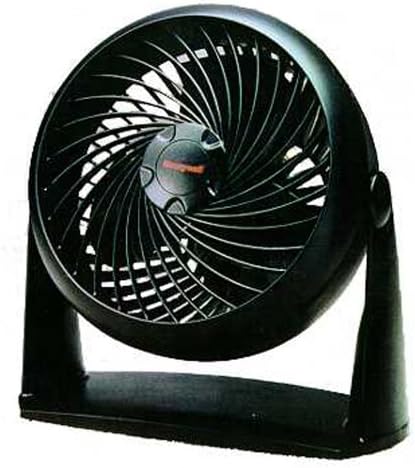
그림 1: 앞쪽 view of the Honeywell HT8002 Turbo High Performance Fan. The fan features a black housing, a distinctive turbo grille design, and a central Honeywell logo on the fan hub. It is mounted on a sturdy base, allowing for stable placement on flat surfaces.
The Honeywell HT8002 is a compact, high-performance fan designed for versatile air circulation. Its aerodynamic wind tunnel design and high-intensity max velocity blades provide dynamic power for personal cooling or whole-room air circulation. The fan also includes a wall mount feature for flexible placement.
설정
- 짐 풀기: Carefully remove the fan from its packaging. Retain packaging for storage if desired.
- 놓기: Place the fan on a firm, level surface. Ensure there is adequate space around the fan for proper air intake and exhaust.
- 벽면 장착(선택 사항): The fan features a wall mount option. Locate the keyhole slots on the base of the fan. Use appropriate screws (not included) to secure the fan to a wall stud or use suitable wall anchors. Ensure the fan is securely mounted before operation.
- 전원 연결: 선풍기의 전원 코드를 일반적인 120V AC 콘센트에 꽂으세요.
작동 지침
- 전원 켜기/끄기: Locate the control buttons on the fan. Press the power button to turn the fan on. Press it again to turn the fan off.
- 팬 속도 조정: The fan features a 3-speed motor. Use the speed control buttons to select your desired airflow: 낮은, 중간, 또는 높은.
- 선풍기 각도 조절하기: The fan head can be manually tilted to direct airflow upwards or downwards. Gently adjust the fan head to the desired angle.
- 진동: The fan oscillates at 90 degrees for full room air circulation. Locate the oscillation button (if present, otherwise assume automatic or manual swivel). Press to activate or deactivate oscillation.
유지
정기적인 청소는 선풍기의 성능을 유지하고 수명을 연장하는 데 도움이 됩니다.
- 청소 전: 청소하기 전에 항상 팬의 플러그를 전기 콘센트에서 뽑으세요.
- 외부 청소: 부드러운 d를 사용하세요amp 팬 외부 표면을 닦을 때는 천을 사용하세요. 연마성 세제나 용제는 사용하지 마세요.
- 그릴과 칼날 청소하기: Use a vacuum cleaner with a brush attachment to remove dust and debris from the front grille and fan blades. Do not attempt to disassemble the fan for cleaning the blades.
- 저장: 장기간 사용하지 않을 때는 선풍기를 서늘하고 건조한 곳에, 가급적 원래 포장 상태로 보관하십시오.
문제 해결
| 문제 | 가능한 원인 | 해결책 |
|---|---|---|
| 팬이 켜지지 않습니다. | 장치에 전원이 들어오지 않습니다. | 선풍기가 제대로 된 콘센트에 꽂혀 있는지 확인하십시오. 회로 차단기를 점검하십시오. |
| 감소된 기류. | Dust accumulation on grille or blades. | Unplug the fan and clean the grilles and blades as described in the Maintenance section. |
| 팬에서 이상한 소리가 납니다. | Fan not on a level surface; foreign object in fan. | Place fan on a stable, level surface. Unplug and inspect for any foreign objects. If noise persists, discontinue use and contact customer support. |
명세서
- 모델: HT8002
- 상표: 허니웰
- 색상: 검은색
- 선풍기 디자인: 테이블 선풍기
- 전원: 코드식 전기
- 속도 수: 3
- 특징: Oscillating, Wall Mount
- 제품 크기: 13.07 x 11.77 x 11.6 인치
- 품목 무게: 8 파운드
- 제조업체: 카즈
- 한국어: 092926342111
보증 정보
이 제품에는 다음이 포함되어 있습니다. 5년 한정 보증. For detailed warranty terms and conditions, please refer to the warranty card included with your product or contact Honeywell customer support.
고객 지원
For assistance with your Honeywell HT8002 fan, please visit the official Honeywell website or contact their customer service department. Please have your model number (HT8002) and proof of purchase available when contacting support.
온라인 지원: www.honeywell.com


