1. 서론
This manual provides comprehensive instructions for the safe and efficient use of your InFocus X2 Multimedia DLP Projector. Please read this manual thoroughly before operating the projector and retain it for future reference. The InFocus X2 is designed for versatile use, suitable for both business presentations and home entertainment.
2. 제품 오버view
The InFocus X2 is a Digital Light Processing (DLP) projector featuring an 800x600 native resolution. It offers a bright display with up to 1500 ANSI lumens and a 2000:1 contrast ratio, ensuring clear and vibrant images. The projector includes a manual zoom and focus lens for image adjustment and a built-in 2.5-watt speaker for audio output.

그림 2.1: 앞 왼쪽 view of the InFocus X2 Projector with the lens cap removed, showing the main lens and ventilation.
주요 특징:
- Digital Light Processing (DLP) technology for consistent image quality.
- Native 800x600 (SVGA) resolution, compatible with resolutions up to XGA (1024x768).
- Up to 1500 ANSI lumens brightness.
- 2000:1 contrast ratio for sharp image detail.
- Manual zoom and focus lens (1.2x magnification).
- Multiple input options for computers, video sources, and audio.
- Integrated 2.5-watt speaker.
- Supports front, rear, and ceiling projection methods.
3. 설정
3.1 포장 풀기 및 배치
Carefully remove the projector and all accessories from the packaging. Place the projector on a stable, flat surface or mount it securely according to the chosen projection method (front, rear, or ceiling). Ensure adequate ventilation around the projector.
3.2 Connecting the Projector
The connection panel is located at the rear of the unit. All inputs are color-coded for ease of connection.

그림 3.1: 후면 view of the InFocus X2 Projector, highlighting the various input ports for computer, video, and audio connections.
- Computer Input: Connect your computer using the provided computer cable to the M1-DA port (which supports RGB, DVI, and HDTV signals) or the VGA port.
- 비디오 입력 : For video sources, use the S-video port or the composite video jack.
- 오디오 입력 : Connect audio sources to the stereo RCA audio inputs.
- 힘: Connect the power cord to the projector's power inlet and then to a suitable electrical outlet.
3.3 전원 켜기/끄기
- 전원을 켜려면: 프로젝터 제어판 또는 리모컨의 전원 버튼을 누르세요. 전원 표시등이 켜집니다.
- 전원을 끄려면: Press the power button again. The projector will enter a cooling cycle before completely shutting down. Do not unplug the projector during the cooling cycle.
4. 운영
4.1 제어판
The intuitive keypad on the top of the projector allows for easy navigation and control of various functions.
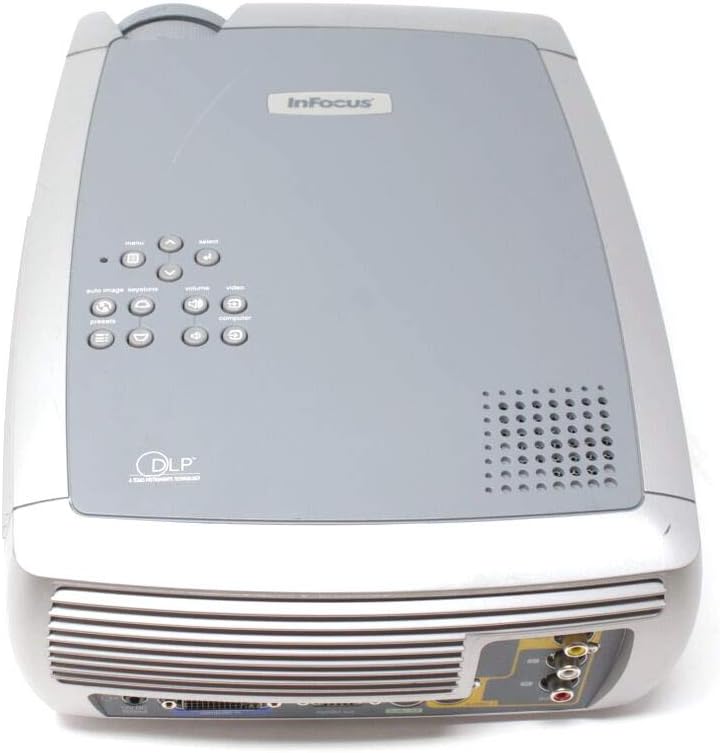
그림 4.1: 상단 view of the InFocus X2 Projector, displaying the control panel with buttons for menu navigation, input selection, and image adjustments.
4.2 이미지 조정
- 집중하다: 프로젝터 렌즈의 초점 링을 돌려 이미지가 선명하고 깨끗해질 때까지 돌립니다.
- 줌: 프로젝터 렌즈의 줌 링을 조절하여 이미지 크기를 변경하십시오.
- 키스톤 보정: Use the keystone correction function (accessible via the menu) to square the image if the projector is not perfectly perpendicular to the screen.
4.3 입력 선택
Use the 'Input' button on the control panel or remote control to cycle through available input sources (Computer, S-Video, Composite Video).
4.4 리모컨 사용하기
The included wireless Navigator remote control provides full functionality for operating the projector from a distance. Refer to the remote control's specific instructions for detailed button functions.
5. 유지관리
5.1리터amp 대사
프로젝터 lamp has an estimated life of up to 3,000 hours in low-power mode. When the lamp needs replacement, a warning indicator will appear. Always allow the projector to cool down for at least 30 minutes before attempting to open the lamp door or replace the lamp.

그림 5.1: 하단 view of the InFocus X2 Projector, showing the warning labels and the location of the lamp access panel. Refer to this area for lamp 교체 절차.
WARNING: To replace the lamp, allow 30 minutes before opening the lamp door. Refer to instructions in the User's Guide to replace the lamp.
5.2 청소
- 렌즈: Use a soft, lint-free cloth and a lens cleaning solution specifically designed for optical surfaces.
- 외부: 프로젝터 외부를 부드러운 천으로 닦으세요.amp 천. 연마성 세척제나 용매를 사용하지 마십시오.
- 통풍구: Ensure air vents are clear of dust and obstructions to prevent overheating. Use compressed air to gently clean the vents if necessary.
6. 문제 해결
If you encounter issues with your InFocus X2 projector, refer to the following common problems and solutions:
| 문제 | 가능한 원인 | 해결책 |
|---|---|---|
| 화면에 이미지가 없습니다. | Incorrect input selected; loose cable connection; projector not powered on. | Verify input source; check all cable connections; ensure projector is powered on. |
| 이미지가 흐릿함 | 렌즈가 초점이 맞지 않습니다. | 프로젝터 렌즈의 초점 링을 조정합니다. |
| 이미지는 사다리꼴입니다 | 프로젝터가 화면에 수직이 아닙니다. | Use keystone correction feature in the projector menu. |
| 프로젝터가 과열되어 꺼집니다 | Blocked air vents; excessive ambient temperature. | Clear air vents; ensure proper ventilation; operate in a cooler environment. |
| 오디오 없음 | Audio cables not connected; volume too low; incorrect audio input selected. | Connect audio cables; increase volume; select correct audio input. |
이러한 해결 방법을 시도한 후에도 문제가 지속되면 고객 지원팀에 문의하세요.
7. 사양
| 특징 | 사양 |
|---|---|
| 디스플레이 기술 | DLP(디지털 광 처리) |
| 네이티브 해상도 | 800 x 600(SVGA) |
| 명도 | 1500 ANSI 루멘(최대) |
| 대비율 | 2000시 1분 |
| Lamp 삶 | Up to 3,000 hours (low power mode) |
| 종횡비 | 4:3(네이티브) |
| 이미지 크기(대각선) | 31인치에서 258인치까지 |
| 투영법 | 전면, 후면, 천장 |
| 내장 스피커 | 2.5-watt mono |
| 입력 | M1-DA (Computer RGB, DVI, HDTV), S-Video, Composite Video, Stereo RCA Audio |
| 제품 치수 | 12.87 x 9.8 x 4.17 인치 |
| 품목 무게 | 12.39파운드 |
8. 상자 안에 무엇이 들어있나요?
The InFocus X2 Multimedia DLP Projector package typically includes:
- InFocus X2 Projector
- 렌즈 캡
- Wireless Navigator Remote Control (with batteries)
- 컴퓨터 케이블
- RCA Video and Audio Cable
- 전원 코드
- Projector System CD (with multi-language user guide)
- 빠른 시작 카드
- 인쇄된 사용자 가이드
9. 보증 및 지원
For warranty information and technical support, please refer to the documentation included with your product or visit the official InFocus web사이트. 보증 청구를 위해 구매 증빙 자료로 구매 영수증을 보관하세요.


