소개
This manual provides comprehensive instructions for the setup, operation, and maintenance of your VTech t2451 2.4 GHz Analog Cordless Phone with Answering System and Caller ID. Please read this manual thoroughly before using your new phone system to ensure proper functionality and to take full advantag그 기능의 전자.
Key features of your VTech t2451 include:
- 2.4 GHz analog reception for clear communication.
- Digital answering system with 3 mailboxes and 15 minutes of recording time.
- 50 name/number phonebook directory for easy contact management.
- 99 name/number Caller ID history to review 부재중 전화.
- Headset compatibility (2.5 mm jack) for hands-free operation.
- Hold function, page/handset locator, and selectable ring tones.
- Wall-mountable design for flexible placement.
설정
Follow these steps to set up your VTech t2451 cordless phone system.
- 짐 풀기: Carefully remove all components from the packaging. Ensure you have the cordless handset, base unit, AC power adapter, telephone line cord, and battery pack.
- 배터리 설치: Open the battery compartment on the back of the cordless handset. Connect the battery pack connector to the jack inside the compartment, ensuring correct polarity. Place the battery pack into the compartment and close the cover.
- 베이스 유닛 연결:
- Connect one end of the telephone line cord to the TEL LINE jack on the base unit and the other end to a telephone wall jack.
- Connect the small end of the AC power adapter to the DC IN 9V jack on the base unit. Plug the large end of the AC power adapter into a standard electrical outlet.
- 핸드셋 충전: Place the cordless handset in the base unit's charging cradle. The charge indicator on the handset should illuminate, indicating that the battery is charging. Allow the handset to charge for at least 12 hours before initial use.
- 벽면 장착(선택 사항): The base unit is designed to be wall-mountable. Refer to the included wall-mount bracket and instructions for secure installation.
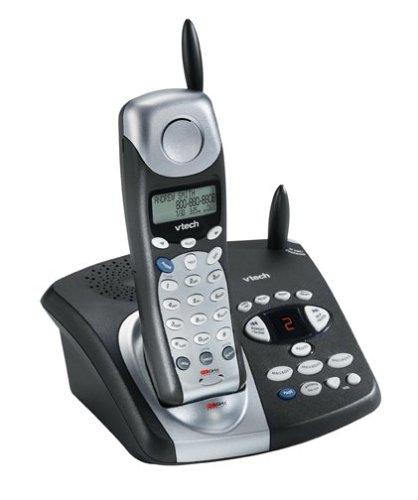
Image: The VTech t2451 cordless phone system, showing the black base unit with the silver and black handset docked in its charging cradle. The base unit features an integrated digital answering system with controls and a display.
작동 지침
전화 걸기 및 받기
- 전화를 걸려면: 를 누르세요 말하다 button, wait for a dial tone, then dial the phone number.
- 전화를 받으려면: 전화가 울리면 누르세요 말하다 button or any key on the keypad (Any Key Answer).
- 통화를 종료하려면: 를 누르세요 끝 button or place the handset back in the base unit.
- 홀드 기능: 통화 중에 잡고 있다 button to place the call on hold. Press 말하다 다시 통화를 재개합니다.
디지털 응답 시스템
Your phone system includes a digital answering system with 3 mailboxes and 15 minutes of recording time.
- 재생 메시지: 를 누르세요 놀다 새로운 메시지를 들으려면 베이스 유닛의 버튼을 누르세요.
- 발신 메시지(OGM) 녹음: Follow the voice prompts to record a personalized outgoing message.
- Mailbox Management: The system supports up to 3 distinct mailboxes. Refer to the detailed instructions in the full user guide for setting up and accessing individual mailboxes.
발신자 번호 표시 및 전화번호부
- 거는 사람 확인: When subscribed to Caller ID service, the handset display will show the caller's name and number. Press the 신원확인 다시 버튼view the 99-name/number Caller ID history.
- 전화번호부: Store up to 50 names and numbers in the phonebook. Use the navigation buttons to scroll through entries and the 메뉴/선택 button to add or edit entries.
기타 기능
- Page/Handset Locator: 를 누르세요 페이지 button on the base unit to locate a misplaced handset.
- Ringer Tones: Customize your phone's ringer by selecting from various available tones. Refer to the handset settings menu.
- 헤드셋 사용: Connect a 2.5 mm compatible headset to the headset jack on the side of the handset for hands-free communication.
유지
Proper care ensures the longevity of your VTech t2451 phone system.
- 청소: 부드러운 천으로 전화기와 베이스 유닛을 청소하세요.amp 옷감. 강한 화학 물질이나 연마성 세제를 사용하지 마십시오.
- 배터리 관리 :
- 사용하지 않을 때는 항상 단말기를 충전 베이스에 다시 놓아두어 배터리가 충전된 상태를 유지하도록 하십시오.
- 장기간 휴대전화를 사용하지 않을 경우 배터리를 분리하십시오.
- Replace the battery when its performance significantly degrades. Use only the specified replacement battery pack.
- 환경 조건: 휴대전화를 극한의 온도, 직사광선 또는 습기에 노출시키지 마세요.
문제 해결
If you experience issues with your VTech t2451, try these common troubleshooting steps.
| 문제 | 해결책 |
|---|---|
| 발신음이 없습니다. |
|
| 수신 상태가 좋지 않거나 잡음이 있습니다. |
|
| 핸드셋이 충전되지 않습니다. |
|
| 응답 시스템이 메시지를 기록하지 않습니다. |
|
명세서
| 특징 | 세부 사항 |
|---|---|
| 상표 | VTECH |
| 모델 번호 | T2451 |
| 전화 유형 | 무선 |
| 빈도 | 2.4GHz 아날로그 |
| 응답 시스템 유형 | 디지털 |
| 기록 용량 | 15 분 |
| Mailboxes | 3 |
| 전화번호부 디렉토리 | 50개의 이름/번호 |
| 발신자 ID 메모리 | 99개의 이름/번호 |
| 헤드셋 호환성 | 2.5mm 잭 |
| 전원 | 코드식 전기 |
| 제품 치수 | 7.1 x 8.5 x 5.1 인치 |
| 품목 무게 | 2.19파운드 |
| 제조업체 | 브이텍 |
보증 및 지원
For warranty information, please refer to the warranty card included with your product packaging or visit the official VTech website. VTech provides customer support for product inquiries, technical assistance, and service. Contact information can typically be found on the VTech web사이트 또는 제품의 원래 설명서에서 확인하세요.
제조업체: VTECH


