소개
This manual provides essential instructions for the safe and efficient operation of your Sharper Image SO226 Compact CD Stereo with AM/FM Digital Tuner. Please read this manual thoroughly before using the unit and retain it for future reference.
중요 안전 지침
- 기기를 작동하기 전에 모든 지침을 읽으십시오.
- 이 설명서를 향후 참고용으로 보관하세요.
- 이 기기를 물 근처에서 사용하지 마십시오.
- 마른 천으로만 닦으십시오.
- 환기구를 막지 마십시오. 제조업체의 지침에 따라 설치하십시오.
- 라디에이터, 난방 조절기, 스토브 또는 기타 장치(다음을 포함)와 같은 열원 근처에 설치하지 마십시오. amp열을 생성하는 발전기.
- 전원 코드가 밟히거나 끼지 않도록 보호하세요. 특히 플러그, 편의용 콘센트 및 기기에서 나오는 부분은 보호하세요.
- 제조사가 지정한 부속품/액세서리만 사용하세요.
- 모든 서비스는 자격을 갖춘 서비스 담당자에게 문의하십시오. 장비가 어떤 식으로든 손상된 경우 서비스가 필요합니다.
패키지 내용
포장을 풀 때 모든 품목이 있는지 확인하세요.
- Sharper Image SO226 Compact CD Stereo Unit
- AC Power Adapter (if applicable, check packaging)
- 사용 설명서 (본 문서)
제품 끝view
Familiarize yourself with the components and controls of your SO226 unit.
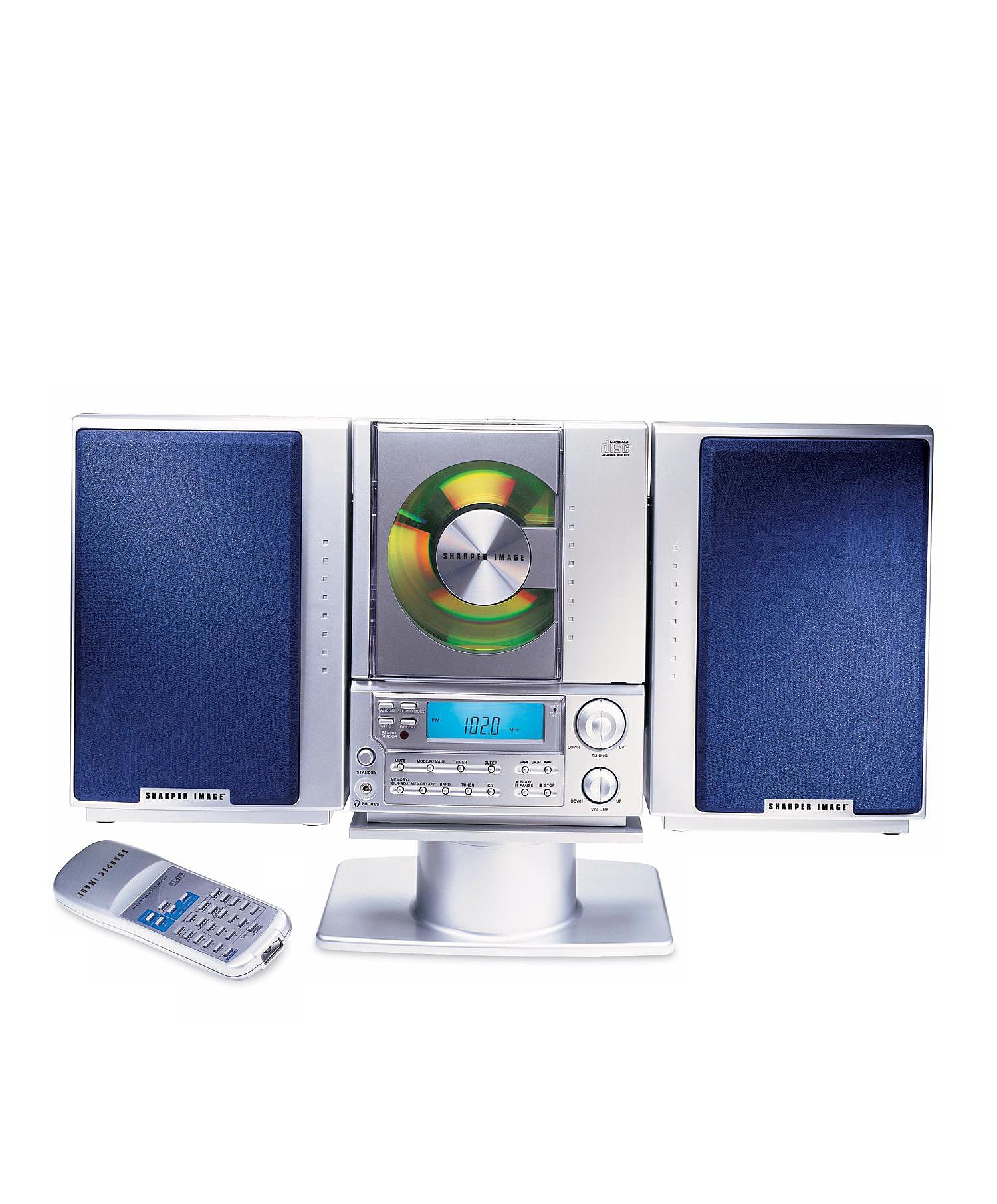
This image displays the front panel of the Sharper Image SO226 Compact CD Stereo. Visible features include the top-loading CD compartment, the digital display for radio frequencies and CD track information, and various control buttons for power, volume, CD playback, and radio tuning.
Control Panel (Typical Layout)
- 전원 버튼: 장치를 켜거나 끕니다.
- 기능/모드 버튼: Switches between CD, AM, and FM modes.
- 볼륨 +/- 버튼: 오디오 출력 레벨을 조정합니다.
- 재생/일시정지 버튼: CD 재생을 시작하거나 일시 정지합니다.
- 정지 버튼: CD 재생을 중지합니다.
- 건너뛰기/검색 버튼(◀◀ / ▶▶): Skips tracks on CD or tunes radio frequencies.
- 프로그램 버튼: CD 트랙 프로그래밍에 사용됩니다.
- 슬립 버튼: 슬립 타이머 기능을 활성화합니다.
- 튜닝 +/- 버튼: 라디오 주파수를 미세 조정합니다.
- 프리셋 버튼: 즐겨 듣는 라디오 방송국을 저장하고 불러옵니다.
- LCD 디스플레이: 현재 모드, 트랙 번호, 주파수 및 시간을 표시합니다.
설정
전원 연결
- 장치가 안정적이고 평평한 표면에 놓여 있는지 확인하세요.
- If using batteries (not included), open the battery compartment on the bottom or back of the unit and insert the required batteries, observing correct polarity.
- Alternatively, connect the AC power adapter (if supplied) to the DC IN jack on the unit and then plug the adapter into a standard wall outlet.
안테나 설정
- For FM reception, extend the telescopic antenna fully. Adjust its position for optimal reception.
- For AM reception, the unit has a built-in ferrite bar antenna. Rotate the entire unit for best AM reception.
작동 지침
CD 플레이어 작동
- 를 누르세요 힘 버튼을 눌러 기기를 켭니다.
- 를 누르세요 기능/모드 화면에 'CD'가 나타날 때까지 버튼을 반복해서 누르십시오.
- CD 수납공간 커버를 엽니다.
- CD의 라벨이 위를 향하도록 하여 칸에 넣으세요.
- Close the CD compartment cover. The unit will read the CD, and the total number of tracks will be displayed.
- 를 누르세요 재생/일시정지 버튼을 눌러 재생을 시작합니다.
- 일시 정지하려면 다음을 누르세요. 재생/일시정지 다시 한 번 누르세요. 다시 시작하려면 한 번 더 누르세요.
- 재생을 중지하려면 멈추다 단추.
- 다음 트랙으로 건너뛰려면 SKIP/SEARCH ▶▶ 단추.
- 현재 트랙의 시작 부분 또는 이전 트랙으로 돌아가려면 버튼을 누르십시오. SKIP/SEARCH ◀◀ 단추.
- 트랙 내에서 빨리 감기 또는 되감기를 하려면 버튼을 길게 누르세요. SKIP/SEARCH ▶▶ or ◀◀ 버튼을 재생합니다.
AM/FM 라디오 작동
- 를 누르세요 힘 버튼을 눌러 기기를 켭니다.
- 를 누르세요 기능/모드 화면에 'AM' 또는 'FM'이 나타날 때까지 버튼을 반복해서 누르세요.
- 수동 조정 : 를 누르세요 튜닝 +/- 주파수를 단계별로 조절하는 버튼입니다.
- 자동 스캔: 를 누르고 계세요 튜닝 +/- buttons for a few seconds. The tuner will scan and stop at the next strong station.
- 사전 설정 저장 : Tune to your desired station. Press the 프로그램 버튼을 누르세요. 설정된 숫자가 깜빡입니다. 사용하세요. 건너뛰기/검색 미리 설정된 숫자를 선택하려면 버튼을 누른 다음 누르세요. 프로그램 다시 확인합니다.
- 사전 설정 불러 오기 : 라디오 모드에서 사전 설정 buttons to cycle through your stored stations.
타이머 기능을 잠
The unit features a convenient sleep timer that automatically turns off the sound after a set period.
- 기기에서 CD나 라디오가 재생 중일 때, 버튼을 누르십시오. 잠 단추.
- 를 누를 때마다 잠 button will cycle through available sleep times (e.g., 10, 20, 30, 60, 90 minutes, or OFF).
- Select your desired sleep duration. The unit will automatically power off after the selected time has elapsed.
유지
- 장치 청소: 부드럽고 마른 천으로 기기 외부를 닦으세요. 연마성 세제나 용제는 사용하지 마세요.
- CD 관리: Handle CDs by their edges. Keep them clean and free of scratches. If a CD is dirty, wipe it gently with a soft, lint-free cloth from the center outwards.
- 저장: When not in use for extended periods, disconnect the power adapter and remove batteries. Store the unit in a cool, dry place.
문제 해결
문제가 발생하면 다음의 일반적인 문제와 해결 방법을 참조하세요.
- 전원 없음:
- Ensure the AC power adapter is securely plugged into both the unit and a working wall outlet.
- If using batteries, check if they are inserted correctly and are not depleted. - 소리 없음:
- Check the volume level and increase it if necessary.
- Ensure the correct function mode (CD/AM/FM) is selected. - CD Not Playing / Skipping:
- Ensure the CD is inserted correctly with the label side up.
- Clean the CD for any dirt or scratches.
- Try a different CD to rule out a faulty disc.
- Ensure the CD compartment cover is fully closed. - 라디오 수신 불량:
- For FM, fully extend and adjust the telescopic antenna.
- For AM, rotate the entire unit for better signal.
- Move the unit away from other electronic devices that may cause interference. - 버튼이 응답하지 않음:
- Try turning the unit off and on again.
- Disconnect power for a few minutes, then reconnect.
명세서
| 모델 번호 | SO226 |
| 제품 크기(L x W x H) | 1.3 x 19 x 5.5인치(3.3 x 48.3 x 14cm) |
| 품목 무게 | 5파운드(2.27kg) |
| 스피커 유형 | 스테레오 재생 |
| 전원 | Battery Powered (AC adapter typically included or sold separately) |
| Color (as per specific variant) | 파란색 |
보증 및 지원
For warranty information and customer support, please refer to the documentation included with your purchase or visit the official Sharper Image web사이트. 보증 청구를 위해 구매 증빙 자료를 보관하세요.


