1. 서론
이 매뉴얼은 포괄적인 지침을 제공합니다. Koss SB40 Computer Headset with Microphone. Designed for clear communication and immersive audio, this headset is suitable for various computer applications, including gaming and voice calls. Please read this manual thoroughly to ensure proper setup, operation, and maintenance of your device.
2. 안전 정보
To prevent damage to the headset or personal injury, please observe the following safety guidelines:
- 헤드셋을 극한의 온도, 습도 또는 직사광선에 노출시키지 마세요.
- Do not disassemble or attempt to repair the headset yourself. Refer all servicing to qualified personnel.
- Keep the headset away from water or other liquids.
- Adjust volume to a comfortable level to prevent hearing damage during prolonged use.
3. 패키지 내용
패키지에 모든 품목이 들어 있는지 확인하세요.
- Koss SB40 Computer Headset with Microphone
- 사용 설명서 (본 문서)

그림 1: 앞쪽 view of the Koss SB40 Computer Headset, showing the over-ear design and attached microphone boom.
4. 설정
4.1 헤드셋 연결
The Koss SB40 headset features a dual-entry cable design with two 3.5mm plugs for separate audio and microphone connections:
- 위치 3.5mm TRS 플러그 (Tip-Ring-Sleeve) for headphone audio. Insert this plug into your computer's headphone jack (typically marked with a headphone icon or green color).
- 위치 3.5mm TS 플러그 (Tip-Sleeve) for the microphone. Insert this plug into your computer's microphone input jack (typically marked with a microphone icon or pink color).

그림 2: The Koss SB40 headset showing its dual 3.5mm audio and microphone plugs for connection to a computer.
4.2 Microphone Configuration (Windows PC)
For optimal microphone performance on a Windows PC, especially with Realtek audio drivers, consider adjusting the following settings:
- After connecting the headset, the Realtek audio manager may automatically open. If not, access it through your system tray or Control Panel.
- 로 이동합니다 마이크로폰 꼬리표.
- 할 수 있게 하다 소음 억제 to reduce background noise.
- 할 수 있게 하다 어쿠스틱 에코 캔슬 to prevent echoes during calls.
- 조정하다 마이크 부스트. Click the microphone icon next to the volume slider and increase the boost to +10데시벨 for clearer voice pickup.
- Additionally, configure microphone settings within your communication applications (e.g., Steam, Zoom, Skype) for push-to-talk or specific mute options.
5. 사용 설명서
5.1 오디오 재생
The SB40 headset delivers a frequency response of 20 to 20 kHz, an impedance of 120 ohms, and a sensitivity of 96 dB SPL, ensuring clear and dynamic sound reproduction. Adjust the audio volume using your computer's system volume controls or within individual applications.
5.2 마이크 사용
The integrated noise-cancelling microphone is designed to minimize ambient background noise, focusing on your voice for clear communication. Position the microphone boom approximately 1-2 inches from your mouth for optimal voice pickup.
5.3 편안함과 착용감
The headset features large, closed leatherette earcups that comfortably surround the ear, providing maximum sound isolation and reducing external noise. The adjustable headband ensures a secure and comfortable fit for extended periods of use.
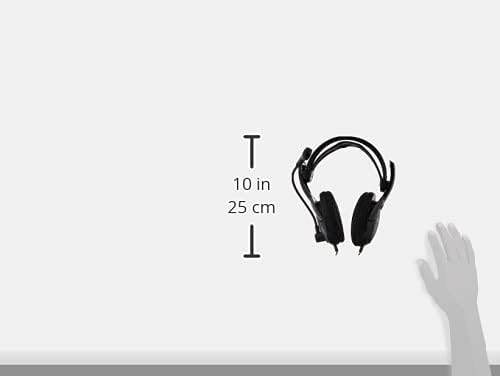
그림 3: 옆 view of the Koss SB40 headset illustrating its dimensions, which contribute to its lightweight and comfortable design.
6. 유지관리
To maintain the performance and longevity of your Koss SB40 headset:
- Clean the earcups and headband with a soft, dry cloth. Do not use harsh chemicals or abrasive cleaners.
- 사용하지 않을 때는 헤드셋을 깨끗하고 건조한 곳에 보관하세요.
- Avoid pulling on the cables excessively to prevent internal damage.
7. 문제 해결
7.1 오디오 출력 없음
- Ensure the 3.5mm TRS audio plug is fully inserted into the correct headphone jack on your computer.
- Check your computer's volume settings and ensure they are not muted or set too low.
- 운영 체제의 사운드 설정에서 올바른 오디오 출력 장치가 선택되었는지 확인하세요.
7.2 마이크가 작동하지 않음
- Confirm the 3.5mm TS microphone plug is fully inserted into the correct microphone input jack.
- Check your computer's microphone settings and ensure the microphone is not muted and input levels are adequate. Refer to Section 4.2 for detailed PC microphone configuration.
- Verify that the correct microphone input device is selected in your operating system's sound settings and within your communication applications.
7.3 왜곡된 오디오
- Reduce the volume level on your computer or application.
- 오디오 소스의 품질이 좋은지 확인하세요.
- The headset is designed for low total harmonic distortion (less than 0.2%), so persistent distortion may indicate an issue with the audio source or connection.
8. 사양
| 특징 | 사양 |
| 주파수 응답 | 20Hz - 20kHz |
| 임피던스 | 120옴 |
| 감광도 | 96 dB SPL |
| 총 고조파 왜곡률 | 0.2% 미만 |
| 연결성 | Wired (Dual 3.5mm plugs: TS for mic, TRS for headphone) |
| 마이크로폰 | 노이즈 캔슬링 |
| 귀 위치 | 오버이어 |
| 재료 | Plastic, Leatherette earcups |
| 색상 | 검은색 |
| 제품 치수 | 4 x 7.06 x 9.19 인치 |
| 품목 무게 | 0.023 온스(약 0.66그램) |
9. 제품 오버view 동영상
시각적으로 살펴보려면view of the Koss SB40 Computer Headset, please watch the following video:
동영상 1 : 공식 제품 영상 쇼asing the key features and design of the Koss SB40 Computer Headset with Microphone.
10. 보증 정보
The Koss SB40 Computer Headset is covered under the Koss 스테레오폰 평생 제한 보증. For detailed information regarding warranty terms, conditions, and claims, please refer to the official Koss web해당 웹사이트를 방문하거나 Koss 고객 지원팀에 문의하십시오.
11. 지원
If you require further assistance, have questions, or encounter issues not covered in this manual, please contact Koss customer support through their official web사이트 또는 제품 포장과 함께 제공된 연락처 정보를 참조하세요.