소개
This manual provides detailed instructions for the proper use and care of your Audiovox CE-145G Personal CD Player. Please read this manual thoroughly before operating the device to ensure optimal performance and longevity.
제품 특징
- 40-Second Anti-Skip Protection: Ensures continuous audio playback even during movement, utilizing a digital buffer.
- Multi-Directional Anti-Roll Sensors: Provides additional protection against playback interruption from various movements.
- 22-Track Programmable Memory: Allows customization of CD playback order.
- Bass Boost System: 저주파 오디오 출력을 향상시킵니다.
- 3-Beam Laser Pickup: Designed for accurate CD tracking and clear sound reproduction.
- 다양한 재생 모드: Includes random play and various repeat functions.
- 홀드 스위치: Prevents accidental button presses and program changes.
- 자동 종료: Conserves battery life by automatically shutting down the player when not in use.
- Line-Out Jack: For connecting to external audio systems or power adapters.
- Built-in Rechargeable Circuitry: Supports the use of rechargeable Ni-Cad batteries (not included).
- 스테레오 헤드폰: Included for immediate listening.
설정
1. 배터리 설치
The Audiovox CE-145G operates on two (2) AA batteries (not included) or an optional AC/car adapter (not included) connected via the line-out jack. For rechargeable Ni-Cad batteries, the unit features built-in charging circuitry.
- CD 플레이어 아랫면에 있는 배터리함을 찾으세요.
- 배터리실 커버를 밀어서 엽니다.
- 칸 내부에 표시된 대로 올바른 극성(+/-)을 확인하여 AA 배터리 2개(2)를 삽입합니다.
- 배터리 덮개를 단단히 닫으세요.

Image: The Audiovox CE-145G Personal CD Player in translucent green, shown with included stereo headphones. This image illustrates the overall product design and the headphones that come with the unit.
2. 헤드폰 연결하기
Insert the stereo headphone plug into the headphone jack located on the side of the CD player.

Image: A close-up of the stereo headphones included with the Audiovox CE-145G CD player, showing the earcups and the 3.5mm audio jack.
작동 지침
1. 기본 CD 재생
- Open the CD compartment lid by pressing the "OPEN" button or sliding the latch.
- Place a CD onto the center spindle with the label side facing up.
- CD 수납부 덮개를 딸깍 소리가 날 때까지 단단히 닫으십시오.
- 를 누르세요 재생/일시정지 button to begin playback. The track number and elapsed time will display.
- 재생을 일시 중지하려면 재생/일시정지 다시 한 번 누르세요. 다시 시작하려면 한 번 더 누르세요.
- 재생을 중지하려면 멈추다 단추.
- 다음 트랙으로 건너뛰려면 앞으로 건너뛰기 버튼(►►|).
- To return to the beginning of the current track or go to the previous track, press the 뒤로 건너뛰기 버튼(|£︿).
- 트랙 내에서 빨리 감기 또는 되감기를 하려면 버튼을 길게 누르세요. 앞으로 건너뛰기 or 뒤로 건너뛰기 버튼을 각각 선택하세요.
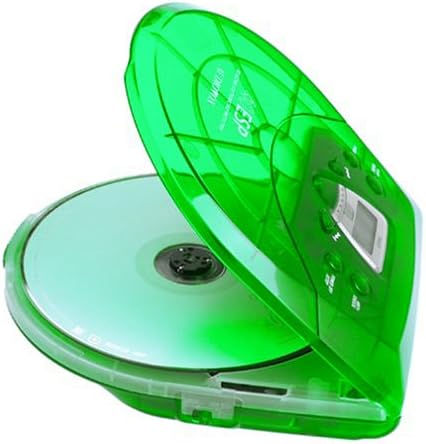
Image: The Audiovox CE-145G Personal CD Player with its translucent green lid open, revealing a compact disc placed inside the compartment.
2. Anti-Skip Protection (ESP)
The CE-145G features a 40-second Electronic Skip Protection (ESP) buffer. This system stores up to 40 seconds of audio data, allowing for uninterrupted playback even if the player experiences minor shocks or vibrations. This feature is automatically active during playback.
3. Programmable Memory (22 Tracks)
최대 22개의 트랙을 특정 순서대로 재생하도록 프로그래밍할 수 있습니다.
- STOP 모드에서는 프로그램 button. The display will show "PROG" and "01".
- 사용하세요 앞으로 건너뛰기 or 뒤로 건너뛰기 원하는 첫 번째 트랙을 선택하는 버튼입니다.
- 누르다 프로그램 트랙을 다시 한번 확인하십시오. 디스플레이에 "02"가 표시됩니다.
- Repeat steps 2 and 3 to add up to 22 tracks to your program.
- 마지막 트랙을 프로그래밍한 후, 누르세요. 재생/일시정지 to start playback of your programmed sequence.
- 프로그램을 초기화하려면 누르세요. 멈추다 버튼을 두 번 누르세요.
4. 베이스 부스트
To enhance the bass frequencies, locate the 베이스 부스트 switch (or button) on the unit and activate it. Deactivate it to return to standard audio output.
5. 홀드 기능
그만큼 잡고 있다 switch prevents accidental button presses. Slide the 잡고 있다 switch to the "ON" position to disable all control buttons. Slide it to "OFF" to re-enable controls.
6. 자동 전원 끄기
To conserve battery life, the CD player will automatically power off after a period of inactivity (e.g., when a CD finishes playing and no buttons are pressed). To restart, press the 재생/일시정지 단추.
유지
- 장치 청소: Wipe the exterior of the player with a soft, damp 천. 연마성 세척제나 용매를 사용하지 마십시오.
- CD 렌즈 청소: 렌즈 오염으로 인해 재생 문제가 발생하는 경우, CD 렌즈 전용 청소 키트를 사용하십시오. 렌즈를 직접 만지지 마십시오.
- CD 관리: CD는 가장자리를 잡고 깨끗하게 유지하세요. 긁히지 않도록 주의하세요. 사용하지 않을 때는 케이스에 보관하세요.
- 배터리 관리 : 장기간 사용하지 않을 경우 배터리 누출을 방지하기 위해 배터리를 제거하세요.
문제 해결
| 문제 | 가능한 원인 | 해결책 |
|---|---|---|
| 전원이 없습니다 | 배터리가 소진되었거나 잘못 삽입되었습니다. AC 어댑터가 연결되지 않았거나 결함이 있습니다. | Replace batteries, check polarity, or ensure AC adapter is properly connected and functional. |
| CD skips or stops | CD is dirty or scratched; unit is subjected to excessive shock; lens is dirty. | Clean CD, use a different CD, avoid strong impacts, clean the CD lens. |
| 소리가 나지 않습니다 | Headphones not connected properly; volume too low; headphones faulty. | Ensure headphones are fully plugged in, increase volume, try different headphones. |
| 버튼이 반응하지 않음 | HOLD switch is engaged. | Slide the HOLD switch to the "OFF" position. |
명세서
- 모델: CE-145G
- 상표: 오디오복스
- 건너뛰기 방지 보호: 40 seconds (Electronic Skip Protection)
- 프로그래밍 가능한 트랙: 22
- 전원: 2 x AA batteries (not included) or optional AC/car adapter
- 오디오 출력: 3.5mm headphone jack, Line-out jack
- 치수(대략): 11.8 x 8.3 x 2.6인치(패키지 크기)
- 무게 (근사치) : 1.35파운드(품목 중량)
- 색상: 반투명 녹색
보증 및 지원
The Audiovox CE-145G Personal CD Player is backed by a 90일 부품 및 공임 보증 구매일로부터. 보증 청구를 위해 구매 증빙을 보관하세요.
For technical support or warranty service, please refer to the contact information provided with your product packaging or visit the official Audiovox web대지.


