소개
This manual provides instructions for the setup, operation, and maintenance of your Logitech Wingman Force Joystick, model 963155-0403. This device is designed to enhance your PC gaming experience with force feedback technology and programmable controls.
패키지 내용
패키지에 다음 품목이 포함되어 있는지 확인하십시오.
- Logitech Wingman Force Joystick
- 전원 어댑터
- USB 케이블 (내장형 또는 별도형)
- Software CD (if applicable, for WingMan Software)
- 사용 설명서 (본 문서)
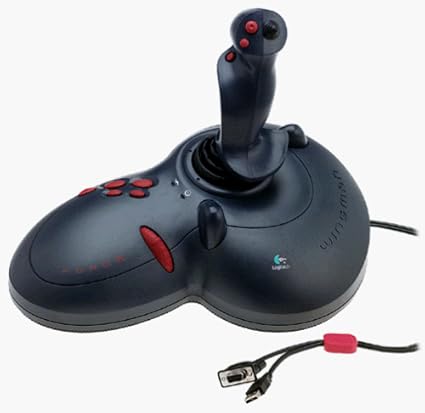
Figure 1: The Logitech Wingman Force Joystick packaging, showing the joystick and its features.
설정
- 전원 연결: Plug the power adapter into the joystick and then into a standard electrical outlet.
- PC에 연결: Connect the joystick's USB cable to an available USB port on your computer. The joystick also supports serial interfaces.
- 소프트웨어 설치: Insert the WingMan Software CD (if provided) into your computer's CD-ROM drive and follow the on-screen instructions to install the drivers and WingMan Software. If no CD is provided, drivers may be automatically installed by your operating system or available for download from the Logitech support web대지.
- 시스템 요구 사항: Ensure your computer runs a compatible Windows operating system.
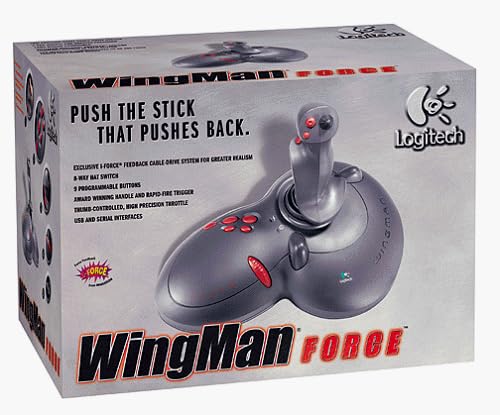
Figure 2: The Logitech Wingman Force Joystick, illustrating its ergonomic design and button layout.
작동 지침
컨트롤 오버view
- Joystick Handle: Provides precise control for in-game movement.
- 9개의 프로그래밍 가능 버튼: Customize these buttons using the WingMan Software for various in-game actions.
- 8방향 햇 스위치: Located on top of the joystick, this switch allows for quick camera views or directional commands.
- Thumb-Controlled Throttle: Adjust speed or thrust with the integrated throttle control.
포스 피드백 기술
The Wingman Force Joystick utilizes Logitech's exclusive I-Force force feedback technology with a cable-drive system. This system provides realistic tactile feedback, such as vibrations from impacts, recoil from weapons, and resistance during maneuvers, enhancing immersion in compatible games.
Using WingMan Software
The WingMan Software allows you to:
- Program the 9 buttons for specific game functions.
- 여러 개의 프로를 생성하고 저장하세요file다른 게임에 대한 것입니다.
- Adjust force feedback intensity settings.
- Calibrate the joystick for optimal performance.
Refer to the WingMan Software's help documentation for detailed instructions on customization and profile 관리.
유지
To ensure the longevity and optimal performance of your joystick:
- 청소: Use a soft, dry cloth to wipe the surface of the joystick. Avoid using abrasive cleaners or solvents.
- 저장: Store the joystick in a clean, dry environment away from extreme temperatures and direct sunlight.
- 케이블 관리: Avoid bending or crimping the cables excessively.
문제 해결
- Problem: Joystick not recognized by computer.
- 해결책:
- USB 케이블이 조이스틱과 컴퓨터에 제대로 연결되어 있는지 확인하십시오.
- 다른 USB 포트에 연결해 보십시오.
- Verify that the power adapter is properly connected and the joystick is receiving power.
- Reinstall the WingMan Software drivers.
- Problem: Inconsistent or absent force feedback.
- 해결책:
- Check the force feedback settings within the WingMan Software and ensure they are set to an appropriate level.
- Ensure the game you are playing supports force feedback and that it is enabled in the game's settings.
- Restart your computer and the game.
- 모든 연결이 안전한지 확인하세요.
- Problem: Buttons or controls are unresponsive.
- 해결책:
- Calibrate the joystick using the WingMan Software.
- Ensure the joystick drivers are up to date.
- Test the joystick in a different game or application to determine if the issue is game-specific.
명세서
| 특징 | 세부 사항 |
|---|---|
| 모델 번호 | 963155-0403 |
| 상표 | 로지텍 |
| 컨트롤러 유형 | 조종간 |
| 연결 기술 | USB, 직렬 |
| 호환 장치 | 윈도우 PC |
| 제품 치수 | 13.5 x 9.63 x 9.25 인치 |
| 품목 무게 | 4.14파운드 |
| 힘 피드백 | I-Force feedback cable-drive system |
| 버튼 | 9개의 프로그래밍 가능한 버튼 |
| 모자 스위치 | 8방향 모자 스위치 |
| 조절판 | Thumb-controlled, high precision throttle |
보증 및 지원
보증 정보 및 기술 지원에 대해서는 제품에 포함된 설명서를 참조하거나 로지텍 공식 지원 웹사이트를 방문하십시오. web사이트에서 드라이버, FAQ, 고객 서비스 연락처 정보를 찾을 수 있습니다.
Logitech 지원 Web대지: www.logitech.com/support


