
1. 서론
Thank you for choosing the Thomson 24HQG3S15C Smart TV. This manual provides essential information for the safe and efficient operation of your new television. Please read these instructions thoroughly before using the product and retain them for future reference.
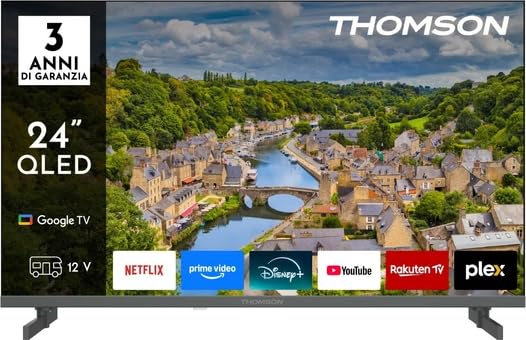
그림 1: 전면 view of the Thomson 24HQG3S15C Smart TV.
2. 안전 정보
감전, 화재 또는 TV 손상을 방지하려면 항상 다음 안전 예방 조치를 준수하세요.
- 전원: 전원 공급 장치 볼륨을 확인하십시오.tage는 TV에 표시된 등급과 일치합니다.
- 통풍: 통풍구를 막지 마세요. TV 주변에 충분한 공간을 확보하여 공기가 원활하게 흐르도록 하세요.
- 물과 습기: TV를 비나 습기에 노출시키지 마세요. 꽃병 등 액체가 담긴 물건을 TV 위에 올려놓지 마세요.
- 청소: 청소하기 전에 TV 플러그를 뽑으세요. 부드럽고 마른 천을 사용하세요. 액체 세제나 에어로졸 세제는 사용하지 마세요.
- 놓기: TV를 안정적이고 평평한 곳에 놓으세요. 직사광선이나 열원 근처에 두지 마세요.
- 어린이들: 아이들이 TV 위에 올라가거나 TV로 놀지 않도록 감독하세요.
- 서비스: TV를 직접 수리하려고 하지 마십시오. 모든 수리는 자격을 갖춘 서비스 담당자에게 맡기십시오.
3. 패키지 내용
Carefully unpack your Thomson 24HQG3S15C Smart TV and check that all the following items are included:
- Thomson 24HQG3S15C Smart TV
- 원격 제어
- 전원 케이블
- 사용 설명서 (본 문서)
- TV Stand (if applicable, check packaging)
- TV 스탠드용 나사 (해당되는 경우)
누락되거나 손상된 품목이 있는 경우 즉시 판매점에 문의하십시오.
4. 설정
4.1 스탠드 부착(선택 사항)
If you are not wall-mounting the TV, you will need to attach the included stand. Follow these steps:
- 화면 손상을 방지하려면 부드럽고 깨끗한 표면에 TV를 뒤집어서 놓으세요.
- 스탠드를 TV 바닥의 장착 구멍에 맞춰 정렬하세요.
- 제공된 나사를 사용하여 스탠드를 고정하십시오. 나사가 단단히 조여졌는지 확인하십시오.
4.2 벽면 장착(선택 사항)
The TV supports VESA standard mounting (100 x 100 mm). Use a compatible wall-mount bracket (not included) and follow the instructions provided with the bracket. Ensure the wall can support the weight of the TV.
Note: Remove the stand before wall mounting.
4.3 외부 장치 연결
Refer to the following connection options:
- HDMI(x3): Connect Blu-ray players, game consoles, or set-top boxes. The TV supports HDMI 1.4 and Audio Return Channel (ARC) on one port.
- USB 2.0(x2): 미디어 재생을 위해 USB 저장 장치를 연결하세요.
- 안테나/케이블 입력: Connect an antenna for DVB-T/T2 or a cable for DVB-C.
- 위성 입력: Connect a satellite dish for DVB-S/S2.
- 이더넷(LAN): 유선 인터넷 연결을 위해 이더넷 케이블을 연결합니다.
- CI+ 슬롯: Insert a Common Interface Plus module for encrypted channels.
4.4 초기 전원 켜기 및 첫 번째 설정
- 전원 케이블을 TV에 연결한 다음 전원 콘센트에 연결하세요.
- 리모컨이나 TV의 전원 버튼을 누르세요.
- The TV will guide you through the initial setup process, including language selection, network connection (Wi-Fi or Ethernet), channel scanning, and Google TV account setup.
5. 스마트 TV 사용법
5.1 원격 제어view
The included remote control allows you to access all functions of your TV. Familiarize yourself with the buttons for power, volume, channel, input selection, and Smart TV navigation.
Note: Insert two AAA batteries (not included) into the remote control, observing polarity.
5.2 기본 TV 기능
- 전원 켜기/끄기: 를 누르세요 힘 단추.
- 볼륨 조절: 사용하세요 볼륨 +/- 버튼.
- 채널 선택: 사용하세요 채널 +/- 버튼이나 숫자 패드.
- 입력 소스: 를 누르세요 원천 HDMI, TV, USB 등 입력 소스를 전환하는 버튼입니다.
- 메뉴: TV 설정 메뉴에 액세스합니다.
5.3 스마트 TV 기능(Google TV)
Your Thomson 24HQG3S15C runs on Google TV, offering a personalized entertainment experience.
- 홈 화면: Access recommended content, installed apps (e.g., Disney+), and settings.
- 음성 제어: Use the Google Assistant feature (if available on your remote) to search for content, control smart home devices, and more.
- 앱 스토어: 구글 플레이 스토어에서 추가 앱을 다운로드하세요.
- HbbTV: Access interactive services from broadcasters (if supported in your region).
- 스마트 모드: Select from various picture and sound modes like Energy Saving, Game, Movie, Sport, Standard, and Vivid.
6. 연결성
The TV offers various connectivity options for seamless integration with your home network and devices.
- 와이파이: Built-in Wi-Fi allows wireless connection to your home network for internet access and streaming.
- 블루투스 5.1 : 무선 헤드폰, 사운드바 또는 기타 블루투스 지원 장치를 연결하세요.
- 이더넷 LAN: 안정적인 유선 인터넷 연결을 제공합니다.
- HDMI(x3): High-Definition Multimedia Interface for digital audio and video. One port supports ARC (Audio Return Channel) for simplified audio connections to compatible sound systems.
- USB 2.0(x2): Universal Serial Bus ports for connecting external storage devices to play media files (3GP, AVI, FLV, MKV, MOV, MP4, MPG, WEBM for video; AAC, FLAC, MP3, WAV for audio; BMP, GIF, JPG, PNG for images).
- Digital Tuners: Supports DVB-C, DVB-S, DVB-S2, DVB-T, DVB-T2 for various digital broadcast standards.
7. 유지관리
7.1 TV 청소
- 화면: 부드럽고 보풀이 없는 천으로 화면을 부드럽게 닦으세요. 잘 지워지지 않는 얼룩은 가볍게 닦아주세요.amp천에 물이나 특수 화면 세척제를 묻혀 닦으세요(절대 화면에 직접 뿌리지 마세요).
- 내각: 부드럽고 마른 천으로 TV 장식장을 닦으세요.
- 사용하지 마십시오: Abrasive cleaners, waxes, or solvents like alcohol, benzene, or thinners, as these can damage the TV's finish or screen.
- 청소하기 전에는 항상 TV의 플러그를 뽑아 두세요.
7.2 소프트웨어 업데이트
Your Smart TV may receive software updates to improve performance and add new features. Ensure your TV is connected to the internet. Updates can usually be checked and installed via the TV's settings menu (System > About > System update).
8. 문제 해결
TV 사용 중 문제가 발생하면 다음의 일반적인 문제 및 해결 방법을 참조하십시오.
| 문제 | 가능한 원인 / 해결책 |
|---|---|
| 전원이 없습니다 |
|
| 화면은 나오지 않지만 소리는 나옵니다 |
|
| 소리는 나지 않지만 화면은 나옵니다 |
|
| 리모컨이 작동하지 않습니다 |
|
| Wi-Fi에 연결할 수 없습니다 |
|
문제가 지속되면 고객 지원팀에 문의하세요.
9. 사양
| 특징 | 세부 사항 |
|---|---|
| 모델 | Thomson 24HQG3S15C |
| 디스플레이 크기 | 24인치(대각선 61cm) |
| 해결 | 1366 x 768 픽셀(HD) |
| 디스플레이 기술 | QLED |
| 새로 고침 빈도 | 60Hz |
| 스마트 TV 플랫폼 | 구글 티비 |
| 디지털 튜너 | DVB-C, DVB-S, DVB-S2, DVB-T, DVB-T2 |
| 와이파이 | 예 |
| 블루투스 | 버전 5.1 |
| 이더넷 랜 | 예 |
| HDMI 포트 | 3 (HDMI 1.4, one with ARC) |
| USB 2.0 포트 | 2 |
| 오디오 출력(RMS) | 6W (스피커 2개) |
| HDR 지원 | HDR10 |
| VESA 장착 | 100 x 100mm |
| 치수(스탠드 포함) | 53.5cm(W) x 15.1cm(D) x 35.3cm(H) |
| 무게(스탠드 포함) | 2.4kg |
| 에너지 효율 등급(SDR) | E |
| 에너지 소비량(SDR) | 17kWh/1000시간 |
10. 보증 및 지원
For warranty information, please refer to the warranty card included in your product packaging or contact your retailer. Thomson provides customer support for technical assistance and service inquiries.
Please visit the official Thomson website or refer to your purchase documentation for contact details and further support resources.