
1. 서론
This manual provides essential information for the safe and effective use of your LIGE EF18 Smartwatch. Please read it thoroughly before using the device and retain it for future reference. The LIGE EF18 is a versatile smartwatch designed for daily wear, fitness tracking, and communication, compatible with both iOS and Android smartphones.
2. 패키지 내용
패키지에 모든 품목이 들어 있는지 확인하세요.
- LIGE EF18 Smartwatch (with 1 stainless steel band attached)
- 2 x Silicone Bands (additional)
- 충전 케이블(USB-A)
- 충전 케이블(USB-C)
- Band Adjustment Tool (for stainless steel band)
- 사용자 설명서

Image: The LIGE EF18 Smartwatch, showing its large round display, accompanied by two additional silicone bands, two charging cables (USB-A and USB-C), and a band adjustment tool.
3. 제품 오버view
The LIGE EF18 Smartwatch features a robust design with a 1.85-inch high-definition touch display. It includes physical buttons for navigation and quick access to features.
3.1. 시계 구성 요소
- 표시하다: 1.85-inch LCD touchscreen with 2000 nits peak brightness.
- 버튼: Side buttons for power, menu navigation, and LED flashlight activation.
- 센서: Heart rate, blood oxygen, accelerometer, sleep tracker.
- 스피커 및 마이크: For Bluetooth calling and voice assistant.
- 충전 포트: 뒷면에 자석식 충전 핀이 있습니다.
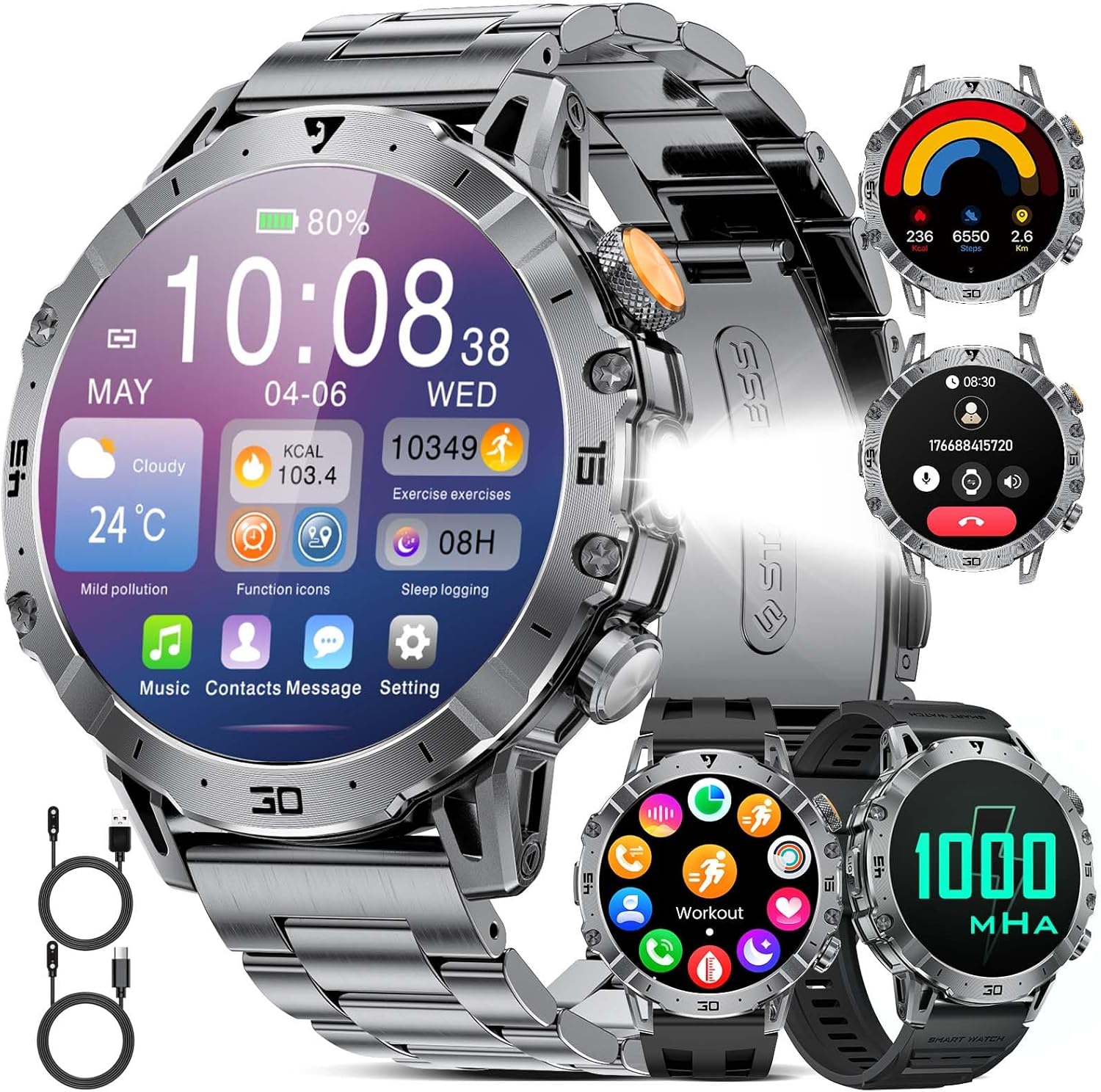
Image: A close-up of the LIGE EF18 Smartwatch, highlighting its large 1.85-inch display, metallic casing, and side buttons. The screen shows various health metrics and time.
4. 설정
4.1. 스마트워치 충전하기
Before first use, fully charge your smartwatch. Connect the magnetic charging cable to the charging pins on the back of the watch and plug the USB end into a power adapter (not included) or a computer USB port. A full charge takes approximately 3 hours.

Image: The LIGE EF18 Smartwatch connected to its magnetic charging cable, illustrating the charging process. The screen displays a charging animation.
4.2. 앱 설치 및 페어링
- Scan the QR code in the manual or on the watch screen to download the companion app (e.g., FitCloudPro).
- Install the app on your iOS (11.0 or higher) or Android (5.0 or higher) smartphone.
- 앱을 열고 화면의 지시에 따라 계정을 만들고 프로 설정을 완료하세요.file.
- 스마트폰에서 블루투스를 활성화하세요.
- In the app, search for your LIGE EF18 device and pair it. Ensure the watch is powered on and near your phone.
- For Bluetooth calling functionality, ensure your iOS device is running iOS 13 or higher and follow any additional pairing prompts for call audio.
4.3. 밴드 설치 및 조정
The smartwatch comes with one stainless steel band and two silicone bands. You can easily swap them to suit your style or activity.
- 밴드 변경: Use the quick-release pins to detach the current band and attach a new one.
- Adjusting Stainless Steel Band: Use the provided band adjustment tool to remove or add links for a comfortable fit.

Image: The LIGE EF18 Smartwatch displayed with its three interchangeable bands: a sleek stainless steel band and two flexible silicone bands, offering versatility for different occasions.
5. 사용 설명서
5.1. 기본 작업
- 전원 켜기/끄기: Press and hold the power button on the side.
- 화면 깨우기: Raise your wrist or press any button.
- 항해: Swipe left/right, up/down on the touchscreen to navigate menus. Press the side buttons for quick access or to return to the previous screen.
- 시계 모드 : Customize your watch face through the app or by long-pressing the watch screen. Over 200 online watch faces are available.

Image: The LIGE EF18 Smartwatch showcasing a selection of its over 200 customizable watch faces, allowing users to personalize their device's appearance.
5.2. 블루투스 통화
스마트폰과 페어링이 완료되면 스마트워치에서 직접 전화를 걸고 받을 수 있습니다.
- 전화 걸기: Access the dial pad or contact list on the watch.
- 전화 받기: 시계 화면에서 바로 수신 전화를 받거나 거부할 수 있습니다.

Image: The LIGE EF18 Smartwatch worn on a wrist, showing an active incoming call notification on its display, demonstrating its Bluetooth calling capability.
5.3. 알림
Receive real-time notifications from various apps (LINE, email, SMS, SNS) directly on your watch. Manage which app notifications appear via the companion app settings.

Image: The LIGE EF18 Smartwatch screen showing multiple notification icons from popular messaging and social media applications, indicating its notification feature.
5.4. 스포츠 모드
The smartwatch supports over 100 sports modes, including walking, running, cycling, strength training, yoga, and more. It automatically records your activity data such as steps, distance, and calories burned.
- Select your desired sport mode from the watch menu to start tracking.
- Review your exercise records and progress in the companion app.

Image: A LIGE EF18 Smartwatch on a user's wrist during a cycling activity, with the screen showing real-time exercise data such as duration, calories, and distance.
5.5. 건강 모니터링
The EF18 smartwatch provides comprehensive health monitoring features:
- 수면 모니터: 깊은 수면, 얕은 수면, 깨어있는 시간 등 수면 패턴을 추적합니다. View 앱에서 자세한 분석을 확인하세요.
- 만보계 및 칼로리 카운터: Automatically counts your steps and estimates calories burned throughout the day.
- 심박수: 심박수를 지속적으로 또는 필요에 따라 모니터링합니다.
- 혈중 산소: 혈중 산소 포화도를 측정합니다.
- 앉아서 보내는 시간 상기시키기: 일정 시간 동안 활동이 없으면 움직이라는 알림을 보냅니다.
- 물 마시기 알림: 일정한 간격으로 물을 마시도록 알려줍니다.

Image: A user sleeping with the LIGE EF18 Smartwatch on their wrist, illustrating the device's sleep tracking capabilities and displaying sleep data on the screen.
5.6. LED 라이트
The smartwatch is equipped with a built-in LED flashlight for convenience in dark environments.
- Activate the LED light via a dedicated button or menu option.
- Useful for night activities, finding items in the dark, or as an emergency light.

Image: The LIGE EF18 Smartwatch with its powerful LED flashlight turned on, projecting a beam of light, useful for outdoor activities or in emergencies.
5.7. 기타 기능
The LIGE EF18 Smartwatch offers a variety of additional features:
- 일기 예보: 휴대전화와 연결하면 현재 날씨와 일기 예보를 표시합니다.
- 음악 제어: 스마트폰에서 음악 재생을 제어하세요(재생, 일시정지, 트랙 건너뛰기).
- 원격 카메라 제어: 시계를 휴대폰 카메라의 원격 셔터로 사용하세요.
- 전화번호 찾기: 연결된 스마트폰을 벨소리로 울려 위치를 찾는 데 도움을 줍니다.
- 알람 시계: 진동 알림 기능이 있는 여러 개의 알람을 설정하세요.
- 계산자: 기본 계산기 기능.
- 음성 어시스턴트 : Access your phone's voice assistant (e.g., Siri, Google Assistant) through the watch.
- 방해 금지 모드: 지정된 시간 동안 알림을 음소거합니다.

Image: The LIGE EF18 Smartwatch showcasing its multi-functional capabilities, including weather display, music control interface, and remote camera activation, among others.
6. 방수 기능(IP68)
The LIGE EF18 Smartwatch is IP68 rated, meaning it is resistant to dust and can withstand immersion in water up to 1.5 meters for 30 minutes. It is suitable for daily use such as hand washing, rain, and splashes during sports activities.
중요 참고 사항:
- Do not use the watch for prolonged periods underwater.
- Not suitable for diving, hot water, seawater, or sauna environments.
- 시간이 지남에 따라 일반적인 마모로 인해 방수 기능이 저하될 수 있습니다.

Image: The LIGE EF18 Smartwatch with water splashing on it, visually representing its IP68 water-resistant design, suitable for everyday exposure to water.
7. 배터리 수명
The LIGE EF18 is equipped with a 1000mAh ultra-large capacity lithium polymer battery, offering extended usage times.
- 평균 사용량: Up to 10-20 days depending on feature usage.
- 대기 시간: 40일 이상.
- 충전 시간: 완전 충전에는 약 3시간이 소요됩니다.

Image: The LIGE EF18 Smartwatch with a prominent graphic emphasizing its 1000mAh battery, illustrating its long-lasting power for extended use.
8. 유지관리
To ensure the longevity and optimal performance of your LIGE EF18 Smartwatch, follow these maintenance guidelines:
- 시계를 깨끗하고 건조하게 유지하십시오. 부드럽고 마른 천으로 정기적으로 닦아주세요.
- 시계를 극한 온도, 장시간 직사광선 또는 강한 화학 물질에 노출시키지 마십시오.
- 적절한 충전을 위해 충전 접점을 주기적으로 청소하세요.
- If the bands become dirty, clean them according to their material type (e.g., mild soap and water for silicone, dry cloth for stainless steel).
9. 문제 해결
If you encounter issues with your LIGE EF18 Smartwatch, refer to the following common solutions:
| 문제 | 가능한 해결책 |
|---|---|
| 시계가 켜지지 않습니다 | 시계가 완전히 충전되었는지 확인하세요. 전원 버튼을 몇 초간 길게 누르세요. |
| 스마트폰과 페어링이 안되네요 | Ensure Bluetooth is enabled on your phone. Make sure the watch is within range. Restart both the watch and phone. Check app permissions. |
| 알림이 수신되지 않았습니다. | Check app notification settings on your phone and in the smartwatch app. Ensure the watch is connected via Bluetooth. Disable 'Do Not Disturb' mode. |
| 부정확한 건강 데이터 | Ensure the watch is worn snugly on your wrist. Clean the sensor on the back of the watch. Note that smartwatch data is for reference and not for medical use. |
| 배터리 수명이 짧음 | Reduce screen brightness, turn off unnecessary features, limit frequent heart rate monitoring. Ensure background app usage is optimized. |
10. 사양
| 특징 | 세부 사항 |
|---|---|
| 모델 | EF18 (AK80) |
| 표시하다 | 1.85-inch LCD Touchscreen, 2000 nits max brightness |
| 배터리 용량 | 1000mAh 리튬 폴리머 |
| 평균 배터리 수명 | 10-20 days (usage), 40+ days (standby) |
| 충전 시간 | 약 3시간 |
| 연결성 | 블루투스(BT4.0) |
| 방수성 | IP68 |
| 운영 체제 | 아스테로이드OS |
| 메모리 저장 | 512메가바이트 |
| 호환 장치 | iOS 11.0 이상 (통화는 iOS 13 이상), 안드로이드 5.0 이상 |
| 밴드 소재 | 스테인리스 스틸, 실리콘 |
| 케이스 소재 | 금속 |
| 특징 | LED Flashlight, Bluetooth Call, 100+ Sports Modes, Health Monitoring (Sleep, Steps, Calories, Heart Rate, Blood Oxygen), Notifications, Weather, Music Control, Remote Camera, Find Phone, Alarm, Calculator, Voice Assistant, Drink Water Reminder, Sedentary Reminder, Do Not Disturb Mode |
11. 보증 및 지원
LIGE provides comprehensive support for your EF18 Smartwatch:
- 보증: 24-month (2-year) limited warranty from the date of purchase.
- 온라인 지원: 24-hour online customer support is available.
- 반품 서비스: 6-month return service is offered.
If you encounter any issues with parts, quality, operation, or charging, please contact customer support within 24 hours for a resolution.

Image: A graphic displaying the LIGE brand logo and details about their customer service, including 24-hour online support, 6-month return service, and a 2-year quality warranty.