
1. 이상view
The Philips TAZ2200 is a versatile portable sound machine designed for enjoying various audio formats. It features a top-loading CD player, a front-loading cassette player, FM radio, Bluetooth 6.0 connectivity, USB playback, and a 3.5mm audio input. Equipped with dynamic bass boost and 6W stereo speakers, it delivers rich sound. The unit can be powered by AC mains or batteries and includes a carrying handle for portability.
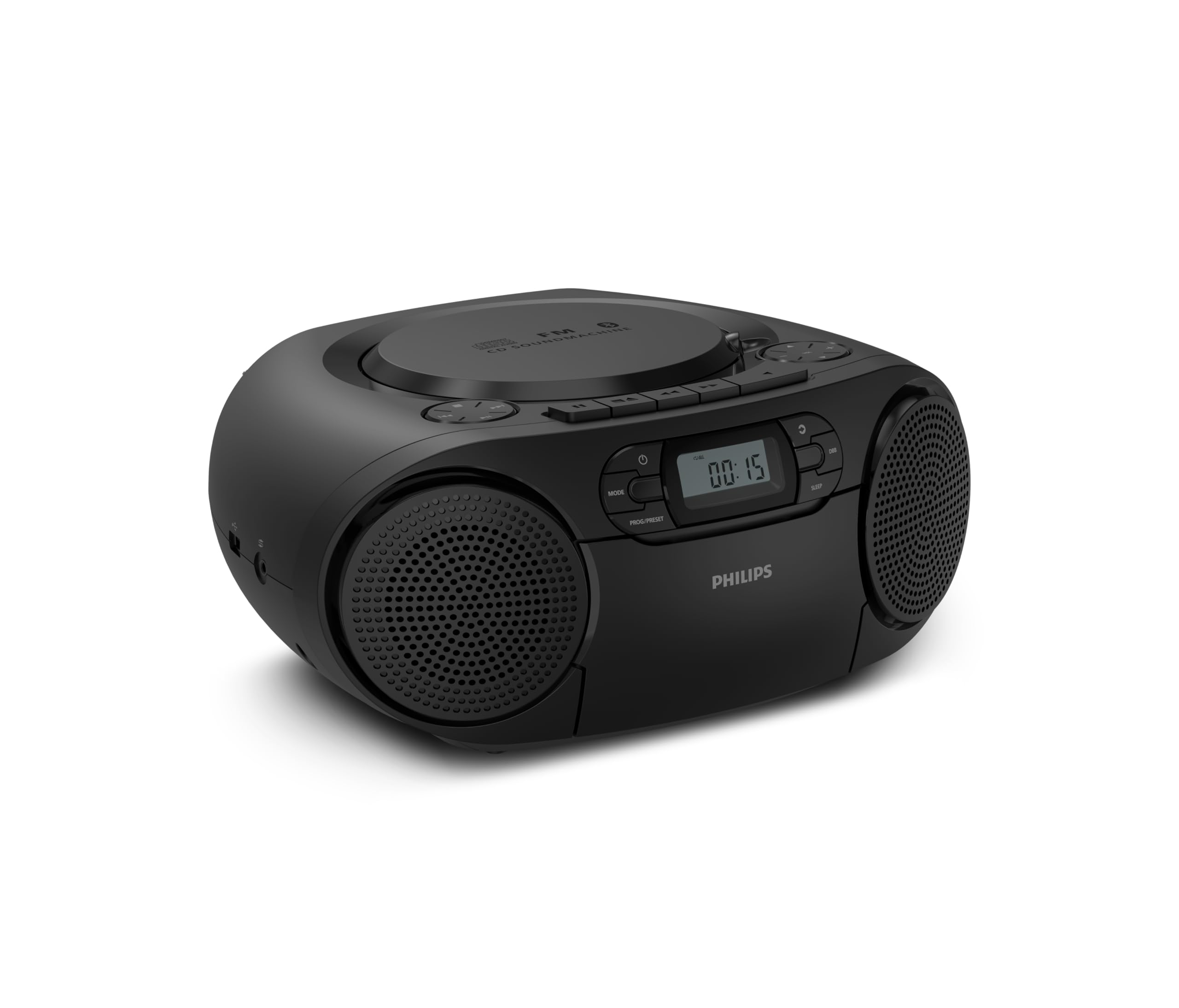
앞쪽 view of the Philips TAZ2200 CD Soundmachine, showing the main display and control buttons.
2. 안전 정보
Please read these safety instructions carefully before using your device and keep them for future reference. Incorrect use may result in hazards.
- 전원: 지정된 전원 어댑터나 배터리만 사용하세요. 볼륨을 확인하세요.tage는 해당 장치의 요구 사항을 충족합니다.
- 물과 습기: 제품을 비, 습기, 물방울 또는 물 튀김에 노출시키지 마십시오. 꽃병과 같이 액체가 담긴 물건을 제품 위에 올려놓지 마십시오.
- 통풍: 적절한 환기를 확보하십시오. 환기구를 막지 마십시오. 충분한 환기를 위해 기기 주변에 최소한의 거리를 유지하십시오.
- 열: 라디에이터, 난방 조절기, 스토브 또는 기타 장치(다음 포함)와 같은 열원 근처에 장치를 두지 마십시오. amp열을 생성하는 발전기.
- 배터리: Follow correct polarity when inserting batteries. Do not mix old and new batteries, or different types of batteries. Remove batteries if the unit is not used for a long period.
- 청소: 청소하기 전에 전원 콘센트에서 제품의 플러그를 뽑으십시오. 부드럽고 마른 천을 사용하십시오. 액체 세척제나 스프레이형 세척제는 사용하지 마십시오.
- 서비스: 이 제품을 직접 수리하려고 하지 마십시오. 모든 서비스는 자격을 갖춘 서비스 담당자에게 문의하십시오.
3. 상자 안에 무엇이 들어있나요?
짐을 풀 때 아래 나열된 품목이 모두 있는지 확인하세요.
- Philips TAZ2200 CD Soundmachine
- 전원 케이블
- 빠른 시작 가이드
- 보증서
- 안전 시트
4. 제어 및 연결
전면 패널 컨트롤
The front panel features the main display, power button, mode selection, program/preset buttons, and dynamic bass boost (DBB) control. Playback controls for CD and USB are also located here.

자세한 앞면 view showing the display, power, mode, program/preset, and DBB buttons.
Side and Rear Connections
The side of the unit provides a USB port for digital audio playback and a 3.5mm audio input jack for connecting external devices.

옆 view illustrating the USB port and Audio Input jack.
The top of the unit houses the CD compartment and additional playback controls, while the rear features the AC power input and the FM antenna.

맨 위 view showing the CD compartment and associated controls.

뒤쪽 view displaying the AC power input and the telescopic FM antenna.
5. 설정
5.1 전원 공급
교류 전원
- 장치의 스위치가 꺼져 있는지 확인하십시오.
- Connect the supplied power cable to the AC IN socket on the rear of the sound machine.
- Plug the other end of the power cable into a wall power outlet.
배터리 전원
For portable use, the unit can operate on 6 x C-type batteries (not included).
- 장치 하단에있는 배터리 함 덮개를 엽니 다.
- Insert 6 C-type batteries, ensuring correct polarity (+/-) as indicated inside the compartment.
- 배터리 덮개를 단단히 닫으세요.
5.2 안테나 조정
For optimal FM radio reception, fully extend the telescopic antenna located at the rear of the unit. Adjust its position and angle to achieve the clearest signal.
6. 사용 설명서
6.1 일반 작업
- 전원 켜기/끄기: 를 누르세요 힘 버튼을 눌러 장치를 켜거나 끕니다.
- 볼륨 조절: 사용하세요 볼륨 + or 권 - 버튼을 사용하여 볼륨 레벨을 조정합니다.
- 다이내믹 베이스 부스트(DBB): 를 누르세요 DBB button to activate or deactivate the dynamic bass boost feature for enhanced bass sound.
- 모드 선택: 를 누르세요 방법 button repeatedly to switch between CD, Cassette, FM Radio, Bluetooth, USB, and Audio Input modes.
6.2 CD 재생
- 기기 상단의 CD 수납부 덮개를 여세요.
- Place a CD (CD, CD-R, or CD-RW) with the label side facing up onto the spindle.
- CD 수납 공간 커버를 닫습니다.
- 를 누르세요 방법 버튼을 눌러 CD 모드를 선택합니다.
- 를 누르세요 재생/일시정지 버튼을 눌러 재생을 시작합니다.
- 사용하세요 건너뛰다 버튼 (|< or >>|) 트랙을 건너뜁니다.
- 누르고 있으세요 |< or >>| 트랙 내에서 검색합니다.
- 를 누르세요 멈추다 버튼을 눌러 재생을 중지합니다.
6.3 카세트 재생
- Open the cassette compartment door on the front of the unit.
- 카세트테이프의 열린 면이 위를 향하도록 삽입하십시오.
- 카세트 칸 문을 닫습니다.
- 를 누르세요 방법 카세트 모드를 선택하는 버튼입니다.
- 를 누르세요 놀다 버튼을 눌러 재생을 시작합니다.
- 사용하세요 빨리 감기 or 되감기 buttons to quickly advance or rewind the tape.
- 를 누르세요 멈추다 버튼을 눌러 재생을 중지합니다.
6.4 FM 라디오
- 를 누르세요 방법 FM 라디오 모드를 선택하는 버튼입니다.
- 자동 스캔: 를 누르고 계세요 PROG/PRESET 사용 가능한 FM 방송국을 자동으로 검색하고 저장하는 버튼입니다.
- 수동 조정 : 를 누르세요 동조 버튼 (|< or >>|) 원하는 주파수에 수동으로 맞춰보세요.
- 사전 설정 저장: After tuning to a station, press PROG/PRESET once, then use |< or >>| 미리 설정된 숫자를 선택하고 누르세요. PROG/PRESET 다시 확인합니다.
- 사전 설정 불러 오기 : FM 모드에서 PROG/PRESET repeatedly to cycle through saved preset stations.
6.5 블루투스 재생
- 를 누르세요 방법 button to select Bluetooth mode. The display will show 'BT' and flash, indicating it's in pairing mode.
- Bluetooth가 지원되는 기기(스마트폰, 태블릿)에서 Bluetooth를 활성화하고 사용 가능한 기기를 검색하세요.
- Select "Philips TAZ2200" from the list of devices.
- Once paired, the unit will emit a confirmation sound, and 'BT' will stop flashing.
- Start playing audio on your connected device. The sound will be streamed to the sound machine.
6.6 USB 재생
- 기기 측면에 있는 USB 포트에 USB 플래시 드라이브를 삽입하세요.
- 를 누르세요 방법 버튼을 눌러 USB 모드를 선택합니다.
- 이 장치는 호환되는 오디오를 자동으로 감지하고 재생을 시작합니다. files (MP3, WAV, WMA).
- 재생 컨트롤을 사용하세요(재생/일시정지, 건너뛰다, 멈추다) as you would for CD playback.
6.7 Audio Input (AUX)
- Connect one end of a 3.5mm audio cable (not included) to the AUDIO IN jack on the side of the sound machine.
- Connect the other end of the audio cable to the headphone jack or audio output of your external device (e.g., MP3 player, turntable).
- 를 누르세요 방법 button to select Audio Input mode.
- Start playing audio on your external device. The sound will be played through the sound machine.
7. 유지관리
- 장치 청소: 부드럽고 가벼운 천으로 장치 외부를 닦으십시오.amp 천. 연마성 세척제나 용매를 사용하지 마십시오.
- CD 플레이어 관리: Keep the CD compartment clean. If the lens is dirty, use a specialized CD lens cleaner. Avoid touching the lens.
- 카세트 플레이어 관리: 테이프 헤드와 핀치 롤러는 면봉으로 가볍게 주기적으로 청소하십시오.amp이소프로필 알코올로 소독함.
- 배터리 교체: If using batteries, replace all 6 C-type batteries when the unit's performance diminishes or if the unit will not be used for an extended period.
- 저장: 사용하지 않을 때는 직사광선과 극한 온도 변화를 피해 깨끗하고 건조한 곳에 보관하십시오.
8. 문제 해결
If you encounter any issues with your Philips TAZ2200, please refer to the table below for common problems and solutions.
| 문제 | 가능한 원인 | 해결책 |
|---|---|---|
| 전원이 없습니다 | 전원 케이블이 연결되지 않았습니다. 배터리가 소모되었거나 잘못 삽입되었습니다. | AC 전원 연결을 확인하십시오. 배터리를 교체하거나 극성이 올바른지 확인하십시오. |
| 소리가 나지 않습니다 | 볼륨이 너무 낮음; 잘못된 모드가 선택됨; 헤드폰이 연결됨. | Increase volume; Select the correct source mode (CD, FM, BT, etc.); Disconnect headphones. |
| CD가 재생되지 않습니다 | CD inserted incorrectly; CD is dirty or scratched; CD format not supported. | Insert CD with label side up; Clean or replace CD; Ensure CD is CD-R/RW compatible. |
| 카세트가 재생되지 않습니다 | Cassette inserted incorrectly; Tape is damaged. | Insert cassette correctly; Try a different cassette. |
| FM 수신 불량 | 안테나가 확장되지 않았거나 올바른 위치에 있지 않음; 신호가 약함. | 텔레스코픽 안테나를 완전히 펼치고 조정하십시오. 기기를 다른 위치로 옮겨 보십시오. |
| 블루투스가 연결되지 않습니다 | Unit not in pairing mode; Bluetooth device too far; Device already paired with another unit. | Ensure unit is in Bluetooth mode and flashing; Move device closer; Disconnect from other devices. |
| USB 재생 문제 | USB 드라이브가 제대로 삽입되지 않았습니다. 호환되지 않습니다. file 포맷됨; USB 드라이브가 손상되었습니다. | USB 드라이브를 다시 삽입하십시오. files are MP3, WAV, or WMA; Try a different USB drive. |
9. 사양
| 특징 | 사양 |
|---|---|
| 상표 | 필립스 |
| 모델 번호 | TAZ2200/10 |
| 연결 기술 | Bluetooth 6.0, USB, Audio Input (3.5mm) |
| 스피커 유형 | Stereo (2 speakers) |
| 출력 전력 | 6와트(최대) |
| 지원되는 미디어 | CD, CD-R, CD-RW, Cassette, USB (MP3, WAV, WMA) |
| 라디오 튜너 | Digital FM with 20 presets |
| 전원 | AC (wired), 6 x C-type batteries (not included) |
| 치수(길이x너비x높이) | 24.5 x 28.5 x 12.5cm |
| 무게 | 1.35 킬로그램 |
| 색상 | 은 |
10. 보증 및 지원
10.1 제품 보증
This Philips TAZ2200 CD Soundmachine comes with a 2년 보증 구매일로부터 적용됩니다. 보증 청구를 위해 구매 증빙 자료를 보관해 주십시오. 보증은 정상적인 사용 조건에서 발생하는 제조상의 결함 및 오작동에 적용됩니다.
10.2 고객 지원
For technical assistance, troubleshooting beyond this manual, or warranty service, please refer to the contact information provided in the warranty booklet included with your product. You can also visit the official Philips support website for your region for further assistance and FAQs.