
1. 서론
Thank you for choosing the ATK Horizon Gaming In-Ear Earphones. This manual provides essential information for the proper setup, operation, and maintenance of your 3.5mm audio earphones. Please read this manual thoroughly before use to ensure optimal performance and longevity of your product.
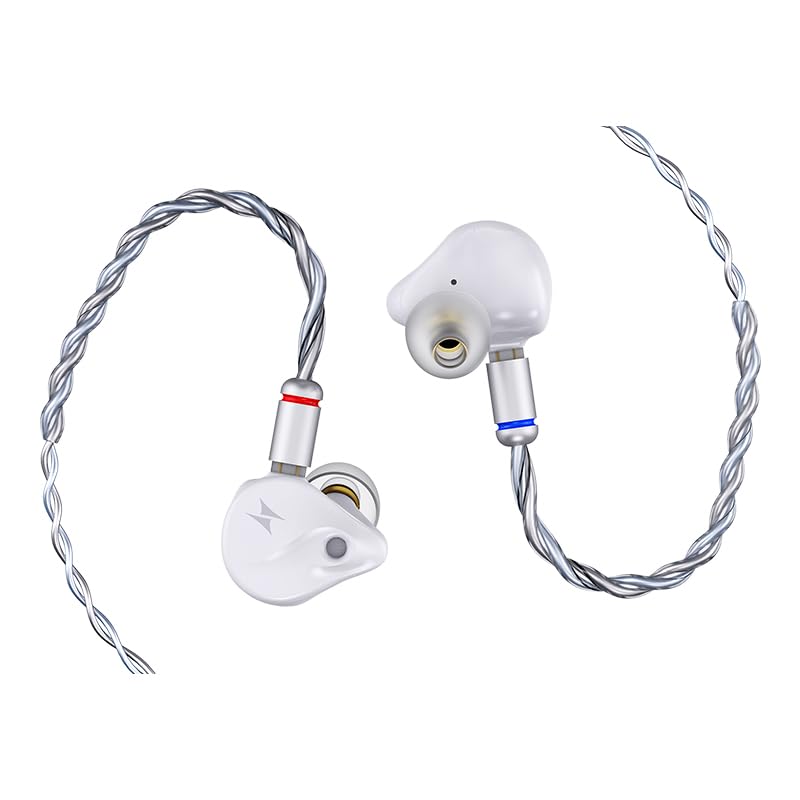
Image 1.1: ATK Horizon Gaming In-Ear Earphones (White, 3.5mm Audio). This image displays the white in-ear earphones with their attached 3.5mm audio cable.
2. 패키지 내용
다음 품목이 패키지에 포함되어 있는지 확인하세요.
- ATK Horizon Gaming In-Ear Earphones (White, 3.5mm Audio)
- 분리형 3.5mm 오디오 케이블
- 사용 설명서 (본 문서)
3. 설정
Setting up your ATK Horizon earphones is a simple process:
- 케이블 연결: Ensure the detachable 3.5mm audio cable is securely connected to the earphones. The earphones typically use a 0.78-2pin connector. Align the pins and gently push until fully seated.
- Insert into Audio Device: Plug the 3.5mm jack of the cable into the corresponding audio port on your gaming console, PC, smartphone, or other compatible device.
- 이어폰을 착용하세요: Gently insert the earphones into your ears. Adjust them for a comfortable and secure fit to ensure optimal sound isolation and audio quality. The ear placement is designed for an in-ear fit.
4. 사용 설명서
The ATK Horizon earphones are designed for straightforward use:
- 오디오 재생: Once connected, audio from your device will be routed through the earphones. Adjust the volume directly on your connected device.
- 마이크 사용법: The integrated AI Noise-Cancelling Microphone is designed for clear voice communication. Ensure your device's audio settings are configured to use the earphone's microphone for input.
- 버튼 컨트롤: If your cable includes an inline remote with button controls, refer to your device's manual for specific functions (e.g., play/pause, answer call).
5. 특징
The ATK Horizon earphones incorporate several design elements for an enhanced audio experience:
5.1. Next-generation Composite Dynamic Driver

Image 5.1: Components of the 10mm Dynamic Driver. This image shows the internal structure of the 10mm dynamic driver, highlighting its composite diaphragm and magnetic components.
Equipped with a 10mm dynamic driver featuring a PU + PEEK composite surround and a DLC-like diaphragm. This design provides a balance of rigidity and flexibility, contributing to responsive performance, punchy bass, well-defined mids, and smooth highs with low distortion.
5.2. Precision CNC-machined Faceplate
The earphones feature a precision CNC-machined faceplate, crafted for both aesthetic appeal and structural integrity.
5.3. Esports-level Sound Positioning
Designed to deliver precise sound positioning, allowing users to discern subtle audio cues such as footsteps and gunshots in gaming environments. The audio profile aims for powerful yet non-piercing sound reproduction.
5.4. AI 노이즈 캔슬링 마이크
An integrated AI Noise-Cancelling Microphone ensures clear voice capture by reducing background noise, essential for effective communication during gaming or calls.
5.5. Balanced Tuning
The earphones are tuned to provide a balanced audio experience suitable for both high-fidelity music listening and gaming applications.
5.6. Dual Magnetic Circuit Design

이미지 5.2: 내부 view of an earphone showcasing the dual magnetic circuit design. This transparent view highlights the dual neodymium magnets within the earphone's housing.
The ATK Horizon features dual neodymium magnets that optimize magnetic flux density, contributing to the performance required for demanding audio scenarios.
5.7. Rear Chamber Design for Improved Sound Diffusion

이미지 5.3: 단면도 view of an earphone illustrating the rear chamber design. This image shows how the internal acoustic structure enhances sound diffusion.
A unique acoustic rear chamber design enhances low-frequency diffusion and reduces standing waves. This minimizes bass muddiness and masking effects, resulting in tight, controlled bass and clear in-game audio for enhanced precision.
5.8. High-quality Brass Nozzle

Image 5.4: Close-up of the high-quality brass nozzle. This image highlights the metallic construction of the earphone's sound output component.
The brass nozzle reduces unwanted resonance, delivering rich, well-defined mids with enhanced imaging and precise spatial positioning.
5.9. OFC Four-strand Braided Cable
The earphones come with a four-strand braided cable made of high-purity Oxygen-Free Copper (OFC), designed for durability and optimal signal transmission.
5.10. Note on DSP and Integrated Sound Card Features

Image 5.5: USB Type-C connector featuring an integrated DSP chip. This image illustrates the digital signal processing capabilities available with the USB-C variant of the ATK Horizon earphones.
Please note that features such as the HIFI-level DSP Wired Integrated Sound Card, high-performance 384kHz/32-bit DAC chip, DSP with Intuitive Visual Controls (supported by ATK Hub Dual-driver), and associated EQ/Sensitivity adjustments are exclusive to the USB Type-C variant of the ATK Horizon earphones. This 3.5mm audio model utilizes a standard analog connection and does not include these integrated digital processing features.
6. 유지관리
To ensure the longevity and performance of your earphones, follow these maintenance guidelines:
- 청소: Regularly wipe the earphones and cable with a soft, dry cloth. For ear tips, you may use a slightly damp 순한 비누를 묻힌 천으로 닦고, 다시 부착하기 전에 완전히 말리십시오. 강한 화학 약품이나 연마제를 사용하지 마십시오.
- 저장: 사용하지 않을 때는 깨끗하고 건조한 곳에 보관하고, 보호 케이스에 넣어 보관하면 꼬임과 손상을 방지할 수 있습니다.
- 케이블 관리: Avoid sharp bends or excessive pulling on the cable. Always grasp the plug, not the cable, when disconnecting from a device.
- 수분: The earphones are not water-resistant. Avoid exposure to water, sweat, or high humidity.
7. 문제 해결
If you encounter issues with your ATK Horizon earphones, refer to the following common solutions:
| 문제 | 가능한 원인 | 해결책 |
|---|---|---|
| 소리가 나지 않거나 볼륨이 작음 |
|
|
| 마이크가 작동하지 않습니다 |
|
|
| 왜곡된 소리 |
|
|
8. 사양
Detailed specifications for the ATK Horizon Gaming In-Ear Earphones (3.5mm Audio variant):

Image 8.1: Specifications table for ATK Horizon Series Gaming In-ear Earphones. This table outlines key technical details for both Type-C and 3.5mm variants.
| 특징 | Detail (3.5mm Audio Variant) |
|---|---|
| 모델명 | ATK Horizon |
| 색상 | 하얀색 |
| 커넥터 | 3.5mm 오디오 잭 |
| DSP (Integrated Sound Card) | Not applicable for 3.5mm variant |
| 드라이버 유닛 | 10mm PU+PEEK composite surround DLC-like diaphragm unit |
| 임피던스 | 16.0Ω±15% (@1kHz) |
| 감광도 | 110±3dB/Vrm(@1kHz) |
| 마이크로폰 | AI 노이즈 캔슬링 마이크 |
| 이어폰 케이블 | 0.78-2pin detachable |
| 연결 모드 | 열광한 |
| 케이블 길이 | 1.2m |
| 케이블 사양 | Four-Strand Braided High-Purity Oxygen-Free Copper |
| 주파수 응답 | 20 KHz (Partial data, typical range is 20Hz-20kHz) |
| 소음 제어 | Active Noise Cancellation (as per product specifications, though typically passive for in-ear) |
| 호환 장치 | Desktops and other devices with 3.5mm audio jack |
| 방수 레벨 | 방수가 되지 않음 |
9. 보증 및 지원
Your ATK Horizon Gaming In-Ear Earphones are covered by a 6개월 보증 구매일로부터. 본 보증은 정상적인 사용 중에 발생한 제조상의 결함 및 제조상의 결함을 보장합니다.
For warranty claims, technical support, or any inquiries, please contact ATK customer service through the retailer where the product was purchased or visit the official ATK web지원 연락처 정보 사이트.
보증 확인을 위해 구매 증빙서류를 보관하세요.