
1. 중요 공지
Please carefully check the store name and ensure you are purchasing products sold by "LUZHAN." We have received customer feedback stating that products received did not match the description and were of poor quality. Upon investigation, we found that these customers did not purchase the products from us. To prevent such incidents from happening again in the future and to avoid unnecessary misunderstandings, please carefully verify the store name LUZHAN.

Image: Important notice to verify seller name LUZHAN for authentic products.
2. 이상view
The XIAOMI POCO X8 Pro Max 5G is a high-performance smartphone designed for advanced users. It features a powerful Mediatek Dimensity 9500s processor, a vibrant 1.5K 120Hz AMOLED display, a large 8500mAh battery with 100W HyperCharge, and a 50 MP Light Fusion 600 camera system with OIS. This manual provides essential information for setting up and operating your device.
이미지: 앞면과 뒷면 view of the POCO X8 Pro Max 5G smartphone.
비디오: 오버view of the POCO X8 Pro Series, highlighting key features and design.
3. 설정
3.1 상자 내용물
- XIAOMI POCO X8 Pro Max 5G Smartphone
- 충전기
- 스크린 보호 필름(사전 적용 또는 포함)
3.2 초기 장치 설정
- 전원 켜기: Press and hold the power button located on the side of the device until the XIAOMI logo appears.
- 언어 및 지역: 화면의 지시에 따라 원하는 언어와 지역을 선택하세요.
- Wi-Fi에 연결: Select your Wi-Fi network and enter the password to connect to the internet. This is necessary for initial setup and software updates.
- 구글 계정: Google 계정으로 로그인하거나 새 계정을 만드세요. Google Play 스토어 및 기타 Google 서비스에 액세스하려면 이 계정이 필수입니다.
- 데이터 전송: If you are upgrading from another device, you may have the option to transfer your data (apps, photos, contacts) during this stage.
- 보안 설정: Set up your preferred security method, such as a PIN, pattern, password, or fingerprint. The device supports an ultrasonic fingerprint sensor.
- 설정 완료: 설치 과정을 완료하려면 남은 안내 메시지를 따르십시오.
3.3 SIM Card and eSIM Setup
The POCO X8 Pro Max 5G supports physical SIM cards and eSIM functionality.
- Physical SIM: Use the provided SIM ejector tool to open the SIM tray. Insert your Nano-SIM card(s) into the tray, ensuring proper orientation. Close the tray securely.
- eSIM: eSIM 활성화를 위해 다음 경로로 이동하세요. 설정 > 네트워크 및 인터넷 > SIM 안내에 따라 eSIM Pro를 추가하세요.file provided by your carrier.
4. 사용 설명서
4.1 디스플레이 기능
Your device features a 6.83-inch 1.5K ultra-bright AMOLED display with a 120Hz refresh rate for smooth visuals and a 24x super resolution touch for enhanced responsiveness. It also includes eye protection features and Corning Gorilla Glass 7i for durability.
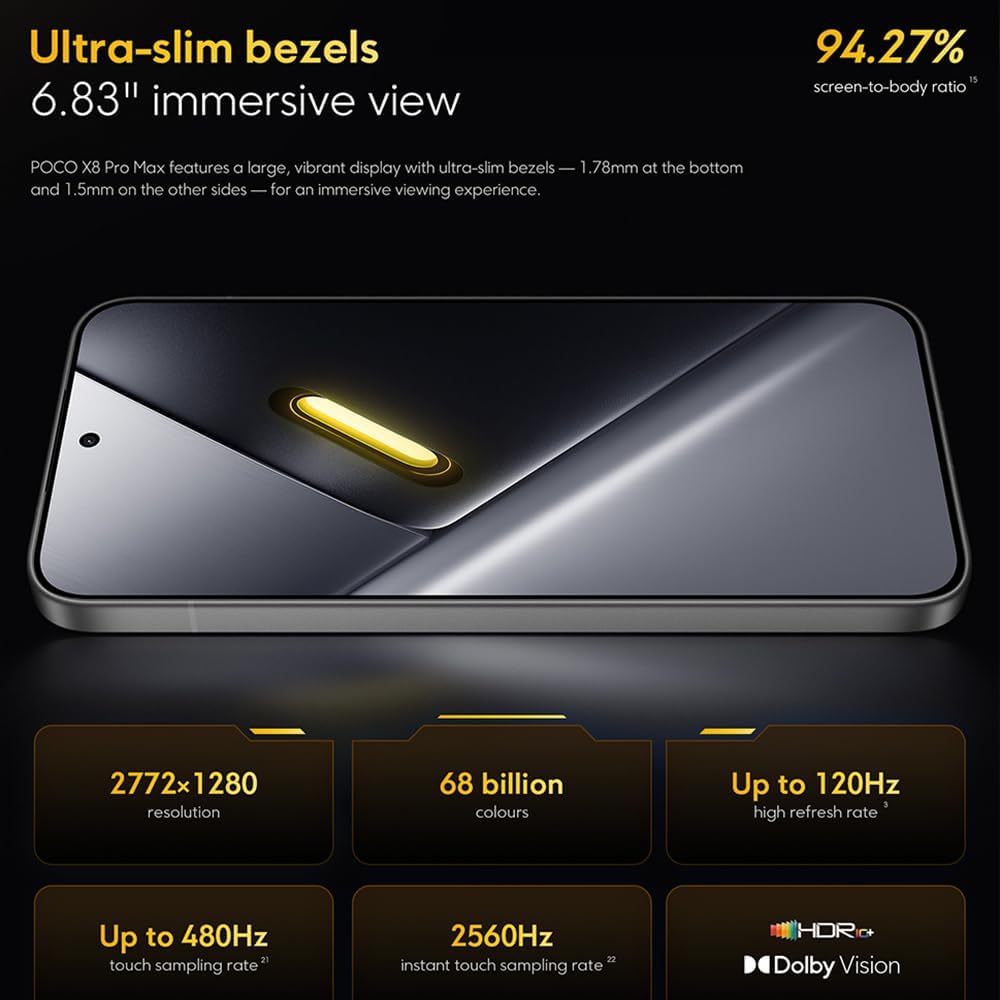
Image: The 6.83-inch 1.5K ultra-bright AMOLED display with minimal bezels.
4.2 성능
Powered by the Mediatek Dimensity 9500s chipset (3nm, 4+4 All Big Core architecture, NPU890 AI processor), the POCO X8 Pro Max 5G delivers high performance. The POCO 3D IceLoop cooling system ensures efficient heat dissipation, maintaining optimal performance during intensive tasks like gaming.

Image: Diagram illustrating the Mediatek Dimensity 9500s flagship platform.

Image: Illustration of the 5800mm² ultra-large LHP area for cooling.
4.3 카메라 시스템
The device features a 50 MP Light Fusion 600 main camera with OIS (Optical Image Stabilization) and an 8 MP ultra-wide camera. It supports portrait mode with bokeh + HDR and dynamic video-to-still conversion.

Image: Close-up of the 50 MP main camera and 8 MP ultra-wide camera system.
4.4 배터리 및 충전
Equipped with a massive 8500 mAh (typical) battery, the POCO X8 Pro Max 5G offers extended usage. It supports 100W HyperCharge, allowing for rapid recharging. A 16% ultra-high carbon-silicon content contributes to its high energy density.

Image: Illustration highlighting the massive 8500mAh battery capacity.

Image: Visual representation of the 100W HyperCharge technology.
4.5 오디오
The device features symmetrical dual stereo speakers (1115F) for a balanced and immersive audio experience.
4.6 소프트웨어
The POCO X8 Pro Max 5G comes with Xiaomi HyperOS 3 installed, offering an optimized and user-friendly interface based on Android 16.
5. 유지관리
5.1 장치 청소
- 부드럽고 보푸라기가 없는 천을 사용하여 화면과 뒷면 패널을 닦으세요.
- 강한 화학 물질, 연마재 또는 에어로졸 스프레이는 사용하지 마세요.
- 완고한 얼룩의 경우 약간 damp천에 물을 묻히거나 전자제품용 화면 세정제를 묻힙니다.
5.2 방진 및 방수 기능
The device is certified for IP68 dust and water resistance. This means it can withstand immersion in up to 2 meters of water for 30 minutes under specific laboratory conditions. However, water and dust resistance may deteriorate over time with normal wear and tear. The warranty does not cover liquid damage. Avoid exposing the device to hot water, saltwater, or other liquids.

Image: Visual representation of the IP68 dust and water resistance.
5.3 소프트웨어 업데이트
기기에 최신 기능, 보안 패치 및 성능 향상 기능이 적용되어 있는지 확인하기 위해 소프트웨어 업데이트를 정기적으로 확인하고 설치하세요. 이 옵션은 일반적으로 다음 위치에서 찾을 수 있습니다. 설정 > 휴대전화 정보 > 시스템 업데이트.
6. 문제 해결
6.1 일반적인 문제 및 해결 방법
- 장치가 켜지지 않음: 배터리가 충전되어 있는지 확인하십시오. 기기를 충전기에 연결하고 몇 분 정도 기다린 후 다시 전원을 켜보십시오.
- 화면이 반응하지 않음: 전원 버튼을 10~15초 정도 길게 눌러 기기가 재부팅될 때까지 기다린 후 다시 시작해 보세요.
- 앱 충돌: 문제가 있는 앱의 캐시를 지웁니다.설정 > 앱 > [앱 이름] > 저장공간 > 캐시 지우기) or reinstall the app. Ensure your device software is up to date.
- 배터리 수명이 짧음: Check background app usage, reduce screen brightness, disable unnecessary features like GPS or Bluetooth when not in use, and ensure your software is updated.
- 네트워크 연결 문제: Restart your device. Check if your SIM card is properly inserted. Toggle Airplane Mode on and off. Reset network settings (설정 > 시스템 > 재설정 옵션 > Wi-Fi, 모바일 및 Bluetooth 재설정).
6.2 공장 초기화
문제가 계속 발생하는 경우 공장 초기화가 필요할 수 있습니다. 경고: 이렇게 하면 기기의 모든 데이터가 삭제됩니다. 진행하기 전에 중요한 데이터를 백업하세요. 설정 > 시스템 > 옵션 재설정 > 모든 데이터 삭제(공장 초기화) 화면의 지시를 따르세요.
7. 사양
| 특징 | 사양 |
|---|---|
| 상표 | 샤오미 |
| 모델명 | POCO X8 Pro Max 5G |
| 운영 체제 | Android 16 (with Xiaomi HyperOS 3) |
| 메모리 저장 용량 | 512GB (XNUMX기가바이트) |
| 화면 크기 | 6.83 인치 |
| 디스플레이 유형 | AMOLED, 1.5K, 120Hz refresh rate |
| 셀룰러 기술 | 5G |
| 색상 | 느와르(검정) |
| 커넥터 유형 | USB 타입 C |
| 생체 인식 보안 | Fingerprint Recognition (Ultrasonic) |
| 배터리 용량 | 8500mAh(리튬폴리머) |
| 충전 중 | 100W 하이퍼차지 |
| 메인 카메라 | 50 MP Light Fusion 600 with OIS |
| 초광각 카메라 | 8 MP |
| 프로세서 | Mediatek Dimensity 9500s |
| 먼지 및 방수 기능 | IP68 |
| 모델 연도 | 2025 |
| 원산지 | 중국 |
8. 보증 및 지원
For detailed warranty information and customer support, please refer to the warranty card included with your product or visit the official XIAOMI web사이트. 보증 청구를 위해 구매 증빙 자료를 보관하세요.
Online resources and FAQs may also be available on the XIAOMI support portal.