
소개
This manual provides detailed instructions for the operation and maintenance of your RadioShack Portable CD Player Boombox. Please read this manual thoroughly before using the device to ensure proper function and to maximize your listening experience. This boombox combines classic CD playback with modern connectivity options including Bluetooth, FM radio, USB, and AUX input.
상자 안에 무엇이 들어있나요?

그림 1: 상자 내용물. This image displays the items included with your purchase: the boombox unit, AC power cord, remote control, and telescopic antenna.
- 1x RadioShack Portable CD Player Boombox Unit
- 1x AC 전원 코드
- 1x 원격 제어
- 1x Telescopic Antenna (pre-attached)
- 1x 사용자 매뉴얼(이 문서)
Note: 4 C batteries are required for portable operation and are not included.
제품 끝view 및 기능
The RadioShack Portable CD Player Boombox offers multiple audio playback options and user-friendly controls.

그림 2: 주요 특징 This diagram highlights the boombox's main functionalities including Bluetooth 5.0, various CD formats, USB MP3 playback, FM radio, AUX input, and playback modes.
- CD 재생 : CD, CD-R, CD-RW 및 CD-MP3 형식을 지원합니다.
- 블루투스 연결: 호환 장치에서 무선으로 오디오를 스트리밍하세요.
- FM 라디오 : Built-in tuner with telescopic antenna and 18 preset stations.
- USB 재생 : MP3 재생 fileUSB 드라이브에서 직접.
- 보조 입력: 3.5mm 케이블을 사용하여 외부 오디오 장치를 연결하세요.
- 재생 모드: Includes random, repeat, and program play functions.
- 원격 제어: 원거리에서도 편리하게 조작할 수 있습니다.
설정
1. 장치 전원 공급

Figure 3: Power Options. The boombox can be powered by the included AC cord or by 4 C batteries for portable use.
Your boombox can be powered in two ways:
- AC 전원: Connect the included AC power cord to the AC input jack on the back of the boombox and then plug it into a standard wall outlet (110V-240V).
- 배터리 전원: For portable use, open the battery compartment on the bottom of the unit and insert 4 "C" size batteries (not included), ensuring correct polarity (+/-). Close the compartment securely.
2. Antenna Setup (FM Radio)
For optimal FM radio reception, fully extend the telescopic antenna located on the back of the unit. Adjust its position for the best signal.
작동 지침
일반 제어
- 전원 버튼 (⏻): 기기를 켜거나 끄려면 누릅니다.
- 볼륨 노브: 시계 방향으로 돌리면 소리가 커지고, 시계 반대 방향으로 돌리면 소리가 작아집니다.
- Function (FUNC) Button: Press to cycle through playback modes: CD, Bluetooth, FM, USB, AUX.
- 재생/일시 정지(⏸/⏸) 버튼: 재생을 시작하거나 일시 중지합니다.
- 중지 (⏹) 버튼: 재생을 중지합니다.
- Skip/Search (⏮ / ⏭) 버튼: Press briefly to skip tracks. Press and hold to search within a track.
CD 재생
- CD 수납공간 뚜껑을 엽니다.
- Place a CD (CD, CD-R, CD-RW, or CD-MP3) onto the spindle with the label side facing up.
- CD 수납부 뚜껑을 단단히 닫으세요.
- 를 누르세요 FUNC "CD" 모드가 선택될 때까지 버튼을 누릅니다.
- CD가 자동으로 재생됩니다. 재생되지 않으면 버튼을 누르세요. 재생/일시정지 단추.
블루투스 페어링

Figure 4: Bluetooth Streaming. Easily stream audio from your smartphone or tablet to the boombox.
- 를 누르세요 FUNC button until "BT" (Bluetooth) mode is selected. The display will show "BT" and flash, indicating it's in pairing mode.
- On your Bluetooth-enabled device (smartphone, tablet), go to its Bluetooth settings and search for available devices.
- Select "RadioShack Boombox" from the list.
- Once paired, the "BT" indicator on the boombox display will stop flashing and remain solid.
- 이제 기기의 오디오를 붐박스를 통해 재생할 수 있습니다.
FM 라디오 작동

Figure 5: FM Presets and Programmed Playback. Use the SCAN button to automatically save FM stations and REP/PROG for custom playback sequences.
- 를 누르세요 FUNC "FM" 모드가 선택될 때까지 버튼을 누르세요.
- Auto Scan and Save Presets: 를 누르고 계세요 주사 button (often combined with Play/Pause). The radio will automatically scan for and save up to 18 available FM stations.
- 수동 조정 : 짧게 누르세요 건너뛰기/검색 버튼 (⏮ / ⏭주파수를 미세 조정하기 위해.
- 사전 설정 선택: 짧게 누르세요 음식물 button (often combined with Repeat) to cycle through saved preset stations.
USB 재생
- MP3가 포함된 USB 플래시 드라이브 삽입 fileUSB 포트에 s.
- 를 누르세요 FUNC "USB" 모드가 선택될 때까지 버튼을 누르십시오.
- The boombox will automatically detect and begin playing MP3 fileUSB 드라이브에서.
- 사용하세요 재생/일시정지, 멈추다, 그리고 건너뛰기/검색 재생을 제어하는 버튼.
AUX 입력
- 3.5mm 오디오 케이블(별도 구매)의 한쪽 끝을 붐박스의 AUX IN 단자에 연결하십시오.
- 케이블의 다른 쪽 끝을 외부 오디오 장치(예: MP3 플레이어, 스마트폰)의 헤드폰 잭 또는 오디오 출력 단자에 연결하십시오.
- 를 누르세요 FUNC "AUX" 모드가 선택될 때까지 버튼을 누르십시오.
- 외부 오디오 장치를 통해 재생 및 볼륨을 제어하세요.
원격 제어 사용
The included remote control allows for convenient operation of most functions from a distance. Ensure the remote has working batteries (typically 2x AAA, not included) and point it towards the front of the boombox.
- 힘: 장치를 켜거나 끕니다.
- 기능: Select input mode (CD, BT, FM, USB, AUX).
- 볼륨 +/- : 볼륨 레벨을 조정합니다.
- Play/Pause, Stop, Skip/Search: 재생을 제어합니다.
- REP/PROG: Access repeat and program functions.
- 주사: FM 방송국 자동 검색.
- EQ/SLEEP: Adjust equalizer settings or set sleep timer (refer to specific remote markings for details).
Playback Modes (CD/USB)
- Repeat (REP): 를 누르세요 대표 button (on unit or remote) to cycle through repeat modes:
- Repeat One: Repeats the current track.
- Repeat All: Repeats all tracks on the CD/USB.
- Repeat Folder (for MP3 CDs/USB): Repeats all tracks in the current folder.
- Program (PROG): Allows you to program a specific order of tracks for CD or USB playback.
- In CD or USB mode, with playback stopped, press the 음식물 단추.
- 사용하세요 건너뛰기/검색 buttons to select your desired track.
- 누르다 음식물 again to confirm and add the track to the program list.
- Repeat steps 2-3 to add more tracks.
- 누르다 재생/일시정지 프로그램 재생을 시작하려면.
- Random/Shuffle: Some models may have a dedicated shuffle button (often labeled "RDM" or "SHUF") or it may be part of the REP/PROG cycle. This plays tracks in a random order.
유지
- 청소: Use a soft, dry cloth to clean the exterior of the boombox. Do not use abrasive cleaners or solvents. For the CD lens, use a specialized CD lens cleaner disc.
- 저장: 장기간 사용하지 않을 경우 누액 방지를 위해 배터리를 제거하십시오. 제품은 직사광선과 극한 온도 변화를 피해 서늘하고 건조한 곳에 보관하십시오.
- 배터리 교체: Replace all 4 "C" batteries simultaneously when they are depleted. Do not mix old and new batteries or different types of batteries.
- CD 관리: CD는 가장자리를 잡고 깨끗하게 유지하세요. 긁히지 않도록 주의하세요. 사용하지 않을 때는 케이스에 보관하세요.
문제 해결
| 문제 | 가능한 원인 | 해결책 |
|---|---|---|
| 전원이 없습니다 | AC 코드가 연결되지 않았습니다. 배터리가 소모되었거나 잘못 삽입되었습니다. | Ensure AC cord is securely plugged in. Replace batteries with new ones, checking polarity. |
| 소리가 나지 않습니다 | Volume too low; Incorrect input mode; Headphones connected. | Increase volume. Press FUNC to select correct mode. Disconnect headphones. |
| CD가 건너뛰거나 재생되지 않음 | CD dirty or scratched; CD inserted incorrectly; CD compartment not closed. | Clean CD. Reinsert CD correctly. Close lid firmly. Try another CD. |
| 블루투스가 페어링되지 않습니다 | Boombox not in BT mode; Device too far; Device already paired to another unit. | Ensure boombox is in BT mode and flashing. Move device closer. Disconnect from other devices. |
| FM 수신 불량 | 안테나가 확장되지 않았거나 올바른 위치에 있지 않음; 신호 영역이 약함. | 텔레스코픽 안테나를 완전히 펼치고 조정하세요. 장치를 다른 위치로 옮겨보세요. |
| USB가 재생되지 않음 | USB 드라이브가 올바르게 삽입되지 않았습니다. Files not MP3 format; USB drive corrupted. | USB 드라이브를 다시 삽입하십시오. fileMP3입니다. 다른 USB 드라이브를 사용해 보세요. |
명세서
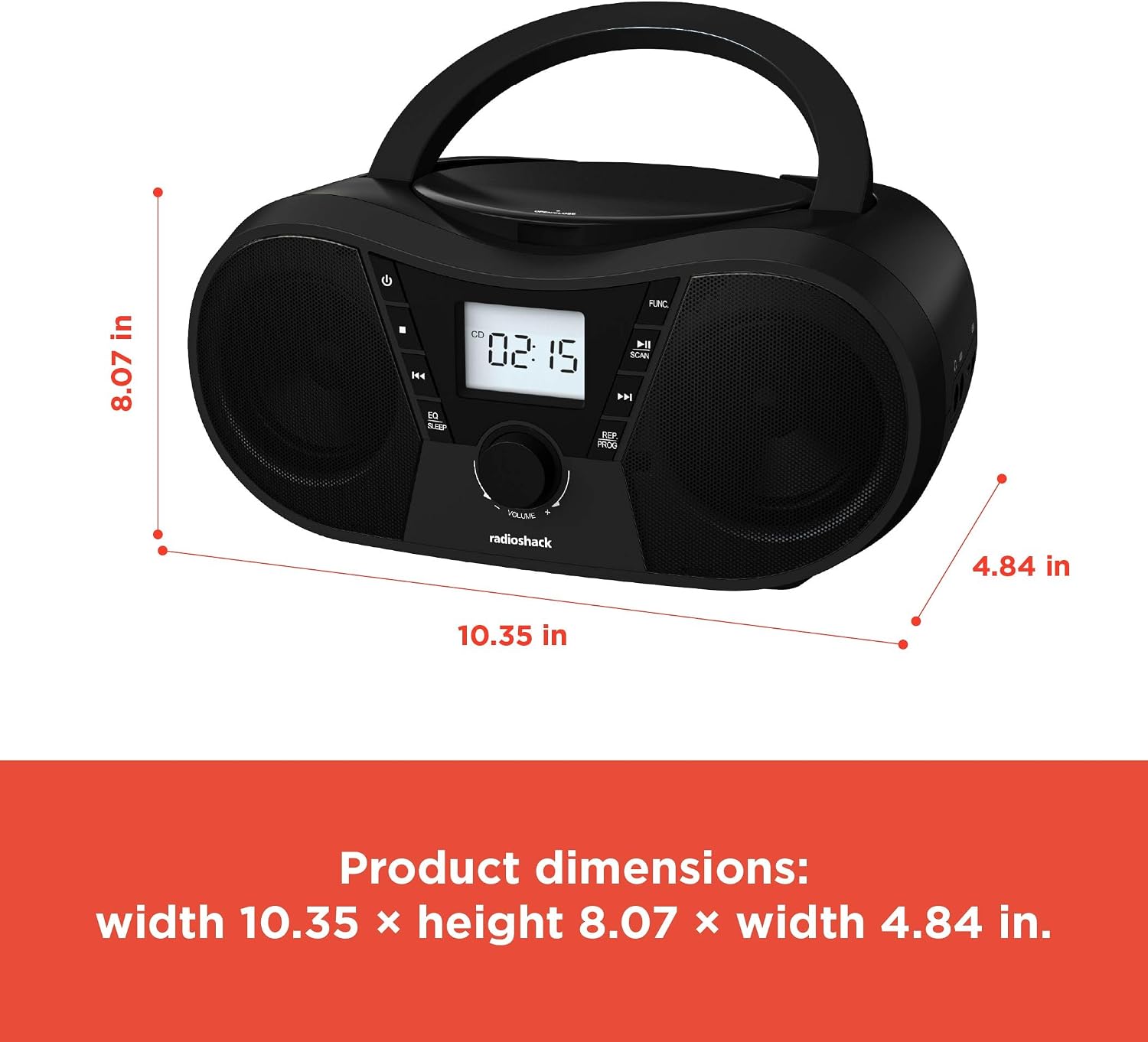
그림 6: 제품 치수 The boombox measures approximately 10.35 inches wide, 8.07 inches high, and 4.84 inches deep.
| 특징 | 세부 사항 |
|---|---|
| 모델 번호 | 1402010 |
| 전원 | AC 110V-240V ~ 50/60Hz or 4 x "C" Batteries (DC 6V) |
| 지원되는 미디어 | CD, CD-R, CD-RW, CD-MP3, USB (MP3), Bluetooth, FM Radio, AUX Input |
| 블루투스 버전 | 5.0 (호환 가능) |
| FM 주파수 범위 | 87.5~108MHz |
| 오디오 출력 모드 | 스테레오 재생 |
| 스피커의 수 | 2 (Built-in Stereo Speakers) |
| 왓tage | 10 와트 |
| 주파수 응답 | 20Hz - 20000Hz |
| 치수(폭 x 높이 x 깊이) | 약 10.35 x 8.07 x 4.84인치 |
| 색상 | 검은색 |
보증 및 지원
This RadioShack Portable CD Player Boombox (Model 1402010) comes with a 1년 한정 보증 구매일로부터. 본 보증은 정상적인 사용 중에 발생하는 재료 및 제조상의 결함을 보장합니다.
For warranty claims, technical support, or customer service inquiries, please contact RadioShack customer support through their official web사이트 또는 구매 문서에 제공된 연락처 정보를 참조하세요.
보증을 위해 구매 증빙서류를 보관하세요.
