
소개
Thank you for choosing the Hwagol Smart Glasses with Camera. These smart glasses integrate advanced technology to enhance your daily interactions, offering features such as high-definition photo and video recording, real-time translation, AI voice assistance, and hands-free communication. This manual provides essential information for setup, operation, and maintenance to ensure optimal performance and longevity of your device.
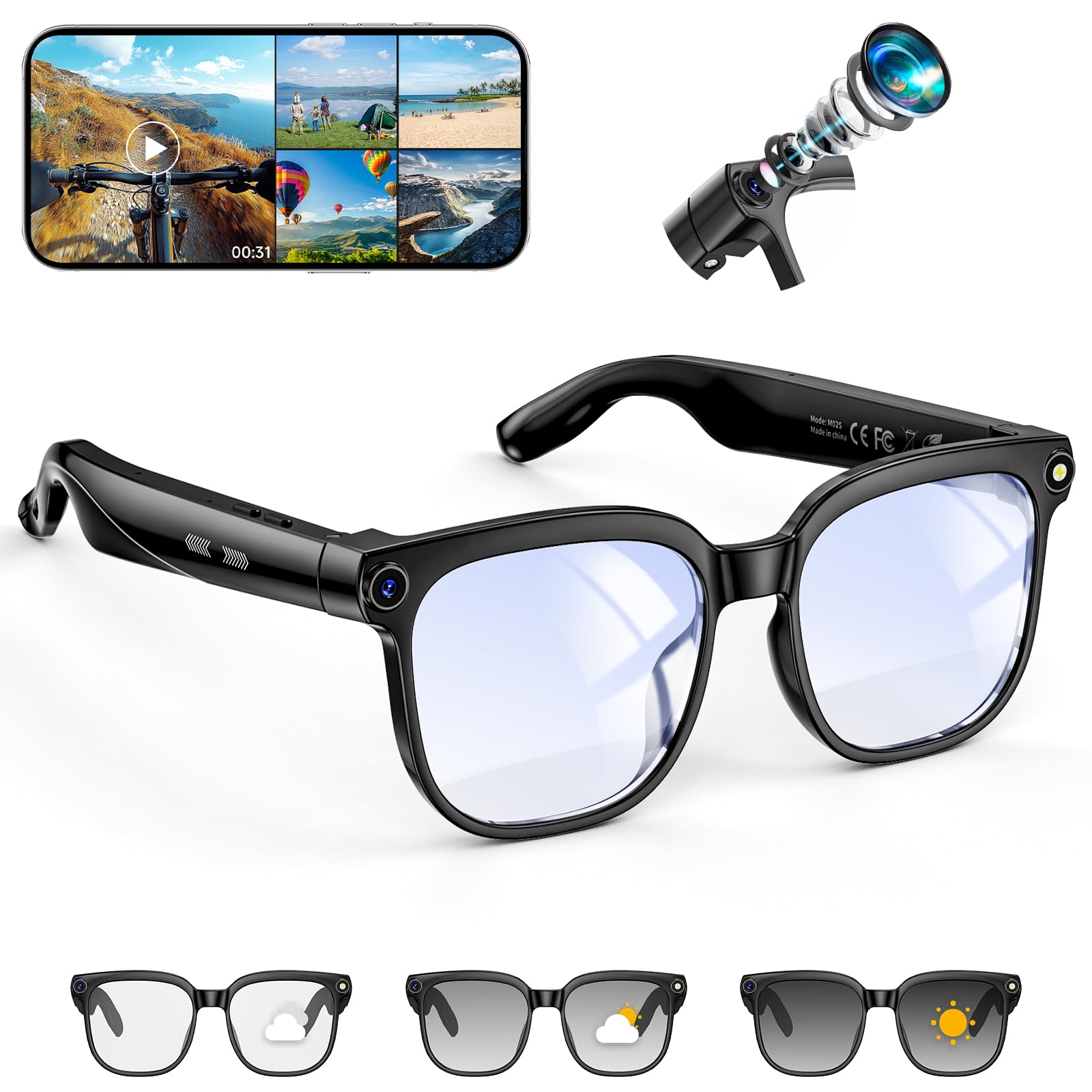
Image: Hwagol Smart Glasses with Camera, showcasin세련된 디자인.
상자 안에 무엇이 들어있나요?
상자를 푼 후 패키지 내용물을 확인하세요.
- Photochromic AI Smart Glasses with Camera (1 unit)
- 충전 케이블
- 사용자 설명서
주요 특징
The Hwagol Smart Glasses offer a range of functionalities designed for convenience and connectivity:
- 8MP HD Camera & 4K Video Recording: Capture high-resolution photos and stabilized 1080p videos.
- AI 음성 비서: Activate with "Hey Cyan" for instant answers to queries and task execution.
- 객체 인식: Identify objects, text, and landmarks through the camera.
- 실시간 번역: Listen to instant translations across multiple languages.
- Dual Microphone Noise Cancellation: Ensures clear audio for calls and music.
- 블루투스 연결: For calls, music playback, and smartphone pairing.
- IP65 방진 및 방수: 먼지와 물 튀김으로부터 보호해 줍니다.
- 변색 렌즈: Lenses adapt to light conditions.
- 배터리 수명 연장: Up to 150 minutes of continuous use, 7 hours music playback, or 3 hours talk time.

이미지: 이상view of the Hwagol Smart Glasses' main features.
설정
1. 안경 충전하기
Before first use, fully charge your Hwagol Smart Glasses. Connect the provided charging cable to the charging port on the glasses and a USB power source. A full charge takes approximately 1.5 hours.

Image: Charging port location on the smart glasses.

Image: Battery specifications and usage times.
2. 블루투스 페어링
- 스마트 안경이 충전되어 있고 전원이 켜져 있는지 확인하십시오.
- Enable Bluetooth on your smartphone (compatible with iOS and Android devices).
- 검색 available devices and select "Hwagol Smart Glasses" (or similar name) from the list.
- Confirm pairing on your smartphone. A voice prompt or indicator light on the glasses will confirm successful connection.
작동 지침
1. Camera Functions (Photo & Video)
The integrated 8-megapixel camera allows for hands-free capture of moments.
- 사진 찍기: Press the designated camera button once to capture a 32-megapixel high-definition photo.
- 비디오 녹화: Press and hold the camera button to start recording 1080p stabilized video. Press again to stop.
- View미디어: Connect the glasses to your smartphone or computer to access recorded photos and videos.

Image: Capturing a moment with the 8MP HD camera.

Image: Hands-free video recording capability.
2. AI Voice Assistant & Object Recognition
Engage with the smart assistant for information and recognition tasks.
- Activating AI: Simply say "Hey Cyan" to activate the voice assistant.
- 질문하기: Once activated, ask your questions naturally. The AI can provide answers to everyday queries, scientific knowledge, and work-related challenges.
- 객체 인식: Point the camera at an object, text, or landmark, and the AI will identify it.

Image: Interacting with the AI voice assistant.
3. 실시간 번역
Facilitate communication across language barriers with the real-time translation feature.
- Activating Translation: Refer to the companion app for specific instructions on activating and selecting translation languages.
- 용법: The glasses will process spoken language and provide instant audio translations in your selected language. Supported languages include French, Italian, Spanish, Portuguese, and more.

Image: Real-time translation in action, supporting multiple languages.
4. Calls and Music
Manage calls and enjoy music hands-free through the integrated Bluetooth audio.
- 전화 받기/거부: Press the designated button once to answer an incoming call. Press and hold to reject.
- 음악 재생/일시정지: Double-tap the button to play or pause music playback.
- 볼륨 조절: Swipe on the temple arm (refer to specific model instructions for swipe direction) to adjust the volume.
- 소음 제거 : Dual microphones with noise cancellation ensure clear audio during calls and an immersive music experience.

Image: Hands-free calls and music playback.
유지
- 청소: Use a soft, lint-free cloth to clean the lenses and frame. Avoid abrasive materials or harsh chemicals.
- 방수 기능: The glasses are IP65 dust and water resistant, meaning they can withstand splashes and light rain. Do not submerge them in water or expose them to high-pressure water jets.
- 저장: 긁힘과 손상을 방지하기 위해 사용하지 않을 때는 안경을 보호 케이스에 보관하세요.
- 온도: Avoid exposing the glasses to extreme temperatures (hot or cold) as this can affect battery life and electronic components.
문제 해결
| 문제 | 가능한 해결책 |
|---|---|
| 안경의 전원이 켜지지 않습니다. | 배터리가 충전되어 있는지 확인하십시오. 최소 30분 동안 충전기에 연결하십시오. |
| Bluetooth를 통해 연결할 수 없습니다. | Make sure Bluetooth is enabled on your smartphone and the glasses are in pairing mode. Try restarting both devices. Ensure the glasses are within the 15-20 meter range. |
| 카메라가 녹화 또는 사진 촬영 중이 아닙니다. | Check if the glasses have sufficient battery. Ensure there is enough storage space. |
| AI voice assistant not responding. | Ensure you are saying "Hey Cyan" clearly. Check microphone for obstructions. Verify internet connection if AI requires online processing. |
| Audio quality is poor during calls/music. | Check Bluetooth connection stability. Ensure microphones and speakers are clean and unobstructed. Move closer to your paired device. |
명세서
| 특징 | 세부 사항 |
|---|---|
| 상표 | 화골 |
| 모델 | B0GTZGDKL8 |
| 운영 체제 | 안드로이드, iOS 호환 |
| 카메라 | 8-megapixel, 4K ultra-wide-angle lens, 1080p video stabilization, 32-megapixel photos |
| 특별 기능 | AI voice wake-up, AI photo recognition, AI smart Q&A, AI smart translation, HD photo and video recording, IP65 dust and water resistance, Bluetooth calling, Music playback (track switching, pause) |
| 배터리 용량 | 300mAh(리튬 이온) |
| 배터리 충전 시간 | 1.5시간 |
| 연속 사용 시간 | 최대 150분 |
| 음악 재생 시간 | 최대 7시간 |
| 통화 시간 | 최대 3시간 |
| 연결 기술 | 블루투스 |
| 무선 통신 표준 | 블루투스 |
| 무선 범위 | 15-20 미터 |
| 휴먼 인터페이스 입력 | 버튼 |
| 색상 | 검은색 |
| 화면 크기 | 5.3센티미터 |
| Wearable Computer Type | 스마트 안경 |
| 한국어: | 619704314407, 738253239723 |
보증 정보
The Hwagol Smart Glasses with Camera come with a 1년 제조사 보증. This warranty covers defects in materials and workmanship under normal use. Please retain your proof of purchase for warranty claims. For specific terms and conditions, refer to the warranty card included in your package or visit the official Hwagol web대지.
지원하다
For further assistance, technical support, or to inquire about replacement parts, please visit the official Hwagol web해당 웹사이트를 방문하거나 고객 서비스 부서에 문의하십시오. 연락처 정보는 일반적으로 제품 포장이나 공식 웹사이트에서 찾을 수 있습니다. web대지.
온라인 리소스: www.hwagol.com (참고: 이것은 플레이스홀더입니다. URL. Please refer to your product packaging for the actual support web대지.)