
소개
This manual provides essential information for the safe and efficient use of your Xiaomi 55-inch 4K UHD Smart Quantum MagiQ S Mini LED Google TV. Please read these instructions thoroughly before operating the device and retain them for future reference.
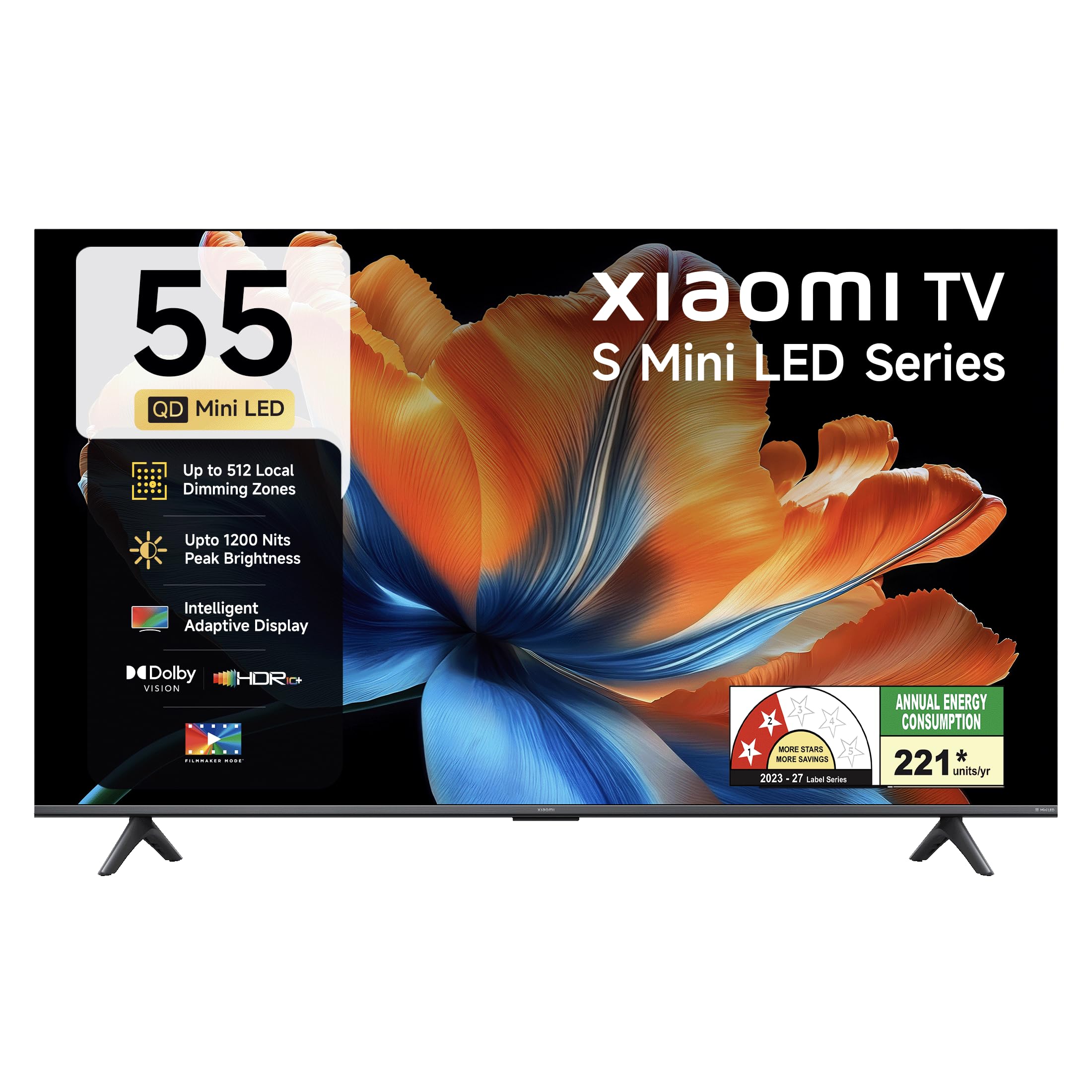
이미지: 앞면 view of the Xiaomi 55-inch 4K UHD Smart Quantum MagiQ S Mini LED Google TV, showcasin얇은 베젤 디자인이 특징입니다.
설치 가이드
1. 포장 풀기 및 구성품 확인
Carefully remove all items from the packaging. Ensure all components listed below are present and undamaged.

Image: Contents of the product box, including the TV unit, remote control, user manual, two stand units, four screws, two AAA batteries, and a power cord.
- 1 LED TV 유닛
- 1 리모컨
- 1 사용자 매뉴얼(본 문서)
- 스탠드 유닛 2개
- 4 Screws for stand installation
- AAA 배터리 2개 (리모컨용)
- 1 전원 코드
2. 스탠드 설치 또는 벽면 장착
Your television supports both table-top stand installation and wall mounting. Choose the method suitable for your environment.
- 스탠드 설치용: Attach the two provided stand units to the bottom of the TV using the four screws. Ensure they are securely fastened.
- 벽 장착용: Use a compatible VESA wall mount (sold separately). Follow the instructions provided with your wall mount kit. Ensure the wall can support the TV's weight.
3. 외부기기 연결하기
Connect your external devices such as set-top boxes, gaming consoles, or audio systems to the TV's ports.

이미지: 후면 view of the TV highlighting connectivity ports: Optical, Earphone, AV In, 3 HDMI ports (one with eARC), 2 USB 2.0 ports, Antenna, and Ethernet.
- HDMI 포트(x3): Connect gaming consoles, Blu-ray players, or set-top boxes. One port supports eARC for enhanced audio return channel functionality.
- USB 포트(x2): 미디어 재생을 위해 USB 저장 장치를 연결하세요.
- 이더넷 포트 : 유선 인터넷 연결용.
- 광 출력: 외부 오디오 시스템에 연결합니다.
- AV 입력: 컴포지트 비디오 및 스테레오 오디오를 사용하는 구형 장치 연결용입니다.
- 안테나: 지상파 또는 케이블 안테나를 연결합니다.
4. 초기 전원 켜기 및 설정
After connecting all necessary cables, plug the power cord into an electrical outlet. Press the power button on the remote control or the TV to turn it on. Follow the on-screen instructions for initial setup, which typically includes:
- 언어 선택
- 네트워크 연결(Wi-Fi 또는 이더넷)
- Google 계정 로그인
- 채널 스캐닝
샤오미 스마트 TV 작동 방법
1. 원격 제어 기능
동봉된 리모컨으로 모든 TV 기능을 사용할 수 있습니다. 리모컨에 AAA 배터리 2개를 넣을 때 극성을 확인하십시오.

Image: Xiaomi remote control, featuring dedicated quick access buttons for popular streaming services and Google Assistant voice control.
- 전원 버튼: TV를 켜거나 끕니다.
- Google 어시스턴트 버튼: 콘텐츠 검색, 스마트 홈 기기 제어 등을 위한 음성 제어 기능을 활성화합니다.
- 탐색 패드: 메뉴를 탐색하고 항목을 선택하는 데 사용됩니다.
- 볼륨 높이기/낮추기: 오디오 볼륨을 조절합니다.
- 채널 위/아래: TV 채널을 변경합니다.
- 빠른 액세스 버튼: Dedicated buttons for Netflix, Prime Video, YouTube, Disney+ Hotstar, SonyLIV, and Live TV.
- 음소거 버튼: TV 오디오를 음소거합니다.
2. Google TV Interface and Applications
Your TV runs on the Android 14 OS with Google TV, offering a personalized content experience. Access a wide range of applications from the Google Play Store.

Image: The PatchWall interface, providing customized content recommendations and curation from various streaming platforms.
- 콘텐츠 우선 UI: 모든 스트리밍 서비스의 콘텐츠를 한 곳에 정리해 줍니다.
- 개인 프로files: 개인 전문가 만들기file개인 맞춤형 추천을 위한 기능입니다.
- 지원되는 앱: Pre-installed and downloadable apps include Netflix, Prime Video, YouTube, Zee5, JioCinema, SonyLiv, and more.
- 구글 어시스턴트: Use voice commands for navigation, search, and smart home control.
3. 화면 및 사운드 설정
최적화하세요 view다양한 영상 및 음향 모드를 통해 시청 및 청취 경험을 제공합니다.
사진 설정:
- 영화 제작자 모드: Disables post-processing effects to display content as intended by the director.
- 돌비 비전: Enhances HDR content with dynamic metadata for optimized image quality frame by frame.
- HDR10+: Uses dynamic data to enhance every frame, providing an immersive view경험.
- 눈의 편안함 모드: 더욱 편안한 시야를 위해 푸른 빛과 깜빡임을 줄여줍니다. view경험.
- MEMC 엔진: 빠른 속도의 장면에서 더욱 부드러운 움직임을 구현하기 위한 모션 추정 및 모션 보정 기술.
- AI Picture Optimization Engine: Advanced AI algorithms analyze content in real-time to enhance clarity, contrast, and color reproduction.

Image: Filmmaker Mode, designed to preserve original colors, contrast, and motion for an authentic cinematic experience.

Image: Dolby Vision technology, optimizing image quality with deeper blacks and brighter highlights.

Image: HDR10+ dynamic frame-by-frame tuning, ensuring consistent detail across dark and bright scenes.

Image: Eye Care Mode, providing flicker-free visuals with DC Dimming and reduced blue light for comfortable view주고받음.
오디오 설정:
- 34와트 출력: Powerful built-in box speakers.
- 돌비 오디오: 풍부하고 선명하며 강력한 사운드를 제공합니다.
- DTS-X 및 DTS Virtual:X: 몰입감 넘치는 다차원 오디오를 제공합니다.
- 샤오미 사운드: Preset audio configurations developed for optimal sound quality.

Image: Xiaomi Sound, offering tailored audio experiences through expert-developed configurations.
4. 연결성 및 스트리밍
Your TV offers versatile connectivity options for seamless streaming and device integration.
- 듀얼 밴드 Wi-Fi: Connects to 2.4GHz and 5GHz wireless networks.
- 블루투스: 무선 헤드폰, 스피커 또는 기타 블루투스 액세서리를 연결하세요.
- Google Cast Built-in: Stream content directly from compatible apps on your smartphone or tablet.
- 애플 에어플레이 2: Apple 기기에서 콘텐츠를 스트리밍하세요.
- Miracast : 안드로이드 기기의 화면을 무선으로 미러링하세요.

Image: Stream content from your phone using Google Cast or Apple AirPlay 2.
관리 및 유지 보수
적절한 관리는 TV의 수명과 최적의 성능을 보장합니다.
- 화면 청소: 부드럽고 보풀이 없는 천으로 화면을 부드럽게 닦으세요. 잘 지워지지 않는 얼룩의 경우, 화면에 직접 닿지 않도록 천에 화면 전용 세척액을 묻혀 사용하세요.
- 바디 클리닝: Wipe the TV's frame and back panel with a soft, dry cloth. Avoid abrasive cleaners or solvents.
- 통풍: TV 주변의 공기가 원활하게 흐르도록 하세요. 통풍구를 막지 마세요.
- 전원 끄기 : 청소하기 전이나 장기간 사용하지 않을 경우에는 항상 TV 전원을 끄고 전원 콘센트에서 플러그를 뽑으세요.
- 소프트웨어 업데이트: 최적의 성능과 보안을 유지하려면 정기적으로 소프트웨어 업데이트를 확인하고 설치하십시오.
일반적인 문제 해결
Refer to this section for solutions to common operational problems.
| 문제 | 해결책 |
|---|---|
| TV가 켜지지 않습니다 | Ensure the power cord is securely plugged into both the TV and a working electrical outlet. Check if the power outlet is active. Try pressing the power button on the TV itself. |
| 화면은 나오지 않지만 소리는 나옵니다 | Check the input source. Ensure the connected device (e.g., set-top box) is turned on and functioning. Try a different HDMI cable or port. |
| 소리는 나지 않지만 화면은 나옵니다 | Check the volume level and ensure the TV is not muted. Verify audio output settings (e.g., internal speakers, external sound system). Check audio cables for external devices. |
| 리모콘이 응답하지 않음 | Replace the AAA batteries in the remote control. Ensure there are no obstructions between the remote and the TV. Re-pair the Bluetooth remote if necessary (refer to TV settings). |
| Wi-Fi에 연결할 수 없습니다 | Ensure your Wi-Fi router is on and working. Re-enter the Wi-Fi password. Try restarting both the TV and the router. Check if other devices can connect to the Wi-Fi network. |
기술 사양
Detailed specifications for the Xiaomi 55-inch 4K UHD Smart Quantum MagiQ S Mini LED Google TV (Model L55MC-IN).

Image: Physical dimensions and weight of the Xiaomi 55-inch TV, both with and without the stand.
| 특징 | 사양 |
|---|---|
| 모델 번호 | L55MC-IN |
| 화면 크기 | 55 인치 (138cm) |
| 디스플레이 기술 | 미니 LED |
| 해결 | 4K 울트라 HD(3840 x 2160) |
| 새로 고침 빈도 | 60 Hz (DLG 120 Hz) |
| 최대 밝기 | 최대 1200니트 |
| 운영 체제 | Android 14 OS with Google TV |
| 숫양 | 2GB |
| ROM(내부 저장소) | 32GB (XNUMX기가바이트) |
| 사운드 출력 | 34 와트 |
| 오디오 기술 | 돌비 오디오, DTS-X, DTS Virtual:X |
| 연결성 | Dual Band Wi-Fi, Bluetooth, 3 HDMI (1 eARC), 2 USB, Optical, Ethernet, AV In |
| 화면 미러링 | Google Cast, Apple AirPlay 2, Miracast |
| 특별 기능 | Filmmaker Mode, MEMC, Eye Comfort Mode, AI Picture Optimization Engine |
| 제품 크기(D x W x H) | 31.2D x 31.2W x 76.9H Centimeters (with stand) |
| Item Weight Without Stand | 11.6 킬로그램 |
| 전력 소비 | 230 와트 |
| 원산지 | 인도 |
보증 정보
Your Xiaomi TV comes with a comprehensive warranty provided by the brand from the date of purchase.
- 표준 보증: 3-year comprehensive warranty for non-prebook customers (purchases between April 22nd - May 31st).
- Pre-book Customer Warranty: 4-year comprehensive warranty for pre-book customers (purchases between April 22nd - April 30th).
Warranty claims can be made using your Amazon invoice as proof of purchase. For detailed terms and conditions, please refer to the official Xiaomi warranty policy or contact customer support.
고객 지원
For any assistance, service requests, or queries regarding your Xiaomi TV, please contact Xiaomi customer support.

이미지: 이상view of Xiaomi's customer support commitments, including quick installation, prompt call-backs, and swift doorstep solutions.
- 설치 서비스: New TV installations are typically completed within 3 hours of your appointment.
- Service Requests: 서비스 요청 시 60분 이내에 지원팀에서 연락을 드릴 예정입니다.
- 현장 지원: Experts aim to arrive at your home within 24 hours of your service request.
Please visit the official Xiaomi India web최신 지원 세부 정보를 보려면 해당 사이트를 방문하거나 제품 포장에 제공된 연락처 정보를 참조하세요.