
1. 서론
This manual provides detailed instructions for the installation, operation, and maintenance of your LongPlus CLK2-W1X8 4K 8MP UHD Wireless Outdoor Security Camera. Please read this manual thoroughly before using the product to ensure proper function and safety. Keep this manual for future reference.
2. 상자 안에 무엇이 들어있나요?
패키지에 모든 구성 요소가 들어 있는지 확인하세요.
- 카메라
- 벽걸이형
- 사용자 설명서
- 나사
3. 제품 오버view 및 기능
The LongPlus CLK2-W1X8 is a 4K 8MP UHD wireless outdoor security camera designed for home surveillance. It offers advanced features for comprehensive monitoring.
3.1 주요 특징
- 4K (8MP) UHD Resolution: Delivers ultra-clear video and image details.
- 컬러 나이트 비전: Advanced starlight sensor and large aperture lens provide vivid full-color night vision in low-light conditions.
- 24시간 연중무휴 녹화: Supports continuous recording in Always-On Power Mode.
- 듀얼 밴드 Wi-Fi: 2.4GHz 및 5GHz Wi-Fi 네트워크 모두와 호환되어 안정적인 연결을 제공합니다.
- 양방향 오디오 : 실시간 통신을 위한 마이크와 스피커가 내장되어 있습니다.
- AI 동작 감지: PIR detection with adjustable sensitivity, triggering recording, flashing white lights, and a siren.
- 유연한 스토리지: Supports local SD card storage (up to 512GB, not included) and cloud storage options.
- 배터리 구동: 5200mAh battery provides extended operation.
3.2 시각적 특징
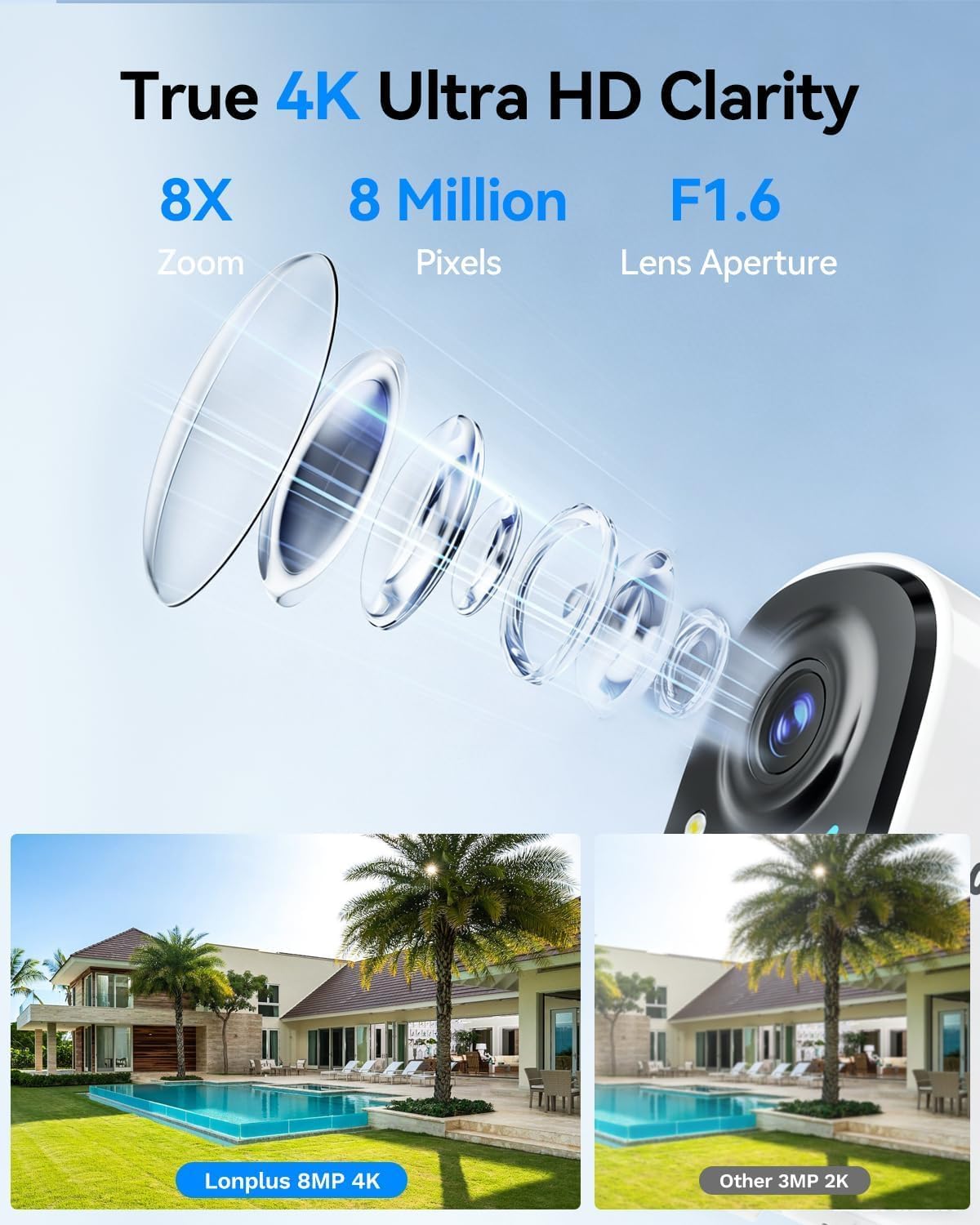
이미지 1: Illustrates the 4K 8MP UHD clarity of the LongPlus camera, showing a detailed lens diagram and a comparison of 8MP 4K footage versus 3MP 2K footage of a house with a pool.

이미지 2: Shows the LongPlus 4K 8MP wireless outdoor camera mounted on a wall, highlighting features such as 4K 8MP HD, 5200mAh battery, multi-user share, 2-way talk, human/car detection, SD/cloud storage, sound/light alarm, and color/infrared night vision.

이미지 3: Depicts PIR motion detection in action, showing a man near a garage door and a notification indicating a person detected by the outdoor camera. It mentions 3 levels of detection, automatic 20-second recording, and a motion detection distance of up to 24 feet.

이미지 4: Compares different night vision capabilities, showing a house at night with Color Night Vision, what is visible to the Naked Eyes, and the view from an IR Light Camera, demonstrating enhanced clarity with color night vision.

이미지 5: Illustrates the two-way talk feature, with a delivery person at a door and a smartphone screen showing a video feed and a text message exchange, demonstrating voice and call functionality.
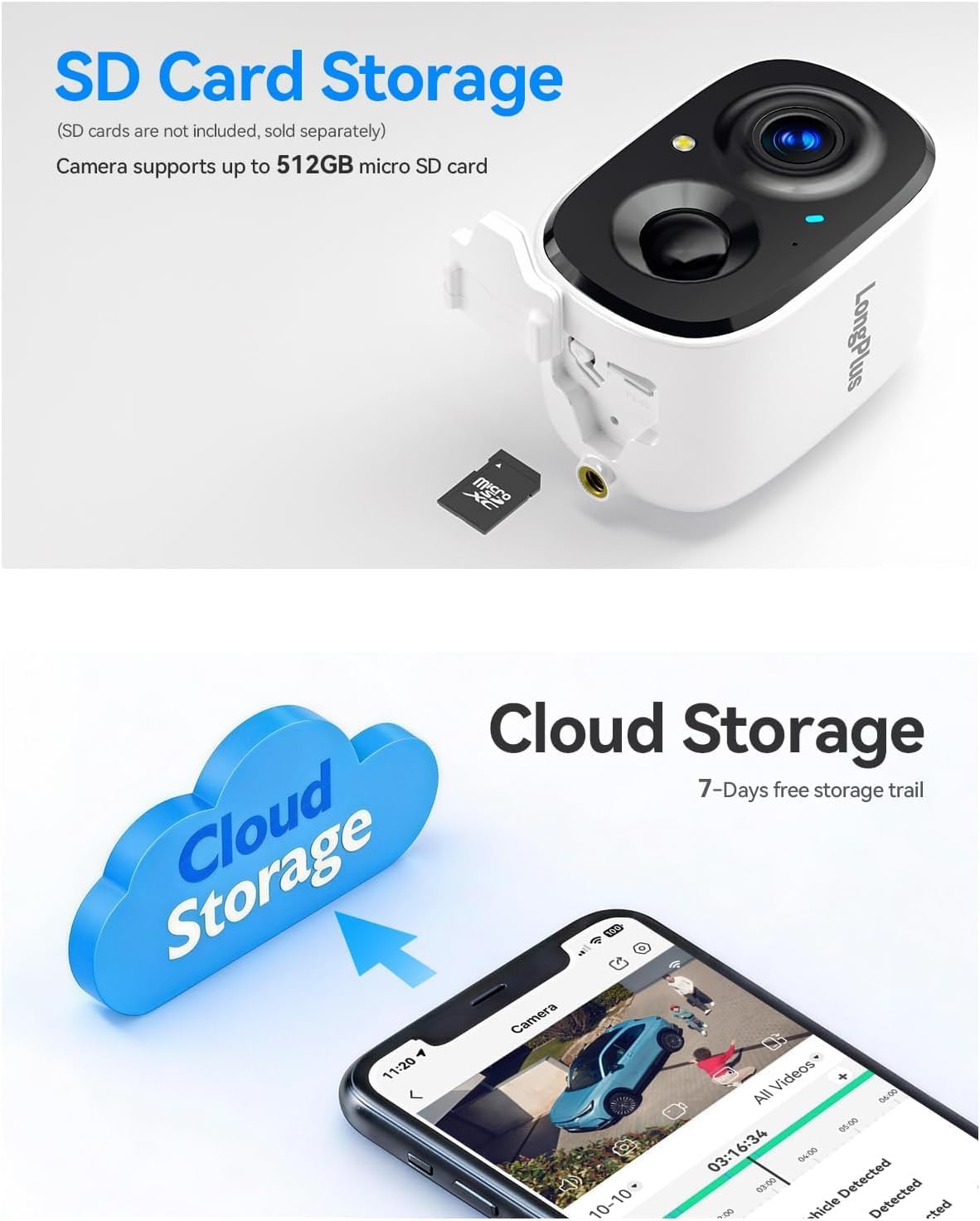
이미지 6: Details the storage options, showing the camera with an inserted micro SD card (up to 512GB supported) and a cloud storage graphic with a smartphone displaying recorded video, indicating both local and cloud storage availability.

이미지 7: Provides an exploded view of the camera, highlighting its 5200mAh battery and internal components, emphasizing its 100% wire-free battery-powered design and extended battery life.
4. 설정 가이드
4.1 초기 충전
Before first use, fully charge the camera battery using a standard 5V USB charger (not included). The charging indicator light will change color when charging is complete.
4.2 앱 다운로드 및 계정 생성
- Download the 'SV360' app from your smartphone's app store (iOS or Android).
- Open the app and create a new user account, following the on-screen instructions.
4.3 Camera Pairing with Wi-Fi
- 카메라의 전원을 켭니다.
- In the SV360 app, tap 'Add Device' or the '+' icon.
- Select your camera model and follow the in-app prompts to connect to your Wi-Fi network. The camera supports both 2.4GHz and 5GHz Wi-Fi bands. Ensure your phone is connected to the same Wi-Fi network during setup.
- 안내에 따라 휴대폰 화면에 표시된 QR 코드를 카메라 렌즈로 스캔하세요.
- 연결되면 카메라 이름을 지정하고 설정을 완료하세요.
4.4 설치
- 탁 트인 야외 장소를 선택하세요 view of the area you wish to monitor. Ensure good Wi-Fi signal strength at the chosen location.
- Use the provided wall mount and screws to securely attach the camera to a wall or suitable surface.
- 원하는 감시 영역을 커버할 수 있도록 카메라 각도를 조정하십시오.
5. 사용 설명서
5.1 라이브 View 그리고 녹음
- Open the SV360 app and select your camera to view 라이브 피드.
- 24/7 Recording (Always-On Power Mode): This mode enables continuous recording. Be aware that this consumes more battery.
- Power Saving Mode (Event-Triggered Recording): The camera records only when motion is detected, conserving battery life. You can switch between these modes in the app settings.
5.2 양방향 오디오
라이브에서 view in the app, tap the microphone icon to speak through the camera's speaker. Tap the speaker icon to listen to audio from the camera's microphone.
5.3 동작 감지 및 경보
- The camera uses PIR detection to identify motion. Adjust sensitivity levels in the app settings.
- Upon detection, the camera will automatically begin recording for 20 seconds.
- You can configure the camera to activate flashing white lights and a loud siren as a deterrent when motion is detected.
- Receive push notifications on your smartphone when motion events occur.
5.4 재생 및 저장
- SD 카드 저장: Insert a micro SD card (up to 512GB) into the camera's slot for local storage of recordings. Access recorded footag앱의 재생 기능을 통해.
- 클라우드 스토리지: The camera supports cloud storage. A 7-day free trial is typically offered, after which subscription plans are available for continuous video history and enhanced data protection. Access cloud recordings through the app.
6. 유지관리
6.1 배터리 관리
- Monitor the battery level through the SV360 app.
- Recharge the camera when the battery is low to ensure continuous operation.
- Battery life varies based on usage, recording mode, and environmental factors.
6.2 청소
Periodically clean the camera lens and housing with a soft, dry cloth to remove dust and smudges. Do not use harsh chemicals or abrasive materials.
6.3 펌웨어 업데이트
Check the SV360 app regularly for available firmware updates. Keeping your camera's firmware updated ensures optimal performance and access to new features.
6.4 SD 카드 관리
If using an SD card, ensure it is formatted correctly within the app. Regularly back up important footage and consider replacing the SD card if it shows signs of degradation.
7. 문제 해결
- 카메라가 Wi-Fi에 연결되지 않음:
Ensure your Wi-Fi network is 2.4GHz or 5GHz and has a strong signal. Verify the Wi-Fi password. Try resetting the camera and repeating the pairing process. - 비디오 품질이 좋지 않음:
Check your Wi-Fi signal strength. Ensure the camera lens is clean and free from obstructions. Adjust video quality settings in the app if available. - 동작 감지가 작동하지 않습니다:
Verify that motion detection is enabled in the app settings. Adjust PIR sensitivity. Ensure there are no physical obstructions blocking the sensor. - 배터리가 빠르게 소모됨:
Frequent motion events, continuous recording (Always-On Power Mode), and low temperatures can reduce battery life. Consider switching to Power Saving Mode. - 양방향 오디오 문제:
휴대폰과 앱의 볼륨 설정을 확인하세요. 카메라의 마이크나 스피커를 가리는 장애물이 없는지 확인하세요.
For further assistance, refer to the FAQ section within the SV360 app or contact customer support.
8. 사양
| 모델명 | CLK2-W1X8 |
| 해결 | 4K (8MP) UHD |
| 연결 기술 | 무선(2.4GHz 및 5GHz Wi-Fi) |
| 특별 기능 | 2-Way Audio, Color Night Vision, AI Motion Sensor, Siren, Flashing Lights |
| 실내/실외 사용 | 집 밖의 |
| 호환 장치 | 스마트폰 (iOS, 안드로이드) |
| 제어 방법 | App (SV360) |
| 전원 | 배터리 구동(5200mAh) |
| View잉 각도 | 110도 |
| 나이트 비전 범위 | 33 피트 |
| 지원되는 최대 플래시 메모리 용량 | 512GB (마이크로 SD 카드) |
| 품목 치수 | 2.3 x 2.3 x 3.5 인치 |
9. 보증 및 지원
Your LongPlus CLK2-W1X8 camera is covered by a manufacturer's warranty. Please refer to the warranty card included in your package or the official LongPlus web구체적인 이용 약관은 해당 사이트에서 확인하세요.
For technical support, troubleshooting assistance, or warranty claims, please contact LongPlus customer service through the SV360 app or visit the official LongPlus support website. Have your product model number (CLK2-W1X8) and purchase information ready when contacting support.