
1. 소개 및 이상view
The STRONG LEAP-NOVA-X TV Stick is a compact streaming device designed to transform any television with an HDMI port into a 4K Ultra HD smart TV. It operates on Android 14, offering access to over 5000 streaming applications. Key features include Dolby Vision, HDR10+ for superior picture quality, Dolby Audio for immersive sound, Wi-Fi 6 for stable connectivity, and integrated Chromecast for easy content sharing. The device also supports voice control via its included remote.
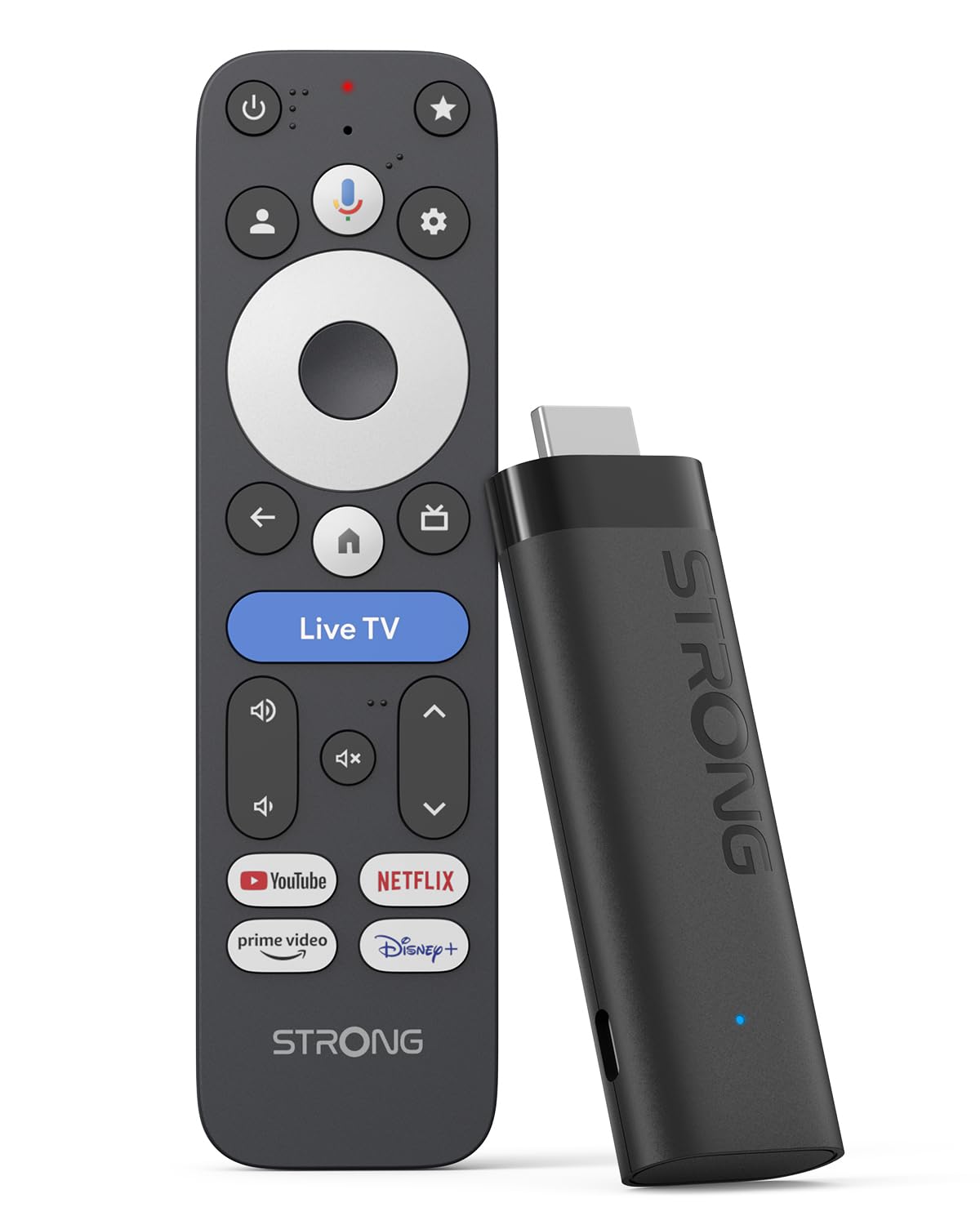
Image: The STRONG LEAP-NOVA-X TV Stick, a compact black streaming device.
2. 상자 안에 무엇이 들어있나요?
상자를 조심스럽게 풀고 모든 품목이 들어 있는지 확인하세요.
- 1x TV Stick LEAP-NOVA-X
- 1x 10W 5V/2A Power Adapter
- 1x 1m USB-C Power Cable
- 1x HDMI 확장 케이블
- 1x 퀵 가이드
- 1x 원격 제어
- AAA 배터리 2개

Image: The contents of the STRONG LEAP-NOVA-X TV Stick package, including the TV stick, power adapter, USB-C cable, HDMI extension cable, quick guide, remote control, and AAA batteries.
3. 설정 지침
Follow these steps to set up your STRONG LEAP-NOVA-X TV Stick:
- TV에 연결: Insert the LEAP-NOVA-X TV Stick directly into an available HDMI port on your television. If space is limited, use the provided HDMI extension cable.
- 전원 켜기: Connect the USB-C power cable to the TV Stick and the other end to the power adapter. Plug the power adapter into a wall outlet.
- HDMI 입력 선택: Turn on your TV and use your TV remote to select the correct HDMI input source to which the TV Stick is connected.
- 리모컨 페어링: Insert the two AAA batteries into the provided remote control. Follow the on-screen instructions to pair the remote with your TV Stick.
- Wi-Fi에 연결: Once the initial setup screen appears, follow the prompts to connect your TV Stick to your home Wi-Fi network. Enter your Wi-Fi password when requested.
- Google 계정 설정: Google 계정으로 로그인하면 Google TV 기능에 액세스하고, 앱을 다운로드하고, 환경을 맞춤 설정할 수 있습니다.
- 스트리밍 시작: After completing the setup, you can begin exploring apps and streaming content.

Image: A three-step visual guide demonstrating how to set up the TV Stick: 1. Connect to TV's HDMI port, 2. Connect to Wi-Fi, 3. Start streaming.
4. 사용 설명서
4.1 Google TV 탐색
The LEAP-NOVA-X TV Stick uses the Google TV interface, which organizes content from all your streaming services into one personalized home screen. Use the directional pad on your remote to navigate through menus, select apps, and browse content.

Image: A television displaying the Google TV interface with various streaming app icons, including Netflix, Disney+, and YouTube.
4.2 Google Assistant를 통한 음성 제어
The included remote control features a dedicated button for Google Assistant. Press and hold this button, then speak your command or question. You can ask to find movies, launch apps, control playback, or get information.

Image: A woman using the voice control feature of the remote to interact with Google Assistant on the TV, displaying voice commands like 'Play my favorite playlist on YouTube' and 'Show me trending movies'.
4.3 크롬캐스트 내장
The LEAP-NOVA-X TV Stick has Chromecast built-in, allowing you to cast content directly from your compatible smartphone, tablet, or computer to your TV screen. Look for the Cast icon (깁스) within supported apps on your mobile device.

Image: Multiple screens (TV, tablet, smartphone) displaying a basketball game, illustrating the Google Cast (Chromecast) feature for sharing content across devices.
4.4 앱 설치
Access the Google Play Store directly from your TV Stick to download and install additional streaming apps, games, and utilities. With 32GB of internal storage, you have ample space for numerous applications.
5. 주요 특징
5.1 안드로이드 14 운영체제
Experience a smarter and faster interface with the integrated Android 14 operating system. This provides ultra-fluid entertainment and optimized background performance for a responsive user experience.

Image: A side-by-side comparison showing the faster performance of Android 14 on the LEAP-NOVA-X TV Stick versus an older Android version, illustrated by a racing game.
5.2 4K UHD with Dolby Vision and HDR10+
Enjoy stunning 4K Ultra HD resolution (3840 x 2160 pixels) with exceptional clarity and detail. Support for Dolby Vision and HDR10+ delivers extraordinary contrast, vibrant colors, and enhanced brightness for a cinematic view경험.

Image: A man watching an action movie with fighter jets on a television, illustrating the immersive visual experience with Dolby Vision.
5.3 돌비 오디오
Immerse yourself in rich, clear, and powerful sound with Dolby Audio support. This technology enhances your audio experience, making movies, music, and games more engaging.

Image: A couple enjoying a concert on television, with sound waves emanating from the screen, highlighting the Dolby Audio experience.
5.4 Wi-Fi 6 및 블루투스 5.2
The device features Wi-Fi 6 for ultra-stable and low-latency 4K streaming, even in congested network environments. Bluetooth 5.2 ensures reliable connectivity with accessories like headphones, game controllers, and speakers.

Image: A split screen showing a smooth streaming experience with Wi-Fi 6 and Bluetooth 5.2 (right) versus a buffering experience with older Wi-Fi 5 and Bluetooth 5.0 (left), using an animated movie scene.
5.5 32GB Storage and 2GB RAM
With 32GB of internal storage, you can install dozens of apps and games without worrying about running out of space. The 2GB of RAM ensures smooth operation and quick transitions between applications.

Image: A visual comparison between a standard 2+8GB TV stick and the STRONG LEAP-NOVA-X with 2GB RAM + 32GB Storage, highlighting the increased memory capacity.
6. 사양
| 모델명 | LEAP-NOVA X |
| 상표 | 강한 |
| 연결 기술 | HDMI |
| 해결 | 4K UHD(3840 x 2160픽셀) |
| 운영 체제 | 안드로이드 14 (구글 TV) |
| 숫양 | 2GB (XNUMX기가바이트) |
| 저장 용량 | 32GB (XNUMX기가바이트) |
| 특별 기능 | Google TV, Chromecast, Dolby Vision & Audio, HDR10+, Wi-Fi 6, Bluetooth 5.2, HDMI 2.1, Voice Control |
| 컨트롤러 유형 | Voice Control, Remote Control |
| 치수(길이 x 너비 x 높이) | 9L x 3W x 1.5Hcm |
| 색상 | 검은색 |
7. 문제 해결
If you encounter issues with your STRONG LEAP-NOVA-X TV Stick, refer to the following common troubleshooting steps:
- 전원 없음/디스플레이 없음:
- Ensure the power adapter is securely connected to the TV Stick and a working power outlet.
- Verify that your TV is on the correct HDMI input source.
- TV의 다른 HDMI 포트에 연결해 보세요.
- 리모콘이 응답하지 않음:
- AAA 배터리가 올바르게 삽입되었는지, 그리고 충전량이 충분한지 확인하십시오. 필요한 경우 교체하십시오.
- Re-pair the remote control by following the initial setup instructions or consulting the Quick Guide.
- Wi-Fi 연결 문제:
- Wi-Fi 라우터가 켜져 있고 올바르게 작동하는지 확인하세요.
- 와이파이 공유기와 TV 스틱을 재시작하세요.
- Go to the TV Stick's network settings and re-enter your Wi-Fi password.
- Move the TV Stick closer to your Wi-Fi router if possible, or ensure no major obstructions are blocking the signal.
- 앱이 충돌하거나 정지됨:
- 문제가 있는 애플리케이션을 닫고 다시 시작하세요.
- Clear the cache for the app in the TV Stick's settings (Settings > Apps > [App Name] > Clear Cache).
- Ensure the app and the TV Stick's operating system are updated to the latest versions.
- 문제가 지속되면 앱을 제거한 후 다시 설치해 보세요.
- 화질/음질이 좋지 않음:
- Check your internet connection speed; 4K streaming requires a stable and fast connection.
- Ensure your TV supports 4K UHD, HDR10+, and Dolby Vision for optimal visual quality.
- Verify that your TV's audio settings are correctly configured for Dolby Audio.
8. 유지관리
To ensure the longevity and optimal performance of your STRONG LEAP-NOVA-X TV Stick:
- 과열을 방지하기 위해 장치를 통풍이 잘 되는 곳에 보관하십시오.
- Regularly check for and install system and app updates to benefit from new features and security patches.
- Clean the device with a soft, dry cloth. Avoid using liquid cleaners or abrasive materials.
- 장치를 극한의 온도, 습도 또는 직사광선에 노출시키지 마십시오.
9. 보증 및 지원
The STRONG LEAP-NOVA-X TV Stick comes with a 2년 제조사 보증보증 청구를 위해 구매 증빙 서류를 보관하세요.
For technical support, product information, or warranty inquiries, please refer to the contact information provided in your Quick Guide or visit the official Strong web대지.