
1. 서론
Welcome to the user manual for your new Nothing Phone (4a) Pro. This guide provides essential information on setting up, operating, maintaining, and troubleshooting your device. Please read this manual thoroughly to ensure optimal performance and longevity of your smartphone.
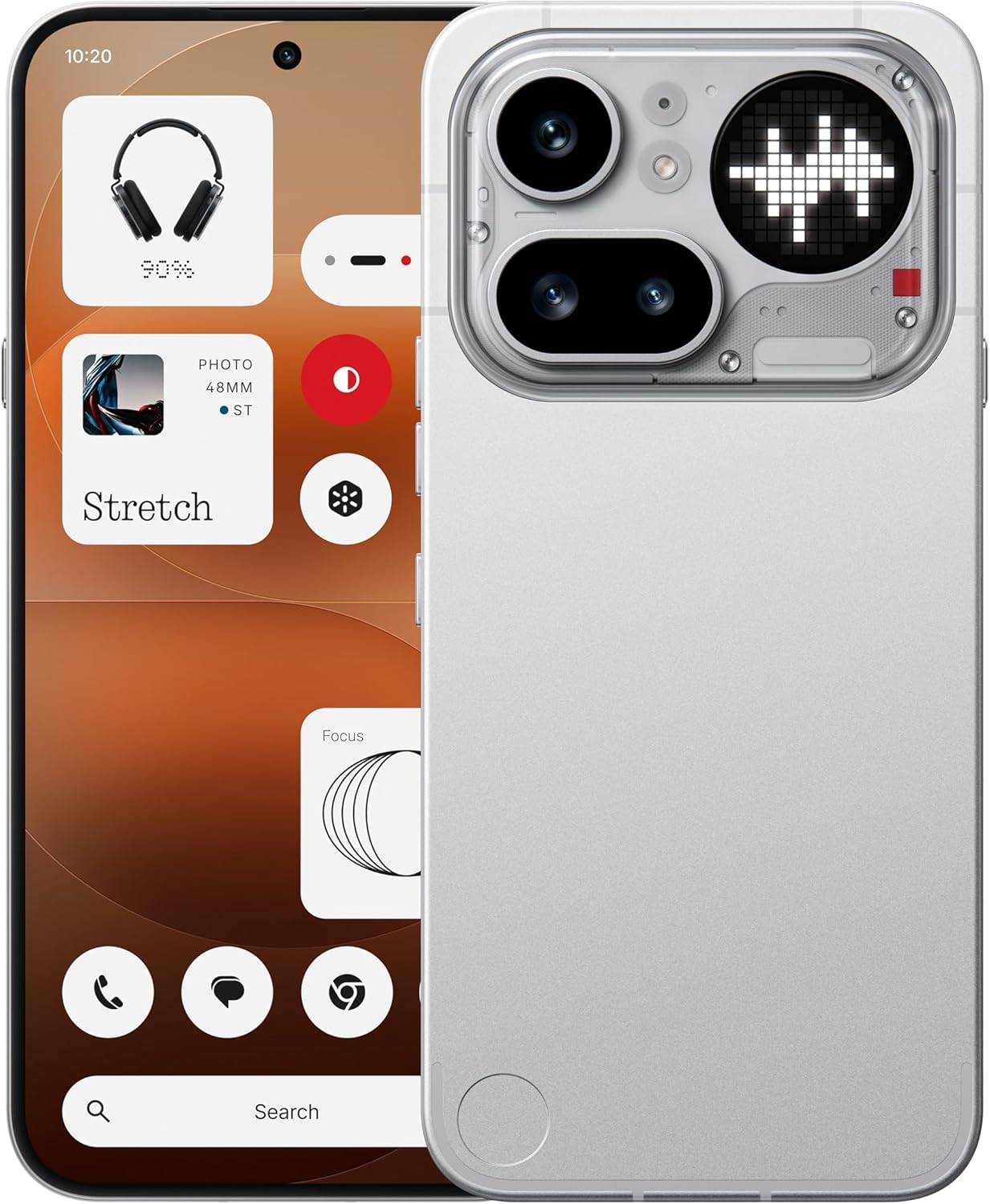
그림 1.1: 앞쪽 view of the Nothing Phone (4a) Pro. This image displays the sleek design and full-screen display of the device.
2. 상자 내용물
패키지에 다음 품목이 포함되어 있는지 확인하십시오.
- Nothing Phone (4a) Pro Handset
- Nothing USB-C Cable
- 전화 케이스
- 사전 적용된 스크린 보호 필름
- SIM 이젝터 도구
- 안전 정보
- 보증 카드
3. 초기 설정
3.1. SIM 카드 삽입
- 휴대폰 측면에서 SIM 카드 트레이를 찾으세요.
- Insert the provided SIM ejector tool into the small hole on the tray and press gently until the tray pops out.
- Place your Nano SIM card(s) into the tray with the gold contacts facing down. The Phone (4a) Pro supports Dual Nano SIM.
- 트레이를 조심스럽게 전화기 안으로 밀어 넣어 딸깍 소리가 나면서 제자리에 고정되도록 합니다.
3.2. 장치 전원 켜기
를 누르고 계세요 전원 버튼 located on the side of the phone until the Nothing logo appears on the screen. Follow the on-screen instructions to complete the initial setup, including language selection, Wi-Fi connection, and Google account setup.
3.3. 배터리 충전
Before first use, it is recommended to fully charge your device. Connect the Nothing USB-C cable to the phone's USB Type-C port and the other end to a compatible power adapter (sold separately). The phone supports quick charging.
4. 장치 작동
4.1. 기본 탐색
The Nothing Phone (4a) Pro features a responsive touchscreen. Use gestures such as tapping, swiping, pinching, and spreading to navigate the interface, open apps, and interact with content.
4.2. In-Display Fingerprint Sensor
Your device is equipped with an in-display fingerprint sensor for secure unlocking and authentication. To set up, navigate to 설정 > 보안 > 지문 and follow the instructions to register your fingerprint(s).
4.3. 운영 체제
The Nothing Phone (4a) Pro runs on Nothing OS based on Android 16, offering a clean and intuitive user experience with access to a wide range of applications via the Google Play Store.

그림 4.1: 위에view of Nothing Phone (4a) Pro key features, including the triple camera system, 140x ultra zoom, 5080 mAh battery with 50W fast charge, Snapdragon 7 Gen 4 processor, essential AI tools, Nothing OS on Android 16, 6.83" 1.5K flexible AMOLED display, and Google Gemini + ChatGPT integration.
5. 카메라 기능
The Nothing Phone (4a) Pro is equipped with an advanced camera system to capture high-quality photos and videos.
5.1. 후방 카메라 시스템
The rear camera setup includes a 50MP main sensor, a 50MP ultra-wide sensor, and an 8MP telephoto sensor주요 특징은 다음과 같습니다.
- OIS + EIS: Optical Image Stabilization and Electronic Image Stabilization for steady shots.
- 자동 초점 : Fast and accurate focusing.
- Ultra XDR: Enhanced dynamic range for vibrant images.
- 7X In-sensor Zoom: High-quality zoom without loss of detail.
- 70X Ultra Zoom: Extended zoom capabilities for distant subjects.
- 4K 비디오 녹화: Capture high-resolution videos.
5.2. 전면 카메라
The front camera features a 32MP sensor, 지원 1080p video recording at 30fps/60fps with Ultra XDR, ideal for selfies and video calls.

그림 5.1: Diagram illustrating the Pro 3-Camera System of the Nothing Phone (4a) Pro, highlighting the 50 MP OIS Periscope Camera, 50 MP OIS Sony Main Camera, 120° Sony Ultra-Wide Camera, and 32 MP Front Camera.
6. 디스플레이 및 성능
6.1. 디스플레이
이 장치의 특징은 다음과 같습니다. 6.83-inch 144Hz flexible LTPS AMOLED display 다음과 같은 해상도로 1260 x 2800 픽셀 and a pixel density of 450ppi. This provides sharp visuals, smooth scrolling, and an immersive view경험.
6.2. 성능
에 의해 구동됨 Qualcomm Snapdragon 7 Gen 4 octa-core processor with a clock speed of up to 2.8GHz, the Phone (4a) Pro delivers robust performance for multitasking, demanding applications, and gaming. It is complemented by 12GB LPDDR5X 램 그리고 256GB 내장 저장공간.
7. 배터리 및 충전
The Nothing Phone (4a) Pro is equipped with a 5400mAh 리튬 이온 배터리사용 시간을 연장해 줍니다. 이 제품은 다음과 같은 기능을 지원합니다. 급속 충전 via the USB Type-C port, allowing for rapid power replenishment.
8. 연결성
Your device offers comprehensive connectivity options:
- 회로망: Dual Nano SIM, 5G, 4G VoLTE
- 무선 전화: Wi-Fi 6, 블루투스 v5.4
- 포트: USB 타입 C (OTG 호환)
- 항해: GPS
9. 유지관리 및 관리
9.1. 방수성
The Nothing Phone (4a) Pro is rated as 방수. While it can withstand splashes and light rain, it is not fully waterproof. Avoid submerging the device in water or exposing it to high-pressure water jets.
9.2. 청소
To clean your phone, use a soft, lint-free cloth. Avoid using abrasive materials, solvents, or aerosol sprays, as these can damage the screen or finish.
9.3. 환경 조건
Operate and store your device within recommended temperature ranges. Extreme heat or cold can affect battery life and overall performance.
10. 문제 해결
If you encounter issues with your Nothing Phone (4a) Pro, try the following basic troubleshooting steps:
- 장치 전원이 켜지지 않음: 배터리가 충전되었는지 확인하세요. 충전기를 연결하고 몇 분 정도 기다린 후 다시 전원을 켜보세요.
- 화면 응답 없음: Restart the device by pressing and holding the Power button for approximately 10-15 seconds.
- 네트워크 문제: Check if your SIM card is properly inserted. Try toggling Airplane Mode on and off. Ensure you have network coverage.
- 앱 충돌: 앱을 닫았다가 다시 여세요. 문제가 지속되면 앱의 캐시와 데이터를 삭제하세요. 설정 > 앱.
- 느린 성능: Close unnecessary background apps. Restart your device. Consider performing a factory reset as a last resort (note: this will erase all data on your phone).
11. 사양
| 특징 | 세부 사항 |
|---|---|
| 상표 | 아무것도 아님 |
| 모델 | Phone (4a) Pro |
| 운영 체제 | 안드로이드 16 |
| 프로세서 | Qualcomm Snapdragon 7 Gen 4 Octa-core (up to 2.8 GHz) |
| 숫양 | 12GB LPDDR5X |
| 내부 저장소 | 256GB (XNUMX기가바이트) |
| 디스플레이 크기 | 6.83 인치 |
| 디스플레이 유형 | Flexible LTPS AMOLED |
| 디스플레이 해상도 | 1260 x 2800 픽셀 |
| 새로 고침 빈도 | 144Hz |
| 후방 카메라 | 50MP + 50MP + 8MP (OIS + EIS, Ultra XDR, 7X in-sensor zoom, 70X ultra zoom, 4K video) |
| 전면 카메라 | 32MP (1080p video at 30fps/60fps, Ultra XDR) |
| 배터리 용량 | 5400mAh 리튬 이온 |
| 충전 중 | Quick Charging, USB Type-C |
| 연결성 | 5G, Dual SIM, Wi-Fi 6, Bluetooth v5.4, OTG, GPS |
| 보안 | 디스플레이 지문 센서 |
| 방수성 | 방수 |
| 치수 | 16.4 x 7.8 x 0.8 센티미터 |
| 무게 | 190그램 |
12. 보증 정보
The Nothing Phone (4a) Pro comes with a 1년 제조사 보증 from the date of purchase. This warranty covers manufacturing defects under normal use. Please refer to the included Warranty Card for detailed terms and conditions, exclusions, and how to claim warranty services.
13. 지원
For further assistance, technical support, or service inquiries, please visit the official Nothing support website or contact their customer service. Keep your purchase receipt and warranty card handy when seeking support.


