
1. 서론
This manual provides essential instructions for setting up, operating, and maintaining your Nothing Phone (4a) Pro. Please read this guide thoroughly to ensure proper use and to maximize the performance of your device.
2. 초기 설정
2.1. 언박싱 및 구성품
패키지를 열면 모든 구성품이 들어 있는지 확인하세요.
- Nothing Phone (4a) Pro device
- 헤드폰
Note: A USB Type-C cable and SIM ejector tool may be sold separately or included depending on region. A power adapter is typically sold separately.
2.2. SIM 카드 삽입
- 휴대폰 측면에서 SIM 카드 트레이를 찾으세요.
- Insert a SIM ejector tool (not always included) into the small hole next to the tray and press gently until the tray pops out.
- 나노 SIM 카드의 금색 접점이 아래를 향하도록 트레이에 놓으세요.
- 트레이를 조심스럽게 전화기에 다시 삽입하여 제자리에 고정되도록 합니다.
2.3. 전원 켜기 및 초기 구성
- Press and hold the Power button until the Nothing logo appears.
- 화면의 안내에 따라 언어를 선택하고, Wi-Fi 네트워크에 연결하고, Google 계정으로 로그인하세요.
- Complete the setup process, including data transfer (if applicable) and security settings.
3. 휴대전화 작동
3.1. 디스플레이 및 사용자 인터페이스
The Nothing Phone (4a) Pro features a 6.83-inch 1.5K Flexible AMOLED Display 와 함께 144Hz 재생률, providing vibrant colors and smooth scrolling. Navigate the interface using touch gestures.
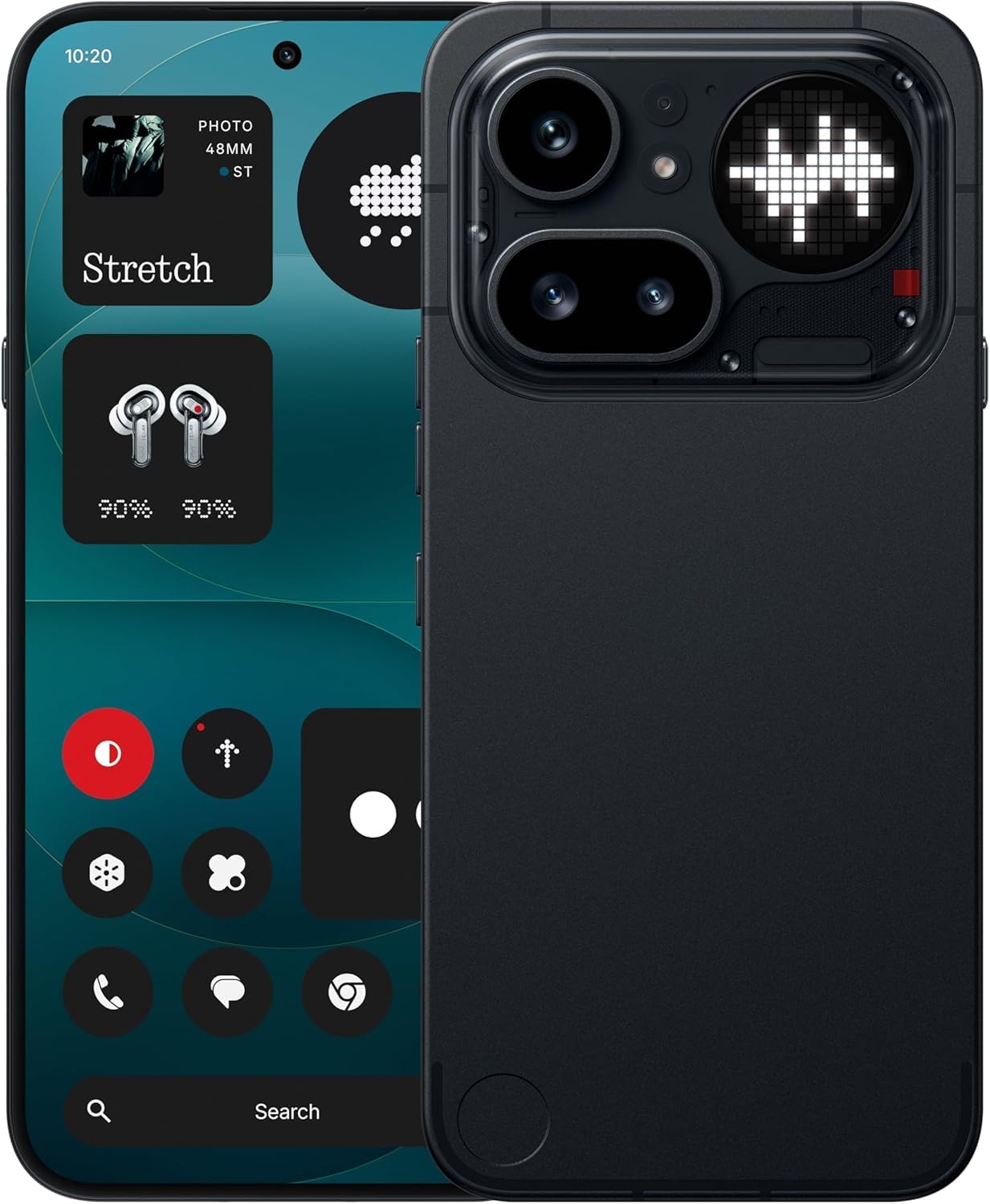
Image: The Nothing Phone (4a) Pro showcasing its flexible AMOLED display and sleek design.
3.2. 카메라 시스템
귀하의 기기에는 다음이 장착되어 있습니다. Triple Camera System, allowing for versatile photography. The camera supports up to 140x ultra zoom for capturing distant subjects.
Image: Detail of the triple camera module and a screen showing 140x zoom capability.
3.3. 성능
The Nothing Phone (4a) Pro is powered by the 스냅드래곤 7 4세대 processor, ensuring smooth multitasking and efficient performance for demanding applications and games. It comes with 12GB 램 for enhanced responsiveness.
Image: A visual representation of the Snapdragon 7 Gen 4 processor, highlighting the device's core performance component.
3.4. 배터리 및 충전
장치에는 다음이 포함됩니다. 5080mAh 배터리사용 시간을 연장해 줍니다. 이 제품은 다음과 같은 기능을 지원합니다. 50W 급속 충전 technology, allowing for quick recharging.
이미지: 내부 view of the phone, showing the battery component with its specifications.
3.5. 소프트웨어 및 AI 기능
Your Nothing Phone (4a) Pro runs on Nothing OS~을 기반으로 안드로이드 14, offering a clean and intuitive user experience. It integrates Essential AI tools 및 기능 Google Gemini + ChatGPT Integration for advanced assistance and productivity.
Image: Screenshots depicting the Nothing OS home screen, an AI tools interface, and the Google Gemini + ChatGPT integration menu.
3.6. 연결성
장치 지원 5G cellular technology for high-speed internet access. It uses a USB 타입-C (USB 2.0) connector for charging and data transfer.
4. 유지관리
4.1. 기기 청소
휴대전화를 닦을 때는 부드럽고 보풀 없는 천을 사용하세요. 거친 재질이나 독한 화학 약품은 사용하지 마세요. 잘 지워지지 않는 얼룩은 살짝 적신 천으로 닦아내세요.amp천에 물을 묻히거나 전자제품용 화면 세정제를 묻힙니다.
4.2. 소프트웨어 업데이트
기기에 최신 기능, 보안 패치, 성능 향상 기능이 적용되어 있는지 확인하려면 소프트웨어 업데이트를 정기적으로 확인하고 설치하세요. 설정 > 시스템 > 소프트웨어 업데이트 사용 가능한 업데이트를 확인하세요.
4.3. 배터리 관리
배터리 수명을 연장하려면 휴대전화를 극한 온도에 노출시키지 마세요. 최적의 배터리 수명을 위해서는 배터리 충전량을 20%에서 80% 사이로 유지하는 것이 좋습니다.
5. 문제 해결
5.1. 일반적인 문제 및 해결 방법
- 장치가 켜지지 않음: 배터리가 충전되어 있는지 확인하세요. 충전기에 최소 15분 동안 연결한 후 다시 전원을 켜보세요.
- 앱 충돌: Clear the cache of the problematic app (Settings > Apps > [App Name] > Storage & cache > Clear cache). If the issue persists, reinstall the app.
- 네트워크 신호가 약함: 유심 카드가 제대로 삽입되었는지 확인하세요. 휴대폰을 재시작하거나 비행기 모드를 껐다 켜보세요.
- 배터리가 빠르게 소모됨: 화면 밝기를 낮추고, 불필요한 백그라운드 앱을 비활성화하고, 위치 서비스 사용을 제한하세요.
5.2. 공장 초기화
지속적으로 소프트웨어 문제가 발생하는 경우, 공장 초기화를 통해 해결할 수 있습니다. 경고: 이 작업을 수행하면 휴대폰의 모든 데이터가 삭제됩니다. 진행하기 전에 중요한 데이터를 백업하세요. 이동하다 설정 > 시스템 > 옵션 재설정 > 모든 데이터 삭제(공장 초기화).
6. 사양
| 특징 | 세부 사항 |
|---|---|
| 모델 | Nothing Phone (4a) Pro |
| 운영 체제 | Android 14 (Nothing OS) |
| 프로세서 | 스냅드래곤 7 4세대, 2.5GHz |
| 숫양 | 12GB (XNUMX기가바이트) |
| 내부 저장소 | 256GB (XNUMX기가바이트) |
| 표시하다 | 6.83" 1.5K Flexible AMOLED, 144Hz refresh rate |
| 배터리 용량 | 5080mAh 리튬 이온 |
| 충전 중 | 50W Fast Charge, USB Type-C (USB 2.0) |
| 카메라 | Triple Camera System, up to 140x ultra zoom |
| 연결성 | 5G, GSM, LTE |
| 치수 | 16.4 x 7.8 x 0.8 센티미터 |
| 무게 | 250그램 |
| 상자 내용물 | 헤드폰 |
7. 보증 및 지원
7.1. 제품 보증
The Nothing Phone (4a) Pro comes with a 1년 제조사 보증 from the date of purchase. This warranty covers manufacturing defects and workmanship under normal use. It does not cover damage caused by accidents, misuse, unauthorized modifications, or normal wear and tear.
7.2. 고객 지원
For technical assistance, warranty claims, or service inquiries, please contact Nothing customer support. Refer to the official Nothing web최신 연락처 정보는 사이트에서 확인하세요.
Manufacturer: Nothing
Packer/Importer Contact: Essentially Nothing