
1. 제품 오버view
The Edifier CC300 is a professional Bluetooth 6.0 communicator headset designed for reliable and high-quality audio communication in various professional environments. It features AI-enhanced dual-microphone noise filtering, a 30mm dynamic driver for clear sound, and multiple connectivity options for versatile use.
2. 패키지 내용
- Edifier CC300 Headset
- USB-C 동글
- USB-A to USB-C 충전 케이블
- 사용자 설명서
3. 제품 특징
The Edifier CC300 headset is engineered for comfort and performance, featuring a lightweight design and a flexible microphone arm.

그림 3.1: Edifier CC300 Headset with included USB-C dongle and charging cable.

그림 3.2: 옆 view of the Edifier CC300 Headset with the microphone arm extended.

그림 3.3: The microphone arm can rotate 240 degrees for flexible positioning on either the left or right side.
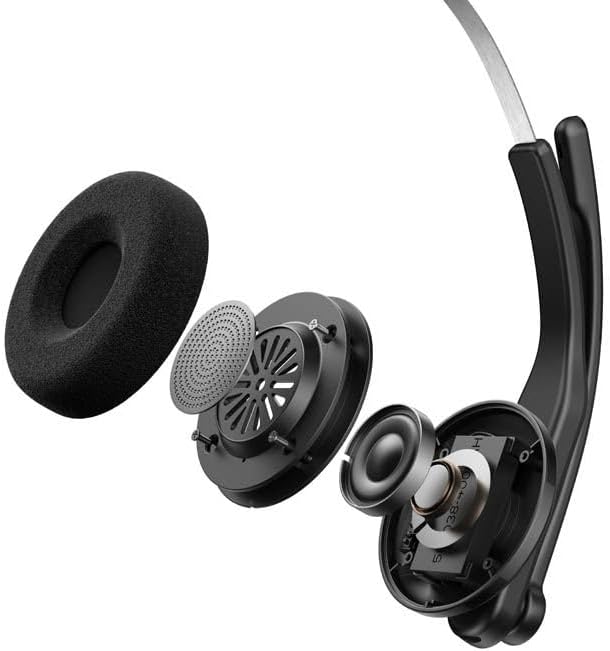
그림 3.4: 폭발했다 view showing the internal components of the earcup, including the 30mm dynamic driver.
4. 설정
4.1 초기 충전
Before first use, fully charge the headset using the provided USB-A to USB-C cable. Connect the USB-C end to the headset and the USB-A end to a power source (e.g., computer USB port or wall adapter). The charging indicator light will show the charging status.
4.2 전원 켜기/끄기
- 전원을 켜려면: 표시등이 켜질 때까지 전원 버튼을 길게 누릅니다.
- 전원을 끄려면: 표시등이 꺼질 때까지 전원 버튼을 길게 누르세요.
4.3 헤드셋 착용
Adjust the headband for a comfortable fit. The microphone arm can be rotated 240 degrees to be positioned on either the left or right side of your face. Position the microphone approximately 2-3 cm from your mouth for optimal voice pickup.
5. 사용 설명서
The Edifier CC300 features intuitive controls for managing calls and audio playback.

그림 5.1: Diagram illustrating the control buttons and their functions on the Edifier CC300 Headset.
5.1 버튼 기능
| 행동 | 기능 |
|---|---|
| Press and hold (Power Button) | 전원 켜기/끄기 |
| Press 1x (Mute Button) | Activate/Deactivate Mute (during calls) |
| Press 1x (Volume Up) | 볼륨을 높이다 |
| Press and hold (Volume Up) | 다음 트랙 |
| Press and hold (Volume Down) | 볼륨 감소 |
| Press 1x (Volume Down) | 이전 트랙 |
| Press 1x (Call Button) | Play/Pause Audio; Answer/End Call |
| Press and hold (Call Button) | 전화 거부 |
| Press 2x (Call Button) | 마지막 번호 다시 걸기 |
6. 연결 옵션
The Edifier CC300 offers three versatile connection methods:
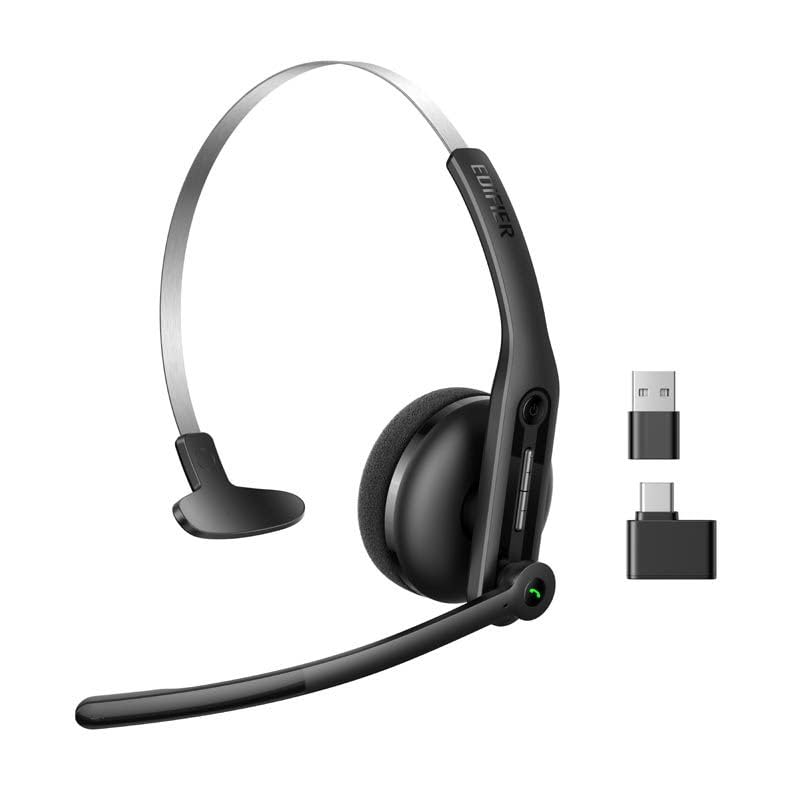
그림 6.1: Visual representation of the three connectivity options: Bluetooth, USB-C dongle, and wired USB-A.
6.1 블루투스 연결
- 헤드셋 전원이 켜져 있고 페어링 모드인지 확인하십시오(표시등이 깜빡임).
- On your device (smartphone, laptop), enable Bluetooth and search for "EDIFIER CC300".
- Select the headset to pair. Once connected, the indicator light will turn solid blue.
6.2 USB-C Dongle Connection
- Plug the provided USB-C dongle into an available USB-C port on your computer.
- Power on the headset. It will automatically connect to the dongle for a stable, low-latency connection.
6.3 Wired USB-A Connection
- Connect the headset to your computer using the provided USB-A to USB-C cable.
- The headset will function as a wired audio device, providing zero interference.
7. 배터리 및 충전
The CC300 headset is designed for extended use with a long-lasting battery.
- 배터리 수명: Up to 72 hours for audio playback, or 36 hours for talk time.
- 충전 시간: 완전 충전에는 약 1.5시간이 소요됩니다.
- 충전 표시기: Refer to the LED indicator on the headset for charging status.
To charge, connect the headset to a power source using the USB-A to USB-C cable.
8. 유지관리
- 청소: 헤드셋을 닦을 때는 부드럽고 마른 천을 사용하십시오. 액체 세척제나 스프레이형 세척제는 사용하지 마십시오.
- 저장: 헤드셋은 직사광선과 극한의 온도를 피해 서늘하고 건조한 곳에 보관하세요.
- 습기를 피하세요: Keep the headset away from water and high humidity to prevent damage.
- 조심스럽게 다루십시오: 헤드셋을 떨어뜨리거나 강한 충격을 주지 마십시오.
9. 문제 해결
9.1 소리가 나지 않거나 오디오 품질이 좋지 않음
- Ensure the headset is powered on and properly connected (Bluetooth, dongle, or wired).
- 헤드셋과 연결된 기기의 볼륨 레벨을 확인하세요.
- If using Bluetooth, ensure the headset is within range of your device.
- 헤드셋과 연결된 기기를 모두 재시작해 보세요.
9.2 마이크가 작동하지 않음
- 마이크가 음소거되어 있지 않은지 확인하십시오(음소거 버튼을 확인하세요).
- Verify that the headset is selected as the input device in your computer's or device's sound settings.
- Ensure the microphone arm is positioned correctly near your mouth.
9.3 Headset Not Pairing via Bluetooth
- 헤드셋이 페어링 모드인지 확인하십시오(표시등이 깜빡임).
- 간섭을 피하려면 근처의 다른 기기에서 Bluetooth를 끄세요.
- 기기의 블루투스 목록에서 해당 기기를 삭제하고 다시 페어링을 시도하세요.
10. 사양
| 특징 | 세부 사항 |
|---|---|
| 상표 | 에디파이어 |
| 모델명 | CC300 |
| 색상 | 검은색 |
| 연결 기술 | Wireless (Bluetooth), Wired (USB-A), USB-C Dongle |
| 블루투스 버전 | 6.0 |
| 블루투스 프로토콜 | A2DP, AVRCP, HFP |
| 오디오 코덱 | (주) |
| 드라이버 유형 | 30mm 다이나믹 드라이버 |
| 주파수 응답 | 20Hz - 20KHz |
| 음압 레벨 | 94±3dB(A) |
| 배터리 용량 | 400mAh |
| 음악 재생 시간 | 약 72시간 |
| 통화 시간 | 약 36시간 |
| 충전 시간 | 약 1.5시간 |
| 전원 입력 | 5V/500mAh |
| 무게 | 70그램 |
| 특별 기능 | AI-enhanced Dual-Mic Noise Cancellation |
| 호환 장치 | Mobile Phones, Desktops, Laptops |
11. 보증 및 지원
11.1 보증 정보
The Edifier CC300 Headset comes with a 1년 보증 제조상의 결함에 대해서는 구매일로부터 보증이 적용됩니다. 보증 청구를 위해 구매 증빙 자료를 보관해 주십시오. 오용, 사고, 무단 개조 또는 정상적인 마모로 인한 손상은 보증 대상에서 제외됩니다.
11.2 고객 지원
For technical assistance, troubleshooting, or warranty inquiries, please contact Edifier customer support through their official website or the contact information provided with your product packaging. You may also visit the Amazon의 Edifier Store 자세한 내용은.