
1. 서론
Thank you for choosing the Cillso GTR3 Fitness Smart Watch. This manual provides essential information for the proper setup, operation, and maintenance of your device. Please read it thoroughly to ensure optimal performance and a complete understanding of all features.
2. 패키지 내용
패키지에 모든 품목이 들어 있는지 확인하세요.
- 1 x Cillso GTR3 Smart Watch
- 1 x 마그네틱 충전 케이블
- 1 x 상세 사용자 설명서 (본 문서)
3. 설정 가이드
3.1 스마트워치 충전하기
Before first use, fully charge your Cillso GTR3 Smart Watch. Connect the magnetic charging cable to the charging points on the back of the watch and plug the USB end into a standard USB power adapter (not included).

Image: The Cillso GTR3 Smart Watch connected to its magnetic charging cable, indicating a 350 mAh battery and 3ATM waterproof rating.
A full charge typically takes approximately 2 hours. The watch has a standby time of up to 45 days and can last up to 10 days with heavy usage.
3.2 앱 다운로드 및 페어링
To unlock the full functionality of your smart watch, download the "Runmefit" application on your smartphone.
- 앱 다운로드: 검색 "Runmefit" in your smartphone's app store (compatible with iOS 12.0+ and Android 7.0+).
- 블루투스 활성화: 스마트폰의 블루투스를 켜세요.
- Open Runmefit App: Launch the app and follow the on-screen instructions to search for your device. Select "GTR3" from the list of available devices.
- 페어링 확인: 휴대폰과 스마트워치 모두에서 페어링 요청을 확인하세요.

Image: Visual guide demonstrating the steps to download the "Runmefit" app, enable Bluetooth, and connect the GTR3 smart watch.
3.3 Enabling Bluetooth Call Function
For Bluetooth calling functionality, an additional connection is required:
- Ensure the watch is successfully bound to the "Runmefit" app.
- 스마트폰의 블루투스 설정으로 이동하세요.
- Find and select "GTR3" (or a similar identifier) in the list of available devices and click to bind. This creates a separate audio connection.
- 연결되면 시계를 사용하여 전화를 걸고 받을 수 있습니다.
4. 사용 설명서
4.1 기본 탐색
The Cillso GTR3 features a 1.46-inch AMOLED Ultra-HD full touchscreen display. Swipe across the screen to navigate through menus and functions. Use the physical buttons for quick access or to return to the home screen.

Image: The 1.46-inch AMOLED display of the GTR3 Smart Watch showcasin다양한 맞춤형 시계 화면을 제공합니다.
4.2 상태 모니터링
이 스마트워치는 다양한 건강 지표를 지속적으로 모니터링합니다.
- 심박수: 심박수를 24시간 내내 추적합니다. View real-time data and historical trends in the Runmefit app.
- 혈중 산소(SpO2): Monitors blood oxygen levels to help ensure vital signs stay within a healthy range.
- 수면 모니터링: Automatically tracks sleep patterns, including deep sleep, light sleep, and awake times, providing insights into sleep quality.
- 스트레스 모니터링: Analyzes stress levels throughout the day.
- 생리 주기 알림: Provides reminders for women's health tracking when configured in the app.

이미지: 이상view of the GTR3's 24/7 health tracking capabilities, including heart rate, SpO2, body energy, and sleep monitoring.

이미지: 상세 view of the heart rate monitoring feature on the GTR3 Smart Watch and its companion app.

Image: The GTR3 Smart Watch showing continuous blood oxygen monitoring, with data also visible in the app.

Image: The GTR3 Smart Watch's sleep monitoring interface, showing duration of deep sleep, light sleep, and awake periods.
4.3가지 스포츠 모드
The GTR3 supports over 110 sports modes, including walking, running, cycling, soccer, and hiking. Select your desired activity to track specific metrics such as steps, distance, calories burned, and exercise duration.

Image: The GTR3 Smart Watch highlighting its 110+ sports modes and detailed tracking of steps, calories, heart rate, blood oxygen, and stress.
4.4 블루투스 통화 및 알림
Once the Bluetooth call function is enabled (see Section 3.3), you can answer, reject, or make calls directly from your watch. The watch also displays notifications from your smartphone, including messages and app alerts.
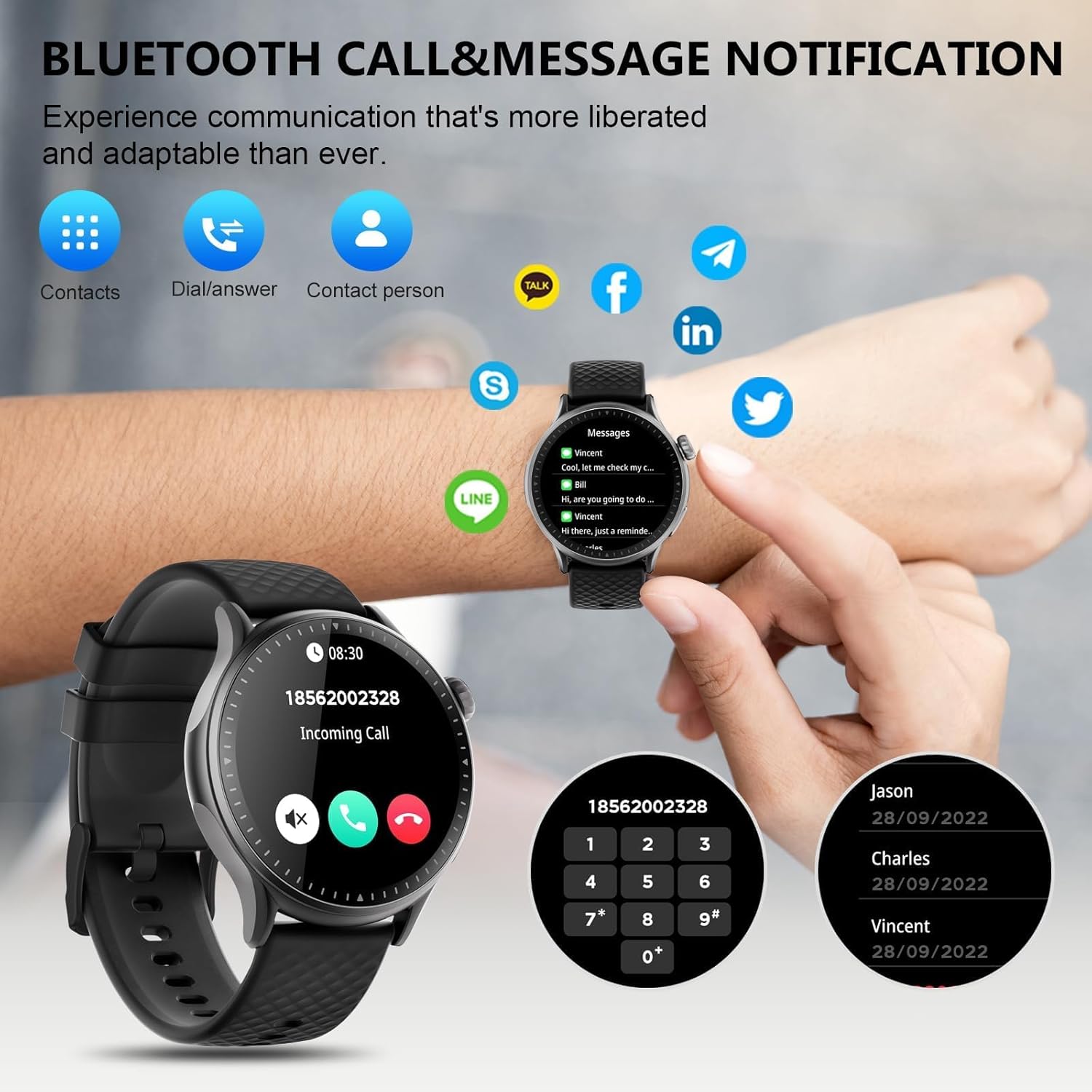
Image: The GTR3 Smart Watch displaying an incoming call and various message notification icons from social media and communication apps.
4.5 AI 음성 비서
The built-in AI assistant allows for hands-free control. Use voice commands to check the weather, control music playback on your phone, set alarms, and more.

Image: The GTR3 Smart Watch's AI Voice Assistant interface, illustrating how to use voice commands for tasks like checking weather or setting alarms.
4.6 추가 기능
The Cillso GTR3 offers a range of other useful features:
- 날씨 예보
- 전화 찾기
- 스톱워치 및 타이머
- 계산자
- 자명종
- 원격 카메라 제어
- Music Control (for your phone's music player)
- 호흡 운동

Image: The GTR3 Smart Watch's app menu, showcasing icons for various functions including Find Phone, Weather, Calculator, Remote Camera Shutter, Breathing Exercises, Women's Health, and Alarm Clock.
4.7 시계 화면 사용자 정의
Personalize your watch with a variety of watch faces. The "Runmefit" app offers over 200 watch faces to choose from. You can also upload your favorite photos to create custom watch faces.
5. 유지관리
5.1 방수
The Cillso GTR3 has a 3ATM waterproof rating, meaning it is resistant to splashes, rain, and sweat. It is suitable for daily use and can withstand brief immersion in water. However, it is ~ 아니다 recommended for hot showers, saunas, diving, or high-speed water sports, as steam or high water pressure can compromise the seals.
5.2 청소 및 관리
시계의 외관과 기능을 유지하려면:
- 화면과 스트랩은 부드러운 천으로 정기적으로 닦아주세요.amp 옷감.
- 강한 화학 물질, 연마 세척제 또는 용제의 사용을 피하세요.
- 충전하기 전에 충전 접점이 깨끗하고 건조한지 확인하세요.
- 시계를 극한의 온도나 직사광선에 장시간 노출시키지 마세요.
5.3 배터리 수명
To maximize battery life, avoid fully discharging the watch frequently. Charge it when the battery level is low, and disconnect it once fully charged.
6. 문제 해결
If you encounter issues with your Cillso GTR3 Smart Watch, refer to the following common problems and solutions:
| 문제 | 가능한 해결책 |
|---|---|
| Watch not connecting to phone via Bluetooth. | Ensure Bluetooth is enabled on your phone. Restart both the watch and phone. Make sure the "Runmefit" app is open and running in the background. Check if the watch is already paired with another device. |
| 블루투스 통화 기능이 작동하지 않습니다. | Verify that the watch is connected via Bluetooth in 둘 다 the "Runmefit" app and your phone's native Bluetooth settings (as a separate audio device). |
| Notifications or calls only vibrate, no sound. | Check the sound settings on your watch and in the "Runmefit" app. Ensure the watch's speaker volume is not muted or set too low. Note that the speaker volume may be limited in noisy environments. |
| 걸음 수나 건강 데이터가 정확하지 않습니다. | Ensure the watch is worn snugly on your wrist. Calibrate the watch in the "Runmefit" app if available. Keep the app connected to sync data regularly. |
| 날씨 정보가 업데이트되지 않습니다. | Ensure your phone's location services are enabled and the "Runmefit" app has permission to access your location. The app must be connected and running in the background to sync weather data. |
| Watch disconnects frequently. | Maintain close proximity between your watch and smartphone. Avoid obstacles that may interfere with the Bluetooth signal. Ensure the "Runmefit" app is not being closed by your phone's power-saving features. |
| Cannot customize watch faces. | Ensure the watch is connected to the "Runmefit" app. Follow the app's instructions for selecting or uploading watch faces. Some watches may have limitations on the number of custom faces stored simultaneously. |
7. 사양
| 특징 | 세부 사항 |
|---|---|
| 모델명 | GTR3 |
| 상표 | 실소 |
| 디스플레이 유형 | 아몰레드 |
| 화면 크기 | 1.46 인치 |
| 해결 | 1.46" AMOLED Ultra-HD |
| 운영 체제 | iOS 12.0 이상 및 Android 7.0 이상 |
| 메모리 저장 용량 | 128메가바이트 |
| 연결 기술 | 블루투스 |
| 무선 통신 표준 | 블루투스 |
| 배터리 용량 | 350 mAh (approximate, based on image) |
| 배터리 평균 수명 | Up to 10 days (heavy usage), 45 days (standby) |
| 방수 레벨 | 3기압(30미터) |
| 측정된 지표 | Heart Rate, Sleep Duration, Blood Oxygen Monitor |
| 특별 기능 | 24/7 Activity Tracker, Heart Rate Monitor, Sleep Monitor, AI Voice Control, Message Notifications, Answer/Make Call, AMOLED Touchscreen, Cycle Tracking, Alarm Clock, Blood Oxygen Monitor, 110+ Sport Modes, Music Control, Distance Record/Pedometer/Calories, Distance Tracker |
| 밴드 소재 유형 | Silicone, Rubber, or Fluoroelastomer |
| GPS | 스마트폰을 통한 GPS |
| 대상 청중 | 남녀 공용 성인 |
8. 보증 정보
The Cillso GTR3 Smart Watch comes with a 1년 표준 보증 구매일로부터 유효합니다. 이 보증은 정상적인 사용 조건에서 발생하는 제조상의 결함 및 오작동에 적용됩니다. 단, 오용, 사고, 무단 개조 또는 본 설명서의 지침을 따르지 않아 발생한 손상은 보증 대상에서 제외됩니다.
보증 청구를 위해 구매 증명서를 보관하십시오.
9. 고객 지원
For further assistance, technical support, or warranty inquiries, please refer to the contact information provided with your purchase or visit the official Cillso website. Ensure you have your product model (GTR3) and proof of purchase ready when contacting support.