
1. 서론
This manual provides detailed instructions for the setup, operation, and maintenance of your Eyoyo EYH2 Handheld USB 2D Barcode Scanner and Eyoyo EY-045 2-in-1 Wireless Mouse Barcode Scanner. Please read this manual thoroughly before using the devices to ensure proper functionality and to prevent damage.
2. 제품 오버view
2.1 Eyoyo EY-H2 Handheld USB 2D Barcode Scanner
The Eyoyo EY-H2 is a wired USB 2D barcode scanner designed for efficient data capture. It offers plug-and-play functionality, requiring no software or driver installation. This scanner is suitable for various environments including retail, warehouses, libraries, and inventory management.

이미지 2.1.1: The Eyoyo EY-H2 2D Barcode Scanner demonstrates superior decoding capabilities compared to traditional laser scanners, accurately reading various 1D and 2D barcodes, including those with damage or complex formats.

이미지 2.1.2: The EY-H2 scanner offers plug-and-play connectivity via USB, compatible with Windows, macOS, Linux, and POS systems, requiring no additional drivers or software.

이미지 2.1.3: The EY-H2 scanner features adjustable sound settings, allowing users to turn the beep sound on or off as needed for different working environments.

이미지 2.1.4: The EY-H2 scanner is designed with drop resistance, capable of sustaining drops from up to 1.5 meters (5 feet) without damage.
2.2 Eyoyo EY-045 2-in-1 Wireless Mouse Barcode Scanner
The Eyoyo EY-045 combines the functionality of a high-precision optical mouse with a powerful 2D barcode scanner. This device aims to streamline workflows by integrating two essential tools into one, reducing desk clutter and improving efficiency. It supports multiple connection methods and features a long-lasting battery with a visual indicator.

이미지 2.2.1: The EY-045 offers a 2-in-1 design, functioning as both a wireless mouse for office tasks and a barcode scanner for data entry, activated by a dedicated button.

이미지 2.2.2: The mouse-style barcode scanner facilitates faster data entry, particularly in retail Point-of-Sale (POS) environments, by allowing seamless transition between mouse and scanning functions.

이미지 2.2.3: The EY-045 supports two wireless connection methods: Bluetooth Mode for laptops, tablets, and phones, and 2.4G Mode via a USB dongle for PCs.
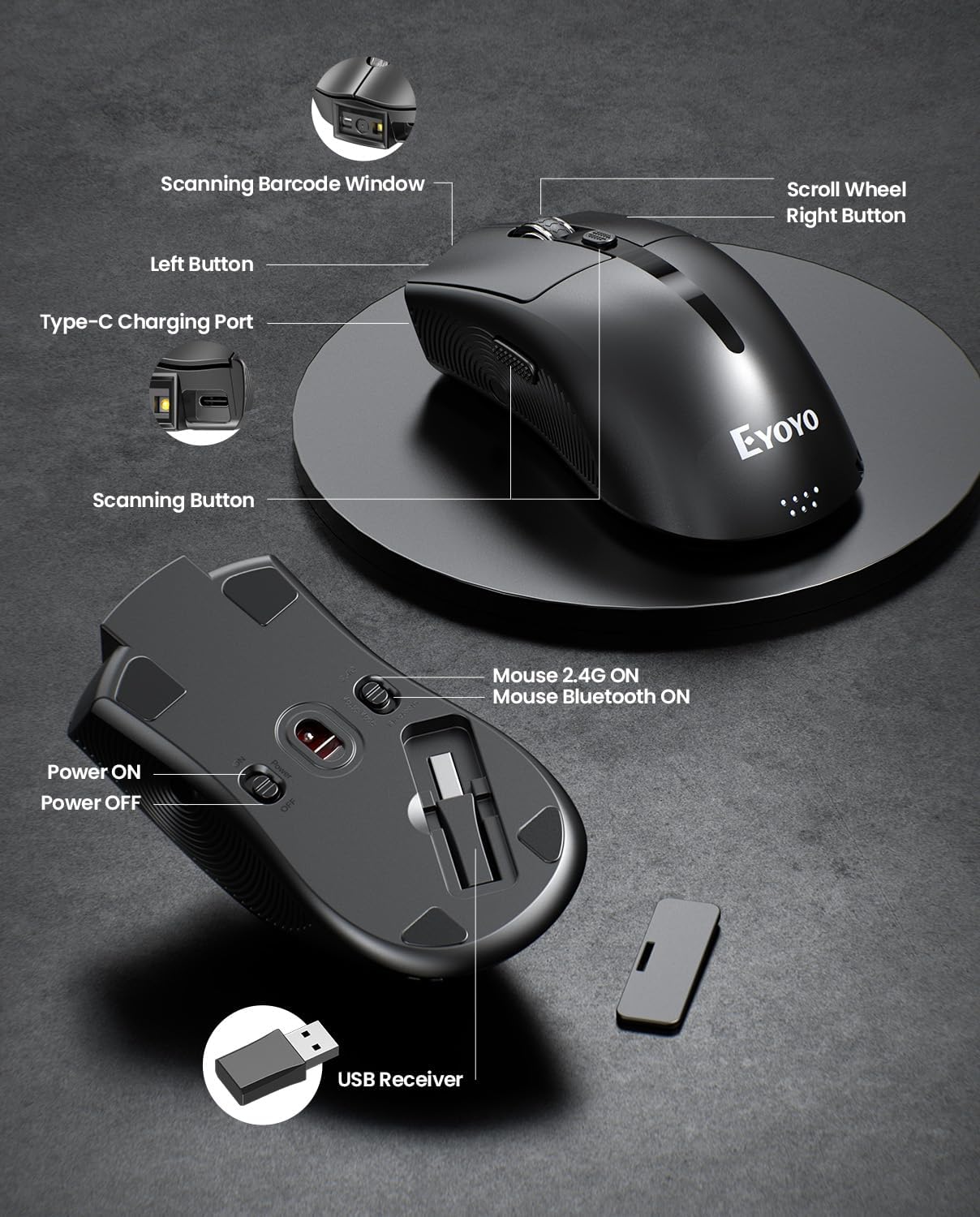
이미지 2.2.4: This diagram highlights the key components of the EY-045, including the Scanning Barcode Window, Scroll Wheel, Left/Right Buttons, Type-C Charging Port, Scanning Button, Power ON/OFF switch, Mouse 2.4G/Bluetooth ON switches, and the USB Receiver storage slot.
3. 설정
3.1 Eyoyo EY-H2 Handheld Scanner Setup
- USB 케이블 연결: Plug the USB cable from the EY-H2 scanner into an available USB port on your computer or POS system.
- 시스템 인식: The operating system (Windows, macOS, Linux, or POS) will automatically detect and install the necessary drivers. No manual driver installation is required.
- 사용 준비: Once recognized, the scanner is ready to use. Open any application where you want to input scanned data (e.g., Notepad, Word, Excel, POS software).
3.2 Eyoyo EY-045 Mouse Scanner Setup
EY-045은 세 가지 연결 방식을 제공합니다.
3.2.1 2.4G Wireless Connection (for PC)
- USB 수신기를 찾으세요: Locate the 2.4G USB receiver stored in the bottom slot of the EY-045 mouse.
- 수신기 삽입: USB 수신기를 PC의 사용 가능한 USB 포트에 꽂습니다.
- 전원 켜기: Slide the power switch on the bottom of the EY-045 to the 'ON' position.
- 2.4G 모드를 선택하세요: Ensure the mode switch on the bottom is set to 'Mouse 2.4G ON'. The device will automatically connect.
3.2.2 Bluetooth 5.0 Connection (for Laptops/Tablets/Phones)
- 전원 켜기: Slide the power switch on the bottom of the EY-045 to the 'ON' position.
- Bluetooth 모드 선택: Ensure the mode switch on the bottom is set to 'Mouse Bluetooth ON'. The device will enter pairing mode (indicator light may flash).
- 호스트 장치에서 블루투스를 활성화하세요. On your laptop, tablet, or phone, go to Bluetooth settings and turn Bluetooth on.
- 페어링 장치: 검색 available devices and select 'Eyoyo EY-045' (or similar name) to pair.
3.2.3 USB-C Wired Connection (for Charging and Working)
- USB-C 케이블 연결: Plug the provided USB-C charging cable into the Type-C charging port on the front of the EY-045.
- 호스트에 연결: Plug the other end of the USB-C cable into a USB port on your computer.
- 기능: The device will charge and function as a wired mouse and scanner simultaneously.
4. 사용 설명서
4.1 Using the Eyoyo EY-H2 Handheld Scanner
- 조준하고 스캔하세요: 스캐너 창을 읽고자 하는 바코드에 향하게 하세요.
- 트리거를 누르세요: Press the trigger button on the handle. A red scanning line or light will appear.
- 확인: A successful scan will typically be indicated by a beep sound (if enabled) and the data appearing in your active application.
- 소리 조절: To adjust the sound, scan the appropriate configuration barcodes provided in the full user manual (e.g., 'Turn On Sound' or 'Turn Off Sound' barcodes).
4.2 Using the Eyoyo EY-045 Mouse Scanner
- 마우스 기능: When connected, the EY-045 functions as a standard optical mouse for navigation and clicking.
- Switch to Scanner Mode: To scan a barcode, press the dedicated scanning button located on the side of the mouse. The scanning light will activate.
- 바코드 스캔: Aim the scanning window at the barcode and press the scanning button. The scanned data will be transmitted to your connected device.
- 배터리 표시기: Monitor the 4-level LED power indicator (25%-50%-75%-100%) on the tail of the mouse to check the battery status. Recharge when the indicator shows low power.
- 오프라인 저장소: The EY-045 can store up to 100,000 barcodes when operating away from a computer. To upload stored data, connect the scanner to your computer and follow the instructions in the full user manual for data transfer.
5. 유지관리
- 청소: Use a soft, dry cloth to clean the exterior of the scanner. For the scanning window, use a lint-free cloth lightly damp순하고 연마성이 없는 세척제로 세척하세요. 강한 화학 물질이나 연마재는 피하세요.
- 저장: 스캐너는 직사광선과 극한 온도 변화를 피해 서늘하고 건조한 곳에 보관하십시오.
- 케이블 관리: Avoid bending or twisting the USB cables excessively to prevent internal damage.
- Battery Care (EY-045): For optimal battery life, avoid fully discharging the battery frequently. Recharge the device regularly. If storing for an extended period, charge the battery to about 50% before storage.
6. 문제 해결
- 스캐너가 바코드를 읽지 못함:
- 바코드가 깨끗하고 지나치게 손상되지 않았는지 확인하세요.
- 스캐너와 바코드 사이의 거리와 각도를 확인하세요.
- Verify that the scanner is properly connected (EY-H2: USB cable; EY-045: 2.4G dongle, Bluetooth, or USB-C cable).
- For EY-045, ensure it is in scanner mode by pressing the dedicated scan button.
- 데이터 출력 없음:
- 스캐너가 기기에 성공적으로 연결되었는지 확인하십시오.
- Ensure an application (e.g., Notepad, Word, POS software) is open and active to receive input.
- Restart the computer and reconnect the scanner.
- EY-045 Not Connecting Wirelessly:
- Check if the EY-045 is powered on and the correct wireless mode (2.4G or Bluetooth) is selected.
- 2.4G를 사용하는 경우 USB 수신기가 컴퓨터에 제대로 연결되어 있는지 확인하십시오.
- For Bluetooth, ensure Bluetooth is enabled on your host device and the EY-045 is paired. Try unpairing and re-pairing if issues persist.
- 배터리가 충전되어 있는지 확인하세요.
- EY-045 Battery Drains Quickly:
- 사용하지 않을 때는 기기를 꺼두세요.
- Check the battery indicator for its current level.
- 제공된 USB-C 케이블을 사용하여 기기를 완전히 충전하세요.
7. 사양
7.1 Eyoyo EY-H2 Handheld USB 2D Barcode Scanner
- 연결성: 유선 USB
- 디코딩 기능: 1D and 2D barcodes (including QR codes)
- 설치: 플러그 앤 플레이, 드라이버 필요 없음
- 호환성: 윈도우, macOS, 리눅스, POS 시스템
- 내구성: Drop resistance up to 1.5m (5ft)
- 케이블 길이: 1.8M / 5.9피트
- 특징: Adjustable sound (on/off)
7.2 Eyoyo EY-045 2-in-1 Wireless Mouse Barcode Scanner
- 설계: 2-in-1 (Optical Mouse + 2D Barcode Scanner)
- 연결성: Bluetooth 5.0, 2.4G Wireless (via USB dongle), USB-C Wired
- 디코딩 기능: 1D, 2D, and QR codes (including from digital screens)
- 배터리: 1200mAh 충전식 배터리
- 배터리 수명: 10+ hours continuous scanning, 20 days daily mouse use
- 배터리 표시기: 4-level LED (25%-50%-75%-100%)
- 오프라인 저장소: 최대 100,000개의 바코드
- 호환성: Windows (XP/7/8/10/11), macOS, Android, iOS
- 특징: Adjustable beep sounds, dedicated scan button
8. 보증 및 지원
Eyoyo products are designed for reliability and performance. For specific warranty information, please refer to the warranty card included with your product or visit the official Eyoyo website. For technical support, troubleshooting assistance, or further inquiries, please contact Eyoyo customer service through the contact information provided on the product packaging or the official web대지.