
1. 서론
This manual provides essential information for setting up, operating, and maintaining your iFFALCON 50U95A 50-inch 4K QD-Mini LED Smart Google TV. Please read it thoroughly before using the product to ensure safe and optimal performance. Keep this manual for future reference.
The iFFALCON 50U95A combines advanced QD-Mini LED display technology with a 144Hz native refresh rate, HDR 1000nit peak brightness, and an ONKYO 2.1 Hi-Fi audio system to deliver an immersive viewing and listening experience. Powered by Google TV, it offers a wide range of smart features and content.
2. 중요한 안전 정보
화재, 감전, 부상의 위험을 줄이려면 이 텔레비전을 사용할 때 항상 기본적인 안전 예방 조치를 따르세요.
- TV를 비나 습기에 노출시키지 마세요.
- 캐비닛을 열지 마십시오. 모든 서비스는 자격을 갖춘 담당자에게 문의하십시오.
- 적절한 환기를 확보하고 통풍구를 막지 마십시오.
- Use only the power adapter and cable supplied with the unit.
- 텔레비전이 넘어지지 않도록 안정적이고 평평한 곳에 놓으십시오.
- 텔레비전을 직사광선, 열원 및 극한 온도로부터 멀리 두십시오.
- 번개가 칠 때나 장기간 사용하지 않을 때는 TV의 플러그를 뽑아 두세요.
3. 포함 사항
모든 구성품이 포장에 들어 있는지 확인하세요.
- iFFALCON 50U95A 50-inch 4K QD-Mini LED Smart Google TV
- 전원 어댑터
- 전원 케이블
- 원격 제어
- TV 스탠드(2개)
- 사용 설명서 (본 문서)

이미지: 앞면 view of the iFFALCON 50U95A 50-inch TV. This image shows the television from the front, highlighting its slim bezels and stand.
4. 설정
4.1 스탠드 부착하기
- 화면이 손상되는 것을 방지하기 위해 부드럽고 평평한 표면에 TV를 뒤집어서 조심스럽게 놓으세요.
- 스탠드 부품을 TV 하단의 나사 구멍에 맞춰 정렬합니다.
- 제공된 나사를 사용하여 스탠드를 고정하세요. 단단히 고정되었는지 확인하세요.

이미지: 측면 view of the iFFALCON 50U95A TV with stand. This image illustrates the television's profile and how the stand supports it.
4.2 주변기기 연결하기
이 TV는 다양한 연결 옵션을 제공합니다.
- HDMI 포트(x4): 블루레이 플레이어, 게임 콘솔 및 기타 HDMI 지원 장치를 연결하세요.
- USB 포트(x1): 미디어 재생을 위해 USB 저장 장치를 연결하세요.
- Wi-Fi 및 블루투스: 무선 네트워크 및 액세서리 연결용입니다.
이미지: 후면 view of the iFFALCON 50U95A TV showing ports. This image displays the back panel of the television, indicating the location of various input and output ports.
4.3 전원 켜기
- 전원 케이블을 TV에 연결한 다음 전원 콘센트에 연결하세요.
- 리모컨이나 TV 본체의 전원 버튼을 누르세요.
- Follow the on-screen instructions for initial setup, including network connection and Google TV account login.
5. 사용 설명서
5.1 리모콘 기능
The remote control allows you to navigate the TV's interface, adjust settings, and access smart features. Refer to the remote control diagram in the separate quick start guide for button layout.
5.2 구글 TV 인터페이스
Your iFFALCON TV runs on Google TV, providing a personalized experience with content recommendations, access to streaming apps, and Google Assistant voice control.
- 홈 화면: 즐겨 사용하는 앱, 영화, 프로그램을 이용하세요.
- 구글 어시스턴트: 리모컨의 Google 어시스턴트 버튼을 눌러 음성 명령으로 콘텐츠를 검색하고, 스마트 홈 기기를 제어하는 등 다양한 작업을 수행하세요.
- 앱: 구글 플레이 스토어에서 앱을 다운로드하고 관리하세요.
5.3 화면 및 사운드 설정
설정 메뉴에 접속하여 사용자 지정하세요. view듣고 경험하기:
- 사진 모드: Choose from various presets (e.g., Standard, Vivid, Movie, Game) or customize brightness, contrast, color, and sharpness.
- 사운드 모드: Select audio presets (e.g., Standard, Music, Movie) or adjust equalizer settings.
- HDR 설정: The TV supports HDR10, HDR10+, Dolby Vision, and HLG. Ensure your content source is HDR compatible for optimal performance.
- 게임 마스터: Activate Game Master mode for reduced input lag and optimized gaming performance.
6. 주요 특징
6.1 QD-Mini LED Display Technology
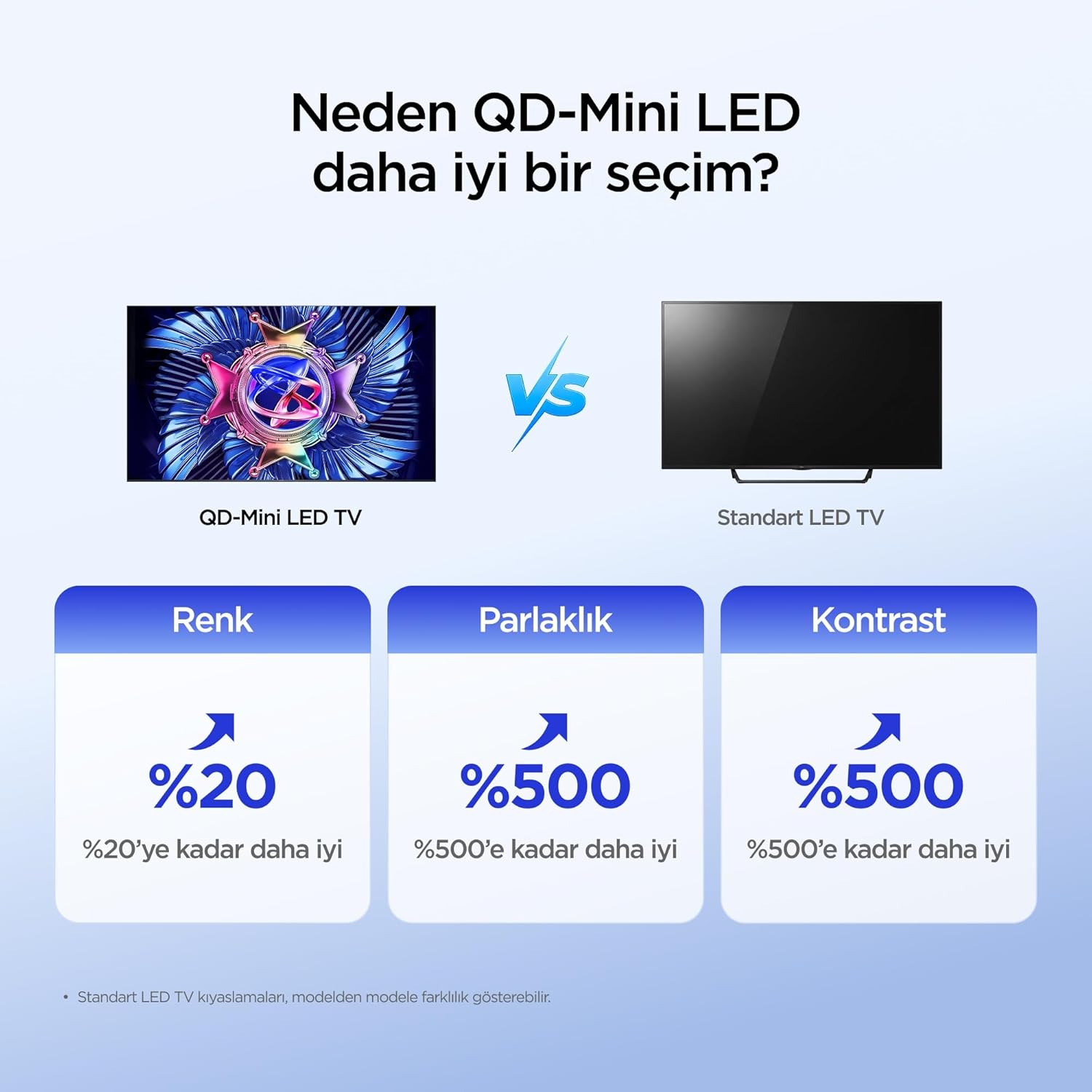
The iFFALCON 50U95A utilizes QD-Mini LED technology, combining Quantum Dot color with Mini LED backlighting. This results in superior brightness, contrast, and color accuracy compared to traditional LED TVs.

Image: Comparison illustrating the benefits of QD-Mini LED over standard LED TVs in terms of color, brightness, and contrast.
With over 500 local dimming zones, the TV provides precise light control at a pixel level, enhancing detail in both bright and dark scenes. It achieves a peak brightness of 1000 nits, ensuring vibrant images even in well-lit environments.

Image: A vibrant image demonstrating the 1000 nits peak brightness capability of the TV.
6.2 144Hz Native Refresh Rate
Experience smoother motion and clearer images with the 144Hz native refresh rate. This is particularly beneficial for fast-paced action movies and gaming, reducing motion blur and ghosting.

Image: A dynamic image of a race car, illustrating the smooth motion provided by the 144Hz native refresh rate.
6.3 ONKYO 2.1 Hi-Fi Audio System with Dolby Atmos
The integrated ONKYO 2.1 channel speaker system delivers rich, immersive stereo sound with deep bass. Combined with Dolby Atmos, it creates a cinematic audio experience, bringing sound to life with incredible clarity and depth.

Image: A living room scene depicting sound waves emanating from the TV, illustrating the immersive audio experience of the 2.1 speaker system.
6.4 AI PQ Pro Processor
The AI PQ Pro Processor intelligently analyzes and optimizes content pixel by pixel. This advanced processor enhances picture quality, delivering sharper details, improved contrast, and more vibrant colors for an overall superior view경험.

Image: A visual representation of the AI PQ Pro Processor chip, highlighting its role in optimizing image quality.
6.5 Matte HVA Panel & Ultra Slim Design
The Matte HVA Panel reduces glare and reflections, providing a comfortable viewing experience even in bright rooms. Its ultra-slim design allows for seamless integration into any living space, whether on a stand or wall-mounted.

Image: A comparison showing the reduced reflections and improved viewing experience of a Matte HVA Panel compared to a standard panel.

Image: A visual representation of the TV's ultra-slim design, highlighting its sleek profile.
7. 유지관리
7.1 화면 청소
- 텔레비전을 끄고 전원 코드를 뽑으세요.
- 부드럽고 보푸라기가 없는 천으로 화면을 부드럽게 닦습니다.
- 완고한 자국의 경우 가볍게 damp천에 물이나 특수 스크린 세척제를 묻혀 닦으세요(스크린에 직접 뿌리지 마세요).
- 독한 화학 약품, 연마제 또는 알코올 기반 세척제 사용을 피하십시오.
7.2 캐비닛 청소
- 부드럽고 마른 천으로 캐비닛을 닦으세요.
- Do not use liquid or aerosol cleaners directly on the cabinet.
8. 문제 해결
| 문제 | 가능한 원인 | 해결책 |
|---|---|---|
| 전원이 없습니다 | 전원 코드가 연결되어 있지 않습니다. 전원 콘센트가 작동하지 않습니다. | 전원 코드가 제대로 꽂혀 있는지 확인하세요. 다른 장치로 콘센트를 테스트해 보세요. |
| 화면은 나오지 않지만 소리는 나옵니다 | Incorrect input source selected; backlight off. | 리모컨의 "입력" 버튼을 눌러 올바른 소스를 선택하세요. 영상 설정을 확인하세요. |
| 소리는 나지 않지만 화면은 나옵니다 | Volume muted or too low; incorrect audio output selected. | Unmute volume or increase level. Check audio output settings (e.g., TV speakers, external soundbar). |
| 리모컨이 작동하지 않습니다 | 배터리가 소진되었거나 잘못 삽입되었습니다. 리모컨과 TV 사이에 장애물이 있습니다. | 배터리를 교체하세요. TV의 적외선 수신기와 배터리 사이에 시야가 확보되었는지 확인하세요. |
| Wi-Fi 연결 문제 | 비밀번호가 틀렸습니다. 라우터에 문제가 있습니다. TV가 라우터에서 너무 멀리 떨어져 있습니다. | Re-enter Wi-Fi password. Restart router. Move TV closer to router or use a Wi-Fi extender. |
위 해결 방법을 시도해 보신 후에도 문제가 지속되면 iFFALCON 고객 지원팀에 문의하십시오.
9. 사양
| 특징 | 세부 사항 |
|---|---|
| 모델 | 50U95A |
| 화면 크기 | 50인치 |
| 디스플레이 기술 | QD-미니 LED |
| 해결 | 4K(3840 x 2160) |
| 새로 고침 빈도 | 144Hz (기본 주파수) |
| 최대 밝기 | 1000니트 |
| HDR 지원 | HDR10, HDR10+, 돌비 비전, HLG |
| 오디오 시스템 | ONKYO 2.1 Channel Speakers, Dolby Atmos, DTS Virtual:X |
| 운영 체제 | 구글 티비 |
| 프로세서 | AI PQ Pro Processor |
| 연결성 | 4x HDMI, 1x USB, Wi-Fi, Bluetooth |
| 치수(D x W x H) | 6.9D x 111.1W x 64.6Hcm |
| 무게 | 13kg |
10. 보증 및 지원
Your iFFALCON 50U95A TV comes with a 2년 제조사 보증. This warranty covers defects in materials and workmanship under normal use. For warranty claims or technical support, please contact iFFALCON customer service through their official web사이트 또는 제품 설명서에 제공된 연락처 정보를 참조하세요.
For the latest support information, FAQs, and software updates, visit the official iFFALCON support web대지: www.iffalcon.com