
소개
This manual provides instructions for the RadioShack Mechanical Gaming Keyboard, Model 2607135. This keyboard features a 98-key layout, mechanical switches designed for durability, adjustable rainbow backlighting, 25-key anti-ghosting, and an integrated rotary knob for volume control. It is designed for plug-and-play operation via USB and is compatible with Windows operating systems.
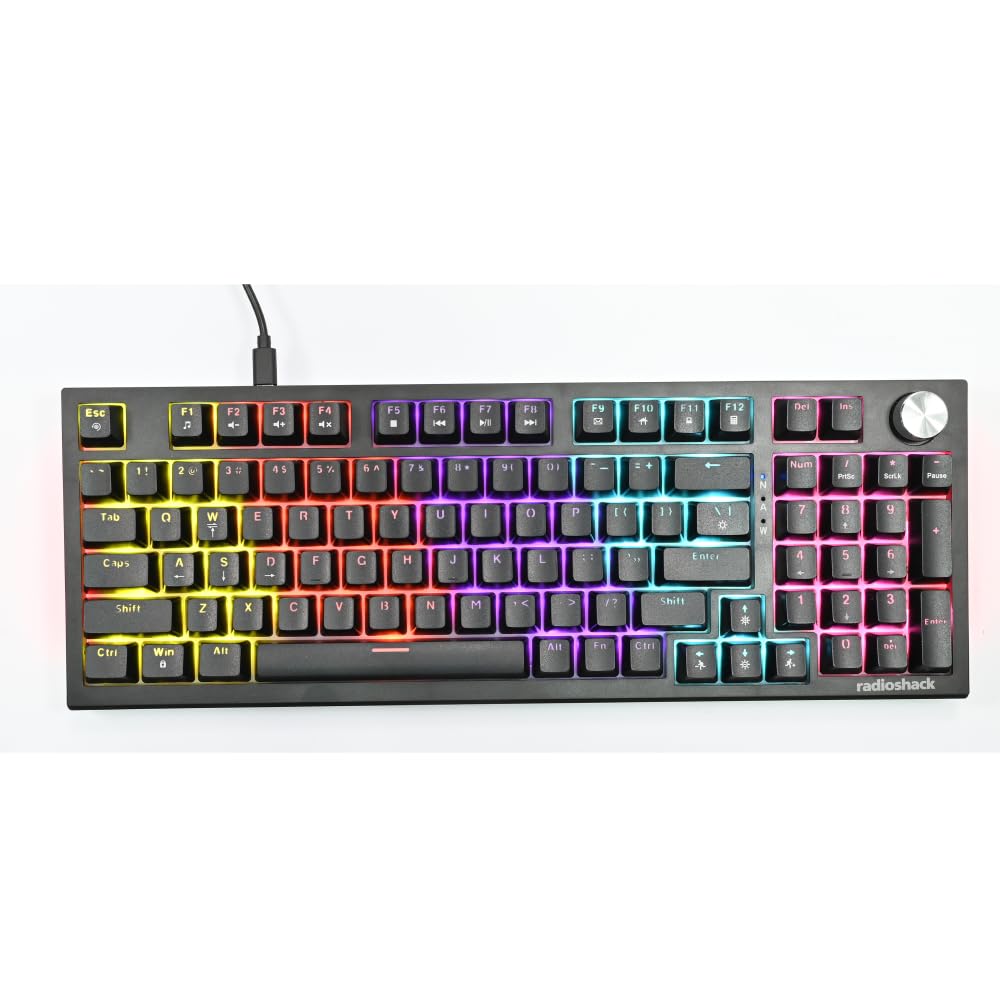
Image: The RadioShack Mechanical Gaming Keyboard, showcasing its 98-key layout and vibrant rainbow backlighting.
패키지 내용
모든 품목이 들어 있는지 확인하려면 패키지 내용물을 확인하세요.
- 1x RadioShack Mechanical Gaming Keyboard
- 1x USB 케이블
- 1x 사용자 매뉴얼(이 문서)

Image: A graphic illustrating the contents of the product package, including the gaming keyboard and user manual.
설정
- 키보드 풀기: 키보드와 USB 케이블을 포장에서 조심스럽게 꺼내세요.
- 컴퓨터에 연결: Insert the USB-A connector of the provided USB cable into an available USB port on your computer.
- 드라이버 설치: The keyboard is plug-and-play. Your operating system (Windows XP-10 compatible) will automatically detect and install the necessary drivers. No additional software installation is required.
- 놓기: 키보드를 안정적이고 평평한 표면에 놓으십시오. 원하는 타이핑 각도로 뒷면 받침대를 조절하십시오.

Image: An illustration highlighting key features such as the 1.5m USB cable length and compatibility with Windows XP through 10.
작동 지침
키보드 레이아웃 및 기능
The keyboard features a 98-key layout, providing a compact design while retaining essential keys, including a numeric keypad.
회전 노브 기능
The dedicated rotary knob located on the top right of the keyboard controls audio volume.
- 시계 방향으로 회전하세요: 볼륨이 증가합니다.
- 시계 반대 방향으로 회전: 볼륨을 줄입니다.
- 아래로 누르기: 오디오를 음소거/음소거 해제합니다.

Image: A close-up of a hand interacting with the rotary knob, demonstrating its use for volume adjustment.
백라이트 제어
The keyboard features adjustable rainbow backlighting with multiple modes and side-light effects. Specific key combinations (often Fn + a function key) are used to cycle through lighting modes, adjust brightness, or change speed. Refer to the keycap legends for specific lighting control functions.
- 모드 전환: Typically Fn + Ins, Home, PgUp, Del, End, PgDn.
- 밝기 조정: 일반적으로 Fn 키와 위/아래 화살표 키를 함께 사용합니다.
- 속도 조정 : 일반적으로 Fn 키와 좌/우 방향키를 함께 사용합니다.

Image: A collage showing the keyboard with various backlighting patterns and side-light effects, illustrating the 17 available lighting modes.
안티 고스팅
The keyboard supports 25-key anti-ghosting, ensuring that multiple simultaneous key presses are registered accurately, which is crucial for gaming and fast typing.

Image: A user actively typing on the keyboard during a gaming session, emphasizing the accuracy provided by 25 anti-ghosting keys.
유지
- 청소: Use a soft, dry cloth to wipe the surface of the keyboard. For deeper cleaning, use compressed air to remove dust and debris from between the keycaps. Avoid using liquid cleaners directly on the keyboard.
- 저장: 장시간 사용하지 않을 경우 키보드를 직사광선과 극한의 온도를 피해 깨끗하고 건조한 곳에 보관하세요.
- 유출을 방지하세요: Liquids can damage the internal components. Exercise caution to prevent spills on the keyboard.
문제 해결
키보드가 응답하지 않음
- USB 케이블이 키보드와 컴퓨터에 모두 단단히 연결되어 있는지 확인하세요.
- 키보드를 컴퓨터의 다른 USB 포트에 연결해보세요.
- 컴퓨터를 다시 시작하세요.
- 키보드가 문제인지 아니면 컴퓨터의 USB 포트/드라이버 문제인지 확인하려면 다른 컴퓨터에서 키보드를 테스트해 보세요.
백라이트가 작동하지 않습니다
- Check if the backlighting has been turned off using the keyboard's function keys (e.g., Fn + brightness down key).
- Cycle through the lighting modes to see if it reactivates.
Keys Not Registering / Ghosting Issues
- Ensure the keyboard is clean and free of debris that might be obstructing key switches.
- The keyboard features 25-key anti-ghosting. If more than 25 keys are pressed simultaneously, some inputs may not register.
명세서
| 모델 번호 | 2607135 |
| 상표 | 라디오샤크 |
| 키보드 유형 | 기계식 게임 키보드 |
| 키 레이아웃 | 98 키 |
| 연결성 | USB-A (Corded Electric) |
| 스위치 내구성 | 최대 50만번의 키 입력 |
| 백라이트 | Rainbow (Adjustable modes, brightness, speed) |
| 안티 고스팅 | 25 키 |
| 특별 기능 | Rotary Volume Knob, Ergonomic Design |
| 호환 장치 | Laptop, PC (Windows XP-10) |
| 포함된 구성 요소 | USB 케이블 |

이미지: 자세한 view of a mechanical switch, illustrating the 50-million keystroke life for long-term reliability.
지원하다
For further assistance or inquiries, please refer to the official RadioShack support channels or web대지.