
1. 서론
Thank you for choosing the Sharp 40HF2265E Full HD Google TV. This manual provides essential information for setting up, operating, and maintaining your television. Featuring integrated Google TV, HDR10 support, Dolby Digital audio, and Bluetooth connectivity, your new TV offers a rich entertainment experience. Please read this manual thoroughly before use to ensure proper operation and to maximize your view즐거움을 느낀다.

이미지 1.1: 앞면 view of the Sharp 40HF2265E Full HD Google TV.
2. 상자 안에 무엇이 들어있나요?
TV를 조심스럽게 풀어서 다음 품목이 모두 포함되어 있는지 확인하세요.
- 샤프 40HF2265E 텔레비전
- 전원 케이블
- 리모컨 (AAA 배터리 2개 필요, 포함되지 않을 수 있음)
- 사용 설명서 (본 문서)
- 보증 카드
If any items are missing or damaged, please contact your retailer or Sharp customer support immediately.
3. 설정
3.1 스탠드 설치
To install the TV stand, place the TV screen-down on a soft, flat surface to prevent scratches. Align the stand feet with the corresponding slots on the bottom of the TV and secure them with the provided screws. Ensure the stand is firmly attached before placing the TV upright.

이미지 3.1: 앞면 view of the TV with stand feet attached.
3.2 벽면 장착
If you prefer to wall-mount your TV, you will need a VESA-compatible wall mount (not included). The Sharp 40HF2265E supports a VESA mounting standard of 200 x 200 mm. Refer to the wall mount's instructions for installation. Always ensure the wall can support the weight of the TV and the mount.

이미지 3.2: 후면 view of the TV, highlighting VESA mounting points and ports.
3.3 주변기기 연결하기
Connect your external devices to the appropriate ports on the back and side of the TV. The TV features multiple HDMI, USB, and other connectivity options.
- HDMI 포트: 블루레이 플레이어, 게임 콘솔, 셋톱박스 등을 연결하는 데 사용됩니다.
- USB 포트: 미디어를 재생하거나 소프트웨어를 업데이트하기 위해 USB 저장 장치를 연결하는 데 사용합니다.
- 이더넷 포트 : 유선 인터넷 연결의 경우.
- 안테나/케이블 입력: 안테나나 케이블 TV 신호를 연결하는 데 사용합니다.
- 오디오 출력: 외부 오디오 시스템을 연결하는 데 사용됩니다.
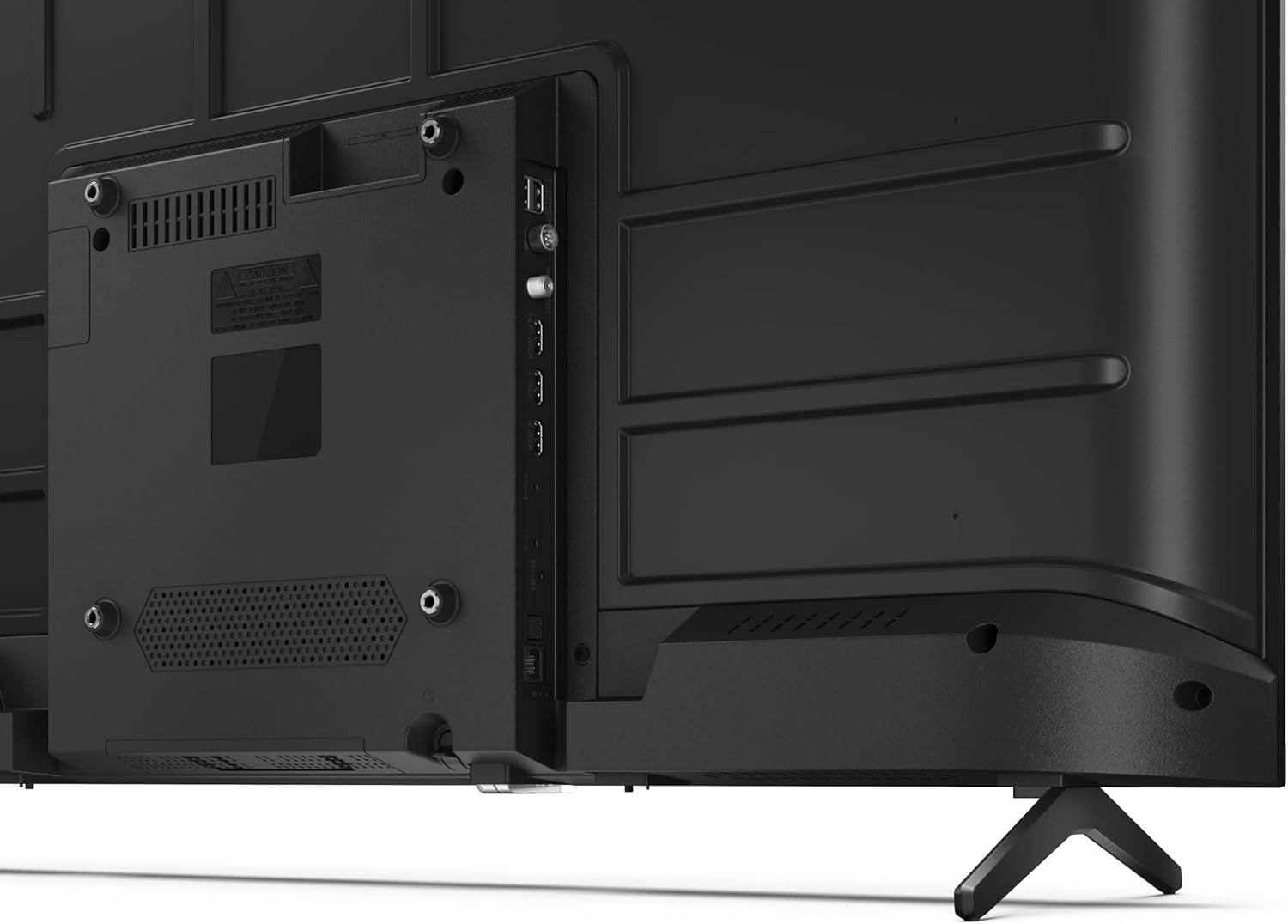
이미지 3.3: 상세 view TV의 연결 포트 중 하나.
3.4 초기 전원 켜기 및 Google TV 설정
After connecting all necessary cables, plug the power cable into an electrical outlet. Press the power button on the remote control or on the TV. Follow the on-screen instructions to complete the initial setup, including network connection, Google account login, and channel scanning.
4. 운영
4.1 리모콘 기능
The remote control allows you to navigate the TV's features. Common buttons include Power, Volume Up/Down, Channel Up/Down, Input Source, Home (Google TV), Navigation (directional arrows, OK), Back, and Google Assistant.
4.2 구글 TV 인터페이스
Your Sharp TV runs on Google TV, providing a personalized home screen with content recommendations from your subscriptions. Use the remote's navigation buttons to browse movies, shows, apps, and your library.

Image 4.1: The Google TV home screen on the Sharp 40HF2265E.
4.3 입력 선택
To switch between connected devices (e.g., HDMI 1, HDMI 2, TV tuner), press the 'Input' or 'Source' button on your remote control and select the desired input from the on-screen menu.
4.4 화면 및 사운드 설정
Access the TV's settings menu to adjust picture modes (Standard, Vivid, Cinema, Game), brightness, contrast, color, and sound modes (Standard, Music, Movie, Speech). The TV supports HDR10 for enhanced contrast and color, and Dolby Digital for rich audio.

Image 4.2: Visual representation of HDR (High Dynamic Range) technology.
4.5 구글 어시스턴트 및 크롬캐스트
Use the built-in Google Assistant for voice control. Press the Google Assistant button on your remote and speak your commands, such as searching for content, controlling smart home devices, or getting information. Chromecast allows you to cast content directly from compatible devices like smartphones or tablets to your TV.

Image 4.3: Google Assistant integration for voice commands.
4.6 블루투스 연결
Pair Bluetooth-enabled devices such as headphones or soundbars with your TV for a wireless audio experience. Navigate to the TV's settings menu, select 'Remotes & Accessories', and then 'Pair new device' to connect.
5. 유지관리
5.1 TV 청소
청소하기 전에 항상 TV의 전원을 뽑으세요. 부드럽고 마른 천으로 화면과 TV 본체를 닦으세요. 잘 지워지지 않는 얼룩은 가볍게 두드려 닦아내세요.amp천을 물이나 전용 화면 세척제로 적셔주세요. 연마성 세척제, 왁스 또는 용제는 절대 사용하지 마세요.
5.2 소프트웨어 업데이트
Google TV는 자동 소프트웨어 업데이트를 받을 수 있습니다. 성능 향상 및 새로운 기능 추가를 위해 TV가 인터넷에 연결되어 있는지 확인하세요. 설정 메뉴에서 수동으로 업데이트를 확인할 수도 있습니다.
6. 문제 해결
TV에 문제가 발생하면 다음의 일반적인 해결책을 참조하세요.
- 전원 없음: TV와 벽면 콘센트에 전원 케이블이 제대로 꽂혀 있는지 확인하십시오. 콘센트가 정상적으로 작동하는지 확인하십시오.
- 화면/소리 없음: 올바른 입력 소스가 선택되었는지 확인하십시오. 모든 케이블 연결 상태(HDMI, 안테나)를 확인하십시오. TV를 재시작해 보십시오.
- 원격 제어가 작동하지 않음: 배터리(AAA 2개)를 교체하세요. 리모컨과 TV IR 센서 사이에 장애물이 없는지 확인하세요.
- 네트워크 연결 문제: For Wi-Fi, check your router and ensure the TV is within range. For wired connections, check the Ethernet cable. Try restarting your router and the TV.
- 화질 문제: 화면 설정(밝기, 대비, 선명도)을 조정하세요. 입력 소스가 고품질 신호를 제공하는지 확인하세요.
For more complex issues, consult the comprehensive troubleshooting section in the full digital manual or contact Sharp customer support.
7. 사양
Below are the technical specifications for the Sharp 40HF2265E Full HD Google TV:

Image 7.1: Dimensions of the Sharp 40HF2265E TV.
| 특징 | 사양 |
|---|---|
| 상표 | 날카로운 |
| 모델 번호 | 40HF2265E |
| 모델명 | HF 시리즈 |
| 모델 연도 | 2025 |
| 화면 크기 | 40인치(81센티미터) |
| 디스플레이 기술 | 주도의 |
| 해결 | 1080p(풀 HD) |
| 새로 고침 빈도 | 60Hz |
| 종횡비 | 16시 9분 |
| 대비율 | 100000시 1분 |
| Screen Finish | 매트 |
| 응답 시간 | 8밀리초 |
| 백라이트 기술 | 주도의 |
| Supported HDR Format | HDR10, HLG |
| 이미지 품질 향상 | Dynamic Contrast, HDR10, HLG |
| Motion Enhancement Technology | Motion Interpolation |
| 운영 체제 | 구글 티비 |
| Internet Applications | Apple TV, Google TV, Hulu, Prime Video, YouTube |
| 특별 기능 | Bluetooth, Chromecast, Dolby Digital, HD Tuner |
| 연결 기술 | 이더넷, USB, Wi-Fi |
| 무선 기술 | 블루투스 |
| 블루투스 버전 | 5.0 |
| Screen Mirroring Technology | Chromecast, Google Cast |
| 총 HDMI 포트 | 3 |
| Total USB 2.0 Ports | 2 |
| Number of Composite Video Inputs | 1 |
| 오디오 입력 | Mini composite/CVBS + audio input |
| Total Audio Output Ports | 2 |
| 오디오 출력 모드 | 스테레오 재생 |
| 오디오 인코딩 | DD |
| Integrated Surround Sound Format | Dolby AC-4, Dolby Digital, Dolby Digital Plus |
| 최대 스피커 출력 전력 | 16와트(2x8W) |
| 오디오 채널 수 | 2.0 |
| 방송 시스템 | DVB-T2/C/S/S2 |
| 비디오 인코딩 | 영어: MKV (엠케이비) |
| 제품 크기(DxWxH) | 8.4P x 89.2l x 50.9H cm |
| 품목 무게 | 5.4 킬로그램 |
| 스탠드 제외 무게 | 5.4 킬로그램 |
| 기본 너비 | 765 밀리미터 |
| VESA 장착 표준 | 200 x 200mm |
| 전력 소비 | 37 와트 |
| 권tage | 230볼트 |
| Remote Control Battery Size | AAA |
| Remote Control Battery Quantity | 2 |
| Parental Control Technology | Kindersicherung Über Google Tv |
| EU 예비 부품 가용성 | 7년 |
8. 보증 및 지원
8.1 제품 보증
The Sharp 40HF2265E television comes with a 2-year manufacturer's warranty. Please refer to the included Warranty Card for detailed terms and conditions regarding coverage and service. Keep your proof of purchase for warranty claims.
8.2 고객 지원
If you require further assistance, have questions not covered in this manual, or need technical support, please contact Sharp customer service. Contact information can typically be found on the Warranty Card or the official Sharp web대지.