
1. 서론
The TOPDON TOPBT600PLUS is a professional-grade 2-in-1 Battery and Resistance Tester designed for comprehensive battery diagnostics in various automotive and industrial settings. This device accurately tests 6V, 12V, and 24V battery systems, providing reliable data for flooded, AGM, GEL, and EFB lead-acid batteries. Additionally, it supports internal resistance measurements for lithium, alkaline, and carbon-zinc batteries. Featuring a bright 3.5-inch display and an onboard power supply, the BT600PLUS offers fast, versatile, and dependable performance.
2. 안전 정보
Read all safety warnings and instructions before using this product. Failure to follow these instructions may result in electric shock, fire, or serious injury.
- 눈 보호: Always wear ANSI-approved eye protection when working near batteries.
- 통풍: Ensure adequate ventilation when testing batteries, as they can emit explosive gases.
- 배터리 산: 배터리 산과의 접촉을 피하십시오. 접촉 시 즉시 물로 씻어내고 의사의 진료를 받으십시오.
- 불꽃과 화염: 배터리 주변에 불꽃, 화염, 담배꽁초를 가까이 두지 마십시오.
- 절연 공구: 절연 공구를 사용하여 합선 사고를 예방하십시오.
- 적절한 연결: Connect the tester leads correctly to the battery terminals (red to positive, black to negative).
- 운영 환경: 본 기기를 d에서 작동하지 마십시오.amp 또는 습한 환경.
3. 제품 오버view
The TOPBT600PLUS features a robust design for professional use. Its main components include a 3.5-inch color display, control buttons, and two sets of test leads for versatile connection options.
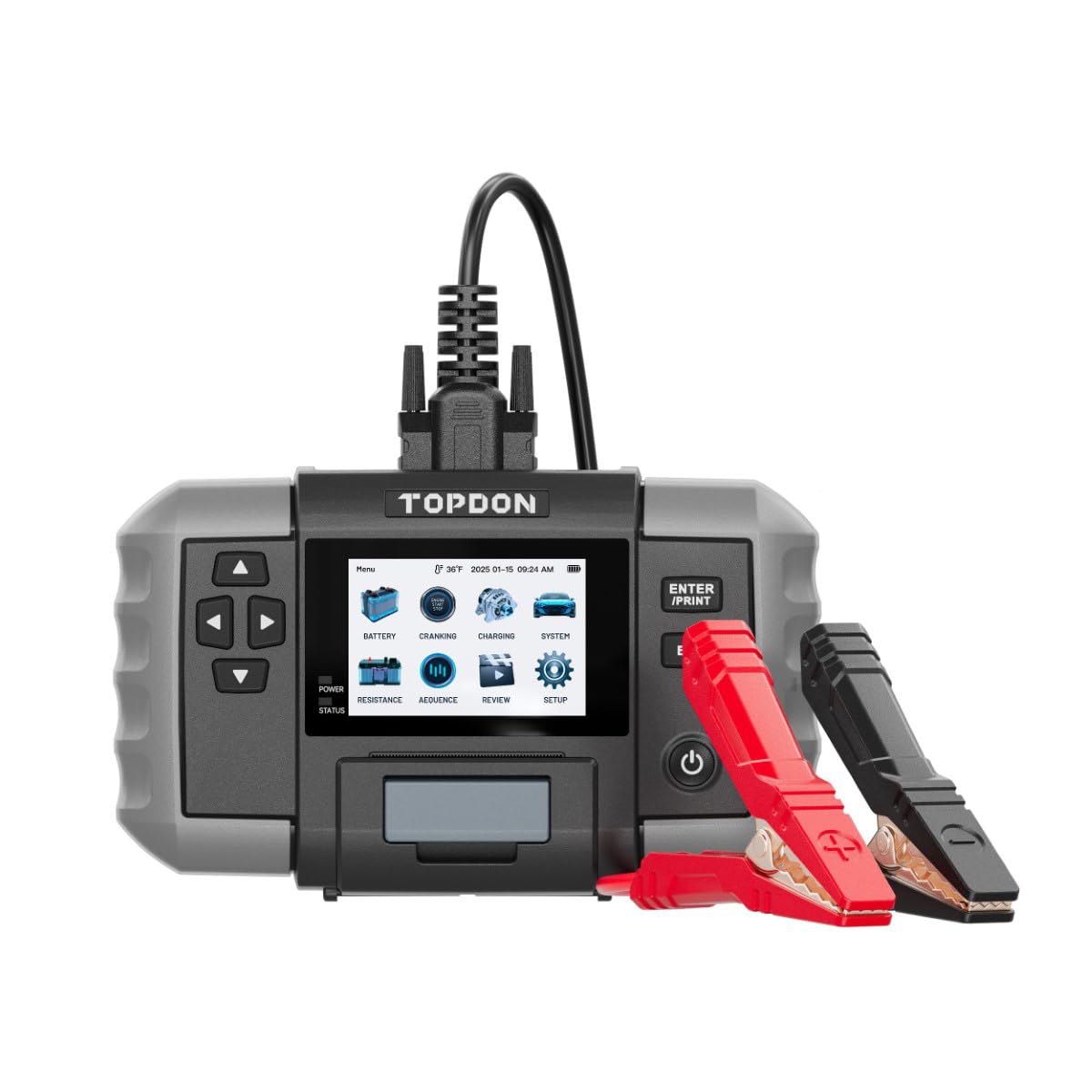
그림 1: 앞쪽 view of the TOPDON TOPBT600PLUS device. This image displays the main unit with its 3.5-inch screen and control buttons, along with the attached test leads.
The device's onboard power source allows for testing batteries down to 2V, enhancing its flexibility for various diagnostic scenarios.
4. 설정
Follow these steps to prepare your TOPBT600PLUS for operation:
- 짐 풀기: Carefully remove the TOPBT600PLUS from its packaging and inspect for any damage.
- 초기 전원 켜기: The device is equipped with an internal power source. Press the power button to turn it on.
- 테스트 리드 연결: Ensure the test leads are securely connected to the device. The red clamp is for the positive (+) terminal, and the black clamp is for the negative (-) terminal.
- 배터리 준비: 정확한 측정을 위해 배터리 단자가 깨끗하고 부식이 없는지 확인하십시오.
5. 사용 설명서
The TOPBT600PLUS offers various testing modes for comprehensive battery analysis.
5.1. 배터리 테스트
This mode performs cranking, charging, and system tests for 6V, 12V, and 24V batteries.
- 배터리에 연결: 빨간색 CL을 붙입니다.amp 배터리의 양극(+) 단자와 검은색 cl에amp (-) 배터리 단자에.
- 배터리 유형 선택: On the device screen, select the appropriate battery type (e.g., Flooded, AGM, GEL, EFB).
- Input Battery Specifications: Enter the battery's Cold Cranking Amps (CCA) or other relevant ratings as prompted.
- 테스트 시작 : Follow the on-screen instructions to initiate the test. The device will guide you through cranking and charging system checks.
- View 결과: The 3.5-inch display will show detailed results, including battery voltage, CCA value, internal resistance, and overall battery health status.
5.2. 저항 시험
This mode measures the internal resistance of various battery chemistries.
- 배터리에 연결: 빨간색 CL을 붙입니다.amp 배터리의 양극(+) 단자와 검은색 cl에amp (-) 배터리 단자에.
- Select Resistance Test: Navigate to the Resistance Test option on the device menu.
- Select Battery Chemistry: Choose the correct battery chemistry (e.g., Lithium, Alkaline, Carbon-Zinc) if prompted.
- 테스트 시작 : Initiate the test. The device will measure and display the internal resistance.
- 결과 해석: Compare the measured resistance with the manufacturer's specifications for the battery to assess its condition.
5.3. Sequence Testing
The TOPBT600PLUS supports sequence testing for up to 500 batteries across 10 groups, ideal for batch testing.
- Setup Thresholds: 볼륨 구성tage or resistance thresholds within the device settings to automatically identify underperforming units.
- 테스트 수행: Connect and test batteries sequentially. The device will alert you if a battery falls outside the set parameters.
6. 유지관리
Proper maintenance ensures the longevity and accuracy of your TOPBT600PLUS.
- 청소: 부드럽고 마른 천으로 기기를 닦으세요. 연마성 세제나 용제를 사용하지 마세요.
- 저장: Store the tester in a dry, cool environment, away from direct sunlight and extreme temperatures.
- Lead Care: Inspect test leads regularly for damage. Replace if insulation is cracked or wires are exposed.
- 소프트웨어 업데이트: Check the official TOPDON website periodically for firmware updates to ensure optimal performance and compatibility.
7. 문제 해결
If you encounter issues with your TOPBT600PLUS, refer to the following common problems and solutions:
| 문제 | 가능한 원인 | 해결책 |
|---|---|---|
| 장치 전원이 켜지지 않음 | Low internal battery; device malfunction | Ensure the internal battery is charged. If issue persists, contact support. |
| 부정확한 판독 | Poor connection; dirty battery terminals; incorrect battery type selected | 배터리 단자를 청소하십시오.amps are securely attached. Verify correct battery type and specifications are entered. |
| 디스플레이 출력 없음 | Screen damage; software error | Restart the device. If the screen remains blank, contact customer support. |
| Clamps get hot during testing | Loose connection; excessive current draw | CL을 확인amps are tightly secured. Discontinue test if excessive heat is observed and check battery condition. |
8. 사양
Key technical specifications for the TOPDON TOPBT600PLUS:
- 상표: 토프던
- 모델: TOPBT600PLUS
- 전원: 배터리 구동식 (내장형)
- 최소 작동 볼륨tage: 2 볼트
- 무게: 4.41파운드
- 표시하다: 3.5인치 컬러 화면
- Supported Battery Types (Lead-Acid): Flooded, AGM, GEL, EFB
- Supported Battery Chemistries (Resistance Test): Lithium, Alkaline, Carbon-Zinc
- 시스템 볼륨tage: 6V, 12V, 24V
9. 보증 및 지원
For detailed warranty information, please refer to the warranty card included with your product or visit the official TOPDON web사이트. 보증 조건은 일반적으로 구매일로부터 특정 기간 동안 제조상의 결함에 대한 보증을 제공합니다.
For technical support, troubleshooting assistance, or service inquiries, please contact TOPDON customer support through their official web사이트 또는 제품 설명서에 제공된 연락처 정보를 참조하세요.