
1. 서론
This manual provides detailed instructions for the setup, operation, and maintenance of your Eyoyo EY-009L 1D Mini Bluetooth Barcode Scanner. This compact and portable scanner offers versatile 3-in-1 connectivity options: USB wired, 2.4G wireless, and Bluetooth. It is designed for efficient 1D barcode scanning across various platforms including iOS, Windows, Android, tablets, and computers.
2. 패키지 내용
계속하기 전에 패키지에 모든 품목이 들어 있는지 확인하세요.
- Eyoyo EY-009L 바코드 스캐너
- USB 충전/데이터 케이블
- 2.4G 무선 동글
- 실리콘 보호 케이스
- 손목 스트랩
- 사용 설명서 (본 문서)
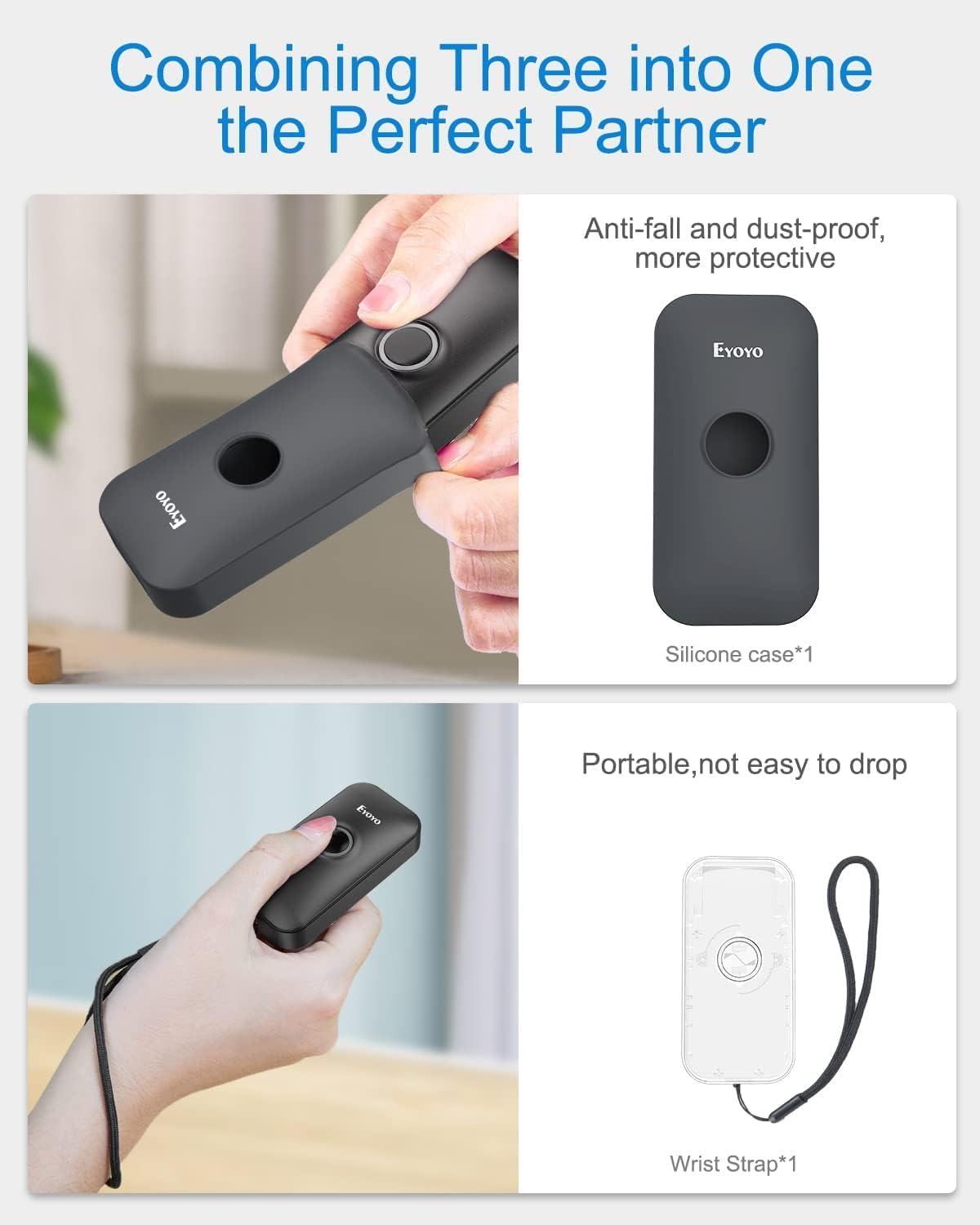
Image: Contents of the Eyoyo EY-009L package, including the scanner, USB cable, 2.4G dongle, silicone case, wrist strap, and user manual.
3. 제품 오버view
The Eyoyo EY-009L is a compact and lightweight 1D barcode scanner designed for portability and ease of use. It features a durable silicone case for protection and multiple connectivity options.
3.1 주요 특징
- 컴팩트한 디자인: Weighs approximately 35g (1.23oz) with dimensions of 3.07" x 1.50" x 0.47".
- 3-in-1 연결성: Supports 2.4G Wireless, Bluetooth, and USB Wired modes.
- 1D 바코드 지원: Reads UPC/EAN, Code 39, Interleaved 2 of 5, Code 93, Code 128, Codabar, Industrial 2 of 5, and Matrix 2 of 5.
- 긴 배터리 수명: 650mAh 충전식 배터리는 최대 5시간 동안 연속 스캔을 제공합니다.
- 높은 호환성: Works with Windows, Mac OS, Linux, iOS, and Android devices.

Image: The compact Eyoyo EY-009L barcode scanner held in a hand, illustrating its small size and portability.
4. 설정 및 연결
The scanner offers three connection modes. Choose the mode that best suits your device and environment.

Image: Visual representation of the three connection modes: USB Wired, 2.4G Wireless, and Bluetooth, connecting the scanner to various devices.
4.1 USB 유선 모드
- 제공된 USB 케이블을 사용하여 스캐너를 컴퓨터에 연결합니다.
- The scanner will automatically enter wired mode and begin charging.
- No additional drivers are typically required. The scanner will function as a keyboard input device.
4.2 2.4G 무선 모드
- Insert the 2.4G wireless dongle into a USB port on your computer or device.
- 스캐너를 켜세요. 자동으로 동글에 연결될 것입니다.
- A successful connection is indicated by a specific LED light pattern or sound (refer to the scanner's indicator guide for details).
- The 2.4G wireless mode offers a transmission range of up to 30m (98ft) in a barrier-free environment.
4.3 블루투스 모드
- Ensure the scanner is powered on and in Bluetooth pairing mode (usually indicated by a blinking blue LED). If not, scan the "Bluetooth Pairing" barcode from the full user manual.
- 호스트 기기(스마트폰, 태블릿, 컴퓨터)에서 블루투스를 활성화하고 사용 가능한 기기를 검색하세요.
- Select "Eyoyo Barcode Scanner" or a similar name from the list of devices to pair.
- Once paired, the scanner's LED will change to a solid blue, and a confirmation sound may be heard.
- Bluetooth mode provides a transmission range of up to 50m (164ft) in a barrier-free environment.

Image: Diagram showing the effective transmission distances for 2.4G wireless mode (up to 30m/98ft) and Bluetooth mode (up to 50m/164ft) in different environments.

Image: Illustration of the scanner's compatibility with Windows, Android, iOS/macOS, and Linux operating systems, connecting to PCs, laptops, tablets, and smartphones.
5. 사용 설명서
5.1 기본 스캐닝
- Ensure the scanner is connected to your device in the desired mode.
- Open an application or text field where you want the scanned data to appear (e.g., Notepad, Word document, POS software).
- Point the scanner's light beam at the 1D barcode you wish to scan.
- Press the scan button. A successful scan will be indicated by a beep and/or a green LED flash, and the barcode data will appear in your application.
5.2 작동 모드
이 스캐너는 두 가지 주요 작동 모드를 지원합니다.
- 자동 업로드 모드: Scanned data is immediately transmitted to the connected device. This is the default mode.
- 저장 모드 : Scanned data is stored in the scanner's internal memory. Data can be uploaded later by scanning a specific "Upload Data" barcode (refer to the full user manual for this barcode). This mode is useful when out of range of the host device.
To switch between modes, scan the corresponding configuration barcodes found in the comprehensive user manual.
5.3 사용자 정의 옵션
The scanner offers various customizable settings by scanning specific configuration barcodes:
- 소리와 진동: 알림음 및 진동 피드백을 활성화 또는 비활성화합니다.
- 접두사/접미사: 스캔한 데이터 앞이나 뒤에 사용자 정의 문자를 추가합니다.
- 문자 삭제: 스캔한 데이터에서 특정 문자를 제거합니다.
- 키보드 키: Insert special keys like TAB or CR&LF (Carriage Return & Line Feed) after each scan for automatic cursor movement.
Refer to the complete user manual for a full list of configuration barcodes and detailed instructions.
6. 배터리 및 충전
The scanner is equipped with a 650mAh rechargeable battery.
- 충전 중: Connect the scanner to a USB power source (computer USB port or USB wall adapter) using the provided USB cable. The charging indicator light will show charging status. A full charge takes approximately 2 hours.
- 배터리 수명: A fully charged battery provides up to 5 hours of continuous scanning or 720 hours of standby time.

Image: Infographic detailing the 650mAh rechargeable battery, 5 hours scanning time, 720 hours standby time, and 4 hours charging time for the Eyoyo barcode scanner.
7. 유지관리
- 청소: 스캐너 외부를 닦을 때는 부드럽고 마른 천을 사용하십시오. 연마성 세척제나 용제를 사용하지 마십시오.
- 저장: 스캐너는 직사광선과 극한의 온도를 피해 시원하고 건조한 곳에 보관하세요.
- 보호: Always use the provided silicone protective case to guard against drops and scratches.

Image: The Eyoyo barcode scanner being inserted into its anti-fall and dust-proof silicone case, and an image showing the scanner with an attached wrist strap for portability.
8. 문제 해결
| 문제 | 가능한 원인 | 해결책 |
|---|---|---|
| 스캐너가 켜지지 않습니다. | 배터리가 부족합니다. | 스캐너를 최소 2시간 동안 충전하세요. |
| 스캔 후 데이터가 전송되지 않습니다. | Not connected to host device; incorrect operating mode; application not in focus. | Ensure proper connection (USB, 2.4G, or Bluetooth). Check if the scanner is in "Instant Upload Mode". Make sure the cursor is in the desired text field of your application. |
| 블루투스로 페어링할 수 없습니다. | 스캐너가 페어링 모드가 아닙니다. 기기 블루투스가 꺼져 있습니다. 간섭이 발생하고 있습니다. | Scan the "Bluetooth Pairing" barcode. Ensure Bluetooth is enabled on your device. Move closer to the device and away from potential interference sources. |
| Scanner reads barcodes incorrectly or not at all. | Damaged barcode; scanner lens dirty; incorrect barcode type enabled. | Try scanning a different, known-good barcode. Clean the scanner lens. Refer to the full manual to enable/disable specific barcode symbologies. |
9. 사양
| 특징 | 세부 사항 |
|---|---|
| 모델 번호 | EY-009L |
| 연결 기술 | 2.4G 무선, 블루투스, USB 케이블 |
| 호환 장치 | Desktop, Laptop, Smartphone, Tablet (iOS, Windows, Android, Mac OS, Linux) |
| 지원되는 바코드 유형 | 1D codes: UPC/EAN, Code 39, Interleaved 2 of 5, Code 93, Code 128, Codabar, Industrial 2 of 5, Matrix 2 of 5 |
| 배터리 용량 | 650mAh |
| 연속 스캔 시간 | 최대 5시간 |
| 충전 시간 | 약 2시간 |
| 치수(D x W x H) | 0.48인치 x 1.56인치 x 3인치 |
| 무게 | 35g(1.23온스) |
| 운영 볼륨tage | 5 볼트 |
| 최대 보관 온도 | 섭씨 50도 |
| 인증 | CE, FCC, RoHS |
10. 보증 및 지원
Eyoyo EY-009L 바코드 스캐너는 다음과 같은 구성품을 포함합니다. 1년 제조업체 보증.
For technical support, warranty claims, or further assistance, please contact Eyoyo customer service through their official web사이트 또는 구매 문서에 제공된 연락처 정보를 참조하세요.
보증을 위해 구매 증빙서류를 보관하세요.