
1. 설정
Before first use, ensure all packaging materials are removed from the robot and docking station. Place the docking station on a hard, flat surface with adequate clearance around it for the robot to maneuver.
1.1 언박싱 및 초기 배치
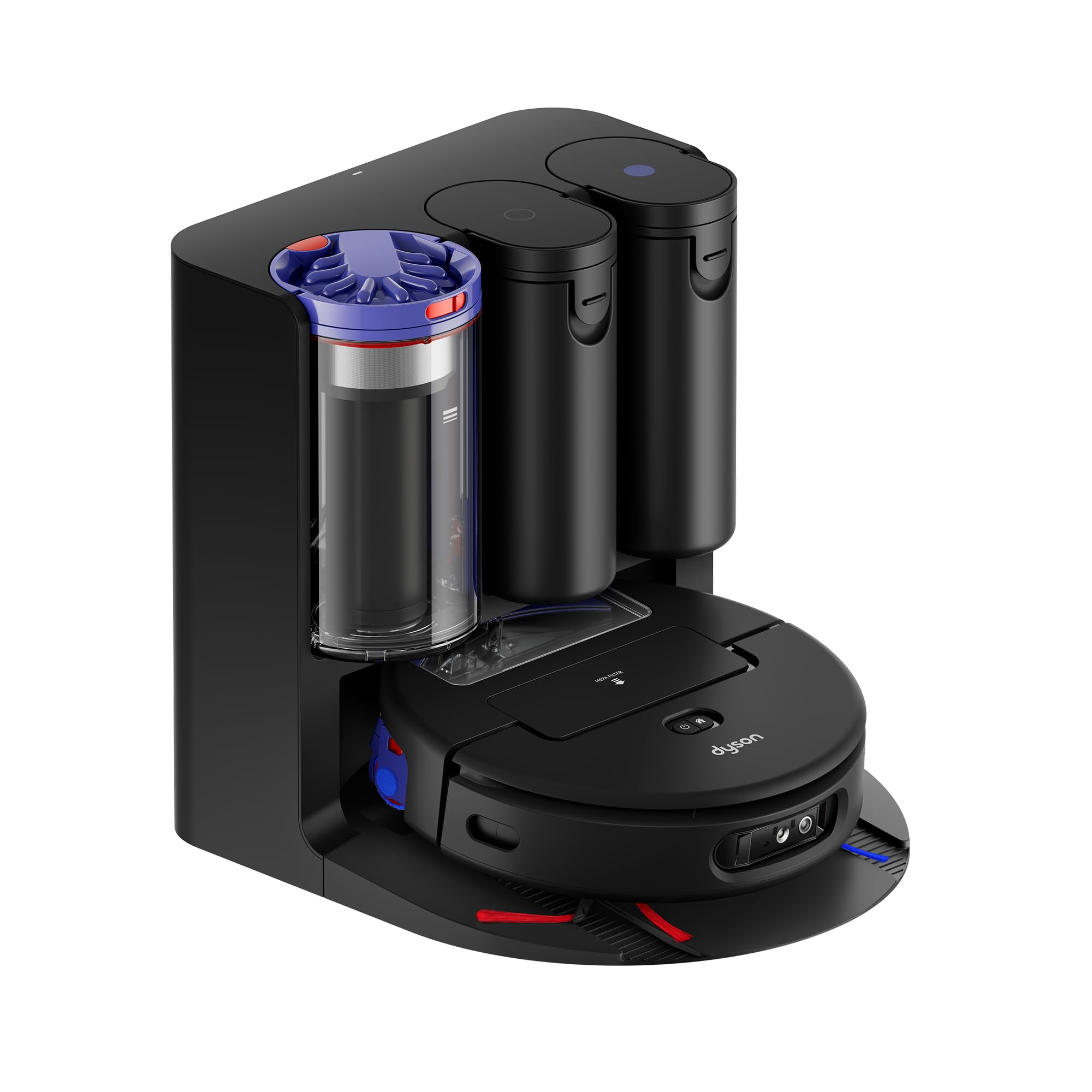
- Unpack the Spot+Scrub Ai robot, charging cable, and docking station.
- Connect the charging cable to the docking station and plug it into a power outlet.
- Place the robot onto the docking station to begin charging. Ensure the robot is properly aligned for charging.
1.2 MyDyson App Integration
- 기기의 앱 스토어에서 MyDyson™ 앱을 다운로드하세요.
- Follow the in-app instructions to connect your Dyson Spot+Scrub Ai robot. This process includes initial mapping of your home using LiDAR technology.
- The app will automatically label rooms based on features; you can customize these labels and create specific cleaning zones.

The MyDyson app allows for comprehensive control and customization of your robot's cleaning routines.
2. 로봇 진공 청소기 작동
The Dyson Spot+Scrub Ai is designed for intelligent and efficient cleaning across various floor types.
2.1 AI-Enhanced Cleaning
- The robot uses an HD camera and AI to identify spills and stains, illuminating them with high-contrast green light.
- For stubborn stains, the robot will return to the area up to 15 times to ensure thorough cleaning.

The robot's AI system actively detects and identifies messes, adapting its cleaning strategy for optimal results.
2.2 Wet and Dry Cleaning Adaptation
- The robot seamlessly transitions between hard floors and carpets. When moving onto rugs or carpets, the microfiber wet roller will lift, and suction power will automatically increase.
- The self-cleaning wet roller ensures only clean water touches your floors, preventing the spread of grime.

The robot intelligently adapts its cleaning mode based on the surface, ensuring effective cleaning without damaging carpets.
2.3 Edge Cleaning and Navigation
- The microfiber wet roller extends to clean right up to the edge of walls and furniture.
- Dual side sweepers push dirt and debris towards the all-floors silicone brush bar for comprehensive cleaning.
- LiDAR technology provides fast and accurate mapping, allowing the robot to spot and avoid obstructions.

Precise navigation and extending rollers ensure no area is missed, even along edges and around obstacles.
2.4 청소 루틴 맞춤 설정
- Use the MyDyson app to set customizable cleaning schedules and define specific cleaning locations.
- The app provides maintenance tips and helps extend the life of your machine.
2.5 데이터 보호
- The advanced AI system operates within the robot’s secure processing environment, eliminating cloud dependencies or images being stored on the robot itself, ensuring your privacy.

Your data and home environment are protected with the robot's on-board processing capabilities.
3. 유지관리
Regular maintenance ensures optimal performance and longevity of your Dyson Spot+Scrub Ai robot vacuum.
3.1 자가 세척 도크
- The hygienic cyclonic dock self-empties dry debris, self-cleans the wet roller, refills the clean water tank, and recharges the robot.
- The cyclonic bin stores dry dirt for up to 100 days, eliminating the need for frequent emptying.

The docking station manages waste and water, providing a hands-free maintenance experience.
3.2 Wet Roller and Brush Bar
- The self-cleaning wet roller washes itself on every rotation with clean water, ensuring a smear-free finish.
- The anti-tangle brush bar minimizes hair tangling, making it easy to remove long hair and pet hair.
- Periodically inspect and clean the brush bar and wet roller for any trapped debris.

The innovative roller design ensures continuous clean water application and minimizes maintenance.
3.3 필터
- Filters in both the robot vacuum and the dock capture dust particles as small as 0.1 microns.
- Check the MyDyson app for filter usage percentage and replace filters as recommended to maintain filtration efficiency.

High-efficiency filters ensure that microscopic dust and allergens are captured, improving air quality.
4. 문제 해결
If you encounter issues with your Dyson Spot+Scrub Ai, refer to the following common troubleshooting steps:
- Robot running into obstacles: Ensure the LiDAR sensors are clean and free from obstruction. The AI learns over time, but some persistent obstacles may require manual adjustment or virtual boundaries in the app.
- Mopping missing stains: Verify that the clean water tank is filled and the correct cleaning mode (Vacuum and Wash) is selected. For very stubborn stains, increase wash repetitions in the app.
- 지도 오류: If room labels or boundaries are incorrect, use the MyDyson app's map editing tools to adjust them. Ensure good lighting during initial mapping.
- 로봇이 갇힘: Clear small items, loose cables, or rugs that may impede movement. The robot may struggle with transitions between different floor heights.
- Moisture in water reservoir: After a cleaning cycle, some residual moisture may remain. Regularly empty and air dry the water tanks if the wet cleaning feature is used infrequently to prevent odors or mold.
- 앱 문제: Ensure your MyDyson app is updated to the latest version. If the app defaults to the Dyson store, check app settings for customization options.
- No physical pause button: Control all operations, including pause and resume, through the MyDyson app.
- Cannot add section while cleaning: Cleaning tasks must be completed before new sections can be added or modified.
- Roller not reaching low spots: The roller's design may not fully clean very uneven floor surfaces or deep grout lines.
- Larger debris stuck in brush roller: Periodically remove the brush roller and manually clear any large debris or tangled items.
5. 사양
| 특징 | 세부 사항 |
|---|---|
| 상표 | 다이슨 |
| 모델명 | Dyson Spot+Scrub Ai™ wet and dry robot vacuum |
| 모델 번호 | 586179-01 |
| 표면 추천 | 모든 층 |
| 특징 | 가방 없음 |
| 색상 | Matched Black/Blue |
| 컨트롤러 유형 | 앱 제어 |
| 필터 유형 | 탄약통 |
| 배터리 수명 | 200 분 |
| 배터리 유형 | 리튬 이온 |
| 품목 치수 L x W x H | 14.6인치 길이 x 14.7인치 너비 x 4.3인치 높이 |
| 포함된 구성 요소 | Spot+Scrub Ai robot, charging cable, docking station |
| 한국어: | 885609040882 |
6. 보증 및 지원
For specific warranty details, please refer to the documentation included with your product or visit the official Dyson website. Dyson offers various protection plans for extended coverage.
For product support, maintenance tips, and to customize cleaning routines, utilize the MyDyson™ app. You can also visit the Dyson support web추가 지원이 필요하면 사이트를 방문하거나 고객 서비스에 문의하세요.


