
1. 제품 오버view
1.1 서론
The LongPlus CLK2-W1X8 is a versatile wireless security camera designed for both indoor and outdoor use. It features 2K QHD video resolution, dual-mode night vision, AI motion detection, two-way audio, and flexible storage options. This manual provides detailed instructions for setting up, operating, and maintaining your camera to ensure optimal performance.

Image: LongPlus Smart Wireless Security Camera overview.
1.2 주요 특징
- 2K QHD 비디오 해상도: Provides clear and detailed surveillance footage.
- 듀얼 모드 야간 투시경: Offers both full-color and infrared night vision up to 33ft.
- AI 동작 감지: Accurately distinguishes between people, vehicles, pets, and packages.
- 양방향 대화: 실시간 통신을 위한 마이크와 스피커가 내장되어 있습니다.
- Siren Alarm & Flashing Light: Deter intruders with audible and visual alerts.
- 와이어 프리 디자인: Rechargeable battery for flexible placement without power cords.
- IP65 방수: 다양한 기상 조건에서도 안정적인 작동을 보장합니다.
- 로컬 및 클라우드 스토리지: Micro SD 카드(최대 128GB)와 클라우드 저장 옵션을 지원합니다.
- VicoHome App & Alexa Integration: Remote monitoring and voice control.

Image: LongPlus camera highlighting key features such as 4K HD, 5200mAh battery, multi-user share, 2-way talk, human/car detection, SD/cloud storage, sound/light alarm, and color/infrared night vision.
1.3 상자 내용물
포장을 풀 때 모든 품목이 들어 있는지 확인하세요.
- LongPlus Security Camera
- 장착 브래킷
- USB 충전 케이블
- 장착 나사 및 벽 앵커
- 사용 설명서 (본 문서)
2. 설정 및 설치
2.1 카메라 충전하기
Before initial use, fully charge the camera's built-in rechargeable battery. Connect the provided USB charging cable to the camera's charging port and a standard 5V USB power adapter (not included). The charging indicator light will show the charging status.

Image: Illustration of the camera's wire-free, battery-powered design, emphasizing the 5200mAh battery capacity.
2.2 앱 다운로드 및 계정 생성
다운로드 비코홈 app from the Apple App Store or Google Play Store. Follow the on-screen instructions to create an account and log in.
2.3 Wi-Fi에 연결하기
Open the VicoHome app and follow the prompts to add your new camera. The camera supports both 2.4GHz and 5GHz Wi-Fi networks. Ensure your smartphone is connected to the same Wi-Fi network you intend to use for the camera during the setup process.

Image: The camera supports both 2.4GHz and 5GHz Wi-Fi for flexible connectivity.
2.4 카메라 장착
Select a suitable location for your camera, ensuring good Wi-Fi signal strength and an unobstructed view. Use the included mounting bracket, screws, and wall anchors to securely attach the camera to a wall or ceiling. The IP65 rating ensures it can withstand outdoor elements.

Image: A hand attaching the camera to its wall-mounted bracket, demonstrating easy installation.
2.5 SD 카드 삽입
To enable local storage, insert a Micro SD card (up to 128GB, not included) into the designated slot on the camera. Ensure the camera is powered off before inserting or removing the SD card. Format the SD card via the VicoHome app after insertion for proper functionality.

Image: Close-up of the camera showing the Micro SD card slot, indicating support for up to 512GB (note: product specifications state 128GB).
3. 카메라 작동
3.1 라이브 View 그리고 녹음
Access the VicoHome app to view live 2K QHD video footage from your camera anytime, anywhere. The camera supports 24/7 recording when in Always-On Power mode, with retention time depending on your SD card size or cloud plan. You can also review past recordings through the app.

Image: Demonstrates the camera's 4K Ultra HD clarity with 8X zoom, 8 million pixels, and F1.6 lens aperture.

Image: Illustrates the 24/7 recording and live view capabilities, showing day and night monitoring.
3.2 동작 감지 및 알림
The camera utilizes advanced AI to detect and differentiate between people, vehicles, pets, and packages. Its sensitive PIR sensor triggers real-time alerts, sending instant notifications to your phone via the VicoHome app. You can adjust detection sensitivity within the app to minimize false alarms. In case of an unwanted presence, activate the loud siren and flashing white light directly from the app to deter intruders.
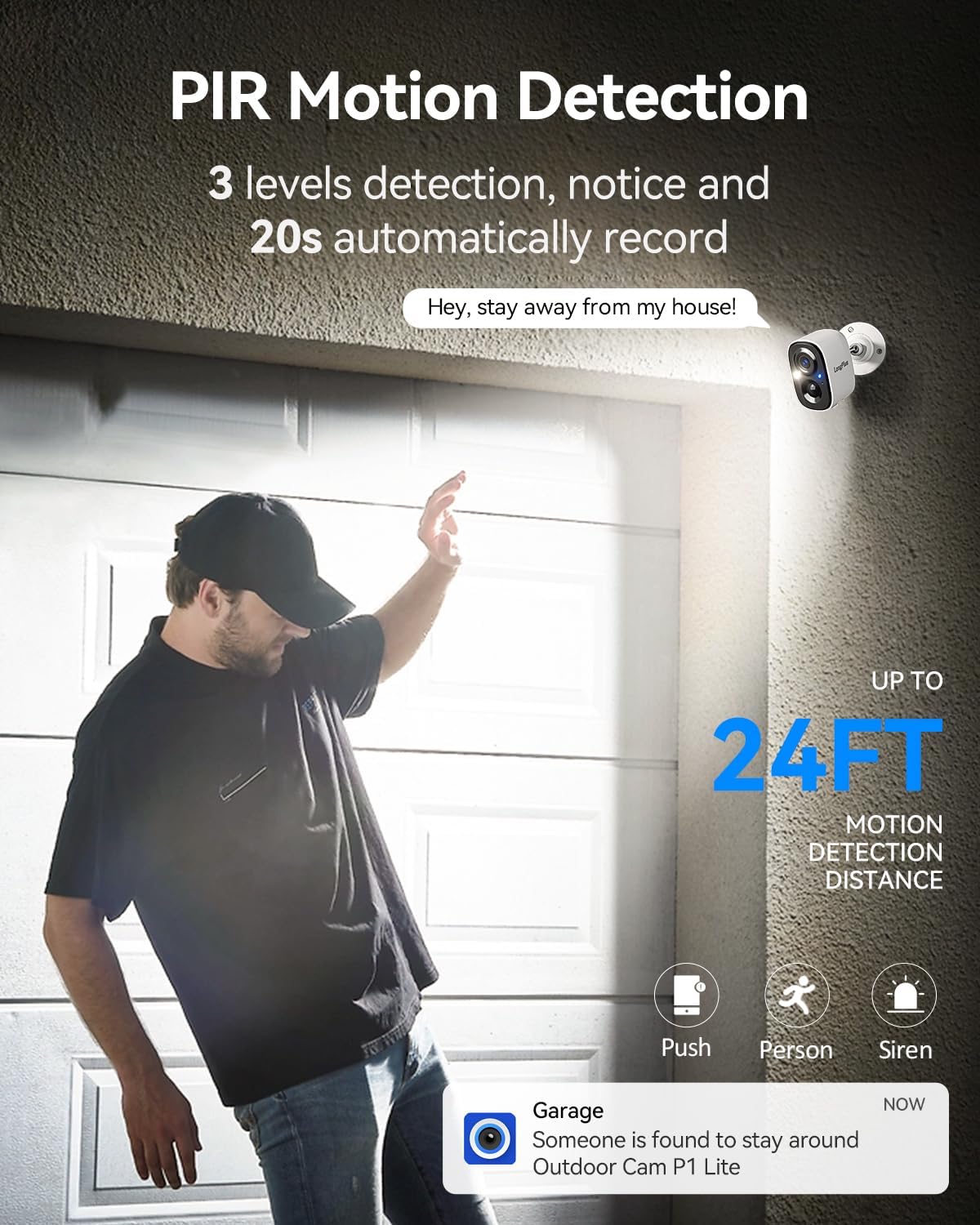
Image: Depicts PIR motion detection with a person triggering an alert, showing a notification on a smartphone and the camera's motion detection range.
3.3 양방향 오디오 통신
Engage in real-time conversations using the camera's built-in microphone and speaker. Through the VicoHome app, you can speak to visitors, delivery personnel, or warn off potential intruders directly from your smartphone.

Image: Illustrates the two-way talk feature, showing a person at the door and a user communicating via the VicoHome app.
3.4 야간 투시 모드
The camera offers dual-mode night vision. Choose between full-color night vision, which utilizes supplemental lighting for a clearer, more detailed view, or infrared night vision for discreet monitoring in complete darkness. Both modes provide coverage up to 33ft.
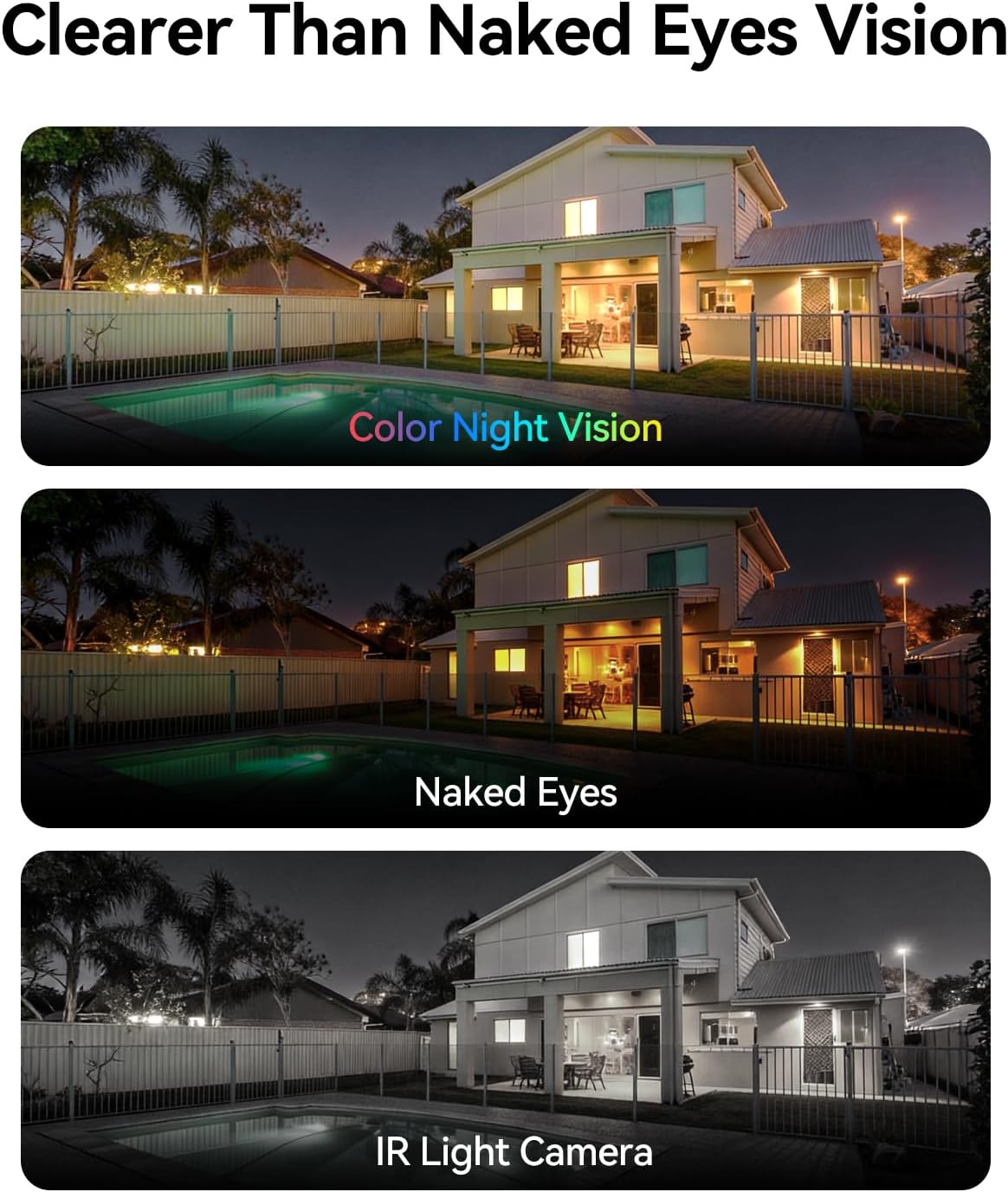
Image: Comparison of color night vision, standard vision, and infrared (IR) light camera vision at night.
3.5 저장 옵션 (SD 카드 및 클라우드)
레코드 푸tage locally onto a Micro SD card (up to 128GB) or securely to the cloud. All users receive complimentary 3-day rolling cloud storage without a subscription. A free 30-day trial is available to unlock advanced capabilities, including AI recognition, extended cloud history, and custom detection zones. Premium cloud plans are available after the trial.

Image: Visual representation of both SD card and cloud storage options for the camera.
3.6 카메라 접근 권한 공유
You can share access to your camera's live feed and recordings with multiple users through the VicoHome app, allowing for seamless multi-person monitoring of your property.

Image: Depicts multiple family members simultaneously viewing the camera feed on their devices.
3.7 Personalized Working Time
Configure the camera's operating schedule to optimize battery life and recording preferences. Choose between 'Always-On Power Mode' for continuous 24/7 recording or 'Power-Saving Mode' where you can select specific AI detection times to reduce battery drain.
4. 유지관리
4.1 배터리 관리
To ensure continuous operation, regularly check the battery level via the VicoHome app and recharge the camera as needed. Battery life can vary based on usage, motion detection frequency, and environmental conditions.
4.2 카메라 청소
카메라 렌즈와 하우징을 부드러운 천으로 주기적으로 청소하십시오.amp cloth to remove dust and dirt. Avoid using harsh chemicals or abrasive materials that could damage the camera's finish or lens.
4.3 펌웨어 업데이트
Keep your camera's firmware updated to the latest version through the VicoHome app. Firmware updates often include performance improvements, new features, and security enhancements.
5. 문제 해결
5.1 일반적인 문제 및 해결 방법
- 카메라가 Wi-Fi에 연결되지 않음:
Ensure your Wi-Fi network is 2.4GHz or 5GHz and has a strong signal. Verify the Wi-Fi password is correct. Try restarting your router and the camera. - 짧은 배터리 수명:
잦은 동작 감지 이벤트, 지속적인 실시간 viewing, or extreme temperatures can reduce battery life. Adjust motion detection sensitivity, reduce live view time, or switch to Power-Saving Mode. Ensure the camera is fully charged. - Motion alerts are too frequent or not triggering:
Adjust the motion detection sensitivity settings in the VicoHome app. Ensure the detection zone is correctly configured. Check for obstructions in the camera's field of view. - SD 카드가 녹화되지 않음:
Ensure the SD card is correctly inserted and formatted within the VicoHome app. Check if the SD card is full or corrupted. Replace the SD card if necessary. - 비디오 품질이 좋지 않음:
와이파이 신호 강도를 확인하세요. 카메라 렌즈가 깨끗하고 장애물이 없는지 확인하세요. - 양방향 오디오가 작동하지 않습니다.
Ensure microphone and speaker permissions are enabled for the VicoHome app on your smartphone. Check the volume settings on both your phone and within the app.
6. 제품 사양
| 특징 | 사양 |
|---|---|
| 모델명 | Battery Security Camera (CLK2-W1X8) |
| 추천 용도 | 실내/실외 감시 |
| 연결 기술 | 무선(Wi-Fi 2.4GHz/5GHz) |
| 비디오 캡처 해상도 | 4K (유효 정지 이미지 해상도 3MP) |
| 특별 기능 | 2-Way Audio, Motion Sensor, Color Night Vision |
| 방수 등급 | IP65 |
| 전원 | 배터리 구동(5200mAh) |
| 저장 | Micro SD (up to 128 GB), Cloud Storage |
| View잉 각도 | 110도 |
| 호환 장치 | Smartphone (VicoHome App), Amazon Alexa |
| 품목 치수 | 4 x 2 x 5 인치 |
| 품목 무게 | 0.36 킬로그램 |
7. 보증 및 고객 지원
7.1 보증 정보
LongPlus products are covered by a limited warranty from the date of purchase. Please refer to the warranty card included with your product or visit the official LongPlus web자세한 보증 약관은 해당 사이트에서 확인하세요.
7.2 고객 지원
If you encounter any issues or have questions regarding your LongPlus CLK2-W1X8 camera, please contact our customer support team. You can find contact information on the LongPlus official website or within the VicoHome app's 'Help' section.
온라인 지원: 방문하다 www.longplus.com/support (전amp링크를 클릭하시고 실제 지원 여부를 확인해 주세요. URL).
이메일 지원: support@longplus.com (전ample email, please verify actual support email).