
1. 설정
1.1 언박싱 및 초기 검사
포장을 개봉할 때 모든 구성품이 들어 있고 상태가 양호한지 확인하십시오. 상자 내용물은 다음과 같습니다.
- XIAOMI Redmi Note 15 Pro 5G AI Smartphone
- SIM 트레이 이젝터
- USB 케이블
- 전화 케이스
1.2 SIM 카드 설치
The Redmi Note 15 Pro 5G AI supports Dual SIM functionality (nano SIM + nano SIM or nano SIM + eSIM). It does ~ 아니다 have a Micro SD slot.
- 기기 측면에서 SIM 트레이를 찾으세요.
- 제공된 SIM 트레이 분리 도구를 트레이 옆의 작은 구멍에 넣고 트레이가 튀어나올 때까지 부드럽게 누르십시오.
- Place your nano SIM card(s) into the designated slots on the tray. Ensure the gold contacts face downwards and the card is correctly oriented.
- SIM 트레이가 딸깍 소리가 나면서 제자리에 고정될 때까지 조심스럽게 휴대폰에 다시 삽입하십시오.
메모: For USA market, this phone is compatible with T-Mobile, Mint, Tello, or any network operating under the T-Mobile infrastructure. An already activated SIM card is required. Outside the USA, it works with any GSM carrier SIM.
1.3 초기 충전 및 전원 켜기
Before first use, it is recommended to fully charge your device. The phone supports 45W turbo charging.
- Connect the USB cable to the phone's USB Type-C port and to a compatible power adapter.
- 전원 어댑터를 벽면 콘센트에 꽂으세요. 화면에 충전 표시등이 켜집니다.
- Once sufficiently charged, press and hold the power button on the side of the device until the XIAOMI logo appears.
- 화면의 안내에 따라 언어 선택, Wi-Fi 연결, Google 계정 설정을 포함한 초기 설정을 완료하세요.
2. 사용 설명서
2.1 디스플레이 기능
The device features a 6.83-inch AMOLED display with a 1.5K resolution (2772 x 1280) and a refresh rate of up to 120Hz. It offers a peak brightness of 3200 nits and is protected by Corning Gorilla Glass Victus 2.
습식 터치 기술 2.0: This feature intelligently detects water, oil, foam, or sweat, providing a smoother and more responsive touch experience even in challenging conditions.
2.2 카메라 사용
The Redmi Note 15 Pro 5G AI is equipped with an advanced camera system:
- 후방 카메라: 200MP main camera with Optical Image Stabilization (OIS) and an 8MP ultra-wide camera.
- 전면 카메라: 20MP.
To access the camera, tap the camera icon on your home screen or lock screen. Select modes such as Photo, Video, Portrait, or Pro mode. The 200MP AI Engine supports features like AI Film Camera for cinematic effects and various AI image editing tools.
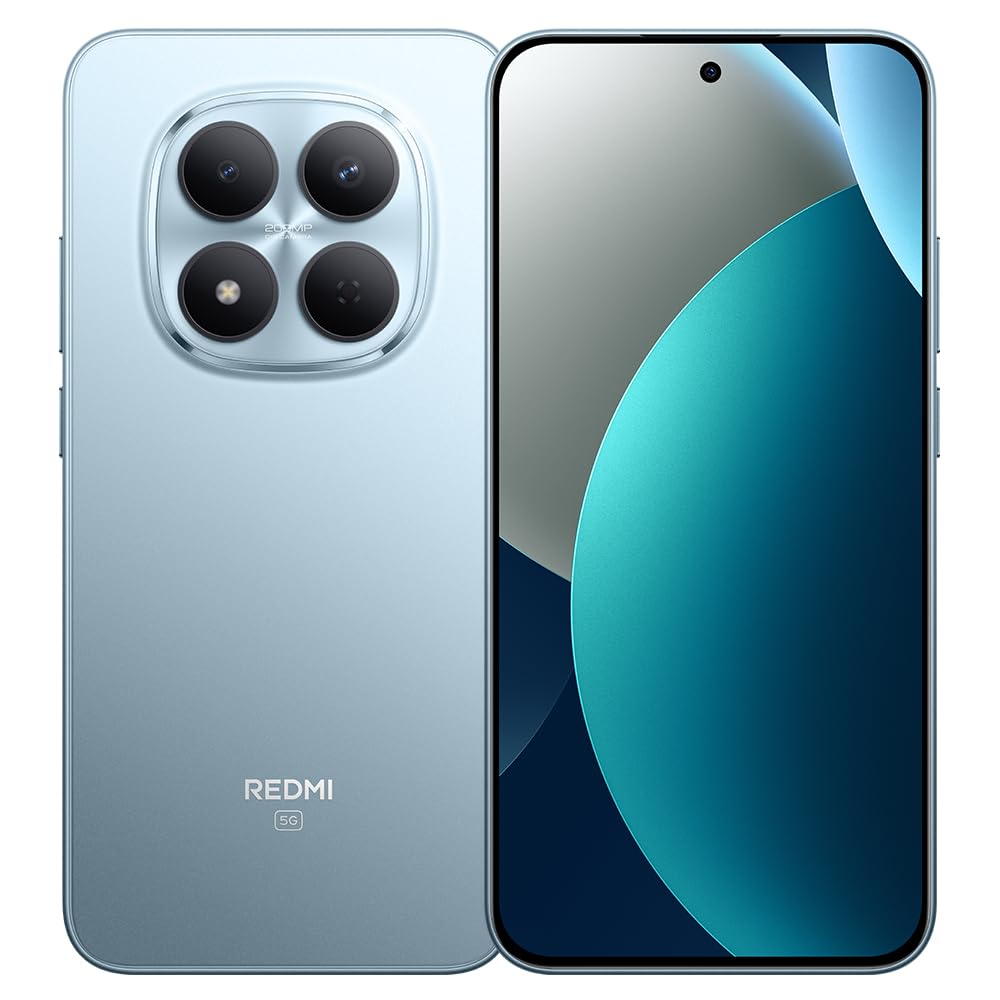
Image: XIAOMI Redmi Note 15 Pro 5G AI smartphone, black color, showing the front display and side profile.
2.3 생체 보안
The device offers two primary biometric security methods:
- 화면 내장 지문 센서: 빠르고 안전한 잠금 해제를 위해 보안 설정에서 지문을 등록하세요.
- AI 얼굴 잠금 해제: Set up face recognition in the Security settings to unlock your device by looking at the front camera.
2.4 Navigation and AI Features
The phone supports multiple global navigation satellite systems including GPS, GLONASS, BDS, Galileo, and QZSS for accurate positioning.
Integrated AI features enhance user experience:
- Google로 검색하려면 동그라미를 치세요: 화면의 내용을 동그라미로 표시하여 빠르게 정보를 검색하세요.
- 구글 제미니: AI assistant for various tasks.
- AI Image Editing: Includes AI Erase Pro, AI Remove Reflection, AI Image Expansion, AI Sky, AI Bokeh, AI Cutouts, AI Image Enhancement, and AI Beautify.
3. 유지관리
3.1 배터리 관리
The device is equipped with a 6580mAh silicon-carbon battery designed for longevity, boasting a 6-year battery life guarantee. To maximize battery life:
- 극한의 온도를 피하세요.
- Use the provided 45W turbo charger for optimal charging speed.
- The phone also supports up to 22.5W reverse charging to power other compatible devices.
3.2 내구성 및 보호
The Redmi Note 15 Pro 5G AI is built for durability:
- 낙하 저항: Certified for 2.5-meter drop resistance.
- 화면 보호 : Features Corning Gorilla Glass Victus 2 for enhanced impact and scratch resistance.
- 방수 및 방진 기능: Rated P66/IP68/IP69/IP69K for dust and water resistance, ensuring protection against various environmental challenges.
3.3 장치 청소
스마트폰을 청소하려면:
- 부드럽고 보푸라기가 없는 천을 사용하여 화면과 본체를 닦으세요.
- 완고한 얼룩의 경우 약간 damp천에 물이나 화면 세척액을 묻힙니다.
- 강한 화학 물질, 연마재 또는 과도한 습기를 사용하지 마십시오.
4. 문제 해결
4.1 일반적인 문제 및 해결 방법
- 장치가 켜지지 않음: Ensure the battery is charged. Connect the phone to its charger for at least 15 minutes, then try powering it on again. If it still doesn't turn on, perform a forced restart by holding the power button for 10-15 seconds.
- 네트워크 신호가 약하거나 서비스가 제공되지 않습니다. Check if your SIM card is properly inserted. Verify that airplane mode is off. Go to Settings > SIM cards & mobile networks and ensure your SIM is enabled. If issues persist, contact your mobile carrier.
- 터치스크린이 반응하지 않음: Restart the device. If the issue continues, ensure the screen is clean and dry. If using a screen protector, ensure it is properly applied and not interfering with touch sensitivity.
- 배터리가 빠르게 소모됨: 화면 밝기를 낮추고, 백그라운드에서 실행 중인 사용하지 않는 앱을 종료하고, 불필요한 알림을 비활성화하고, 위치 서비스 사용을 제한하세요. 설정에서 배터리 사용량을 확인하여 배터리 소모가 심한 앱을 파악하세요.
- 앱이 충돌하거나 정지됨: Clear the cache and data for the problematic app in Settings > Apps. If the issue persists, uninstall and reinstall the app. Ensure your device's software is up to date.
4.2 공장 초기화
다른 문제 해결 단계로는 해결할 수 없는 지속적인 소프트웨어 문제가 발생하는 경우, 공장 초기화가 필요할 수 있습니다. 경고: 공장 초기화를 수행하면 휴대전화의 모든 데이터가 삭제됩니다. 진행하기 전에 중요한 데이터를 백업하세요.
- 설정 > 휴대전화 정보 > 초기화로 이동하세요.
- Tap 'Erase all data' and follow the on-screen instructions.
5. 사양
| 상표 | 샤오미 |
| 모델명 | 노트15프로5G |
| 모델 번호 | 25080RABDG |
| 운영 체제 | 하이퍼OS 2 |
| CPU 모델 | Mediatek Dimensity 7400-Ultra (Octa-core, up to 2.6GHz) |
| 숫양 | 8GB (XNUMX기가바이트) |
| 저장 용량 | 256GB (XNUMX기가바이트) |
| 화면 크기 | 6.83인치 AMOLED |
| 해결 | 1.5K(2772 x 1280) |
| 새로 고침 빈도 | 최대 120Hz |
| 최대 밝기 | 3200니트 |
| 후방 카메라 | 200 MP (Main, OIS) + 8 MP (Ultra-wide) |
| 전면 카메라 | 20 MP |
| 배터리 용량 | 6580mAh |
| 충전 중 | 45W Turbo Charging, 22.5W Reverse Charging |
| SIM 카드 슬롯 | Dual SIM (Nano SIM + Nano SIM or Nano SIM + eSIM) |
| 연결성 | 5G, 4G LTE, Wi-Fi, Bluetooth, NFC, USB Type-C |
| 방수성 | IP66/IP68/IP69/IP69K |
| 생체 인식 보안 | In-screen Fingerprint, AI Face Unlock |
| 치수 | 데이터에 명시되지 않음 |
6. 보증 및 지원
6.1 보증 정보
The XIAOMI Redmi Note 15 Pro 5G AI comes with a 30-day Xiaomi Europe Warranty보증 청구를 위해 구매 증빙 서류를 보관하세요.
Additionally, spare parts for this device are available for a duration of 6년 within the EU.
6.2 고객 지원
For technical assistance, warranty claims, or further inquiries, please contact XIAOMI customer support through their official website or authorized service centers. Refer to the official XIAOMI web최신 연락처 정보와 지원 리소스를 제공하는 사이트입니다.


