
1. 제품 오버view
The NovaStar TB20 Plus is a high-performance, cost-effective asynchronous LED controller designed for managing full-color LED displays. It offers smart features such as Wi-Fi connectivity, remote management, and mobile app control, making it suitable for various applications including storefront signs, retail displays, and promotional screens.
주요 특징은 다음과 같습니다.
- High Pixel Load Capacity: Supports up to 650,000 pixels with resolutions up to approximately 1920x1080, compatible with various LED module scan configurations.
- 듀얼 네트워크 연결: Built-in 2.4GHz Wi-Fi and 10/100M Ethernet for remote content updates and device monitoring.
- 모바일 앱 관리: Free iOS and Android app for managing multiple devices, scheduling playlists, and performing OTA firmware updates.
- Rich Multimedia Support: Plays MP4, AVI, MOV (H.264), JPG, PNG, BMP formats, scrolling text, live clock, and real-time weather. Supports multi-zone layouts.
- 플러그 앤 플레이 설치: Compact design, powered by standard DC 5V/2A, with content loading via USB drive.
- 확장 가능한 스토리지: 8GB internal storage with microSD/TF card expansion capability.
- 넓은 작동 범위: Functions reliably in temperatures from -20°C to +60°C.
2. 포함 사항
패키지에 모든 품목이 들어 있는지 확인하세요.
- NovaStar TB20 Plus Playback Controller ×1
- DC 5V / 2A Power Adapter ×1
- Quick Start Guide ×1 (includes English instructions)

Image: The NovaStar TB20 Plus controller with its Wi-Fi antenna connected, showing the various ports and indicator lights.
3. 설정 가이드
Follow these steps for initial setup of your NovaStar TB20 Plus controller:
- LED 디스플레이에 연결하세요: Connect the TB20 Plus to your LED display using an Ethernet cable from the controller's Ethernet output port to the receiving card of the LED display.
- 전원 연결: Plug the DC 5V / 2A power adapter into the controller's power input port and then into a power outlet. The PWR indicator light should illuminate.
- 네트워크 연결 :
- 와이파이: Attach the provided Wi-Fi antenna to the designated port. You can configure Wi-Fi settings later via the mobile app or web 인터페이스.
- 이더넷: For a wired connection, connect an Ethernet cable from your network router or switch to the controller's Ethernet input port.
- Initial Content Loading (Optional): To load content directly, insert a USB drive containing your media files into the USB port. The controller can automatically play content from the USB drive after setup.
- 모바일 앱 설치: Download the official NovaStar mobile application from the iOS App Store or Google Play Store on your smartphone or tablet.
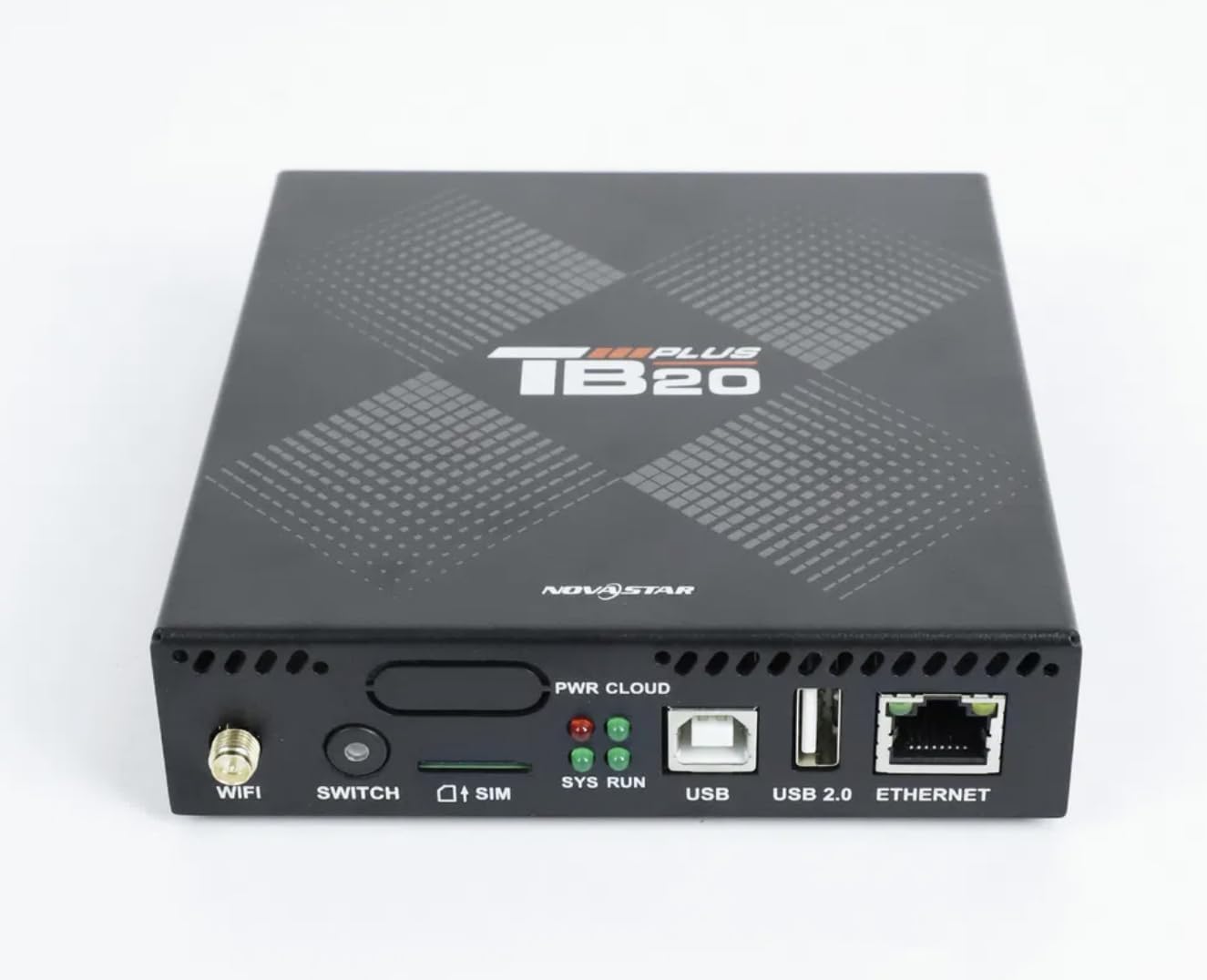
이미지: 클로즈업 정면 view of the NovaStar TB20 Plus, highlighting the Wi-Fi antenna port, SIM card slot, USB ports, and Ethernet port.
4. 사용 설명서
The NovaStar TB20 Plus offers flexible content management and control options:
4.1. 모바일 앱 제어
Use the dedicated mobile app for comprehensive control:
- 장치 페어링: Open the app and follow the on-screen instructions to discover and pair with your TB20 Plus controller via Wi-Fi or Ethernet.
- 콘텐츠 업로드: 미디어 업로드 files (videos, images, text) from your mobile device or cloud storage to the controller.
- 재생 목록 관리: Create and manage playlists, schedule playback times, and set display effects.
- 원격 모니터링: Monitor the status of your LED display and controller, receive fault alerts, and adjust settings remotely.
- OTA 펌웨어 업데이트: Perform over-the-air firmware updates to ensure your device has the latest features and improvements.
4.2. USB Content Playback
For quick content updates without a network connection:
- 미디어를 저장하세요 files (MP4, JPG, etc.) to a USB drive.
- Insert the USB drive into the USB port on the TB20 Plus.
- The controller will detect the new content and can be configured to automatically play it or add it to the device's internal storage.
4.3. Multimedia Support
The TB20 Plus supports a wide range of media types and display features:
- 비디오 형식: MP4, AVI, MOV (H.264).
- 이미지 형식: JPG, PNG, BMP.
- 동적 콘텐츠: Scrolling text, live clock, real-time weather.
- 레이아웃 : Multi-zone layouts for professional visual effects, allowing different content to be displayed simultaneously in various areas of the screen.
5. 유지관리
Proper maintenance ensures the longevity and optimal performance of your NovaStar TB20 Plus:
- 청소: 기기를 깨끗하게 유지하고 먼지가 쌓이지 않도록 하십시오. 부드럽고 마른 천으로 닦으십시오. 액체 세척제 사용은 피하십시오.
- 통풍: Ensure adequate airflow around the device to prevent overheating. Do not block ventilation holes.
- 펌웨어 업데이트: Regularly check for and apply firmware updates via the mobile app or web interface. Updates often include performance improvements and bug fixes.
- 저장: 장기간 기기를 보관할 경우 전원을 끄고 서늘하고 건조한 곳에 보관하세요.
6. 문제 해결
다음의 일반적인 문제와 해결책을 참조하세요.
| 문제 | 가능한 원인 | 해결책 |
|---|---|---|
| LED 화면에 표시되지 않음 | Power issue, incorrect cable connection, display settings. | Check power adapter connection. Verify Ethernet cable connection to LED display. Ensure display is powered on and configured correctly. |
| Cannot connect via Wi-Fi/Ethernet | Incorrect network settings, weak signal, network interference. | Ensure Wi-Fi antenna is attached. Verify network cable is securely connected. Check Wi-Fi password. Restart the controller and router. |
| 콘텐츠가 재생되지 않습니다 | 지원되지 않음 file format, empty playlist, USB drive issue. | Check if media files are in supported formats (MP4, JPG, etc.). Verify playlist configuration in the app. Ensure USB drive is formatted correctly and contains valid files. |
| 장치가 응답하지 않음 | 소프트웨어 오류, 전력 변동. | Perform a power cycle: disconnect power, wait 10 seconds, then reconnect. If issue persists, contact support. |
7. 기술 사양
| 특징 | 사양 |
|---|---|
| 모델명 | TB20 플러스 |
| 최대 하중 용량 | ~650,000 pixels (up to 1920x1080 resolution) |
| 내부 저장소 | 8GB (expandable via microSD/TF card) |
| 네트워크 연결성 | Wi-Fi 2.4GHz, 10/100M Ethernet |
| 전원 입력 | DC 5V / 2A |
| 작동 온도 | -20°C ~ +60°C |
| 호환 플랫폼 | iOS, 안드로이드, 윈도우 |
| 제품 치수 | 8"L x 5"W x 2"H (approximately 20.3 x 12.7 x 5.1 cm) |
| 커넥터 유형 | HDMI (output for display, not for input) |
| 해결 지원 | 1080p |
8. 보증 정보
Warranty details for the NovaStar TB20 Plus LED Playback Controller are typically provided at the time of purchase or can be found on the manufacturer's official web본 사이트에서 구매하신 상품의 보증서를 보관해 주십시오. 보증은 일반적으로 정상적인 사용 조건 하에서의 제조상 결함에 적용됩니다.
9. 고객 지원
For further assistance with installation, configuration, technical guidance, or any other inquiries regarding your NovaStar TB20 Plus, please contact the professional support team of your vendor or the manufacturer. Refer to the contact information provided with your purchase or on the official NovaStar web대지.


