
소개
This manual provides instructions for the AT&T DECT 6.0 Cordless Phone, Model BL108. This system features Smart Call Blocker, Bluetooth Connect to Cell technology, a digital answering machine, and a 2.4-inch color display. Please read these instructions carefully before operating your new phone.
상자 안에 무엇이 들어있나요?
- 기본 유닛
- 무선 단말기 1개
- 1 전원 어댑터
- 전화선 코드
- 2 Battery Cells + Quick Start Guide
설정
1. 베이스 유닛 연결
Connect the base unit to power and your telephone line. Ensure all connections are secure.
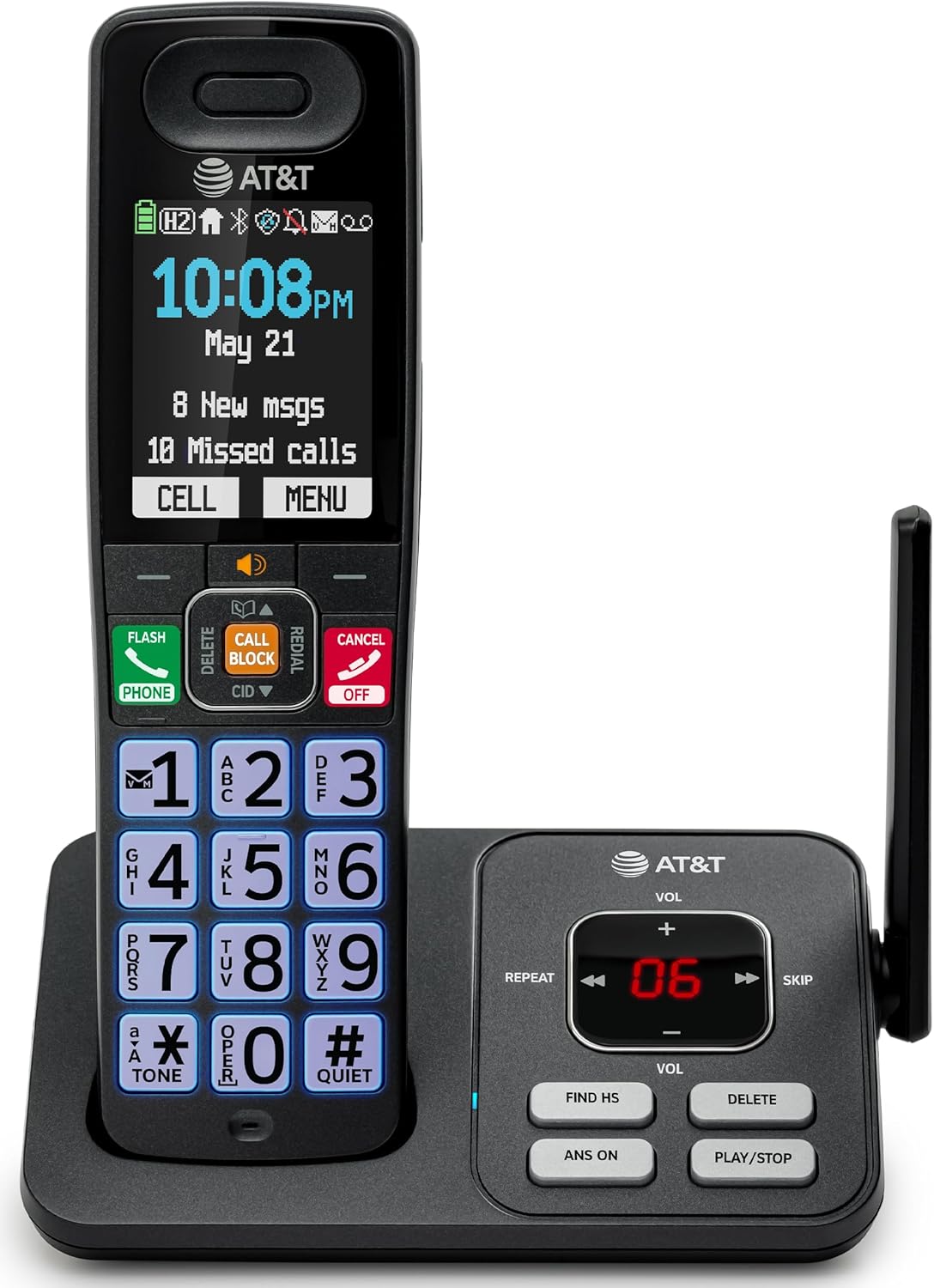
Image: The AT&T BL108 cordless phone base unit connected to a handset, showing its compact design.
2. 휴대폰 배터리 설치 및 충전
Install the provided battery cells into the cordless handset. Place the handset on the base unit or charger to charge for at least 16 hours before initial use. A full charge ensures optimal battery performance.

Image: A cordless handset resting on its charging base, indicating it is ready for use or charging.
3. Set Date and Time
Follow the on-screen prompts on the handset to set the correct date and time. This is important for accurate call logging and answering machine timestamps.
4. 블루투스 연결을 통한 셀룰러 설정
To pair your smartphone with the BL108 system:
- On the handset, navigate to the Bluetooth menu.
- Enable Bluetooth on your smartphone and set it to discoverable mode.
- Select your smartphone from the list of available devices on the handset and confirm pairing.
This feature allows you to make and receive mobile calls through your cordless handset, extending your mobile phone's range within your home.

Image: A visual representation of the phone's Bluetooth Connect to Cell feature, showing a handset on a nightstand connected wirelessly to a smartphone.
작동 지침
전화 걸기 및 받기
- 전화를 걸려면: 번호를 누르고 누르세요 핸드폰 단추.
- 전화를 받으려면: 를 누르세요 핸드폰 전화가 울리면 버튼을 누르세요.
- 통화를 종료하려면: 를 누르세요 취소 버튼을 누르거나 핸드셋을 다시 받침대/충전기에 올려놓으세요.
스마트 통화 차단기
The Smart Call Blocker automatically screens robocalls. To manually block a number during or after a call, press the 통화 블록 button on the handset. The block directory can store up to 1,000 entries.

Image: The handset displaying the "Smart Call Block" screen with a prominent "CALL BLOCK" button highlighted, demonstrating the call blocking feature.
디지털 답변기
The integrated answering machine records up to 22 minutes of messages. Access messages via the handset or the base unit controls (PLAY/STOP, REPEAT, SKIP).

Image: The handset displaying "Answering Sys" with a message icon, and the base unit showing message count, illustrating the answering machine feature.
발신자 번호 표시 알림
When a call comes in, the handset will announce the caller's name (if available in your phonebook or Caller ID service). This allows for screening calls without picking up the handset.

Image: The handset displaying a caller's name and number, with a speech bubble indicating "Call from Johnson," demonstrating the Caller ID Announce feature.
전화번호부 디렉토리
Store up to 1500 names and numbers in the phonebook. Use the navigation buttons to access and manage your contacts.

Image: The handset displaying the "Phonebook" menu with a list of contacts, illustrating the phonebook directory feature.
전이중 핸드셋 스피커폰
Activate the speakerphone function during a call to allow both parties to speak and be heard simultaneously, providing a hands-free conversation experience.

Image: A person using the handset's speakerphone function while working on a laptop, with speech bubbles indicating a two-way conversation.
조용한 모드
Activate Quiet Mode to silence all handset and base ringers for a set period, allowing for undisturbed time. Calls will still be recorded by the answering machine.

Image: The handset displaying "Quiet mode on" with a bell icon crossed out, indicating the phone is in quiet mode, suitable for nighttime use.
핸드셋 간 인터콤
If you have multiple handsets, you can use them as an intercom system to communicate between rooms or transfer calls.

Image: Two handsets, one on its base and one on a charger, with arrows indicating communication between them, demonstrating the intercom feature.
유지
- 청소: 부드러운 천으로 휴대폰과 베이스 유닛을 닦으세요.amp 천으로 닦으세요. 세척용 스프레이나 강한 화학 약품을 사용하지 마세요.
- 배터리 관리 : Replace batteries when the handset indicates low battery. Use only the specified battery type.
문제 해결
| 문제 | 해결책 |
|---|---|
| 발신음이 없습니다. | 전화선이 본체와 벽면 잭에 제대로 연결되어 있는지 확인하십시오. 전원 어댑터가 올바르게 연결되어 있는지 확인하십시오. |
| 전화를 걸거나 받을 수 없습니다. | Check the phone line connection. Ensure the handset battery is charged. If using Connect to Cell, verify your smartphone is paired and within range. |
| 음질이 좋지 않습니다. | Move closer to the base unit. Avoid placing the phone near other electronic devices that may cause interference. |
| Handset battery does not charge. | Ensure the handset is correctly placed on the charging cradle. Clean the charging contacts on both the handset and base unit. |
| Smart Call Blocker not working. | Ensure the feature is enabled in the phone settings. Verify your Caller ID service is active. |
명세서
- 상표: AT&T
- 모델 번호: BL108
- 전화 유형: 무선
- 기술: 6.0월 XNUMX
- 표시하다: 2.4-inch Color Backlit Display
- 응답 시스템: 디지털 방식, 최대 22분 녹화 가능
- 통화 차단기: 스마트 통화 차단, 최대 1,000개 항목 등록 가능
- 블루투스: Connect to Cell for smartphone pairing
- 치수(길이 x 너비 x 높이): 5.63 x 2.99 x 7.4인치(14.3 x 7.6 x 18.8cm)
- 전원: 코드식 전기
- 전화 대기 시간: 6일
- 거는 사람 확인: 예
- 재료: 플라스틱

Image: A diagram showing the dimensions of the AT&T BL108 cordless phone handset and base unit.
보증
This product comes with a 1-Year limited warranty. Please refer to the warranty card included in your package for full details and terms.
지원하다
For further assistance, please consult the full user manual or visit the AT&T support web사이트. 보증 청구를 위해 구매 증빙 자료로 구매 영수증을 보관하세요.